Torch Object Storage
Torch Object Storage


Document

- Documentation
 Torch Object StorageUser GuideWorking with bucketsTransfer acceleration
 Copy page
 Download PDF
Working with buckets
Transfer acceleration
Copy pageDownload PDFTransfer acceleration
The transfer acceleration feature utilizes the globally distributed nodes and the backbone network of Volcano Engine. It uses intelligent routing resolution technology to process requests from the nearest available locations. Combined with optimized network transmission protocols, it provides a secure, high-quality, end-to-end network acceleration solution for TOS users. This topic covers use cases, notes, billing notes, and the steps for enabling and using the feature.
Use cases
- Cross-border transfer of training dataset
- Companies engaged in AI training often have computing resources and datasets located far apart, which leads to slow network transfer of datasets. Enabling transfer acceleration can greatly increase the speed of large-scale, cross-border data transfers.
- Data transfer under poor network conditions
- As mobile internet technology has evolved, the use of mobile network communication technologies to access the internet has grown. However, users often cannot maintain optimal network performance in areas with poor base station coverage, on transportation such as high-speed trains and subways, and in harsh environments such as mountains and deserts. The transfer acceleration feature uses optimized network transmission protocols to provide users with relatively smooth upload and download experiences under poor network conditions.
- If your business primarily targets mobile internet users, using the transfer acceleration feature can give your application a more competitive edge.
- Long-distance transfer of static data
- If your users are located across the country, you can use the transfer acceleration feature to enhance their experience with long-distance network access. This feature is useful for activities such as downloading game installation packages, uploading and downloading photo albums, and uploading and downloading files to a cloud drive.
Billing notes
Different charges apply when you use the transfer acceleration feature, depending on the scenario. Common scenarios are explained below:
Notes
Category | Considerations |
Billing | Fees are only charged when the transfer acceleration feature is used. Enabling the feature without using it will not incur any charges. |
Permissions | Only the bucket owner or a user with the "tos:PutBucketTransferAcceleration" permission can configure transfer acceleration. For more information, see Configuring IAM policies. |
Effective time | After you enable or disable transfer acceleration, it may take up to 30 minutes for the changes to take effect. |
Logging | To ensure data transfer security, the transfer acceleration feature may use the HTTPS protocol, even if the client accesses TOS via HTTP. Logs may show HTTPS instead of HTTP. |
Network |
|
Domain names |
|
Availability |
|
Enabling transfer acceleration
- Log in to the TOS console.
- In the left navigation pane, click Buckets. In the Buckets list, click the bucket you want to manage.
- In the left navigation pane, select Domain name and transfer acceleration > Transfer acceleration.
- On the Transfer acceleration page, click Edit. Then, click Enable and Select.
tip
If your bucket is located in China (Hong Kong) or Asia Pacific (Johor), you must read and check the box for Compliance commitment.
- In the Make sure to turn on transfer acceleration dialog box, click Save.
- Transfer acceleration takes effect globally within 30 minutes of being enabled.
tip
To disable transfer acceleration, navigate to the Transfer acceleration page, and click Edit. Then, click Close and Select. Finally, click Save in the box that appears.
Using transfer acceleration
The default domain names for transfer acceleration are tos-accelerate.volces.com and tos-s3-accelerate.volces.com. After enabling transfer acceleration, you can also obtain these domain names on the Transfer acceleration page. You can then use these domain names to access TOS.
To speed up data transfers when accessing TOS via APIs, replace the domain in the Host request with the transfer acceleration domain name. The following example uses the GetObject operation to illustrate this process.
To speed up data transfers when accessing TOS via SDKs, replace the endpoint in each language with the transfer acceleration domain name. The following example shows how to upload a local file using Go SDK. For more information, see SDK overview.
When using the config command for initial configuration, set the Endpoint to the transfer acceleration domain name. For instructions, see Step 1: Initial configuration. Example:
After completing the initial configuration, you can speed up data transfers in tosutil.
To speed up data transfers when accessing TOS from other browsers, replace the default domain name in the file URL with the transfer acceleration domain name. For example, replace https://bucketname.tos-cn-beijing.volces.com/abc.jpg with https://bucketname.tos-accelerate.volces.com/abc.jpg.
Testing transfer acceleration
You can use the network speed tool to verify if transfer acceleration is working as expected. Specifically, you can use the tool to compare the speeds of accelerated and non-accelerated transfers in a given region and measure the impact of transfer acceleration.
- Log in to the TOS console.
- In the left navigation pane, click Network speed tool.
- Select the region(s) you want to test and click Detect immediately.
tip
You can select multiple regions and test transfer speeds simultaneously from the client to each region.
- The speed test is complete when the Velocity state changes from Detecting to Success. Then, the tool page shows the upload and download speeds between the client and TOS, both with and without transfer acceleration enabled.
Observability
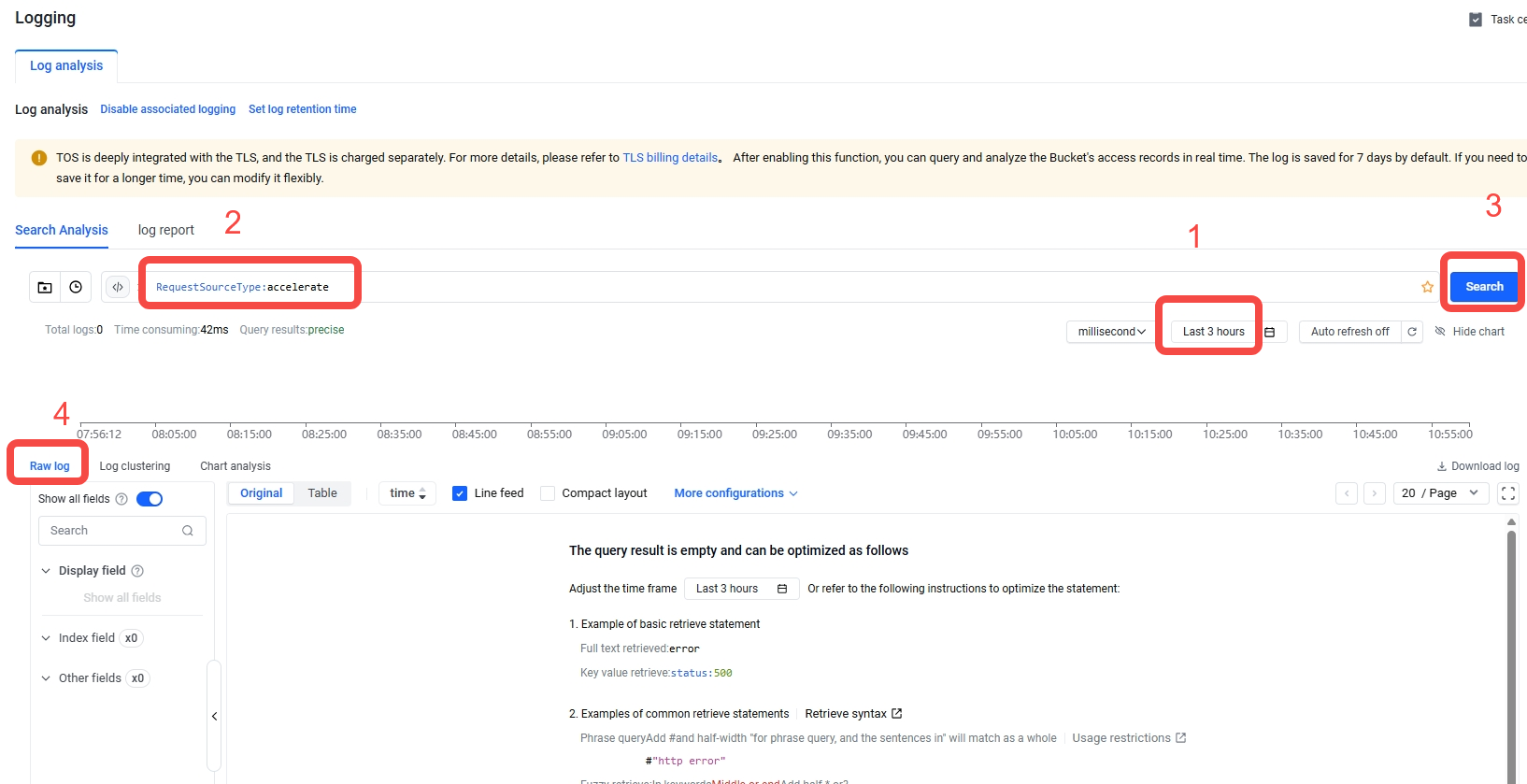
Logs record access requests to TOS. When the log field RequestSourceType is accelerate, it indicates that the request is for transfer acceleration. You can use this field to query the request time, source IP address, and requested object key. For more information, see Log analysis.
- Log in to the TOS console.
- In the left navigation pane, click Buckets. In the Buckets list, click the bucket you want to manage.
- In the left navigation pane, click Logging.
- On the Logging page, click Edit under the Log analysis tab. Then, toggle the Current status switch on to enable the feature, and click Select.
- On the Search Analysis tab, set the time range for the query, enter RequestSourceType:accelerate in the search box, and click Search.
- On the Raw log tab, view the log details related to transfer acceleration requests, including request time, source IP address, and account ID.
-
TOS supports statistics on transfer acceleration traffic. On the Usage statistics page, you can view metrics such as Transfer Acceleration Inflow Traffic (Chinese mainland to Chinese mainland) and Transfer Accelerated Outflow Traffic (outside the Chinese mainland to Chinese mainland) for a specific period. For more information, see Usage statistics.
FAQ
- How does the transfer acceleration feature differ from using Volcano Engine Global Accelerator with TOS's default domains?
- The transfer acceleration feature offers simpler and more flexible operations than using the Volcano Engine Global Accelerator with TOS's default domains. You can increase transfer speeds with one click, without preparing domain names in advance.
- Can the transfer acceleration feature be used with Volcano Engine Content Delivery Network (CDN) for downloads?
- Yes. Combining the transfer acceleration feature with CDN improves the speed and success rate of back-to-origin requests.
Last updated: 2026.07.24 11:20:32
All rights reserved © Beijing Volcano Engine Technology Co., Ltd2024
