Torch Object Storage
Torch Object Storage
Torch Object Storage


Document
What's New
Announcements
Billing
Billable items
Billing method
Getting Started
User Guide
Working with buckets
Basic configurations
Managing lifecycle
Back-to-origin rules
Event notification
Intelligent Tiering
Permissions
Domain management
Fault tolerance and disaster recovery
Cross-region replication
Same-region replication
Data redundancy
Image processing
ObjectSet
Working with objects
Managing folders
Monitoring and alerting
Metric monitoring
Access control
Bucket policies
Common configuration scenarios
Authorizing IAM users of the current account
Authorizing other accounts
Managing access via tools and SDKs
Managing public read access
Data security
Access points
Multi-region access points (MRAP)
Single-region access points (SRAP)
Converged access points (CAP)
DevMind
TOS accelerator
SenseFlow
TOS Agent
Data processing
Basic concepts
Image processing
Media processing
Document preview
Task processing
Data subscription
Flow control management
Quality of Service (QoS) policies
Hierarchical namespace (HNS)
User guide
Tool reference
Best practices
TOS Vectors
User guide
API reference
Vector bucket
Vector index
SDK reference
Python-Vectors
Vector bucket
Vector index
Java-Vectors
Vector bucket
Vector index
Node.js-Vectors
Vector bucket
Vector index
Tool Guide
tosutil
Common commands
Upload, download, and copy objects
Share objects
Auxiliary commands
Common examples
TOS Browser
FSX
FSX best practices
TOS PyTorch Connector
tosfsspec
API Reference
Signature Mechanism
The header contains a signature
Bucket
Basic Bucket Operations
Bucket Lifecycle
Access Monitor
Bucket ACL
Bucket CORS
Bucket Policy
Back-to-origin Rules
Bucket Replication
Versioning
Static Website
Event Notification
Custom Domain
Server-side encryption
Transfer Acceleration
Data Processing
Image processing
Media processing
Video transcoding
Audio transcoding
video to GIF
Document preview
File decompression
Log Storage
Retention Policy
Requester pays
TLS version
Object
Basic Object Operations
Object ACL
Fetch Object
Symbolic Link
WORM object
Multipart Upload
SDK Reference
Java
Pre-signing Mechanism
Bucket Interface
Basic Bucket Interface
Manage Bucket Configuration
Object Interface
Upload Object
Download Object
Upload and Download Speed Limit
Copy Object
List Object
Data Processing
Image Processing
Video Processing
Audio Processing
Log Configuration
Hierarchical Namespace
Bucket base interface
Introduction to Typical Scenes
Python
Data processing
Pre-signature mechanism
Bucket interface
Basic bucket interface
Manage bucket configuration
Object interface
Upload object
Download object
Copy object
List objects
Introduction to typical scenes
C
Object Interface
Upload object
C++
Pre-signature Mechanism
Bucket Interface
Basic Bucket Interface
Manage Bucket Configuration
Object Interface
Upload Object
Download Object
Copy Object
List Objects
Data Processing
Go
Object Interface
Upload Object
Download Object
Copy Object
List Objects
Manage Objects
Bucket Interface
Manage Bucket Configuration
Data Processing
Log Configuration
Introduction to Typical Scenes
Pre-signature Mechanism
Node.js
Pre-signature Mechanism
Bucket Interface
Basic Bucket Interface
Manage Bucket Configuration
Object Interface
Upload object
Download object
Copy object
List objects
Data Processing
Image Processing
Introduction to Typical Scenes
Browser.js
Pre-signature Mechanism
Upload Object
Download Object
Copy Object
List Objects
Manage Objects
Data Processing
.NET
Bucket Interface
Object Interface
Upload Object
Download Object
List Objects
Introduction to Typical Scenes
PHP
Bucket Interface
Object Interface
Download Object
Data Processing
Exception Handling
Android
Bucket Interface
Object Interface
Upload Object
Download Object
Exception Handling
iOS
Bucket Interface
Object Interface
Upload Object
Download Object
Harmony
Pre-signature Mechanism
Bucket Interface
Object Interface
Upload Object
Download Object
List Objects v2
Introduction to Typical Scenarios
Rust
Pre-signing mechanism
Bucket interface
Basic bucket operations
Lifecycle rules
Bucket ACLs
Cross-origin resource sharing
Bucket inventory
Back-to-origin rules
Bucket replication
Static website hosting
Event notification
Custom domain
Server-side encryption
Object interface
Basic operation
Access control
Error Codes
01-SERVICE_ERROR
02-AUTH
03-ACCESS_CONTROL
04-QOS
05-REQUEST
06-BUCKET
07-LIFECYCLE
08-ACL
09-CORS
10-POLICY
11-MIRROR
12-REPLICATION
13-WEBSITE
14-NOTIFICATION
15-ENCRYPT
16-CUSTOMDOMAIN
17-OBJECT
18-TAG
19-MULTIPART
20-STORAGE_CLASS
21-CALLBACK
22-DATA_PROCESS
23-BATCH
24-STORAGE_LENS
25-INVENTORY
26-DIRECTORY_BUCKET
FAQ
Best Practices
AIGC-Doubao LLMs
Accessing TOS with third-party tools
Granting temporary access
Data migration
Data processing
Checking data integrity
Performance optimization
- Documentation
 Torch Object StorageUser GuideUpload callbacks
 Copy page
 Download PDF
User Guide
Upload callbacks
Copy pageDownload PDFUpload callbacks
An upload callback is a process in which the client includes callback parameters in its upload request. Once the upload is complete, the TOS server sends a synchronous POST request with the parameters to the specified third-party application server. The client only receives the results once the application server acknowledges the request and sends a response. Due to the additional steps of sending the callback request and waiting for a response, the upload process takes longer than a standard upload.
How it works
- APIs that support upload callbacks
- Workflow for upload callbacks
-
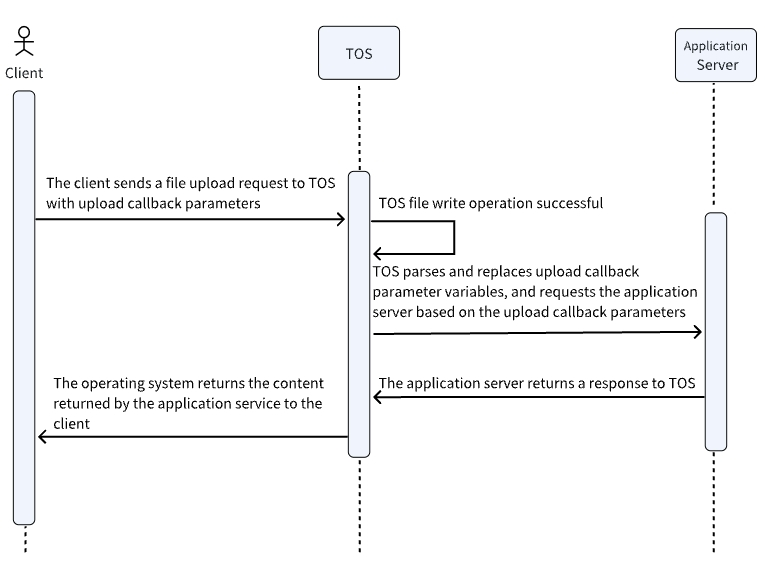
Step 1: Construct callback parameters
To trigger a callback, you must specify callback parameters and variables in the upload request.
Callback parameters
- Example
- Callback parameters are provided as a Base64-encoded JSON string.
- // Example 1: When request body type is "application/json"{"callbackUrl" : "http://domainname.com/callback", "callbackHost" : "alternative-domainname.com", "callbackBody" : "{\"bucket\" : ${bucket}, \"object\" : ${object}, \"key1\" : ${x:key1}, \"key2\" : ${x:key2}}", "callbackBodyType" : "application/json" }// Example 2: When request body type is "application/x-www-form-urlencoded"{"callbackUrl" : "http://domain-name/callback", "callbackHost" : "alternative-domain-name", "callbackBody" : "bucket=${bucket}&object=${object}&key1=${x:key1}&key2=${x:key2}", "callbackBodyType" : "application/x-www-form-urlencoded" }
- Parameters
- ParameterDescriptionConstraints and limitationsParameterDescriptionConstraints and limitationscallbackUrlIndicates the URL of the third‑party application server to which TOS will send an HTTP or HTTPS request after a successful upload.
- callbackUrl can be left empty. This indicates that no upload callback parameter has been set for this request.
- The URL must use either the HTTP or HTTPS protocol. If no protocol is specified, the default will be https://.
- The path and query parameters of the URL must be URL-encoded.
- You can add up to five URLs to this field. Separate them with semicolons (;). The TOS server will sequentially try each URL until it receives a successful response.
- Callback variables are not supported.
- callbackUrl cannot contain special addresses such as 127.0.0.1, 0.0.0.0, 0:0:0:0:0:0:0:1, 0:0:0:0:0:0:0:0, or localhost.
callbackHostRepresents the HOST header of the callback request. The value of this field overrides the host derived from callbackUrl.- callbackHost can be left empty. If provided, it must comply with the rules for domain names or IP addresses. Special addresses such as 127.0.0.1, 0.0.0.0, 0:0:0:0:0:0:0:1, 0:0:0:0:0:0:0:0, and localhost are not permitted.
- Callback variables are not supported.
callbackBodyRepresents the body sent with the callback request. Its format must match the content type specified by callbackBodyType.- callbackBody cannot be empty and must be in a valid format. The TOS server strictly validates this field.
- Callback variables are supported.
callbackBodyTypeIndicates the content type of the callback request. This field must be used with callbackBody.- callbackBodyType can be left empty and will default to "application/x-www-form-urlencoded" if left empty.
- Only "application/x-www-form-urlencoded" and "application/json" are supported. Other values are considered invalid.
- Callback variables are not supported.
Callback variables
The callbackBody parameter supports two types of variables:
- System variables, which can be entered directly in the callbackBody field.
- Custom variables (callback-var), which must be included separately by the client with the request.
The TOS server parses JSON-formatted custom variables and merges them with system variables to create a set of available key-value pairs. These pairs are then used to replace placeholders in callbackBody in the form of ${variable_name} or ${x:variable_name}.
System variables
The following table lists the system variables that can be configured within callbackBody.
- System variables must be used with the ${} operator in callbackBody. For example, ${bucket} retrieves the bucket to which the object was uploaded.
- When callbackBodyType is "application/json", the TOS server populates the JSON field values according to the data types of the variables.
- For example, if "bucket" is the string "bucket-test" and "size" is the integer 1024, then the expression {"bucket": ${bucket}, "size" : ${size}} will be resolved to {"bucket" : "bucket-test", "size" : 1024}.
Variable | Type | Description |
Variable | Type | Description |
bucket | string | The name of the bucket to which the object was uploaded. |
key | string | The name of the uploaded object. |
object | string | The name of the uploaded object. |
size | int64 | The size of the uploaded object. |
etag | string | The ETag of the uploaded object. |
crc64ecma | string | The CRC-64 value of the uploaded object. |
versionId | string | The version ID of the uploaded object, available only when versioning is enabled for the bucket. |
filename | string | The name of the file that was uploaded to TOS via the PostObject API |
fname | string | The name of the file that was uploaded to TOS via the PostObject API |
mimeType | string | The content type that the client specified when uploading an object. If not specified, the default is "binary/octet-stream". |
requestId | string | The ID of this request. |
Custom variables
During an upload callback, the client can include custom key-value pairs in JSON format within the request. The TOS server parses these custom variables and uses them to replace placeholders in callbackBody. Example:
{
"x:key1" : "value1", // Defines a string field
"x:key2" : 123, // Defines a numeric field
"x:key3" : ["value2", "value3"], // Defines an array field
"x:key4" : true // Defines a boolean field
}
- Custom variables must start with x:. Otherwise, they are considered invalid.
- Custom variables must be used with the ${} operator in callbackBody. For example, ${x:key1} retrieves the variable x:key1.
- When callbackBodyType is "application/json", the TOS server populates custom variables the same way as with system variables.
- When callbackBodyType is "application/x-www-form-urlencoded", system variables (key, object, fname, and filename) in callbackBody are URL-encoded during population.
Step 2: Construct a callback request
How to construct
The APIs that support upload callbacks are PutObject, PostObject, and CompleteMultipartUpload. PutObject and CompleteMultipartUpload carry callback parameters and custom variables via URL or header, while PostObject carries them through form fields. The following explains how the client constructs a callback request.
Supported APIs | How callback parameters are passed | Where to include | Signing method | Constraints and limitations |
Supported APIs | How callback parameters are passed | Where to include | Signing method | Constraints and limitations |
PutObject and CompleteMultipartUpload | Through request headers | Request headers:
| Includes signatures in CanonicalQueryString and SignedHeaders according to the signature mechanism. |
|
| Through the URL | Query strings:
| | |
PostObject | Using POST form fields |
| Includes x-tos-callback, x-tos-callback-var, and custom variables as conditions in the policy for form-based uploads, according to the signature mechanism for form uploads. |
|
Remarks
- Passing parameters in the URL: Callback parameters are carried via x-tos-callback, and custom variables are carried via x-tos-callback-var.
- Passing parameters in request headers: Callback parameters are carried via x-tos-callback, and custom variables are carried via x-tos-callback-var.
- Passing parameters via POST form fields: Callback parameters are carried via x-tos-callbackand, and custom variables are carried via x-tos-callback-var. If x-tos-callback-var is not provided, each custom variable is passed as an individual form field. Example:
- --9431149156168Content-Disposition: form-data; name="x:key1"value1--9431149156168Content-Disposition: form-data; name="x:key2"123
Walkthrough
This section demonstrates how to create a callback request to a third-party application server. The response will be {'Status':'OK'}.
- Construct callback parameters.
- // Callback parameters:{"callbackUrl" : "http://domainname.com/callback", "callbackHost" : "alternative-domainname.com", "callbackBody" : "{\"bucket\" : ${bucket}, \"object\" : ${object}, \"key1\" : ${x:key1}, \"key2\" : ${x:key2}}", "callbackBodyType" : "application/json" }// Callback variables:{"x:key1" : "value1","x:key2" : 123}// Result returned by the third-party application server:{"Status":"OK"}
- Encode the callback parameters and variables using Base64.
- // x-tos-callback: Base64-encoded callback parametersCgl7CgkJImNhbGxiYWNrVXJsIiA6ICJodHRwOi8vZG9tYWlubmFtZS5jb20vY2FsbGJhY2siLCAKCQkiY2FsbGJhY2tIb3N0IiA6ICJhbHRlcm5hdGl2ZS1kb21haW5uYW1lLmNvbSIsICAgICAgICAgICAgICAgCgkJImNhbGxiYWNrQm9keSIgOiAie1wiYnVja2V0XCIgOiAke2J1Y2tldH0sIFwib2JqZWN0XCIgOiAke29iamVjdH0sIFwia2V5MVwiIDogJHt4OmtleTF9LCBcImtleTJcIiA6ICR7eDprZXkyfX0iLCAKCQkiY2FsbGJhY2tCb2R5VHlwZSIgOiAiYXBwbGljYXRpb24vanNvbiIgICAgICAgICAgICAgICAgCgl9// x-tos-callback-var: Base64-encoded custom variablesewogICAgIng6a2V5MSIgOiAidmFsdWUxIiwKICAgICJ4OmtleTIiIDogMTIzLAp9
- Construct a callback request.
- PutObjectCompleteMultipartUploadPostObjectCreate a PutObject request that includes callback parameters and custom variables in headers. Example:PUT /objectName HTTP/1.1Host: bucketname.tos-cn-beijing.volces.comDate: Fri, 30 Jul 2021 08:05:36 +0000x-tos-callback-var: ewogICAgIng6a2V5MSIgOiAidmFsdWUxIiwKICAgICJ4OmtleTIiIDogMTIzLAp9x-tos-callback: Cgl7CgkJImNhbGxiYWNrVXJsIiA6ICJodHRwOi8vZG9tYWlubmFtZS5jb20vY2FsbGJhY2siLCAKCQkiY2FsbGJhY2tIb3N0IiA6ICJhbHRlcm5hdGl2ZS1kb21haW5uYW1lLmNvbSIsICAgICAgICAgICAgICAgCgkJImNhbGxiYWNrQm9keSIgOiAie1wiYnVja2V0XCIgOiAke2J1Y2tldH0sIFwib2JqZWN0XCIgOiAke29iamVjdH0sIFwia2V5MVwiIDogJHt4OmtleTF9LCBcImtleTJcIiA6ICR7eDprZXkyfX0iLCAKCQkiY2FsbGJhY2tCb2R5VHlwZSIgOiAiYXBwbGljYXRpb24vanNvbiIgICAgICAgICAgICAgICAgCgl9Authorization: authorization_stringContent-Type: text/plainContent-Length: 0Create a CompleteMultipartUpload request that includes callback parameters and custom variables in the URL. Example:POST /objectName?uploadId=UploadId&x-tos-callback=Cgl7CgkJImNhbGxiYWNrVXJsIiA6ICJodHRwOi8vZG9tYWlubmFtZS5jb20vY2FsbGJhY2siLCAKCQkiY2FsbGJhY2tIb3N0IiA6ICJhbHRlcm5hdGl2ZS1kb21haW5uYW1lLmNvbSIsICAgICAgICAgICAgICAgCgkJImNhbGxiYWNrQm9keSIgOiAie1wiYnVja2V0XCIgOiAke2J1Y2tldH0sIFwib2JqZWN0XCIgOiAke29iamVjdH0sIFwia2V5MVwiIDogJHt4OmtleTF9LCBcImtleTJcIiA6ICR7eDprZXkyfX0iLCAKCQkiY2FsbGJhY2tCb2R5VHlwZSIgOiAiYXBwbGljYXRpb24vanNvbiIgICAgICAgICAgICAgICAgCgl9&x-tos-callback-var=ewogICAgIng6a2V5MSIgOiAidmFsdWUxIiwKICAgICJ4OmtleTIiIDogMTIzLAp9 HTTP/1.1Host: bucketname.tos-cn-beijing.volces.comDate: Fri, 30 Jul 2021 08:05:36 +0000Authorization: authorization_string{"Parts":[{"PartNumber":1, "ETag":"7de47c292287f7965357c1ddd724b2b7"}]}Create a PostObject request that includes callback parameters and custom variables in form fields. Example:POST / HTTP/1.1Host: buketname.tos-cn-beijing.volces.comContent-Type: multipart/form-data; boundary=9431149156168Content-Length: length--9431149156168Content-Disposition: form-data; name="key"objectname--9431149156168Content-Disposition: form-data; name="x-tos-callback"Cgl7CgkJImNhbGxiYWNrVXJsIiA6ICJodHRwOi8vZG9tYWlubmFtZS5jb20vY2FsbGJhY2siLCAKCQkiY2FsbGJhY2tIb3N0IiA6ICJhbHRlcm5hdGl2ZS1kb21haW5uYW1lLmNvbSIsICAgICAgICAgICAgICAgCgkJImNhbGxiYWNrQm9keSIgOiAie1wiYnVja2V0XCIgOiAke2J1Y2tldH0sIFwib2JqZWN0XCIgOiAke29iamVjdH0sIFwia2V5MVwiIDogJHt4OmtleTF9LCBcImtleTJcIiA6ICR7eDprZXkyfX0iLCAKCQkiY2FsbGJhY2tCb2R5VHlwZSIgOiAiYXBwbGljYXRpb24vanNvbiIgICAgICAgICAgICAgICAgCgl9--9431149156168Content-Disposition: form-data; name="x:key1"value1--9431149156168Content-Disposition: form-data; name="x:key2"123--9431149156168Content-Disposition: form-data; name="x-tos-algorithm"TOS4-HMAC-SHA256--9431149156168Content-Disposition: form-data; name="x-tos-date"20220411T000000Z--9431149156168Content-Disposition: form-data; name="x-tos-credential"<your-access-key-id>/<date>/<region>/<service>/request--9431149156168Content-Disposition: form-data; name="policy"base64encoded_policy--9431149156168Content-Disposition: form-data; name="x-tos-signature"signature--9431149156168Content-Disposition: form-data; name="file"; filename="MyFilename.jpg"Content-Type: image/jpegfile_content--9431149156168Content-Disposition: form-data; name="submit"Upload to TOS--9431149156168--
Step 3: Send the callback request
Once the upload is complete, the TOS server sends a POST request to the third-party application server based on the callback parameters. To process the request, the application server must meet the following requirements:
Category | Requirement |
Category | Requirement |
Interface protocol | HTTP or HTTPS. When using HTTPS, the third-party application must have a valid certificate. |
Request method | POST |
Request body format | application/x-www-form-urlencoded or application/json |
Response status code | 200 |
Request body format | application/json |
Response body size | No larger than 3 MB. |
Based on the callback parameters and variables in the upload request, TOS sends a POST request to the third-party application server. Example:
POST /callback HTTP/1.1
Host: alternative-domainname.com
Content-Length: 71
Content-Type: application/json
{"bucket":"bucket-test","object":"key-test","key1":"value1","key2":123}
(Optional) Step 4: Verify the signature of the callback request
After receiving the callback request, the third-party application server can verify its origin using the signature to confirm that the request comes from TOS.
TOS server generates a signature
Third-party application server verifies the signature
The TOS server automatically generates a signature using the RSA asymmetric encryption method and sends it to the third-party application server. The following describes how the TOS server generates signatures.
- Create a string-to-sign (StringToSign).
- url_decode(path) + '?' + url_decode(sorted(query)) + '\\n' + body
- Calculate the hash of the string-to-sign using the MD5 algorithm.
- md5(StringToSign)
- Generate the signature by encrypting the hash value with a private key.
- rsa_sign(private_key, url_decode(path) + '?' + url_decode(sorted(query)) + '\\n' + body, md5)
- Encode the signature using Base64. Then, add the encoded signature to the Authorization header of the callback request and send the request to the third-party application server.
- Authorization = base64_encode(rsa_sign(private_key, url_decode(path) + '?' + url_decode(sorted(query)) + '\\n' + body, md5))
The following explains how third-party application servers verify signatures.
- The x-tos-pub-key-url callback request header contains the Base64-encoded URL of the signature public key. First, decode x-tos-pub-key-url using Base64. Then, download the public key locally.
tip
- To verify that the public key was issued by TOS, check the download address. The download address must start with http://tos-public.volccdn.com/ or https://tos-public.volccdn.com/.
- The public key remains unchanged for an extended period. For future use, we recommend storing it in a local cache.
- Decode the callback request header Authorization using Base64 to obtain the signature.
- Create a string-to-sign (StringToSign), using the request path, request parameters, and request body obtained from the request.
- url_decode(path) + '?' + url_decode(sorted(query)) + '\\n' + body
warning
- When creating a string-to-sign, sort the query parameters lexicographically.
- When creating a string-to-sign, the query parameter must be formatted as “key=” if it contains only a key.
- Calculate the hash of the string-to-sign using the MD5 algorithm.
- md5(StringToSign)
- Verify the signature using the public key, the signature itself, and the hash of the string-to-sign.
- result = rsa_verify(public_key, md5(StringToSign), signature)
- The following example in Go demonstrates how third-party application servers verify signatures.
- package callbackimport ("bytes""crypto""crypto/md5""crypto/rsa""crypto/x509""encoding/base64""encoding/json""encoding/pem""errors"log "github.com/sirupsen/logrus""io/ioutil""net/http""sort"jsoniter "github.com/json-iterator/go")const XTosPublicKeyUrl = "x-tos-pub-key-url"const Authorization = "Authorization"type CallbackAPI struct {}type ErrResp struct {Err string `json:"Err"`RetMsg string `json:"RetMsg"`}func (api *CallbackAPI) CallbackHandler(w http.ResponseWriter, r *http.Request) {sign, err := getSignature(r)if err != nil {log.Warn("authorization: %s is not base64 encoding", r.Header.Get(Authorization))JsonResponse(w, 401, ErrResp{Err: "[Callback] invalid Authorization, err:" + err.Error()})return}publicKey, err := getPublicKey(r)if err != nil {JsonResponse(w, 401, ErrResp{Err: "[Callback] invalid public key, err:" + err.Error()})return}signMd5, body, err := getContentAndSignMD5(r)if err != nil {JsonResponse(w, 401, ErrResp{Err: "[Callback] invalid public key, err:" + err.Error()})return}if err = verifySignature(publicKey, signMd5, sign); err != nil {JsonResponse(w, 401, ErrResp{Err: "[Callback] verify signature failed, err:" + err.Error()})return}log.Info("[Callback] handle callback request")bodyType := r.Header.Get("Content-Type")switch bodyType {case "application/json":if !jsoniter.Valid(body) {JsonResponse(w, 500, ErrResp{Err: "[Callback] the body is not a valid json"})return}JsonResponse(w, 200, body)default: // application/x-www-form-urlencodedJsonResponse(w, 200, struct {EncodedBody string `json:"encoded_body"`}{EncodedBody: base64.StdEncoding.EncodeToString(body),})}}func verifySignature(publicKey []byte, signMd5 []byte, sign []byte) error {pubBlock, _ := pem.Decode(publicKey)if pubBlock == nil {log.Warn("Failed to parse PEM block containing the public key")return errors.New("invalid public key pem")}pubInterface, err := x509.ParsePKIXPublicKey(pubBlock.Bytes)if err != nil || pubInterface == nil {log.Warn("x509.ParsePKIXPublicKey(publicKey) failed, err:%v", err)return errors.New("invalid public key pem")}pub := pubInterface.(*rsa.PublicKey)err = rsa.VerifyPKCS1v15(pub, crypto.MD5, signMd5, sign)if err != nil {log.Warn("verify signature failed, err:%v", err)return err}return nil}func getContentAndSignMD5(r *http.Request) ([]byte, []byte, error) {bodyContent, err := ioutil.ReadAll(r.Body)_ = r.Body.Close()if err != nil {log.Warn("read request body failed, err:%v", err)return nil, nil, err}stringToSign := calcStringToSign(r, bodyContent)log.Info("stringToSign: %s", stringToSign)authMd5 := md5.New()authMd5.Write(stringToSign)signMd5 := authMd5.Sum(nil)return signMd5, bodyContent, nil}func getPublicKey(r *http.Request) ([]byte, error) {var bytePublicKey []bytepublicKeyURLBase64 := r.Header.Get(XTosPublicKeyUrl)if publicKeyURLBase64 == "" {log.Warn("GetPublicKey from Request header failed : No x-tos-pub-key-url field. ")return bytePublicKey, errors.New("no x-tos-pub-key-url field in Request header ")}publicKeyURL, _ := base64.StdEncoding.DecodeString(publicKeyURLBase64)resp, err := http.Get(string(publicKeyURL)) // ignore_security_alertif err != nil {log.Warn("Get PublicKey Content from URL failed : %s", err.Error())return bytePublicKey, err}bytePublicKey, err = ioutil.ReadAll(resp.Body)defer resp.Body.Close()if err != nil {log.Warn("Read PublicKey Content from URL failed : %s", err.Error())return bytePublicKey, err}if resp.StatusCode >= http.StatusBadRequest {log.Warn("get public key failed, res:%s", string(bytePublicKey))return nil, errors.New("get public key failed")}return bytePublicKey, nil}func getSignature(r *http.Request) ([]byte, error) {authorization := r.Header.Get(Authorization)if authorization == "" {return nil, nil}return base64.StdEncoding.DecodeString(authorization)}// url_decode(path) + '?' + url_decode(sorted(query)) + '\\n' + bodyfunc calcStringToSign(req *http.Request, body []byte) []byte {buf := bytes.NewBuffer(nil)buf.WriteString(req.URL.Path)query := req.URL.Query()if len(query) > 0 {buf.WriteByte('?')keys := make([]string, 0, len(query))for key := range query {keys = append(keys, key)}sort.Strings(keys)for _, key := range keys {values := query[key]for _, value := range values {buf.WriteString(key)buf.WriteByte('=')buf.WriteString(value)buf.WriteByte('&')}}buf.Truncate(buf.Len() - 1)}buf.WriteByte('\\n')buf.Write(body)return buf.Bytes()}func JsonResponse(w http.ResponseWriter, status int, entity interface{}) {// Set the content type before calling WriteHeader. Otherwise, it will not take effect.if entity != nil {w.Header().Set("Content-Type", "application/json")}w.WriteHeader(status)if entity != nil {if body, ok := entity.([]byte); ok {_, _ = w.Write(body)return}body, _ := json.Marshal(entity)_, _ = w.Write(body)}}
Step 5: Return the callback result
The third-party application server sends a response to TOS. Example:
HTTP/1.1 200 OK
Date: Fri, 1 Jul 2022 01:00:36 GMT
Content-Length: 15
Content-Type: application/json
{"Status":"OK"}
Step 6: Return the upload result
TOS forwards the content returned by the third-party application server to the client.
PostObject request response
CompleteMultipartUpload request response
PostObject request response
HTTP/1.1 200 OK
x-tos-id-2: 367be10900210004-a444ed0
x-tos-request-id: 367be10900210004-a444ed0
Date: Fri, 30 Jul 2021 08:05:36 GMT
server: TosServer
Content-Length: 15
Content-Type: application/json
ETag: 1c06e540e11d65a51aeb724e72fa641a
{"Status":"OK"}
warning
- By default, the response to a CompleteMultipartUpload request contains a body. However, when a callback is triggered, the original body is overwritten. Therefore, the client must handle this accordingly.
- When a callback is triggered, two header fields are added: a Location field to return the full URL (including the domain name) of the newly created object and an ETag field to return the ETag value.
HTTP/1.1 200 OK
x-tos-id-2: 9b84750a5bbc0029-a444ed0
x-tos-request-id: 9b84750a5bbc0029-a444ed0
Date: Fri, 30 Jul 2021 13:59:38 GMT
server: TosServer
Content-Length: 15
Content-Type: application/json
Location: http://bucketname.tos-cn-beijing.volces.com/objectname
ETag: 7de47c292287f7965357c1ddd724b2b7-1
{"Status":"OK"}
warning
- A response body is returned when callbacks are triggered for PostObject requests. Consequently, the HTTP status code changes from 204 to 200. The client must handle this accordingly.
- The corresponding HTTP status code for the CallbackFailed error code is 203. The client needs to handle this accordingly. For more information on other status codes, see Response codes.
HTTP/1.1 200 OK
x-tos-id-2: 367be10900210004-a444ed0
x-tos-request-id: 367be10900210004-a444ed0
Date: Fri, 1 Jul 2022 01:00:36 GMT
Server: TosServer
Content-Length: 15
Content-Type: application/json
ETag: ab7abb0da4bca5323ab6119bb5dcd296
Location: http://bucketname.tos-cn-beijing.volces.com/objectname
{"Status":"OK"}
Error codes
HTTP status code | Error codes | Error message |
HTTP status code | Error codes | Error message |
203 | CallbackFailed | The upload was successful, but the callback request to the third-party application server failed. Possible reasons for this failure include a DNS error, a request timeout, or invalid response content. |
400 | InvalidCallbackArgument |
|
403 | AccessDenied | Verification of the callback parameters and custom variables against the PostObject request policy document has failed. |
Last updated: 2026.08.25 10:34:07
All rights reserved © Beijing Volcano Engine Technology Co., Ltd2024
