Torch Object Storage
Torch Object Storage
Torch Object Storage


Document
What's New
Announcements
Billing
Billable items
Billing method
Getting Started
User Guide
Working with buckets
Basic configurations
Managing lifecycle
Back-to-origin rules
Event notification
Intelligent Tiering
Permissions
Domain management
Fault tolerance and disaster recovery
Cross-region replication
Same-region replication
Data redundancy
Image processing
ObjectSet
Working with objects
Managing folders
Monitoring and alerting
Metric monitoring
Access control
Bucket policies
Common configuration scenarios
Authorizing IAM users of the current account
Authorizing other accounts
Managing access via tools and SDKs
Managing public read access
Data security
Access points
Multi-region access points (MRAP)
Single-region access points (SRAP)
Converged access points (CAP)
DevMind
TOS accelerator
SenseFlow
TOS Agent
Data processing
Basic concepts
Image processing
Media processing
Document preview
Task processing
Data subscription
Flow control management
Quality of Service (QoS) policies
Hierarchical namespace (HNS)
User guide
Tool reference
Best practices
TOS Vectors
User guide
API reference
Vector bucket
Vector index
SDK reference
Python-Vectors
Vector bucket
Vector index
Java-Vectors
Vector bucket
Vector index
Node.js-Vectors
Vector bucket
Vector index
Tool Guide
tosutil
Common commands
Upload, download, and copy objects
Share objects
Auxiliary commands
Common examples
TOS Browser
FSX
FSX best practices
TOS PyTorch Connector
tosfsspec
API Reference
Signature Mechanism
The header contains a signature
Bucket
Basic Bucket Operations
Bucket Lifecycle
Access Monitor
Bucket ACL
Bucket CORS
Bucket Policy
Back-to-origin Rules
Bucket Replication
Versioning
Static Website
Event Notification
Custom Domain
Server-side encryption
Transfer Acceleration
Data Processing
Image processing
Media processing
Video transcoding
Audio transcoding
video to GIF
Document preview
File decompression
Log Storage
Retention Policy
Requester pays
TLS version
Object
Basic Object Operations
Object ACL
Fetch Object
Symbolic Link
WORM object
Multipart Upload
SDK Reference
Java
Pre-signing Mechanism
Bucket Interface
Basic Bucket Interface
Manage Bucket Configuration
Object Interface
Upload Object
Download Object
Upload and Download Speed Limit
Copy Object
List Object
Data Processing
Image Processing
Video Processing
Audio Processing
Log Configuration
Hierarchical Namespace
Bucket base interface
Introduction to Typical Scenes
Python
Data processing
Pre-signature mechanism
Bucket interface
Basic bucket interface
Manage bucket configuration
Object interface
Upload object
Download object
Copy object
List objects
Introduction to typical scenes
C
Object Interface
Upload object
C++
Pre-signature Mechanism
Bucket Interface
Basic Bucket Interface
Manage Bucket Configuration
Object Interface
Upload Object
Download Object
Copy Object
List Objects
Data Processing
Go
Object Interface
Upload Object
Download Object
Copy Object
List Objects
Manage Objects
Bucket Interface
Manage Bucket Configuration
Data Processing
Log Configuration
Introduction to Typical Scenes
Pre-signature Mechanism
Node.js
Pre-signature Mechanism
Bucket Interface
Basic Bucket Interface
Manage Bucket Configuration
Object Interface
Upload object
Download object
Copy object
List objects
Data Processing
Image Processing
Introduction to Typical Scenes
Browser.js
Pre-signature Mechanism
Upload Object
Download Object
Copy Object
List Objects
Manage Objects
Data Processing
.NET
Bucket Interface
Object Interface
Upload Object
Download Object
List Objects
Introduction to Typical Scenes
PHP
Bucket Interface
Object Interface
Download Object
Data Processing
Exception Handling
Android
Bucket Interface
Object Interface
Upload Object
Download Object
Exception Handling
iOS
Bucket Interface
Object Interface
Upload Object
Download Object
Harmony
Pre-signature Mechanism
Bucket Interface
Object Interface
Upload Object
Download Object
List Objects v2
Introduction to Typical Scenarios
Rust
Pre-signing mechanism
Bucket interface
Basic bucket operations
Lifecycle rules
Bucket ACLs
Cross-origin resource sharing
Bucket inventory
Back-to-origin rules
Bucket replication
Static website hosting
Event notification
Custom domain
Server-side encryption
Object interface
Basic operation
Access control
Error Codes
01-SERVICE_ERROR
02-AUTH
03-ACCESS_CONTROL
04-QOS
05-REQUEST
06-BUCKET
07-LIFECYCLE
08-ACL
09-CORS
10-POLICY
11-MIRROR
12-REPLICATION
13-WEBSITE
14-NOTIFICATION
15-ENCRYPT
16-CUSTOMDOMAIN
17-OBJECT
18-TAG
19-MULTIPART
20-STORAGE_CLASS
21-CALLBACK
22-DATA_PROCESS
23-BATCH
24-STORAGE_LENS
25-INVENTORY
26-DIRECTORY_BUCKET
FAQ
Best Practices
AIGC-Doubao LLMs
Accessing TOS with third-party tools
Granting temporary access
Data migration
Data processing
Checking data integrity
Performance optimization
- Documentation
 Torch Object StorageUser GuideSenseFlowSenseFlow overviewWhat is SenseFlow
 Copy page
 Download PDF
SenseFlow overview
What is SenseFlow
Copy pageDownload PDFWhat is SenseFlow
This topic describes the features and billing of TOS SenseFlow.
tip
SenseFlow is currently in closed beta and is only available in China (Beijing). Please contact your account manager for access.
Introduction
TOS SenseFlow is an intelligent object storage workspace built for AI applications. In the native storage environment, data can be perceived, retrieved, and generated in an intelligent, complete loop without ever leaving the TOS bucket. This reduces the barriers to development and operational costs for AI applications.
Create a SenseFlow rule, bind a scenario-based template and preset workflow to a specified data scope, and then apply it to a bucket. As data enters the bucket, the system automatically executes the following features.
- Content awareness: This feature uses multimodal AI models to automatically understand the content and semantics of unstructured data, such as images and videos. It extracts key features and achieves a deep understanding of the data itself.
- Multimodal retrieval: This feature involves vectorizing semantic features and content descriptions and building indexes. It enables cross-modal semantic retrieval using natural language, such as searching for images or videos with text queries.
- Content generation: This feature uses preset workflows to perform content analysis and intelligent content creation tasks. It produces reusable processing results that support various content production needs.
Billing notes
- SenseFlow is currently free. Before billing begins, we will notify you of the billing schedule and standards. Please pay close attention to billing notifications to avoid any unexpected charges.
- The subtitle erasure operator is provided by AI MediaKit. Using this operator incurs additional charges from AI MediaKit, which are not included in SenseFlow fees. For more information, see Subtitle removal.
Use cases
Using SenseFlow features requires compliance with all TOS constraints and limitations. For more information, see Constraints and limitations.
SenseFlow specializes in understanding, retrieving, operating, and reusing multimodal unstructured data in TOS. It is ideal for the scenarios described below.
- Benefits
- BenefitDescriptionBenefitDescriptionNative to object storageAll intelligent processing occurs internally within TOS. There is no need to transfer or synchronize data or metadata across multiple platforms. This approach ensures fundamental data security and consistency, as well as simplified permission management.Multimodal and closed loopSenseFlow is an end-to-end solution that integrates perception, retrieval, and generation, rather than being a simple collection of features. With SenseFlow, you can configure your data once for the entire business chain.Rule-basedYou can configure multiple rules for a single bucket. This allows you to flexibly apply the most suitable intelligent processing templates to subsets of data in different business scenarios, easily meeting complex business needs.Lower barrierSenseFlow greatly lowers the barrier to using AI capabilities with scenario-based preset templates and a four-step rule creation process. You can quickly add intelligence to your data without worrying about complex operator orchestration or model invocation.Enterprise‑grade controlsSenseFlow is designed with enterprise applications in mind. In the future, it will support refined permission management, budgeting and cost control, approval workflows, and diverse event notification mechanisms. This will ensure that you maintain full control over your data and costs while enjoying the convenience of AI.
- Use cases
- Intelligent security and event awareness
- In video surveillance scenarios, such as those involving industrial parks, retail stores, and residential areas, SenseFlow can automatically identify specific objects, scenes, and events. When preset conditions are met, SenseFlow triggers notifications and generates summaries or descriptions of the matched results.
- Smart cloud photo albums
- You can use SenseFlow to manage cloud-based mobile images and videos, such as personal and family albums in consumer applications. SenseFlow can automatically recognize the content of photos and videos. It supports semantic searches based on people, scenes, or time. It can also generate personalized content, such as animated GIFs, highlight reels, and daily memories.
- Retrieval and reuse of AI asset libraries
- You can use SenseFlow to manage enterprise media assets and generate content. SenseFlow can quickly locate historical materials, such as ad materials, films, and brand content, in libraries by semantics, style, or theme. It supports multi-select aggregation, enabling you to create temporary lists for reuse across projects and for secondary creation.
Workflow
The SenseFlow workflow is as follows:
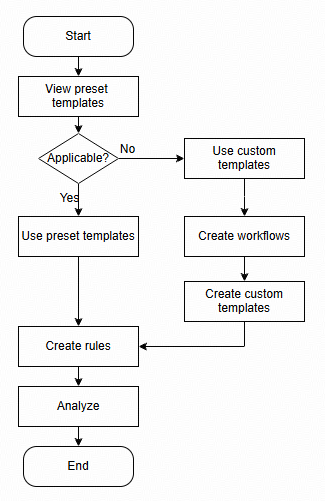
Remarks:
Category | Description |
Category | Description |
Preset templates | TOS offers a variety of SenseFlow preset templates. You can configure a processing pipeline by combining multiple preset operators with one click. For more information about preset templates, see Preset templates. |
Preset operators | SenseFlow workflows include various common preset operators, eliminating the need for complex conversion rule configurations. For more information, see Preset operators. |
Create SenseFlow rules | You can create SenseFlow rules directly using the preset templates. If these templates do not meet your needs, you can create custom templates and configure workflows for them using preset operators to handle complex, scenario-based tasks.
|
FAQ
Will my data be lost or altered after I enable SenseFlow?
No. SenseFlow only reads your original data. It analyzes the content of your objects, and the generated indexes and metadata are stored separately from your original objects. Some workflows, such as video editing, generate new objects that are stored in your bucket by default. However, these new objects do not affect the original ones.
Once I have enabled a SenseFlow rule for a bucket, how long will it take before I can retrieve content?
It depends on how much data needs to be processed under your rule. Typically, indexing and retrieval of newly uploaded objects are completed within minutes.
Can I use only some of SenseFlow's features, such as content awareness, without retrieval?
Yes. SenseFlow is modular. Through template and workflow configuration, you can enable only the features you need. For example, you can set up a rule that performs content awareness and triggers notifications without creating an index for front-end queries.
Last updated: 2026.09.16 10:47:52
All rights reserved © Beijing Volcano Engine Technology Co., Ltd2024
