Elastic Compute Service
Elastic Compute Service


Document

- Documentation
 Elastic Compute ServiceElastic Compute ServiceBest PracticesImagesConfiguring THP in Linux operating system
 Copy page
 Download PDF
Images
Configuring THP in Linux operating system
Copy pageDownload PDFConfiguring THP in Linux operating system
This topic describes how to configure transparent huge pages (THP) for an instance running the Linux operating system.
About THP
THP is a Linux memory management system. It uses larger memory pages to reduce the overhead of Translation Lookaside Buffer (TLB) lookups on machines with large memory.
Advantages of using THP
THP reduces TLB misses and page faults, thereby improving performance. Example:
The application requires 2 MB of memory. If the operating system uses 4 KB as the paging unit, 512 pages are required. Consequently, 512 entries are required in the TLB and 512 page table entries are also required. The operating system must experience at least 512 TLB misses and 512 page faults to fully map the 2 MB application space to physical memory.
However, when the operating system adopts 2 MB as the basic paging unit, only 1 TLB miss and 1 page fault are required to establish the virtual mapping for the application space. Moreover, no additional TLB misses or page faults will occur during the operation (assuming no TLB entry replacement or swap takes place).
Disadvantages of using THP
- Internal fragmentation. When a transparent huge page is used, internal fragmentation occurs. For example, if an application requiring only 1 byte of data is allocated a 2 MB huge page, internal fragmentation occurs.
- Increased page fault handling latency. Although THP reduces the number of page faults, larger pages take more time to transfer from the disk. This leads to increased latency in page fault handling. Meanwhile, it also takes longer to zero out huge pages.
- Memory access performance degradation caused by locking in the memory path. When the khugepaged process scans the process memory and merges 4 KB pages into huge pages, various memory allocation activities for the target memory require different memory locks. This directly affects the memory access performance of the program. Additionally, this process is transparent to the application and cannot be controlled at the application level. For programs optimized specifically for 4 KB memory pages, this may cause random performance degradation.
- System resources occupied by background tasks. When the system lacks sufficient contiguous memory, it triggers memory compression and memory reclamation. These operations ultimately lead to a decline in system performance.
Scenarios
The impact of THP on system performance varies by scenario. You can decide whether to enable THP based on your scenario.
SPECjbbⓇ scenarios
In scenarios such as the Java Server Business Benchmark (SPECjbb), which is developed by the Standard Performance Evaluation Corporation (SPEC), applications require large memory. In such scenarios, using a larger page granularity to map memory helps boost the hit rate in the TLB, making this approach beneficial for performance. For memory-intensive workloads, enabling THP may yield significant performance gains.
Database scenarios
Databases typically have sparse rather than contiguous memory access patterns. As a result, their workloads usually perform poorly when THP is enabled. For example, when you run MongoDB on Linux, you should disable THP to achieve optimal performance.
Procedure
Enable/disable THP
- View the status of the THP feature.
- Execute the following command to view the feature status.
-
- Example:
-

- Return value description:
- [always] madvise never: THP is enabled.
- always [madvise] never: THP can only be used in memory regions marked with MADV_HUGEPAGE through the madvise() system call.
- always madvise [never]: THP is disabled.
- Configure the THP mode.
- warningSettings applied in this way do not require an instance restart, but they take effect only for the current boot session and are lost after a restart.
- Configure the settings during the instance startup process.
- Log in to the ECS console and restart (forcibly restart) the instance. For more information, see Restarting instance.
- Use VNC to connect to the instance. For more information, see Using the console to log in to a Linux instance.
- When the system boots to the kernel selection screen, press the ↑ or ↓ key to select the target kernel.
-
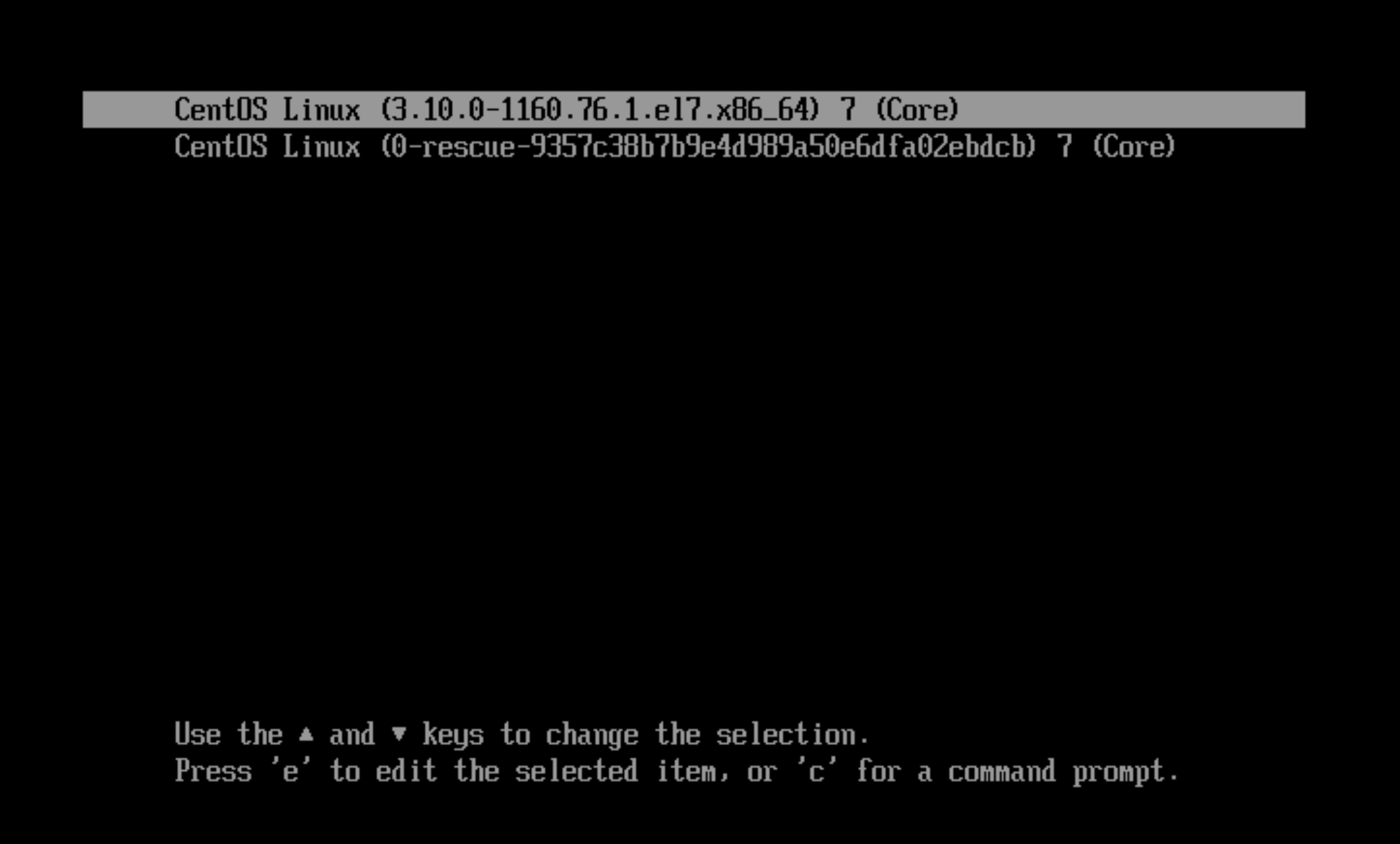
- Press e to enter the page for editing the Grub boot file.
- Move the cursor to the Linux kernel parameter line and add either transparent_hugepage=always, transparent_hugepage=madvise, or transparent_hugepage=never, as shown in the following figure.
-
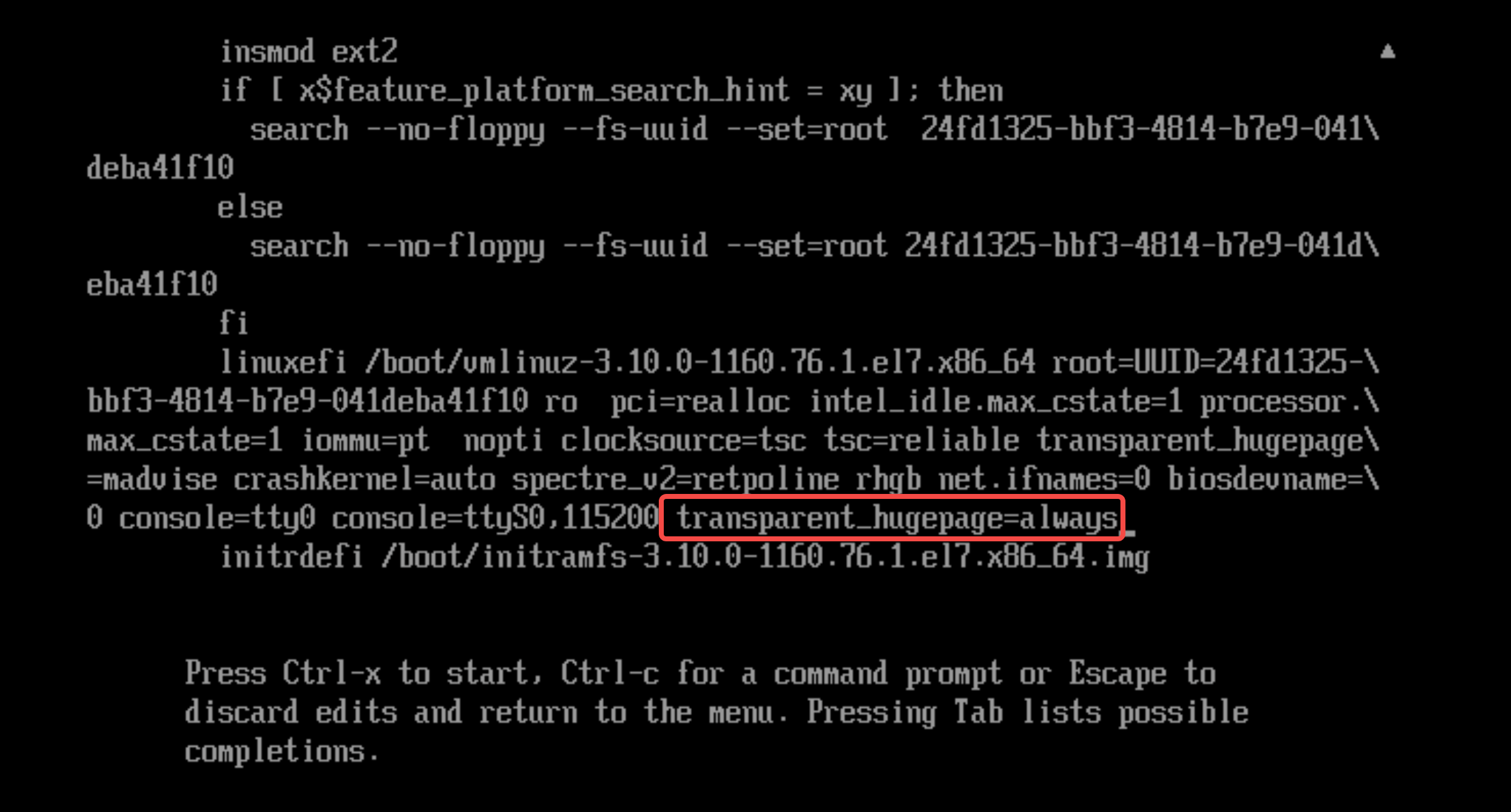
- Press Ctrl + x to complete the configuration.
- After logging in to the operating system, you can execute the command in Step 2 to check whether the configuration takes effect.
- Configure the settings after logging in to the instance.
- Enable THP
-
- Disable THP
-
- Specify that THP can only be used in memory regions marked with MADV_HUGEPAGE through the madvise() system call.
-
warningThe settings applied using this method persist permanently, but a restart of the instance is required for the settings to take effect.- veLinux/Debian/Ubuntu
- Execute the following command to edit the Grub configuration file.
-
- Press i to enter edit mode, and add the transparent_hugepage THP parameter next to GRUB_CMDLINE_LINUX. If this parameter already exists, modify its value as needed.
tipReplace never with the required parameter value. Value:- always: Enable THP.
- madvise: THP can only be used in memory regions marked with MADV_HUGEPAGE through the madvise() system call.
- never: Disable THP.
-
-

- Press the Esc key to exit edit mode, enter :wq, and then press Enter to save and exit the file.
- Execute the following command to generate a new Grub configuration.
-
- Execute the following command to restart the instance for the configuration to take effect.
-
- CentOS/RHEL/Rocky Linux
- Execute the following command to add the THP parameter.
tipReplace never with the required parameter value. Value:- always: Enable THP.
- madvise: THP can only be used in memory regions marked with MADV_HUGEPAGE through the madvise() system call.
- never: Disable THP.
-
- Execute the following command to restart the instance for the configuration to take effect.
-
View the usage of transparent huge pages
- Execute the following command to view the usage of transparent huge pages at the system level.
-
- Example:
-
- Execute the following command to view the usage of transparent huge pages at the process level.
Replace [pid] with the ID of the target process.
-
- Example:
-
Configure THP defragmentation
You can configure the THP defragmentation feature by performing the following steps. When transparent huge pages cannot be allocated, the system automatically performs corresponding operations to defragment huge pages.
- Execute the following command to complete the configuration.
- When transparent huge pages cannot be allocated, the system pauses the allocation, directly reclaims pages and compresses memory to immediately allocate transparent huge pages.
-
- Execute the following command to complete the configuration.
- When transparent huge pages cannot be allocated, the system instead allocates 4 KB regular pages. Meanwhile, it wakes up kswapd in the background to reclaim pages and kcompactd to compress memory. This way, khugepaged can merge transparent huge pages when contiguous memory becomes available.
-
- Execute the following command to complete the configuration.
- When transparent huge pages cannot be allocated, the always mode is only applied to the allocation in memory regions marked with MADV_HUGEPAGE through the madvise() system call. 4 KB regular pages are allocated for other regions.
-
- Execute the following command to complete the configuration.
- When transparent huge pages cannot be allocated, the always mode is applied to the allocation in memory regions marked with MADV_HUGEPAGE through the madvise() system call. The defer mode is applied to other regions.
-
- You can also execute the following command to disable defragmentation.
-
Configure Khugepaged
khugepaged is a daemon process for THP. It wakes up periodically and attempts to convert 4 KB regular pages into large pages (such as 2 MB pages) according to the specified configurations, thereby reducing TLB pressure and improving memory usage efficiency. However, khugepaged needs to use various memory locks during processing, which may affect system performance to a certain extent. You can configure khugepaged according to your actual needs.
- Execute the following command to disable khugepaged defragmentation.
-
- Execute the following command to enable khugepaged defragmentation.
-
- Execute the following command to specify that khugepaged scans 4,096 pages each time (by default, 4,096 pages are scanned).
-
- Execute the following command to specify that the wake-up interval of khugepaged is 10,000 ms (the default wake-up interval is 10,000 ms).
-
- Execute the following command to specify that the wait time after khugepaged fails to allocate huge pages is 60,000 ms (the default wait time is 60,000 ms). This helps prevent repeated failures in a short period.
-
- If the system experiences severe lag and khugepaged usage reaches 100%, you can execute the following command to disable khugepaged.
-
Related documents
Last updated: 2026.06.18 17:49:52
All rights reserved © Beijing Volcano Engine Technology Co., Ltd2024
