Elastic Compute Service
Elastic Compute Service
Elastic Compute Service


Document
Elastic Compute Service
What's New
Announcement
OpenAPI related
Pricing and quotas are related
About products and plugins
Feature discontinuation
Overview
Billing
Billable items
Billing methods
Billing methods change
Getting Started
User Guide
Instances
Instance types
X86 Computing
Elastic Bare Metal Server
Heterogeneous Computing
Select instance billing method
Spot instance
Elastic Scheduled Instance
Offsetting Resources
Reserved Instances
Buying ECS instances
Logging in to an instance
Logging in to a Linux instance
Managing instance status
Modifying instance types
Using instance user data and metadata
Instance metadata
Images
Public images
veLinux images
Custom images
Importing custom images
Creating custom images
Image detection
End of life (EOL) of image
Elastic Block Storage
Basic volume operations
Partitioning and formatting a volume
Extending a volume
EBS Agent
Snapshots
Basic snapshot operations
Auto snapshot policies
DataInsights
Network
Network interface and IP address
IP Address
IPv4 address
Security group
Security
Passwords and key pairs
Deployment and scaling
Monitoring
Monitoring metrics
Event monitoring
Local volume event O&M
Method 1: Solve the local volume failure by replacing the faulty volume
O&M
Cloud assistant
Managing agents
Process choreography
Common operation and maintenance tasks
Batch operations on instances
Batch operations on EBS Volumes
Batch operations on images
Temporary upgrade of bandwidth
Managing application updates
orchestration plan
Patch management
Managing patch plans
Managing patch baselines
IAM
Tags and projects
Best Practices
AI applications
OpenClaw (formerly Moltbot)
Quickly deploying OpenClaw via application templates
Quickly deploying OpenClaw via marketplace images
Manually deploying OpenClaw
Self-service website creation
Building environments
Building a Web environment (Windows)
Building applications
Building FTP site
Deploying databases
Building game servers
Building websites
Building a WordPress blog
Building multiple websites
Manage software sources for Linux instances
AIGC practices
Performance test
Network performance test
Instance configuration
Setting up AD Domain Services on Windows OS
Windows Multi - User Login
Changing screen resolution
Instance data
Uploading or downloading files
Data restoration
ECS instance local time synchronization
Volume
Monitoring
Security
Images
Kernel fine-tuning
O&M
Troubleshooting
Remote log in issue
Linux operating system issue
Windows operating system issue
SSH log in issue
Operating system issue
veLinux operating system issue
Linux operating system issue
Windows operating system issue
Instance status issue
Instance unable to start issue
High instance load issue
GPU instances issue
Network connection issue
Network configuration issue
Storage classes issue
EBS Volume issue
Local Disk issue
Logs and monitoring issue
Third - party software issue
API Reference
Regions and availability zones
Instances
Images
HPC clusters
Key pairs
Tags
Volumes
Reserved storage capacity
Snapshot
Auto snapshot policy
Monitoring
Deployment sets
Launch templates
Cloud assistant
Patch management
SDK reference
CLI Reference
FAQ
Dedicated Host DDH
What's New
Billing
User Guide
Manage Dedicated Host
Manage Dedicated Host Cluster
Manage ECS instances
Monitoring and O&M
API reference
proprietary host
- Documentation
 Elastic Compute ServiceElastic Compute ServiceUser GuideInstancesUsing instance user data and metadataInstance metadataViewing instance metadata
 Copy page
 Download PDF
Instance metadata
Viewing instance metadata
Copy pageDownload PDFViewing instance metadata
Instance metadata contains basic information of an ECS instance on the cloud platform. You can use metadata to configure or manage your instances. This topic describes how to view instance metadata.
Usage notes
You can access instance metadata within the instance only. Since the data is not encrypted, anyone with access to the instance can view the metadata. If the metadata contains sensitive data, you should take proper measures to protect the sensitive data, such as access control and encryption.
Instance metadata items
Expand the table below to view the instance metadata information you can access through the metadata service.
Summary table of instance metadata items
tip
Description
- In the table below, replace [mac] and [volume_id] with the actual MAC address and volume ID of the instance.
- Case-insensitive.
- ":", "-", "/" are allowed.
Metadata item | Description | Examples |
Metadata item | Description | Examples |
mac | MAC address of the instance | 00:16:3e:53:xx:xx |
hostname | Instance hostname | iv-ybo19qc2zqijuuub**** |
uuid | Unique identifier of the instance | 8508262e-df5a-11ec-9ec1-0c42a14c**** |
instance_id | Instance ID | i-ybo19qc2zqijuuub**** |
instance_type_id | Instance type | ecs.g1.large |
image_id | ID of the image used for instance startup | image-4ay4awvwifaqrvqd**** |
region_id | The ID of the region where the instance is located. | cn-beijing |
availability_zone | The availability zone where the instance is located. | cn-beijing_a |
private_ipv4 | The primary private IPv4 address of the primary network interface. | 192.XX.XX.2 |
eip_address | The EIP of the instance primary network interface. | 10.XX.XX.88 |
network/interfaces/macs/[mac]/primary_ip_address | The primary private IP address of the network interface. | 172.XX.XX.127 |
network/interfaces/macs/[mac]/eip_address | The list of EIPs associated with the instance. | 10.XX.XX.1 |
network/interfaces/macs/[mac]/vpc_id | The VPC ID of the instance. | vpc-mini07ggfxmo5smt1b5f**** |
network/interfaces/macs/[mac]/subnet_id | The subnet ID of the instance. | subnet-13g3mh3hjglj43n6nu5if**** |
network/interfaces/macs/[mac]/private_ip_addresses | The list of private IPv4 addresses assigned to network interfaces. | 172.XX.XX.127 |
network/interfaces/macs/[mac]/subnet_cidr_block | The subnet mask corresponding to the network interface. | 172.XX.XX.0/24 |
network/interfaces/macs/[mac]/gateway | IPv4 gateway address of the subnet where the network interface resides | 172.XX.XX.1 |
network/interfaces/macs/[mac]/interface_type | The network interface attribute. |
|
payment/charge_type | Billing method |
|
payment/created_at | The time when the instance is created. | 2022-4-30 13:39:12 |
payment/expired_at | The expiration date of the subscription-based instance. | 2022-5-30 13:39:12 |
network/interfaces/macs/[mac]/security_group_ids | The ID of the security group with which the instance associates. | sg-mini0ddjs3k05smt1b6n**** |
network/interfaces/macs/[mac]/security_group_names | The name of the security group with which the instance associates. | default |
block_devices | Disk ID list | vol-3tf33o3o254bwbhd**** |
block_devices/[volume_id]/device_type | You can query the volume type (Volume or local volume) based on the volume ID. |
|
serial_number | View the mapping relationship between Volume IDs and Volume serial numbers. | [{"serial_number":"3vqvpywv352tq1di****","volume_id":"vol-3vqvpywv352tq1di****"}] |
iam/security_credentials | The list of IAM roles associated with the instance. | ServiceRoleForECS |
spot_instance_termination_time | The interruption time of spot instances. | 2023-02-23T17:35:00Z |
instance_network_bandwith_baseline | The network baseline bandwidth (outbound/inbound), in Mbps. | 2560 |
instance_network_bandwith_maximum | The network peak bandwidth (outbound + inbound), in Mbps. | 12288 |
instance_network_throughput_maximum | The maximum throughput (outbound + inbound), in Kpps. | 150 |
Access methods
Overview
There are two ways to view metadata: Normal Mode and Security Hardening Mode.
- Normal Mode: Use CURL to access a preset fixed IP address and fetch instance metadata. This method is relatively straightforward and simple, with no complex authentication process required.
- Security Hardening Mode: The instance uses tokens for identity authentication to view instance metadata. Compared with Normal Mode, it provides better protection against Server-Side Request Forgery (SSRF) attacks.
Item | Normal Mode | Security Hardening Mode |
Item | Normal Mode | Security Hardening Mode |
Interaction mode | Request/Response | Session |
Security verification | Authentication of source IP address within the same VPC | Authentication of source IP address within the same VPC + Authentication of credentials for accessing instance metadata tip The access credentials have the following characteristics:
|
Viewing method | Direct access to the endpoint through commands | You must first obtain metadata access credentials for authentication, and then access the endpoint via a command. The request must contain the token header. |
Security | Relatively low tip Requests are authenticated based on IP addresses. Attackers can forge the source IP address of requests to bypass IP address authentication and launch SSRF attacks, posing a risk of instance metadata leakage. | Relatively high tip Before accessing metadata, you need to obtain the access credentials, which can only be generated within the ECS instance. The credentials are time-sensitive and apply only to specific instances. Attackers find them difficult to guess or forge, capable of preventing most SSRF attacks. |
Procedure
Security Hardening Mode
Normal Mode
warning
In the following commands, the arguments to be set are described as follows:
- <validity period of metadata access credentials>: The value ranges from 1 to 21,600 seconds.
- <metadata>: Replace with the specific metadata item you want to query. For details, please refer to Instance metadata items.
- <token>: Replace with the obtained token. If the token is invalid, an "Unauthorized request" response will be returned. The token validation rules are as follows:
- It must be within the validity period.
- It must be a token for this instance.
For Linux instances
For Windows instances
- Execute the following command to obtain metadata access credentials, with a specified validity period.
- curl --location --request PUT '100.96.0.96/latest/api/token' \--header 'X-volc-ecs-metadata-token-ttl-seconds:<validity period of metadata access credentials>'
- Execute the following command to obtain instance metadata.
- curl --location '100.96.0.96/latest/<metadata>' \--header 'X-volc-ecs-metadata-token: <token>'
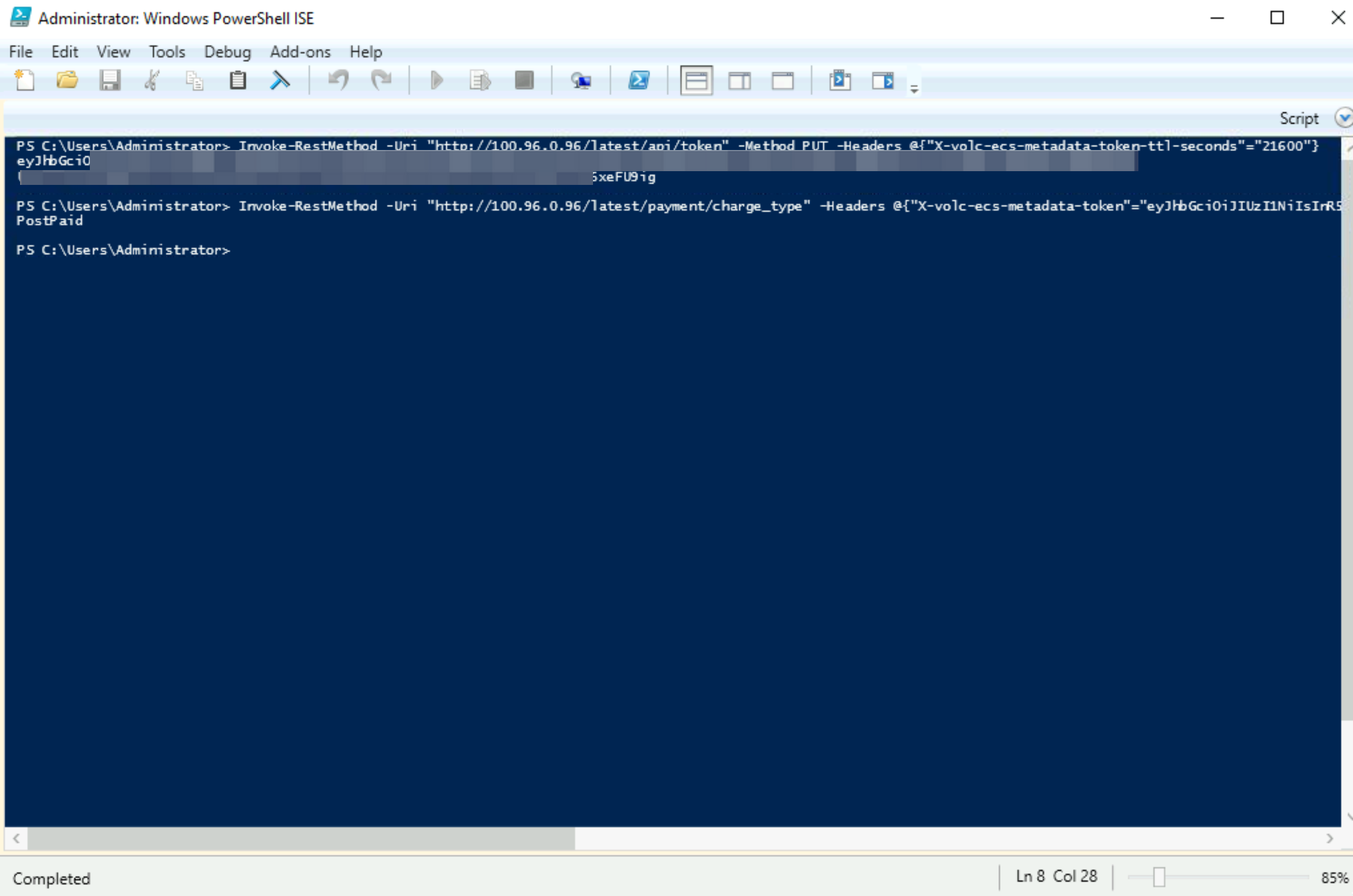
- The response is displayed as follows (For example, the metadata is payment/charge_type).
-

- Execute the following command to obtain metadata access credentials, with a specified validity period.
- Invoke-RestMethod -Uri "http://100.96.0.96/latest/api/token" -Method PUT -Headers @{"X-volc-ecs-metadata-token-ttl-seconds"="<validity period of metadata access credentials>"}
- Execute the following command to obtain instance metadata.
- Invoke-RestMethod -Uri "http://100.96.0.96/latest/<metadata>" -Headers @{"X-volc-ecs-metadata-token"="<token>"}
- The response is displayed as follows (For example, the metadata is payment/charge_type).
-
warning
Replace <metadata> with the specific metadata item you want to query. For details, please refer to Instance metadata items.
- Execute the following commands.
- For Linux instances
- curl http://100.96.0.96/latest/<metadata>
- For Windows instances (PowerShell)
- Invoke-RestMethod http://100.96.0.96/latest/<metadata>
Configure metadata access mode
Overview
When creating an instance, you can set the metadata access mode to Normal Mode and Security Hardening Mode or Security Hardening Mode.
warning
- Security Hardening Mode is currently in Beta. If you need a trial, please contact your account manager to apply.
- To enable Security Hardening Mode, the following conditions must be met:
- The instance type is not GPU.
- The instance image is a custom image that supports Security Hardening Mode. Learn more
- Security Hardening Mode: Only allows accessing instance metadata through a token-based authentication method, enhancing security further.
- Normal Mode and Security Hardening Mode: allows access to instance metadata directly through the normal mode or the token-based security hardening mode.
Procedure
Refer to Purchasing an instance by following the wizard to complete the Basic configuration and Network configuration in sequence. Then, in the Custom configuration stage, expand "Advanced options" and select the access mode for metadata. Follow the on-screen instructions step by step to create the instance.
Last updated: 2026.10.14 17:32:19
All rights reserved © Beijing Volcano Engine Technology Co., Ltd2024
