Volcengine Kubernetes Engine
Volcengine Kubernetes Engine
Volcengine Kubernetes Engine


Document
Volcengine Kubernetes Engine
What's New
History feature release notes
Kubernetes version release notes
Containerd runtime release notes
Add-on release notes
Monitoring add-ons
Scheduling add-ons
DNS add-ons
Security add-ons
GPU add-ons
Sandbox add-on
Security announcements
Product Announcement
Historical announcements
Overview
Getting started
User guide
Clusters
Creating clusters
Connecting to clusters
Upgrading clusters
Node pool
Creating node pools
Scaling out/in node pools
Nodes
Authorization management
Image
Namespaces
Networking
Cluster network
Container Network
Service
LoadBalancer
CLB
Ingress
APIG Ingress
ALB Ingress
Customize ALB Ingress forwarding rules
Certificate and security
CLB Ingress
Nginx Ingress
Gateway API
Workloads
Creating workloads
Configure workloads
Pods
Configuration management
Image acceleration
Storage
FSX client
EBS Volumes
TOS Volumes
NAS volumes
FSX access methods
NFS access methods
EFS volumes
vePFS volumes
FSX access methods
vePFS Client access methods
NFS access methods
CloudFS volumes
Local volumes
Autoscale
Node autoscaler
Workload autoscaler
Horizontal Pod Autoscaler (HPA)
Cron Horizontal Pod Autoscaler (CronHPA)
Intelligent Horizontal Pod Autoscaler (IHPA)
Horizontal Pod Autoscaler based on event-driven (KEDA)
Add-on management
Network add-ons
Storage add-ons
Monitoring add-ons
Scheduling add-ons
DNS add-ons
GPU add-ons
Core add-ons
Sandbox add-on
Upgrading add-ons
Heterogeneous computing
NVIDIA GPU
mGPU scheduling
RDMA high-performance computing
Scheduling management
Topology-aware scheduling
QoS-aware scheduling
Observability
Log management
Basic observation
Setup & Configuration
Cluster observation
Storage observation
Other observation
Using metrics
Full stack observation
Alert management
Diagnosis and inspection
Node check and self-healing
Application center
Backup center
Stability
Large-scale cluster management
Best practices
Authorization
Clusters
Nodes and node pools
Networking
Storage
Scheduling
Observability
Solution
Security and compliance
API reference
Cluster management
NodePool management
Node management
Virtual nodes management
Add-on management
Tag management
Access policy management
Instance images management
Cloud native observability
Inspection and diagnosis
Task management
Volcengine Container Instance
Appendix
SDK reference
Development guide
Terraform
FAQs
General FAQs
Cluster FAQ
cluster management
cluster network
cluster upgrade
Node and Node pool FAQs
Authorization FAQs
Workload FAQs
Service and Ingress FAQs
Storage FAQs
Heterogeneous computing FAQs
Observability FAQs
Quota FAQs
Add-on FAQs
Cloud-native AI
ServingKit
LLM applications
ComfyUI application
Deploying the Al inference application through Helm
Deepseek practices
Qwen practices
Kimi practice
Seed practices
Best practices
DeepSeek model deployment
GLM model deployment
MiniMax model deployment
Qwen model deployment
Kimi model deployment
Volcengine Container Instance
What's new
Historical feature release notes
Product Announcement
Overview
Billing
User guide
Integrating with VCI
Virtual node
VKE cluster uses virtual nodes
Self-managed/third-party cluster uses virtual node
Creating an instance
General purpose instance
GPU-accelerated computing instance
VCI Agent Sandbox
Startup acceleration
E2B-based management
Upgrade guide
Networking
Monitoring
Scheduling
Container configuration
VCI Image Cache
Best practices
Security and compliance
FAQs
- Documentation
 Volcengine Kubernetes EngineVolcengine Kubernetes EngineUser guideObservabilityBasic observationStorage observationCSI storage observability
 Copy page
 Download PDF
Storage observation
CSI storage observability
Copy pageDownload PDFCSI storage observability
VKE can collect and display the running status, request performance, and exception data of CSI storage add-ons in a cluster. This helps you discover storage service issues in a timely manner. This topic describes how to enable and configure CSI storage observability, the meaning of metrics, and how to identify exceptions.
Prerequisites
- Cloud-native observability has been enabled. For details, see Enabling observability.
- The VKE observability feature has been enabled. For details, see VKE observability.
- Add-ons to be monitored have been installed. For details, see csi-ebs, csi-fsx, csi-nas, csi-vepfs, and snapshot-controller.
- (Optional) An alert notification policy has been created in the Observability Platform or VMP. For details, see Creating notification policies and Creating alert notification policies.
- (Optional) An alert aggregation policy has been created in the Observability Platform or VMP. For details, see Creating aggregation policies and Creating alert aggregation policies.
Enabling observability
Step 1: Configure observability items
- Log in to the VKE console.
- In the left navigation bar, click Cluster. Find the target cluster and click its name.
- In the left navigation pane of the cluster management page, click Observability settings, and select the Basic observability tab.
- Find the CSI Storage card and click Enable observation to go to the observability item configuration page.
- The system automatically checks the necessary conditions for enabling observability, such as the workspace configuration and add-on status.
- For the Observation item parameter, select observability items for which you want to collect metrics. For items for which metric collection is not enabled, the system will not collect the corresponding metrics, and the system will prompt you to install the related add-ons. You can decide whether to install the related add-ons and select the corresponding observability items based on your business requirements.
- After the configuration is complete, click Next to go to the metric configuration page.
Step 2: Configure metric collection
- On the metric configuration page, view the collection interval and metric quantity corresponding to the enabled observability items.
- Click Edit metrics. This enables you to select or discard specific metrics of the add-on, modify the collection interval, and configure metric relabeling.
- For Collection interval, select a collection interval for the metrics of the add-on. The supported collection intervals vary for different add-ons.
- In the metric list, select a metric to collect. To stop collecting a metric, uncheck it. Click the All, Basic metrics, or Other metrics tab to filter metrics by type.
tip
- The impact of adjusting the metric collection interval is as follows. Adjust the interval as needed:
- Reducing the collection interval: This increases the number of metrics reported per unit time and improves monitoring accuracy. However, the cost of standard VMP workspaces increases.
- Increasing the collection interval: This decreases the number of metrics reported per unit time and lowers the cost of standard VMP workspaces. However, this decreases monitoring accuracy.
- Cloud service metrics are categorized into Basic metrics and Other metrics. The billing method varies based on different types of metrics. For details, see VMP billing.
- In the metricRelabelings section, click Add rule to configure metric relabeling rules. This allows you to rewrite the labels of each metric after collection and before writing to storage. Common use cases include modifying label values, adding new labels, and renaming labels to standardize label naming for queries. For details, see Metric relabeling.
- No.FeatureReplacement valueDescriptionNo.FeatureReplacement valueDescription①Action typeactionThe action to apply to the metrics. Currently, only replace is supported. The logic is as follows:
- If the values of targetLabel and sourceLabels are the same, sourceLabels is overwritten.
- If the key specified by targetLabel does not exist, a new label is created by default.
②Source labelssourceLabelsSpecify one or more source labels, separated by | if multiple labels are provided. The system reads the values of these labels for matching or extraction.③Regular expressionregexThe regular expression pattern used to match source label values.- The default is (.*), which matches any value.
- You can use capture groups such as (.+) to extract partial content.
④Replacement valuereplacementThe value written to the target label after a successful match.- The default is $1, which refers to the content of the first capture group in the regular expression.
- A fixed string is also supported.
⑤Target labeltargetLabelThe name of the target label to which the processing result is written.- If the target label already exists, its existing value is overwritten.
- If the target label does not exist, a new label is created.
- After the configuration is complete, click Next to go to the alert and notification configuration page.
Step 3: Configure alerts and notifications
- In the Alert and notification step, select the platform to receive alerts. Currently, Unified Alert Center and The original VMP alarm strategy are supported.
- For the Notification strategy name parameter, select the created alert notification policy and specify the notification object and Notification method parameters based on different alert levels.
tip
- If you do not need to configure alerts for a certain level, you can unselect the corresponding alert level.
- If the existing notification policies do not meet your needs, you can select vke_default_notify_policy (automatically created) for the Notification strategy name parameter, and specify the notification object and Notification method parameters for the required alert levels. After you save the configuration, the system will automatically create a custom notification policy named vke_default_notify_policy in the unified Alert Center or VMP.
- In the Alerting aggregation policy section, select the created alert aggregation policy.
- Configure preset alert rules.
- Enable or disable the switch next to a preset alert rule. After it is enabled, the system detects metrics based on the configured trigger conditions and generates alerts. When it is disabled, the rule will no longer trigger new alerts.
- Click View PromQL to view the description and corresponding PromQL statement of the current preset alert rule.
- Click the name of the preset rule to be configured to expand the preset alert rule configuration page, and configure the trigger conditions for different levels (P0, P1, or P2) of alerts in the Triggering condition section.
- ParameterDescriptionParameterDescriptionAlert levelSelect the check box in the Enable column that corresponds to each alert level (P0, P1, or P2) to activate its trigger condition. If you do not select an option, alerts at this level are not configured.Comparison conditionSpecify the comparison condition between the PromQL statement and the threshold. You can configure multiple comparison conditions, including Greater than, Greater than or equal to, Less than, Less than or equal to, Equal to, and Not equal to.ThresholdConfigure the threshold of the metric.The duration of the conditionConfigure the duration for which the metric continuously meets the trigger condition. The system triggers the alert at the corresponding level only if the metric continuously meets the comparison condition within this duration.LabelConfigure the label of the alert rule. It is mainly used for alert identification, grouping, deduplication, and routing matching. A label consists of a key and a value. Where:
- Key: A string. It can start with a letter or an underscore (_), but cannot start with a double underscore (__). It can contain letters, digits, and underscores (_) and can be 1 to 256 characters in length.
- Value: A string. It can contain Chinese characters, English letters, digits, and special characters, and can be 1 to 512 characters in length.
Common configuration example:labels:severity: critical # The alert level.business: pay # The business line.alert_type: resource # The alert type.AnnotationConfigure the annotation of the alert rule. It is mainly used to display key information. An annotation consists of a key and a value. Where:- Key: A string. It can start with a letter or an underscore (_), but cannot start with a double underscore (__). It can contain letters, digits, and underscores (_) and can be 1 to 256 characters in length.
- Value: A string. It can contain Chinese characters, English letters, digits, and special characters, and can be 1 to 512 characters in length.
Common configuration example:annotations:summary: "High CPU usage on instance {{ $labels.instance }}"description: "Current CPU usage is {{ $value | humanizePercentage }}, threshold is 80%"runbook_url: "https://xxx/docs/cpu-alert"dashboard_url: "https://grafana/xxx"
- Click Complete the configuration.
Description
- In addition to using preset alert templates to configure alert rules directly, you can customize the template configurations or directly use PromQL statements to configure alert rules. For details, see Alert configuration overview.
- Details of the preset alert rule templates, including rule descriptions, PromQL configurations, and common alert handling procedures. See Preset alert templates.
Observability dashboards
FSX monitoring
After enabling monitoring for the csi-fsx add-on, you can view its metrics dashboard. You can specify a custom time range for querying information and set the information refresh mode to manual refresh or automatic refresh.
- In the left navigation pane of the cluster management page, click Monitoring center > Dashboard.
- In the left dashboard list, select Storage service monitoring > FSX monitoring to view the monitoring dashboard.
- The csi-fsx monitoring dashboard generally consists of 3 sections, covering FSX client monitoring, CSI monitoring, and FSX client upgrade monitoring. The following table provides the detailed descriptions of charts.
Description
For the method of obtaining the PromQL statements that correspond to the charts, see Using dashboards.
- Chart nameUnitChart descriptionChart nameUnitChart descriptionfsx client monitoringBandwidthbytes per secondRead/write throughput variation of the FSX client across all nodes. It is used to identify overall load trends and high-throughput hot nodes. The related metric is fsx_fusedaemon_volume_throughput.
- Under normal circumstances, this metric fluctuates around the business baseline. Temporary spikes are acceptable during batch read/write operations, data warm-up, or concentrated task execution, yet values should decline after task completion.
- Prolonged elevated bandwidth levels, frequent sudden throughput spikes, or abnormally low throughput of business traffic typically suggest anomalies in client load or data access paths. For example: concentrated access to hotspot data, single-node load skew, downstream storage performance jitter, network link fluctuations, and insufficient client processing capacity
IOPSTimes per secondI/O operation frequency of the FSX client. It helps you determine request concentration, access density, and differences in I/O activity across different nodes. The related metric is fsx_fusedaemon_op_ops.- Under normal circumstances, this metric aligns with business access patterns and fluctuates around the baseline. Short-term spikes are expected during business peak hours.
- If this metric remains persistently above the historical baseline, fluctuates violently and repeatedly within a short timeframe, or drops significantly while business traffic stays stable, it indicates abnormal read/write pressure or request backlog on the client side. For example: a sudden surge in business traffic, concentrated access to hot files or volumes, increased retries, client stalling, and slow response from the storage backend.
Average request latencyMicrosecondsAverage latency of FSX client I/O requests. It helps you identify slow read/write operations. The related metric is fsx_fusedaemon_op_latency_us_avg.- Under normal circumstances, this metric remains at a low level and fluctuates slightly around a stable baseline. Short-term rises may occur during peak traffic, yet values should drop back down afterward.
- If latency rises continuously, stays elevated for a long time, or spikes without obvious traffic changes, it indicates potential performance bottlenecks in the client-side I/O path. For example: slower responses on the storage side, network jitter, client-side resource contention, request queuing, and increased abnormal retries.
I/O ErrorTimes per secondError rate of FSX client in I/O read/write, mount, and other scenarios. It helps you detect anomalies in the actual read-write pipeline. The related metric is fsx_fusedaemon_op_failed_ops.- Under normal circumstances, this metric is expected to be absent or to have a near-zero value, or to recover quickly after occasional fluctuations.
- If the error rate stays above zero persistently, rises periodically, or increases simultaneously across multiple instances, it indicates that perceptible I/O anomalies have occurred on the client side. For example: mount failures, read/write timeouts, network exceptions, unreachable backend storage, and permission or authentication issues.
Controller errorsTimes per secondError rate on the FSX client controller side. It helps you identify control plane issues such as OOM, authentication failures, and unexpected restarts. The related metric is fsx_fusedaemon_ctl_op_failed_ops.- Under normal circumstances, this metric should be zero or close to zero, with no persistent errors observed.
- If the error rate rises continuously or surges intensively during instance restarts, credential refreshes, and other periods, it indicates anomalies in the controller workflow. For example: process OOM, authentication failures, configuration errors, unexpected restarts, and dependent service unavailability.
CPU usage%CPU usage of the FSX client. It helps you identify resource pressure on the client side. The related metric is fsx_fusedaemon_cpu_total_usage_percent.- In normal scenarios, this value only slightly fluctuates around a baseline value, with no sustained increases or sudden spikes. Temporary spikes are only expected during read/write peaks or bulk task execution, followed by a gradual decline.
- If CPU usage stays high without decline, or prominent spikes occur frequently, it indicates the client faces sustained computing pressure or abnormal loop processing. For example: a sudden surge in request volume, excessive error retries, busy client threads, amplified data processing, and insufficient resource allocation.
Memory utilizationMiBMemory usage of the FSX client. It is used to identify risks of memory pressure or memory leaks on the client side. The related metric is fsx_fusedaemon_memory_usage_bytes.- In normal scenarios, this value only slightly fluctuates around a baseline value, with no sustained increases or sudden spikes. It only rises briefly during business peaks and gradually drops off afterwards.
- Continuous memory growth with no long-term decline or sudden, sharp spikes suggests abnormal memory risks for the client. For example: request backlog, cache bloat, abnormal retries, process memory leaks, and insufficient available node memory.
Number of clientsCountCounts the number of client instances under the current filter criteria. It helps you assess the scale and coverage of affected nodes.- In general, FSX clients are deployed on nodes on demand, so each node runs at most one instance.
- A sudden drop, sustained below-expected levels, or abnormal fluctuations in instance count over a short period suggests that clients on some nodes may not be running properly. For example: an abnormal node offline, a client pod not ready, a component deployment failure, and a version upgrade interruption.
Client version-Displays the distribution of client versions across all instances in table format. It helps you locate FSX client version inconsistencies, gray release scope, and faulty instances. The table contains the following key fields: cluster (Cluster ID), instance (Node name), instance_id (ECS Instance ID), version (FSX client version), facilitating troubleshooting of version discrepancies.- Under normal circumstances, the version distribution should comply with the current release strategy. For non-gray release and differentiated configuration scenarios, all nodes should run the identical version.
- If a large number of version branches emerge, a small batch of old versions persists for a long time, or faulty nodes are concentrated on a specific version, it indicates defects in version governance. For example: unfinished upgrades, residual gray release traffic, node upgrade failures, unconverged rollbacks, and instances not rebuilt for an extended period. We recommend converging all instances to the stable version as soon as possible.
CSI monitoringcsi-fsx request frequency received per minuteRequests per secondRequest receiving rate on the csi-fsx server side. It helps you analyze server load fluctuations and request distribution. Supports categorized display by method and instance dimensions. The related metric is fsx_server_rpc_total.- Under normal circumstances, this metric is proportional to the count of FSX storage volume mount and unmount operations, fluctuating around the historical baseline.
- If the request frequency stays persistently above the baseline, rises simultaneously across multiple instances, or an instance shows far higher values than others, it indicates massive creation or deletion of FSX-enabled business pods within a short timeframe.
csi-fsx RPC layer error frequencyRequests per secondError rate of the RPC layer on the csi-fsx server side. It supports categorized display by method, code, and instance dimension. The related metric is fsx_server_rpc_error_total.- Under normal circumstances, this metric is expected to be absent or to have a near-zero value, with no persistent error codes observed.
- If a specific type of error code persists, or error rates rise across multiple methods simultaneously, it indicates anomalies in the server-side processing pipeline. For example: mount parameters inconsistent with expectations, insufficient AKSK permissions for mounting, and expired STS credentials.
csi-fsx request processing latency [P90]secondsP90 latency of request processing on the csi-fsx server side. It helps you identify widespread slowdowns on the server. Supports categorized display by method and instance dimension. The related metric is fsx_server_rpc_time_bucket.- Under normal circumstances, this metric should remain stable. Temporary spikes are acceptable during business peak hours, yet values should decline as traffic load drops.
- Continuously increasing latency that remains above baseline for a long time, or latency increasing concurrently with request frequency, indicates bottlenecks in server processing capacity or in dependent links, or abnormal repeated retries from mounted backends.
fsx-agent request frequency per minuteRequests/periodThe RPC call activity of the node-side FSX client. It helps you determine whether node-side requests are concentrated or abnormally amplified. Supports classification and display by method and instance dimensions, with the Status API excluded by default. The related metric is fsx_agent_pod_rpc_total.- Under normal circumstances, this metric should fluctuate with node business activity and remain broadly consistent with the actual volume of operations.
- If request frequency continues to rise across multiple nodes, or if a single node is significantly higher than similar nodes, it suggests that abnormal request amplification may exist between nodes.
fsx-agent response failure rateRequests per secondRPC call failures of the FSX client on the node side. It helps you quickly locate faulty nodes and failed methods. Supports categorized display by dimensions of method, code, and instance. The related metric is fsx_agent_pod_rpc_error_total.- Under normal circumstances, this metric is expected to be absent or to have a near-zero value.
- A continuous rise in the failure frequency of a certain node or a type of method suggests anomalies exist in the node-side processing workflow.
fsx-agent request processing latency [P90]secondsP90 latency of requests processed by the node-side FSX client. It helps you identify slow requests on the node side. Supports categorized display by method and instance dimensions. The related metric is fsx_agent_pod_rpc_time_bucket.- Under normal circumstances, this metric stays at a low and stable level, with recovery after occasional fluctuations.
- If latency rises continuously, surges simultaneously across multiple nodes, or fails to decline over a long time, it indicates performance issues within the node-side processing pipeline.
fsx-agent lifecycle API request frequencyRequests per secondCall rate of FSX client lifecycle operations (including installation, mount, and unmount). It helps you identify concentrated lifecycle operations. Supports categorized display by method and instance dimensions. The related metric is fsx_agent_pod_lifecycle_total.- Under normal conditions, this metric aligns with the pace of volume mount, unmount, rebuild, and other operations within the cluster. It remains low during stable business periods.
- If the request frequency stays consistently high or rises significantly in a short period, it indicates intensive lifecycle operations are in progress.
Request count of fsx-agent lifecycle APIs.Requests/periodCumulative count of FSX client lifecycle operations (including installation, mount, and unmount) within the query time window. It helps you assess the scale of node-side changes over a specified period. Supports categorized display by method and instance dimensions, with the Status API excluded by default. The related metric is fsx_agent_pod_lifecycle_total.- Under normal circumstances, this metric aligns with the expected scale of O&M operations or business changes.
- If the request count surges sharply within a short time window, or remains persistently higher than historical values for the same period, it indicates excessively frequent lifecycle operations.
fsx-agent lifecycle API latency [P90]secondsP90 latency of FSX client lifecycle operations, helping you determine whether processes such as install, mount, and unmount are slowing down. Supports classification and display by method and instance dimension. The related metric is fsx_agent_pod_lifecycle_time_bucket.- Under normal circumstances, this metric should remain stable. It may temporarily increase during batch operations but should recover after the operations are completed.
- If latency continues to rise, or if it occurs concurrently with an increase in lifecycle request volume, it indicates a bottleneck in the processing flow of the relevant operations.
fsx-agent lifecycle API error frequencyRequests per secondError rate of failed FSX client lifecycle operations. It helps you identify failures in critical operations such as installation, mounting, and unmounting. It supports categorized display by method and instance dimensions. The related metric is fsx_agent_pod_lifecycle_error_total.- Under normal circumstances, this metric is expected to be absent or to have a near-zero value.
- If the error rate stays above zero continuously, or rises significantly during batch lifecycle operations, it indicates anomalies in the node-side lifecycle workflow.
Total count of FSX authentication secretsCountExisting authentication Secrets. They are used to verify whether the number of credential objects aligns with the actual usage. The related metric is fsx_credential_secret_total.- Under normal circumstances, this metric aligns with the actual mount scale on the node side and the number of clients, while remaining relatively stable.
- A continuous rise without any drop in total Secrets, or values significantly exceeding the expected scale, indicates a potential credential backlog on the node side. For example: uncleaned stale credentials, abnormal lifecycle reclamation, duplicate creation, faulty refresh workflows, and long-persistent residual objects on nodes.
Total number of expired secretsCountExisting authentication Secrets that have expired. They are used to identify backlog risks stemming from expired credentials. The related metric is fsx_credential_secret_expired_total.- Under normal circumstances, this metric should remain low, ideally close to zero.
- A continuous rise or prolonged, elevated count of expired Secrets suggests expired credentials have not been replaced or purged promptly.
fsx secret refresh frequencyRequests/periodExecution count of Secret at each refresh stage. It helps you verify whether the refresh process runs as expected. The related metric is fsx_credential_secret_refresh_total.- Under normal conditions, this metric aligns with the credential validity period and instance scale, with stable occurrences within fixed cycles.
- If the refresh frequency rises abnormally, concentrates on a single stage, or remains persistently below expectations, it indicates potential anomalies in the refresh workflow.
fsx secret refresh durationsecondsP90 latency of each refresh stage. It helps you pinpoint which refresh stage has performance bottlenecks. The related metric is fsx_credential_secret_refresh_time_bucket.- Under normal circumstances, this metric fluctuates within a stable range. Although expected variations exist across different stages, the overall trend remains predictable.
- If the latency of a single stage keeps rising, or multiple stages slow down simultaneously, it indicates that processing delays exist in the Secret refresh pipeline.
fsx secret refresh failure rateRequests per secondError rate of Secret refresh failures. It is used to assess the stability of the credential renewal link. The related metric is fsx_credential_secret_refresh_error_total.- Under normal circumstances, this metric is expected to be absent or to have a near-zero value.
- A continuously increasing error rate, or failures concentrated on specific stages or nodes, indicates a clear fault point within the Secret refresh workflow.
fsx-agent upgrade monitoringfsx-agent upgrade count on nodesRequests/periodFSX client upgrade count. It helps you assess the coverage and activity level of upgrade operations. Supports classified display by type and instance dimension, with the Status interface excluded by default. The related metric is fsx_syncer_upgrade_total.- Under normal circumstances, this metric should align with scheduled upgrade batches. It is typically a small value or zero outside upgrade time windows.
- Frequent upgrades outside expected time windows or repeated upgrade attempts on the same node indicate the upgrade workflow may not have stabilized. For example: repeated upgrade retries, repeated node recreation, restarts after rollback, and abnormal upgrade control logic.
fsx-agent upgrade latency [P90] on nodessecondsP90 latency of the FSX client upgrade workflow. It is used to identify slow upgrade execution and the presence of long-tail nodes. Supports categorized display by type and instance dimension. The related metric is fsx_syncer_upgrade_time_bucket.- Under normal circumstances, this metric should stay within a stable range and remain broadly consistent with performance observed in historical upgrade windows.
- Continuously increasing latency, a notable increase in long-tail nodes, or a drastically extended upgrade window indicates blockages or performance defects within the upgrade workflow. For example: high node load, slow image pulling, network jitters, insufficient node-side resources, and prolonged waiting time for upgrade steps.
Count of fsx-agent upgrade failures on nodesRequests/periodNumber of nodes with failed FSX client upgrades and total failure times. They can help you quickly locate nodes with upgrade anomalies. Supports categorized display by type and instance dimension. The related metric is fsx_syncer_upgrade_error_total.- Under normal circumstances, this metric should be zero or close to zero. Minor transient failures may occur during batch upgrades, yet they should recover after retries.
- If failure counts keep rising, failures are concentrated on the same type of nodes, or recovery is not achieved after the upgrade window closes, it indicates faults within the upgrade workflow. For example: abnormal node status, insufficient resources, image pull failures, upgrade script execution errors, and unreachable dependent services.
vePFS monitoring
After enabling monitoring for the csi-vepfs add-on, you can view its metrics dashboard. You can specify a custom time range for querying information and set the information refresh mode to manual refresh or automatic refresh.
- In the left navigation pane of the cluster management page, click Monitoring center > Dashboard.
- In the left dashboard list, select Storage service monitoring > vePFS monitoring to view the monitoring dashboard.
- The csi-vepfs monitoring dashboard consists of four sections: vePFS client and cluster status, OpenAPIs, CSI calls, and native command monitoring. The following table provides the detailed descriptions of charts.
Description
For the method of obtaining the PromQL statements that correspond to the charts, see Using dashboards.
- Chart nameUnitChart descriptionChart nameUnitChart descriptionvePFS client and cluster statusNumber of member nodesCountThe number of member nodes for each mount service under the current filter criteria. This helps you determine whether the node scale of the vePFS cluster meets expectations.
- Under normal circumstances, this value is consistent with the expected node scale of the mount service and only changes during node scaling or business adjustments.
- If the node count suddenly drops, remains below expectations, or falls to 0, some nodes may not have been added to the mount service as expected. For example: nodes going offline, network exceptions, client service exceptions, and mount service configuration changes.
Client pod countCountThe number of running vePFS client Pods in each mount service under the current filter criteria. This helps you determine whether the client has covered all nodes that need to access vePFS.- Under normal circumstances, this value is basically consistent with the number of nodes that require the vePFS client deployment. It changes only with node scaling or adjustments to the client deployment scope.
- If the client Pod count suddenly drops, remains below expectations, or falls to 0, it indicates that clients on some nodes may not be running as expected. For example: Pod scheduling failures, image pull failures, insufficient resources, node exceptions, and add-on upgrade interruptions.
Abnormal nodesCountThe number of abnormal nodes whose status is not active/down in the GPFS cluster under the current filter criteria. This helps you determine whether abnormal nodes exist in the cluster.- Under normal circumstances, this value needs to be 0. Non-zero values may briefly appear during node state transitions and need to return to 0 after the transition is complete.
- If this value remains greater than 0 or continuously increases, it indicates that the status of some nodes has not converged as expected. For example: node failures, network unreachability, client service exceptions, mount service exceptions, and status synchronization failures.
Client pod deployment P99 latencysecondsThe P99 value of the time required from the Controller creating a vePFS client Pod to the Pod entering the Running state. This helps you determine whether the client deployment path is slowing down.- Under normal circumstances, this value fluctuates slightly around its historical baseline. Based on the last 60-second samples, approximately 99% of client Pod deployments complete within this value.
- If this value continuously rises or exhibits frequent spikes, it indicates that the client Pod deployment may be blocked. For example: insufficient node resources, scheduling waits, slow image pulls, network exceptions, and container startup failures.
OpenAPIOpenAPI request QPSTimes per secondThe average number of external OpenAPI or SDK requests initiated by the Controller per second. This helps you assess the load and trends of external calls.- Under normal circumstances, this value is consistent with the frequency of business operations and the reconciliation rate of the controller. Based on the last 60-second samples, it typically fluctuates around its historical baseline.
- If the QPS suddenly spikes, remains consistently higher than the historical baseline, or drops to 0, it indicates potential exceptions in the call chain. For example: a surge in business requests, frequent controller retries, repeated resource state changes, and the Controller not functioning as expected.
OpenAPI error rate%The proportion of failed requests to total requests when the Controller sends external OpenAPI requests. This helps you determine whether external API calls are stable.- Under normal circumstances, this value needs to be close to 0%, with only slight fluctuations during brief network jitters or transient service exceptions. This value is calculated based on samples over the past 60 seconds.
- If the error rate continuously rises or exhibits frequent spikes, it indicates that OpenAPI calls are continuously failing. For example: authentication failures, abnormal request parameters, API rate limiting, network exceptions, and backend service unavailability.
OpenAPI P99 latencysecondsThe P99 latency of external OpenAPI requests initiated by the Controller. This helps you determine the tail latency of most external API requests.- Under normal circumstances, this value fluctuates slightly around its historical baseline. Based on the last 60-second samples, approximately 99% of requests complete within this value.
- If this value continuously rises or exhibits frequent spikes, it indicates that the external API call chain may slow down. For example: increased network latency, API rate limiting, excessive backend service load, or request retries.
OpenAPI average latencysecondsThe average latency of external OpenAPI requests initiated by the Controller. This helps you determine the overall response speed of external API calls.- Under normal circumstances, this value fluctuates slightly around the historical baseline. This value is calculated based on samples from the past 60 seconds, using the rate of increase in cumulative request duration divided by the rate of increase in the request count.
- If the average latency continues to rise or deviates significantly from the historical baseline, it indicates that the overall response of OpenAPI has slowed down. For example: network congestion, increased backend service load, API rate limiting, and abnormal request processing.
OpenAPI error distributionCountThe number of newly added errors when the Controller initiates external OpenAPI requests, displayed by service, operation, QPS category, and region. This helps you identify the call types where errors are concentrated.- Under normal circumstances, the error count for each dimension needs to be 0, or errors occur only occasionally. This value counts the number of newly added errors in the past 60 seconds.
- If the error count for a certain service, operation, QPS category, or region continuously increases, it indicates that the failures may be concentrated in the corresponding call chain. For example: specific API exceptions, regional network failures, API rate limiting, authentication failures, and request parameter errors.
Fileset unavailability monitoringCountThe number of times the Fileset is observed not in the Running state through the DescribeFilesets API. This helps you determine whether the Fileset remains continuously unavailable.- Under normal circumstances, this value needs to be 0. Non-zero values may briefly appear during Fileset creation, deletion, or state transitions and need to return to 0 after the state stabilizes.
- If this value remains greater than 0 or continuously increases, it indicates that the Fileset may not have entered the Running state for a long period. For example: backend storage service exceptions, incomplete state changes, abnormal API responses, and resource operation failures. This value counts new observations over the past 30 minutes.
Fileset dynamic volume error countCountThe number of errors during Fileset dynamic volume creation and deletion. This helps you determine whether dynamic volume lifecycle operations are normal.- Under normal circumstances, the error count for creating and deleting volumes needs to be 0. This value counts newly added errors over the past 60 seconds.
- If the error count continues to increase, it indicates that the Fileset operation corresponding to the dynamic volume is failing. For example: insufficient permissions, insufficient quotas, abnormal resource status, request parameter errors, network exceptions, and backend service unavailability.
Dynamic volume E2E P99 latencysecondsThe P99 value of the end-to-end time consumed for creating dynamic volumes and deleting Filesets. This helps you determine whether dynamic volume lifecycle operations are slowing down.- Under normal circumstances, this value fluctuates slightly around its historical baseline. Based on the last 60-second samples, approximately 99% of creation or deletion operations complete within this value.
- If this value continuously rises or exhibits frequent spikes, it indicates that the dynamic volume operation path may be experiencing delays. For example: slow OpenAPI response, slow backend resource processing, network exceptions, and controller retries.
CSI callControl plane RPC errorsCountThe number of times the gRPC status code is not OK when the vePFS CSI control plane Sidecar calls the CSI Driver. This helps you determine whether the control plane RPC path is normal.- Under normal circumstances, the error count for each Prometheus collection job and method needs to be 0. This value counts the number of newly added errors in the past 60 seconds.
- If the error count for a certain collection task or method continues to increase, it indicates that the call between the Sidecar and the CSI Driver may fail. For example: Driver not ready, API timeout, abnormal request parameters, add-on restarts, and network communication exceptions.
Node RPC errorsCountThe number of times the gRPC status code is not OK when kubelet calls the vePFS CSI Node Driver. This helps you determine whether the node-side RPC path is normal.- Under normal circumstances, the error count for each node and method needs to be 0. This value counts the number of newly added errors in the past 60 seconds.
- If the error count for a certain node or method continues to increase, it indicates that the call between kubelet and the CSI Node Driver may fail. For example: Driver not ready, node network exceptions, API timeouts, abnormal mount parameters, and add-on restarts.
CSI RPC P99 latencysecondsThe P99 latency of Sidecar and kubelet calls to the vePFS CSI Driver. This helps you determine whether the CSI RPC paths on the control plane and node side are slowing down.- Under normal circumstances, the latencies of various methods fluctuate slightly around their historical baselines. Based on the last 60-second samples, approximately 99% of RPC calls complete within this value.
- If the latency of a specific method continuously rises or exhibits frequent spikes, it indicates potential congestion in the CSI call chain. For example: increased Driver load, insufficient node resources, slow backend storage response, network exceptions, and request retries.
Node mount errorsCountThe number of errors when vePFS mount operations are executed on the node side. This helps you identify CSI node mount link exceptions by collection instance IP and mount service.- Under normal circumstances, the error count for each instance and mount service needs to be 0. This value counts the number of newly added errors in the past 60 seconds.
- If the error count for a certain instance or mount service continues to increase, it indicates that node mount operations may fail. For example: mount service unavailability, network unreachability, incorrect permissions or parameter configurations, node client exceptions, and target path conflicts.
Native commandController native command QPSTimes per secondThe average number of vePFS native commands executed per second on the Controller side. This helps you determine the control plane command call load and change trends.- Under normal circumstances, this value is consistent with the business operation frequency and the controller reconciliation frequency. Based on the last 60-second samples, it typically fluctuates around its historical baseline.
- If the QPS suddenly spikes, remains consistently higher than the historical baseline, or drops to 0, it indicates potential exceptions in the Controller command path. For example: repeated changes in resource status, frequent command retries, a sudden surge in business operations, and the Controller not working properly.
Error rate of Controller native command%The proportion of errors to the total number of executions of vePFS native commands on the Controller side. This helps you determine whether control plane command execution is stable.- Under normal circumstances, the error rate for each instance, location, and command needs to be close to 0%. This value is calculated based on samples over the past 60 seconds.
- If the error rate of a certain command continuously rises or exhibits frequent spikes, it indicates that Controller native command execution is failing. For example: abnormal command parameters, backend service unavailability, network exceptions, resource state conflicts, and insufficient permissions.
Controller native command P99 latencysecondsThe P99 value of the duration of executing vePFS native commands on the Controller side. This helps you determine whether the control plane command execution path is slowing down.- Under normal circumstances, the latency of various commands fluctuates slightly around its historical baseline. Based on the last 60-second samples, approximately 99% of commands complete within this value.
- If the latency of a specific command continuously rises or exhibits frequent spikes, it indicates potential congestion in the Controller command path. For example: slow backend service response, increased network latency, resource contention, and command retries.
Node native command QPSTimes per secondThe average number of vePFS native commands executed per second on the node side. This helps you determine the node command call load and change trends.- Under normal circumstances, this value is consistent with the frequency of business operations such as node mounts and unmounts. Based on the last 60-second samples, it typically fluctuates around its historical baseline.
- If the QPS suddenly spikes, remains consistently higher than the historical baseline, or drops to 0, it indicates potential exceptions in the Node command path. For example: a sudden surge in mount operations, frequent command retries, repeated changes in node status, and the CSI node add-on not working properly.
Node native command error rate%The proportion of errors to the total number of executions of vePFS native commands on the node side. This helps you determine whether node command execution is stable.- Under normal circumstances, the error rate for each instance, location, and command needs to be close to 0%. This value is calculated based on samples over the past 60 seconds.
- If the error rate of a certain node or command continuously rises or exhibits frequent spikes, it indicates that Node native command execution is failing. For example: abnormal mount parameters, network unreachability, target path conflicts, client exceptions, and backend service unavailability.
Node native command P99 latencysecondsThe P99 value of the duration of executing vePFS native commands on the node side. This helps you determine whether the node command execution path is slowing down.- Under normal circumstances, the latency of various commands fluctuates slightly around its historical baseline. Based on the last 60-second samples, approximately 99% of commands complete within this value.
- If the latency of a specific node or command continuously rises or exhibits frequent spikes, it indicates potential congestion in the node command path. For example: insufficient node resources, increased network latency, slow backend storage response, command waiting, and command retries.
Node mount service change errorsCountThe number of errors when you add and remove mount service nodes. This helps you determine whether the node mount service change path is healthy.- Under normal circumstances, the error count for adding and removing nodes needs to be 0. This value counts newly added errors over the past 60 seconds.
- If the error count continues to increase, it indicates failures in node mount service change operations. For example: abnormal node status, mount service unavailability, network exceptions, resource state conflicts, and native command execution failures.
P99 latency of changes to the node mount servicesecondsThe P99 latency for adding, deleting, and forcibly deleting mount service nodes. This helps you determine whether the node mount service change path has slowed down.- Under normal circumstances, the latency of various change operations fluctuates slightly around its historical baseline. Based on the last 60-second samples, approximately 99% of change operations complete within this value.
- If the latency of a certain type of change operation continuously rises or exhibits frequent spikes, it indicates potential congestion in the node mount service change path. For example: slow node response, mount service exceptions, increased network latency, resource state conflicts, and command retries.
EBS monitoring
After enabling monitoring for the csi-ebs add-on, you can view its metrics dashboard. You can specify a custom time range for querying information and set the information refresh mode to manual refresh or automatic refresh.
- In the left navigation pane of the cluster management page, click Monitoring center > Dashboard.
- In the left dashboard list, select Storage service monitoring > EBS monitoring to view the monitoring dashboard.
- The csi-ebs monitoring dashboard consists of three sections: overview, control plane monitoring, and data plane monitoring. The following table provides the detailed descriptions of charts.
Description
For the method of obtaining the PromQL statements that correspond to the charts, see Using dashboards.
- Chart nameUnitChart descriptionChart nameUnitChart descriptionOverviewCSI Controller health statusCountThe number of csi-ebs-controller Pods in the Ready and NotReady states. This helps you determine whether the EBS CSI control plane add-ons are healthy.
- Under normal circumstances, the number of Pods in the Ready state needs to be consistent with the expected number of replicas, and the number of Pods in the NotReady state needs to be 0.
- If the number of Ready Pods is lower than the expected number or the number of NotReady Pods remains greater than 0, it indicates that some Controller Pods are not providing services as expected. For example: Pod startup failures, insufficient node resources, image pull exceptions, health check failures, and repeated add-on restarts.
CSI node health statusCountThe number of csi-ebs-node Pods in the Ready and NotReady states. This helps you determine whether the EBS CSI node add-ons have covered the cluster nodes as expected.- Under normal circumstances, the number of Pods in the Ready state needs to be consistent with the number of nodes where the CSI Node add-on needs to be deployed, and the number of Pods in the NotReady state needs to be 0.
- If the number of Ready Pods decreases or remains lower than the expected number, or the number of NotReady Pods remains greater than 0, it indicates that the CSI Node Pods on some nodes are not running as expected. For example: node exceptions, DaemonSet scheduling failures, image pull exceptions, health check failures, and repeated add-on restarts.
CSI Controller RPC errorsCountThe number of failed gRPC operations when the EBS CSI Sidecar calls the Controller Driver. This helps you determine whether the control plane RPC path is normal.- Under normal circumstances, the error count for each Sidecar task and method needs to be 0. This value counts the number of newly added errors in the past 2 minutes.
- If the error count for a certain Sidecar task or method continues to increase, it indicates that the control plane RPC call may fail. For example: Controller Driver not ready, API timeout, abnormal request parameters, add-on restarts, and network communication exceptions.
CSI node RPC errorsCountThe number of failed gRPC operations when kubelet calls the EBS CSI Node Driver. This helps you determine whether the node-side RPC path is normal.- Under normal circumstances, the error count for each method needs to be 0. This value counts the number of newly added errors in the past 2 minutes.
- If the error count for a certain method continues to increase, it indicates that node-side RPC calls may fail. For example: Node Driver not ready, node network exceptions, API timeouts, abnormal mount parameters, and add-on restarts.
Control planePending PVCsCountThe number of PVCs in the Pending state. This helps you determine whether EBS volume provisioning is backing up or failing.- Under normal circumstances, this value needs to be 0. It may briefly exceed 0 while a newly created PVC is waiting for volume creation and binding, and it needs to return to 0 after the binding is complete.
- If this value remains greater than 0 or continuously increases, it indicates that the EBS volume provisioning link may be blocked. For example: incorrect StorageClass configuration, insufficient resources in the availability zone, insufficient quotas, Controller exceptions, and cloud disk creation failures.
Incomplete VolumeAttachmentsCountThe number of VolumeAttachments for which mounting has not been completed. This helps you determine whether the EBS volume attachment link is blocked.- Under normal circumstances, this value needs to be 0. It may briefly exceed 0 while a newly created workload is waiting for a cloud disk attachment and needs to return to 0 after the attachment is complete.
- If this value remains greater than 0 or continuously increases, it indicates that the EBS volume attachment operation may not be completed. For example: node exceptions, mismatch between the cloud disk and node availability zone, reaching the attachment limit, Controller exceptions, and abnormal cloud disk status.
CSI Sidecar → EBS CSI Controller RPC requestsCountThe number of gRPC requests made by each CSI Sidecar to the EBS CSI Controller Driver. This helps you assess the call load of various storage operations on the control plane.- Under normal circumstances, the request count for each Sidecar task and method is consistent with the frequency of business operations such as PVC creation, mounting, expansion, and snapshots. This value counts newly added requests over the past 2 minutes.
- If the request volume suddenly spikes, remains consistently higher than the historical baseline, or drops to 0, it indicates potential exceptions in control plane operation load or add-on status. For example: a surge in business operations, repeated resource state changes, frequent Sidecar retries, and the add-on not functioning as expected.
CSI Sidecar → EBS CSI Controller RPC errorsCountThe number of failed gRPC requests when each CSI Sidecar calls the EBS CSI Controller Driver. This helps you identify control plane call exceptions.- Under normal circumstances, the error count for each Sidecar task and method needs to be 0. This value counts the number of newly added errors in the past 2 minutes.
- If the error count for a certain Sidecar task or method continues to increase, it indicates that the corresponding control plane operations may fail. For example: Controller Driver not ready, API timeout, abnormal request parameters, cloud disk resource state conflicts, and add-on restarts.
CSI Sidecar → EBS CSI Controller RPC average latencysecondsThe average latency of each CSI Sidecar calling the EBS CSI Controller Driver. This helps you determine the overall response speed of control plane RPC calls.- Under normal circumstances, the average latency of each Sidecar task and method fluctuates slightly around the historical baseline. This value is calculated based on samples over the past 2 minutes, using the rate of increase in cumulative duration divided by the rate of increase in the request count.
- If the average latency of a certain Sidecar task or method continues to rise or significantly deviates from the historical baseline, it indicates that control plane RPC calls are slowing down. For example: Controller Driver overload, slow IaaS API response, increased network latency, and request retries.
CSI Sidecar → EBS CSI Controller RPC P99 latencysecondsThe P99 latency of calls made by each CSI Sidecar to the EBS CSI Controller Driver. This helps you assess the tail latency of control plane RPC calls.- Under normal circumstances, the P99 latency for each Sidecar task and method fluctuates slightly around its historical baseline. Based on the last 2-minute samples, approximately 99% of requests complete within this value.
- If the P99 latency of a specific Sidecar task or method continuously rises or exhibits frequent spikes, it indicates potential congestion in the control plane RPC path. For example: Controller Driver overload, slow IaaS API response, network exceptions, and frequent request retries.
IaaS successful requestsCountThe number of successful requests when the EBS CSI Controller calls the cloud storage OpenAPI. This helps you determine the business volume and execution status of various IaaS operations.- Under normal circumstances, the number of successful requests for each operation is consistent with the frequency of business operations such as PVC creation, cloud disk attachment, expansion, and deletion. This value counts newly added successful requests over the past 2 minutes.
- If the number of successful requests abnormally drops to 0, falls significantly below the historical baseline, or decreases while the number of error requests increases, the IaaS call path may be abnormal. For example: Controller failure to initiate requests, API call failures, authentication exceptions, rate limiting, and backend service unavailability.
IaaS error requestsCountThe number of error requests when the EBS CSI Controller calls the cloud storage OpenAPI. This helps you determine whether IaaS API calls are stable.- Under normal circumstances, the error request count for each operation needs to be 0. This value counts the number of newly added error requests in the past 2 minutes.
- If the error request count for a certain operation continuously increases, it indicates that the corresponding cloud storage OpenAPI call fails. For example: authentication failures, abnormal request parameters, insufficient resource quotas, API rate limiting, network exceptions, and backend service unavailability.
IaaS request P99 latencysecondsThe P99 latency of the EBS CSI Controller calling the cloud storage OpenAPI. This helps you determine the tail latency of IaaS API requests.- Under normal circumstances, the P99 latency for each operation fluctuates slightly around its historical baseline. Based on the last 2-minute samples, approximately 99% of requests complete within this value.
- If the P99 latency of a specific operation continuously rises or exhibits frequent spikes, it indicates that the Cloud Storage OpenAPI response is slowing down. For example: increased network latency, API rate limiting, excessive backend service load, and request retries.
Data planeKubelet → EBS CSI Node RPC request volumeCountThe number of gRPC requests when kubelet calls the EBS CSI Node Driver. This helps you identify the call load of node-side operations such as mounting and unmounting.- Under normal circumstances, the request count for each method is consistent with the frequency of node-side business operations such as volume mounting and unmounting. This value counts newly added requests over the past 2 minutes.
- If the request volume suddenly spikes, remains consistently higher than the historical baseline, or drops to 0, it indicates potential exceptions in node-side operation load or add-on status. For example: a sudden surge in Pod scheduling, repeated retries of volume operations, changes in node status, and the Node Driver not working properly.
Kubelet → EBS CSI node RPC errorsCountThe number of failed gRPC requests when kubelet calls the EBS CSI Node Driver. This helps you identify node-side volume operation exceptions.- Under normal circumstances, the error count for each method needs to be 0. This value counts the number of newly added errors in the past 2 minutes.
- If the error count for a certain method continues to increase, it indicates that node-side mount or unmount operations may fail. For example: Node Driver not ready, abnormal mount parameters, device not ready, target path conflicts, and node network exceptions.
Kubelet → EBS CSI Node RPC average durationsecondsThe average latency of calls made by kubelet to the EBS CSI Node Driver. This helps you determine the overall response speed of node-side RPC calls.- Under normal circumstances, the average latency of each method fluctuates slightly around the historical baseline. This value is calculated based on samples over the past 2 minutes, using the rate of increase in cumulative duration divided by the rate of increase in the request count.
- If the average latency of a certain method continues to rise or significantly deviates from the historical baseline, it indicates that node-side RPC calls are slowing down. For example: insufficient node resources, slow device response, time-consuming file system operations, network exceptions, and request retries.
Kubelet → EBS CSI Node RPC P99 latencysecondsThe P99 latency of calls made by kubelet to the EBS CSI Node Driver. This helps you assess the tail latency of node-side RPC calls.- Under normal circumstances, the P99 latency for each method fluctuates slightly around its historical baseline. Based on the last 2-minute samples, approximately 99% of requests complete within this value.
- If the P99 latency of a specific method continuously rises or exhibits frequent spikes, it indicates potential congestion in the node RPC path. For example: insufficient node resources, slow device response, time-consuming file system operations, network exceptions, and frequent request retries.
EBS volumes mounted on the nodeCountThe number of EBS volumes currently mounted on each node. This helps you determine the distribution of volumes across nodes and the number of volumes mounted on each node.- Under normal circumstances, this value is consistent with the number of workloads using EBS volumes on each node and only changes with Pod scheduling, volume mount, or unmount operations.
- If the number of mounted volumes on a certain node suddenly drops, continues to grow abnormally, or approaches the node mount limit, it indicates that volume usage or scheduling may be abnormal. For example: workload migration, incomplete VolumeAttachment, volumes not properly unmounted, repeated Pod recreation, and insufficient node capacity planning.
NAS monitoring
After enabling monitoring for the csi-nas add-on, you can view its metrics dashboard. You can specify a custom time range for querying information and set the information refresh mode to manual refresh or automatic refresh.
- In the left navigation pane of the cluster management page, click Monitoring center > Dashboard.
- In the left dashboard list, select Storage service monitoring > NAS monitoring to view the monitoring dashboard.
- The csi-nas monitoring dashboard consists of three sections: overview, control plane monitoring, and data plane monitoring. The following table provides the detailed descriptions of charts.
Description
For the method of obtaining the PromQL statements that correspond to the charts, see Using dashboards.
- Chart nameUnitChart descriptionChart nameUnitChart descriptionOverviewCSI Controller health statusCountThe number of csi-nas-controller Pods in the Ready and NotReady states. This helps you determine whether the NAS CSI control plane add-ons are healthy.
- Under normal circumstances, the number of Pods in the Ready state needs to be consistent with the expected number of replicas, and the number of Pods in the NotReady state needs to be 0.
- If the number of Ready Pods is lower than the expected number or the number of NotReady Pods remains greater than 0, it indicates that some Controller Pods are not providing services as expected. For example: Pod startup failures, insufficient node resources, image pull exceptions, health check failures, and repeated add-on restarts.
CSI node health statusCountThe number of csi-nas-node Pods in the Ready and NotReady states. This helps you determine whether the NAS CSI node add-ons have covered the cluster nodes as expected.- Under normal circumstances, the number of Pods in the Ready state needs to be consistent with the number of nodes where the CSI Node add-on needs to be deployed, and the number of Pods in the NotReady state needs to be 0.
- If the number of Ready Pods decreases or remains lower than the expected number, or the number of NotReady Pods remains greater than 0, it indicates that the CSI Node Pods on some nodes are not running as expected. For example: node exceptions, DaemonSet scheduling failures, image pull exceptions, health check failures, and repeated add-on restarts.
CSI Controller RPC errorsCountThe number of failed gRPC operations when the NAS CSI Sidecar calls the Controller Driver. This helps you determine whether the control plane RPC path is normal.- Under normal circumstances, the error count for each Sidecar task and method needs to be 0. This value counts the number of newly added errors in the past 2 minutes.
- If the error count for a certain Sidecar task or method continues to increase, it indicates that the control plane RPC call may fail. For example: Controller Driver not ready, API timeout, abnormal request parameters, add-on restarts, and network communication exceptions.
CSI node RPC errorsCountThe number of failed gRPC operations when kubelet calls the NAS CSI Node Driver. This helps you determine whether the node-side RPC path is normal.- Under normal circumstances, the error count for each method needs to be 0. This value counts the number of newly added errors in the past 2 minutes.
- If the error count for a certain method continues to increase, it indicates that node-side RPC calls may fail. For example: Node Driver not ready, node network exceptions, API timeouts, abnormal mount parameters, and add-on restarts.
Control planeCSI Sidecar → CSI Controller RPC requestsCountThe number of gRPC requests made by each CSI Sidecar to the NAS CSI Controller Driver. This helps you assess the call load of various storage operations on the control plane.- Under normal circumstances, the request count for each Sidecar task and method is consistent with the frequency of business operations such as PVC creation, deletion, and expansion. This value counts newly added requests over the past 2 minutes.
- If the request volume suddenly spikes, remains consistently higher than the historical baseline, or drops to 0, it indicates potential exceptions in control plane operation load or add-on status. For example: a surge in business operations, repeated resource state changes, frequent Sidecar retries, and the add-on not functioning as expected.
CSI Sidecar → CSI Controller RPC P99 latencysecondsThe P99 latency of calls made by each CSI Sidecar to the NAS CSI Controller Driver. This helps you assess the tail latency of control plane RPC calls.- Under normal circumstances, the P99 latency for each Sidecar task and method fluctuates slightly around its historical baseline. Based on the last 2-minute samples, approximately 99% of requests complete within this value.
- If the P99 latency of a specific Sidecar task or method continuously rises or exhibits frequent spikes, it indicates potential congestion in the control plane RPC path. For example: Controller Driver overload, slow NAS backend response, network exceptions, and frequent request retries.
CSI Controller NAS operation requestsCountThe number of requests for each fine-grained operation within the NAS CSI Controller Driver, displayed by method, operation, and result. This helps you assess the call load and execution results of control plane NAS operations.- Under normal circumstances, the request count for each method and operation is consistent with the frequency of PVC lifecycle operations, with successful results accounting for the majority. This value counts newly added requests over the past 2 minutes.
- If the request volume for a certain type of operation suddenly spikes or remains consistently higher than the historical baseline, or the number of failed requests significantly increases, it indicates potential exceptions in control plane NAS operations. For example: repeated changes in resource status, frequent operation retries, a sudden surge in business requests, and backend NAS service exceptions.
CSI Controller NAS operation P99 latencysecondsThe P99 latency of each fine-grained operation within the NAS CSI Controller Driver, displayed by method and operation. This helps you assess the tail latency of control plane NAS operations.- Under normal circumstances, the P99 latency of each method and operation fluctuates slightly around its historical baseline. Based on the last 2-minute samples, approximately 99% of operations complete within this value.
- If the P99 latency of a certain type of operation continuously rises or exhibits frequent spikes, it indicates potential congestion in the control plane NAS operation path. For example: slow NAS backend response, increased network latency, resource state conflicts, and frequent operation retries.
CSI Controller NAS operation errorsCountThe error count of various fine-grained operations within the NAS CSI Controller Driver, displayed by method and operation. This helps you identify control plane NAS operation exceptions.- Under normal circumstances, the error count for each method and operation needs to be 0. This value counts the number of newly added errors in the past 2 minutes.
- If the error count for a certain type of operation continues to increase, it indicates that control plane NAS operations may fail. For example: abnormal request parameters, insufficient permissions, NAS backend service unavailability, network exceptions, and resource state conflicts.
Data planeKubelet → CSI Node RPC requestsCountThe number of gRPC requests when kubelet calls the NAS CSI Node Driver. This helps you identify the call load of node-side operations such as mounting and unmounting.- Under normal circumstances, the request count for each method is consistent with the frequency of node-side business operations such as volume mounting and unmounting. This value counts newly added requests over the past 2 minutes.
- If the request volume suddenly spikes, remains consistently higher than the historical baseline, or drops to 0, it indicates potential exceptions in node-side operation load or add-on status. For example: a sudden surge in Pod scheduling, repeated retries of volume operations, changes in node status, and the Node Driver not working properly.
Kubelet → CSI node RPC P99 latencysecondsThe P99 latency of calls made by kubelet to the NAS CSI Node Driver. This helps you assess the tail latency of node-side RPC calls.- Under normal circumstances, the P99 latency for each method fluctuates slightly around its historical baseline. Based on the last 2-minute samples, approximately 99% of requests complete within this value.
- If the P99 latency of a specific method continuously rises or exhibits frequent spikes, it indicates potential congestion in the node RPC path. For example: insufficient node resources, slow NAS service response, time-consuming NFS mounting, network exceptions, and frequent request retries.
Kubelet → CSI node RPC errorsCountThe number of failed gRPC requests when kubelet calls the NAS CSI Node Driver. This helps you identify node-side volume operation exceptions.- Under normal circumstances, the error count for each method needs to be 0. This value counts the number of newly added errors in the past 2 minutes.
- If the error count for a certain method continues to increase, it indicates that node-side mount or unmount operations may fail. For example: Node Driver not ready, abnormal mount parameters, NAS service unavailability, target path conflicts, and node network exceptions.
CSI node NAS operation errorsCountThe error count of various fine-grained operations within the NAS CSI Node Driver, displayed by method and operation. This helps you identify node-side NAS operation exceptions.- Under normal circumstances, the error count for each method and operation needs to be 0. This value counts the number of newly added errors in the past 2 minutes.
- If the error count for a certain type of operation continues to increase, it indicates that node-side NAS operations may fail. For example: abnormal NFS mount parameters, NAS service unavailability, network unreachability, insufficient permissions, and target path conflicts.
CSI Node NAS operation requestsCountThe number of requests for each fine-grained operation within the NAS CSI Node Driver, displayed by method, operation, and result. This helps you assess the call load and execution results of node-side NAS operations.- Under normal circumstances, the request count for each method and operation is consistent with the frequency of node-side business operations such as mounting and unmounting, with successful results accounting for the majority. This value counts newly added requests over the past 2 minutes.
- If the request volume for a certain type of operation suddenly spikes or remains consistently higher than the historical baseline, or the number of failed requests significantly increases, it indicates potential exceptions in control plane NAS operations. For example: a surge in Pod scheduling, frequent mount retries, node state changes, and NAS service exceptions.
CSI node NAS operation P99 latencysecondsThe P99 latency of each fine-grained operation within the NAS CSI Node Driver, displayed by method and operation. This helps you assess the tail latency of node-side NAS operations and NFS mount paths.- Under normal circumstances, the P99 latency of each method and operation fluctuates slightly around its historical baseline. Based on the last 2-minute samples, approximately 99% of operations complete within this value.
- If the P99 latency of a certain type of operation continuously rises or exhibits frequent spikes, it indicates that the node-side NAS operation path or NFS mount path may be congested. For example: slow NAS service response, increased network latency, insufficient node resources, pending mount, and frequent operation retries.
Snapshot Controller monitoring
After enabling monitoring for the snapshot-controller add-on, you can view its metrics dashboard. You can specify a custom time range for querying information and set the information refresh mode to manual refresh or automatic refresh.
- In the left navigation pane of the cluster management page, click Monitoring center > Dashboard.
- In the left dashboard list, select Storage service monitoring > Snapshot-Controller monitoring to view the monitoring dashboard.
-
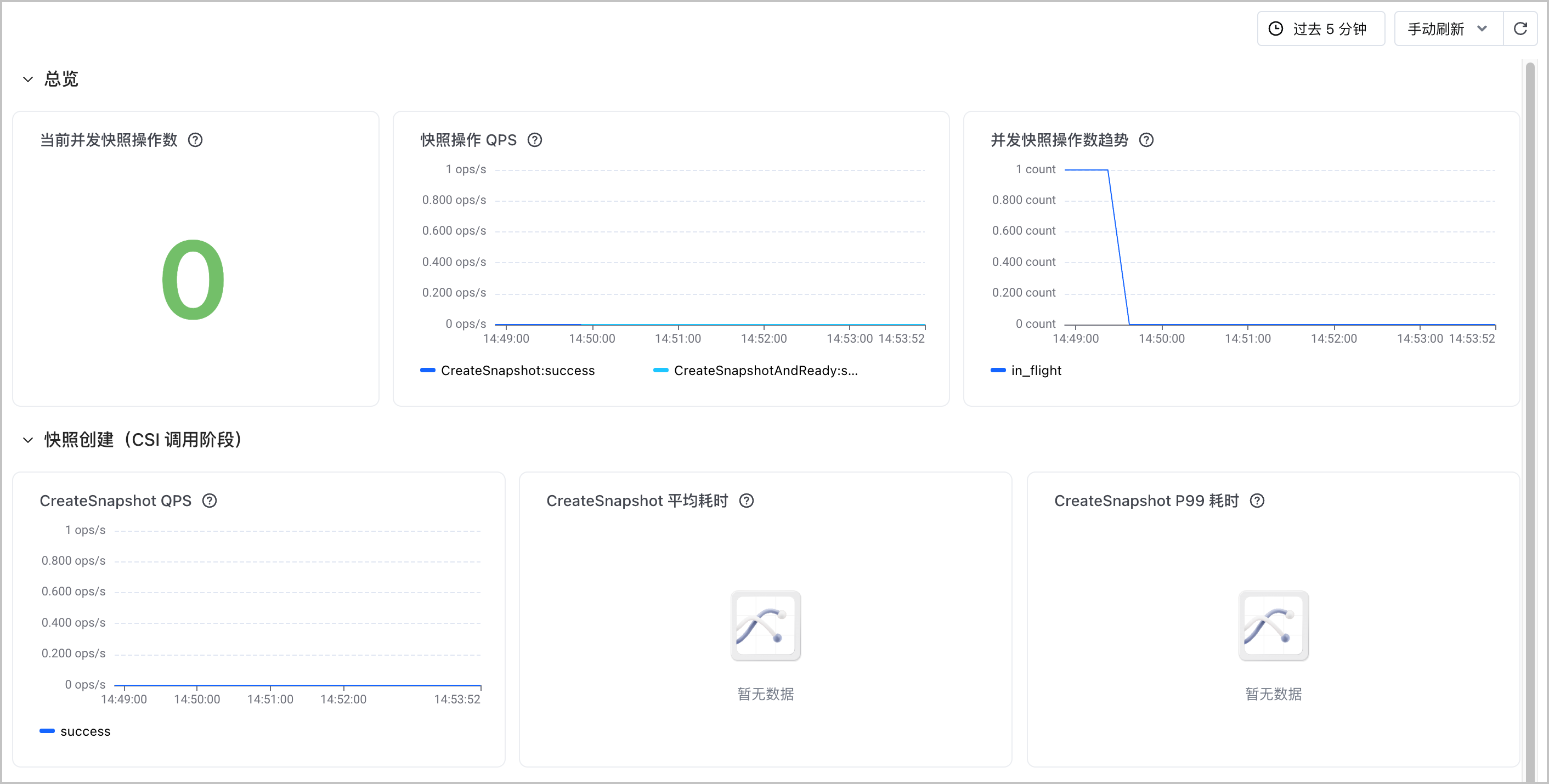
- The snapshot-controller monitoring dashboard consists of three sections: overview, snapshot creation, and snapshot creation end-to-end monitoring. The following table provides the detailed descriptions of charts.
Description
For the method of obtaining the PromQL statements that correspond to the charts, see Using dashboards.
- Chart nameUnitChart descriptionChart nameUnitChart descriptionOverviewCurrent concurrent snapshot operationsCountThe number of snapshot operations being processed by the Snapshot Controller. This helps you assess the real-time concurrent load on the Snapshot Controller.
- Under normal circumstances, this value is consistent with the current number of snapshot creation and state synchronization tasks and needs to promptly fall back after the tasks are complete.
- If this value continuously rises, remains high for an extended period, or approaches the processing capacity limit, it indicates a potential backlog in snapshot operations. For example: slow backend storage response, blocked CSI Driver calls, snapshots remaining unready for extended periods, and insufficient controller processing capacity.
Snapshot operation QPSTimes per secondThe average number of requests per second for various snapshot operations, displayed by operation type and status. This helps you assess the snapshot workload and execution results.- Under normal circumstances, the QPS of each operation is consistent with the frequency of business activities such as snapshot creation, deletion, and state synchronization. Based on the last 5-minute samples, it typically fluctuates around its historical baseline.
- If the QPS suddenly spikes, remains persistently higher than the historical baseline, drops to 0, or the failure status proportion increases significantly, it indicates potential exceptions in snapshot operation load or controller status. For example: a surge in business requests, frequent operation retries, repeated resource state changes, and the controller not functioning as expected.
Concurrent snapshot operation trendCountThe trend of the number of snapshot operations being processed by the Snapshot Controller. This helps you determine whether the concurrent load is continuously increasing or accumulating a backlog.- Under normal circumstances, this value fluctuates as snapshot tasks arrive and complete, and needs to gradually fall back to the historical baseline after business peak hours.
- If this value continues to rise, remains high for an extended period, or exhibits abnormal spikes without falling back, it indicates a potential backlog in snapshot operations. For example: slow backend storage response, snapshots remaining unready for extended periods, blocked CSI Driver calls, and insufficient controller processing capacity.
Snapshot creation (CSI call stage)CreateSnapshot QPSTimes per secondThe average number of CreateSnapshot requests per second, displayed by operation status. This helps you assess the load and execution results during the CSI snapshot creation call phase.- Under normal circumstances, this value is consistent with the snapshot creation request frequency. Based on the last 5-minute samples, it typically fluctuates around the historical baseline, with the success status accounting for the majority.
- If the QPS suddenly spikes, remains persistently higher than the historical baseline, drops to 0, or the failure status increases significantly, it indicates that the CSI snapshot creation call may be abnormal. For example: a sudden surge in creation requests, frequent operation retries, CSI Driver unavailability, and abnormal request parameters.
CreateSnapshot average durationsecondsThe average latency of CreateSnapshot operations. This helps you assess the overall response speed during the CSI snapshot creation call phase.- Under normal circumstances, the average duration of each status fluctuates slightly around the historical baseline. This value is calculated based on samples from the past 60 seconds, using the rate of increase in cumulative duration divided by the rate of increase in the operation count.
- If the average duration continues to rise or deviates significantly from the historical baseline, it indicates that the CSI snapshot creation call has slowed down. For example: high CSI Driver load, slow backend storage response, increased network latency, and frequent operation retries.
CreateSnapshot P99 durationsecondsThe P99 latency of CreateSnapshot operations. This helps you assess the tail latency during the CSI snapshot creation call phase.- Under normal circumstances, the P99 latency of each state fluctuates slightly around its historical baseline. Based on the last 5-minute samples, approximately 99% of operations complete within this value.
- If the P99 latency continues to rise or exhibits frequent spikes, it indicates that a small proportion of CreateSnapshot calls may have slowed down significantly. For example: slow CSI Driver response, high backend storage load, network exceptions, and frequent operation retries.
End-to-end snapshot creation (including waiting for Ready)CreateSnapshotAndReady QPSTimes per secondThe average number of requests per second for the end-to-end CreateSnapshotAndReady operation, displayed by operation status. This helps you determine the overall business load and execution results from snapshot creation to readiness.- Under normal circumstances, this value is consistent with the end-to-end snapshot creation request frequency. Based on a 5-minute sampling window, it typically fluctuates around the historical baseline, with the success status accounting for the majority.
- If the QPS suddenly spikes, remains persistently higher than the historical baseline, drops to 0, or the failure status increases significantly, it indicates that the end-to-end snapshot creation process may be abnormal. For example: a sudden surge in creation requests, snapshots remaining unready for a long period, frequent retries in status polling, and a backend storage exception.
CreateSnapshotAndReady average durationsecondsThe average duration of the end-to-end CreateSnapshotAndReady operation. This helps you determine the overall response time from snapshot creation to readiness.- Under normal circumstances, the average duration of each status fluctuates slightly around the historical baseline. This value is calculated based on samples from the past 60 seconds, using the rate of increase in cumulative duration divided by the rate of increase in the operation count.
- If the average duration continues to rise or deviates significantly from the historical baseline, it indicates that the end-to-end snapshot creation workflow has slowed down. For example: slower CSI creation calls, slower backend snapshot generation, state synchronization delays, and polling retries.
CreateSnapshotAndReady P90 latencysecondsThe P90 latency of the end-to-end CreateSnapshotAndReady operation. This helps you assess the time required for most snapshots to transition from creation to readiness.- Under normal circumstances, the P90 latency of each state fluctuates slightly around its historical baseline. Based on the last 5-minute samples, approximately 90% of operations complete within this value.
- If the P90 latency continues to rise or exhibits frequent spikes, it indicates that a significant proportion of end-to-end snapshot creation operations have slowed down. For example: slower backend snapshot generation, state synchronization delays, network exceptions, and polling retries.
CreateSnapshotAndReady P99 latencysecondsThe P99 latency of the end-to-end CreateSnapshotAndReady operation. This helps you assess the tail latency from snapshot creation to readiness.- Under normal circumstances, the P99 latency of each state fluctuates slightly around its historical baseline. Based on the last 5-minute samples, approximately 99% of operations complete within this value.
- If the P99 latency continues to rise or exhibits frequent spikes, it indicates that a small proportion of end-to-end snapshot creation operations have significantly slowed down. For example: slow backend storage response, snapshots remaining unready for extended periods, state synchronization exceptions, and frequent operation retries.
Total CreateSnapshotAndReady operationsCountThe number of completed end-to-end CreateSnapshotAndReady operations, displayed by operation status. This helps you assess recent snapshot creation results and the scale of failures.- Under normal circumstances, the number of successful operations needs to be consistent with the number of recent snapshot creation tasks, while failures need to be 0 or occur only occasionally. This value counts newly completed operations over the past 2 minutes.
- If the number of failed operations continuously increases, the number of successful operations drops abnormally, or the total number of operations deviates significantly from business expectations, it indicates that the end-to-end snapshot creation process may be abnormal. For example: CSI call failures, snapshots remaining not ready for an extended period, backend storage exceptions, and state synchronization failures.
Snapshot operation latency distribution comparisonsecondsThe comparison among the P50, P90, and P99 latencies of various snapshot operations. This helps you assess differences in typical and tail latencies across operations.- Under normal circumstances, the P50, P90, and P99 of the same operation increase successively by percentile and fluctuate around their respective historical baselines. This value is calculated based on samples over the past 5 minutes.
- If the P90 or P99 of a certain type of operation rises significantly, the gap with P50 continues to widen, or the overall percentiles rise simultaneously, it indicates that the operation has tail latency or has slowed down overall. For example: increased backend storage load, slow CSI Driver response, network jitter, and frequent retries of some requests.
View metrics
- To query integrated or non-integrated metrics in the cluster, or to understand metric meanings, see Querying metrics.
- You can use the Explore feature of VMP to quickly query and display metric data. For details, see Querying metrics.
Last updated: 2026.10.22 17:24:38
All rights reserved © Beijing Volcano Engine Technology Co., Ltd2024
