Volcengine Kubernetes Engine
Volcengine Kubernetes Engine
Volcengine Kubernetes Engine


Document
Volcengine Kubernetes Engine
What's New
History feature release notes
Kubernetes version release notes
Containerd runtime release notes
Add-on release notes
Monitoring add-ons
Scheduling add-ons
DNS add-ons
Security add-ons
GPU add-ons
Sandbox add-on
Security announcements
Product Announcement
Historical announcements
Overview
Getting started
User guide
Clusters
Creating clusters
Connecting to clusters
Upgrading clusters
Node pool
Creating node pools
Scaling out/in node pools
Nodes
Authorization management
Image
Namespaces
Networking
Cluster network
Container Network
Service
LoadBalancer
CLB
Ingress
APIG Ingress
ALB Ingress
Customize ALB Ingress forwarding rules
Certificate and security
CLB Ingress
Nginx Ingress
Gateway API
Workloads
Creating workloads
Configure workloads
Pods
Configuration management
Image acceleration
Storage
FSX client
EBS Volumes
TOS Volumes
NAS volumes
FSX access methods
NFS access methods
EFS volumes
vePFS volumes
FSX access methods
vePFS Client access methods
NFS access methods
CloudFS volumes
Local volumes
Autoscale
Node autoscaler
Workload autoscaler
Horizontal Pod Autoscaler (HPA)
Cron Horizontal Pod Autoscaler (CronHPA)
Intelligent Horizontal Pod Autoscaler (IHPA)
Horizontal Pod Autoscaler based on event-driven (KEDA)
Add-on management
Network add-ons
Storage add-ons
Monitoring add-ons
Scheduling add-ons
DNS add-ons
GPU add-ons
Core add-ons
Sandbox add-on
Upgrading add-ons
Heterogeneous computing
NVIDIA GPU
mGPU scheduling
RDMA high-performance computing
Scheduling management
Topology-aware scheduling
QoS-aware scheduling
Observability
Log management
Basic observation
Setup & Configuration
Cluster observation
Storage observation
Other observation
Using metrics
Full stack observation
Alert management
Diagnosis and inspection
Node check and self-healing
Application center
Backup center
Stability
Large-scale cluster management
Best practices
Authorization
Clusters
Nodes and node pools
Networking
Storage
Scheduling
Observability
Solution
Security and compliance
API reference
Cluster management
NodePool management
Node management
Virtual nodes management
Add-on management
Tag management
Access policy management
Instance images management
Cloud native observability
Inspection and diagnosis
Task management
Volcengine Container Instance
Appendix
SDK reference
Development guide
Terraform
FAQs
General FAQs
Cluster FAQ
cluster management
cluster network
cluster upgrade
Node and Node pool FAQs
Authorization FAQs
Workload FAQs
Service and Ingress FAQs
Storage FAQs
Heterogeneous computing FAQs
Observability FAQs
Quota FAQs
Add-on FAQs
Cloud-native AI
ServingKit
LLM applications
ComfyUI application
Deploying the Al inference application through Helm
Deepseek practices
Qwen practices
Kimi practice
Seed practices
Best practices
DeepSeek model deployment
GLM model deployment
MiniMax model deployment
Qwen model deployment
Kimi model deployment
Volcengine Container Instance
What's new
Historical feature release notes
Product Announcement
Overview
Billing
User guide
Integrating with VCI
Virtual node
VKE cluster uses virtual nodes
Self-managed/third-party cluster uses virtual node
Creating an instance
General purpose instance
GPU-accelerated computing instance
VCI Agent Sandbox
Startup acceleration
E2B-based management
Upgrade guide
Networking
Monitoring
Scheduling
Container configuration
VCI Image Cache
Best practices
Security and compliance
FAQs
- Documentation
 Volcengine Kubernetes EngineVolcengine Kubernetes EngineUser guideObservabilityBasic observationCluster observationUsing self-managed Prometheus to collect control plane add-on metrics
 Copy page
 Download PDF
Cluster observation
Using self-managed Prometheus to collect control plane add-on metrics
Copy pageDownload PDFUsing self-managed Prometheus to collect control plane add-on metrics
VKE clusters expose metrics of control plane add-ons. This helps you use self-managed Prometheus to collect metrics and build a cluster control plane monitoring dashboard. As a result, the metrics are integrated with your self-managed monitoring system. This topic describes how to enable metric collection for cluster control plane add-ons.
Usage limits
- The Kubernetes version of the cluster must meet the following requirements: If the cluster version is outdated, upgrade it first. For details, see Upgrading clusters.
- Kubernetes v1.24: v1.24.17-vke.44 and later
- Kubernetes v1.26: v1.26.15-vke.34 and later
- Kubernetes v1.28: v1.28.15-vke.27 and later
- Kubernetes v1.30: v1.30.4-vke.12 and later
- Kubernetes v1.32: v1.32.3-vke.7 and later
- Other later Kubernetes versions released by VKE
- You can collect metrics only for the following managed add-ons: kube-apiserver, etcd, kube-scheduler, kube-controller-manager, and cloud-controller-manager in the cluster control plane. You cannot collect metrics for other managed add-ons. For related add-on metrics, see VKE metrics.
Prerequisites
- Self-managed Prometheus can be deployed either inside or outside the cluster to be monitored.
- When a self-managed Prometheus is deployed outside the cluster to be monitored, make sure that it can access the API server of the VKE cluster and has read permissions on /metrics.
Procedure
Step 1: Enable metric collection for control plane add-ons
- Log in to the VKE console.
- In the top navigation bar, select the region where your business is located.
- In the left navigation pane, click Cluster. Click the name of the target cluster to enter its management page.
- In the left navigation pane, click Operation and maintenance configuration. In the Custom metric collection configuration section, enable Metric collection from control plane components.
Step 2: Configure collection rules
Before you use self-managed Prometheus to collect metrics from cluster control plane add-ons, you need to configure metric collection jobs for control plane add-ons in the Prometheus configuration file prometheus.yaml. The sample code is as follows:
global:
scrape_interval: 15s # By default, scrape targets every 15 seconds.
# Attach these labels to any time series or alerts when communicating with
# external systems (federation, remote storage, Alertmanager).
external_labels:
monitor: 'custom-prometheus-monitor'
# A scrape configuration containing exactly one endpoint to scrape:
# Here it's Prometheus itself.
scrape_configs:
# The job name is added as a label `job=<job_name>` to any timeseries scraped from this config.
- job_name: api-server-demo
......
- job_name: etcd-demo
......
- job_name: scheduler-demo
......
Cluster internal monitoring
If your self-managed Prometheus is deployed inside the cluster to be monitored, you can collect data of control plane add-ons based on the following sample collection rule code.
APIServer
ETCD
Kube-Scheduler
Kube-Controller-Manager
Cloud-Controller-Manager
The collection rule sample code is as follows:
- job_name: api-server-demo
params:
job: ["apiserver"]
kubernetes_sd_configs:
- role: endpoints
relabel_configs:
- action: keep
regex: default;kubernetes;https
source_labels:
- __meta_kubernetes_namespace
- __meta_kubernetes_service_name
- __meta_kubernetes_endpoint_port_name
scheme: https
bearer_token_file: /var/run/secrets/kubernetes.io/serviceaccount/token
tls_config:
ca_file: /var/run/secrets/kubernetes.io/serviceaccount/ca.crt
insecure_skip_verify: false
The collection rule sample code is as follows:
- job_name: etcd-demo
params:
job: ["etcd"]
kubernetes_sd_configs:
- role: endpoints
relabel_configs:
- action: keep
regex: default;kubernetes;https
source_labels:
- __meta_kubernetes_namespace
- __meta_kubernetes_service_name
- __meta_kubernetes_endpoint_port_name
scheme: https
bearer_token_file: /var/run/secrets/kubernetes.io/serviceaccount/token
tls_config:
ca_file: /var/run/secrets/kubernetes.io/serviceaccount/ca.crt
insecure_skip_verify: false
The collection rule sample code is as follows:
- job_name: kube-scheduler-demo
params:
job: ["scheduler"]
kubernetes_sd_configs:
- role: endpoints
relabel_configs:
- action: keep
regex: default;kubernetes;https
source_labels:
- __meta_kubernetes_namespace
- __meta_kubernetes_service_name
- __meta_kubernetes_endpoint_port_name
scheme: https
bearer_token_file: /var/run/secrets/kubernetes.io/serviceaccount/token
tls_config:
ca_file: /var/run/secrets/kubernetes.io/serviceaccount/ca.crt
insecure_skip_verify: false
The collection rule sample code is as follows:
- job_name: kcm-demo
params:
job: ["kcm"]
kubernetes_sd_configs:
- role: endpoints
relabel_configs:
- action: keep
regex: default;kubernetes;https
source_labels:
- __meta_kubernetes_namespace
- __meta_kubernetes_service_name
- __meta_kubernetes_endpoint_port_name
scheme: https
bearer_token_file: /var/run/secrets/kubernetes.io/serviceaccount/token
tls_config:
ca_file: /var/run/secrets/kubernetes.io/serviceaccount/ca.crt
insecure_skip_verify: false
The collection rule sample code is as follows:
- job_name: ccm-demo
params:
job: ["ccm"]
kubernetes_sd_configs:
- role: endpoints
relabel_configs:
- action: keep
regex: default;kubernetes;https
source_labels:
- __meta_kubernetes_namespace
- __meta_kubernetes_service_name
- __meta_kubernetes_endpoint_port_name
scheme: https
bearer_token_file: /var/run/secrets/kubernetes.io/serviceaccount/token
tls_config:
ca_file: /var/run/secrets/kubernetes.io/serviceaccount/ca.crt
insecure_skip_verify: false
Cluster external monitoring
If your self-managed Prometheus is deployed outside the cluster to be monitored, it cannot automatically mount ServiceAccount credentials or access internal Kubernetes services as it would inside the cluster. The configuration method is as follows:
- Manually specify the API server address of the VKE cluster to connect external Prometheus to the cluster.
- Manually provide authentication credentials, including a CA certificate and a bearer token, to pass the permission check of the Kubernetes API.
- Perform node-based service discovery to automatically obtain the addresses of all nodes in the cluster, and subsequently collect node-related metrics.
The configuration sample code is as follows:
- job_name: 'external-cluster-monitor-job'
scheme: https
tls_config:
ca_file: /etc/prometheus/kubernetes-ca.crt
bearer_token: '<ServiceAccount bearer_token>'
kubernetes_sd_configs:
- api_server: 'https://<APIServer URL>'
role: node
tls_config:
ca_file: /etc/prometheus/kubernetes-ca.crt
bearer_token: '<ServiceAccount bearer_token>'
tip
For more configuration details, see Configuration and Monitoring kubernetes with prometheus from outside of k8s cluster.
Validate the result
- Log in to the self-managed Prometheus console and switch to the Graph page.
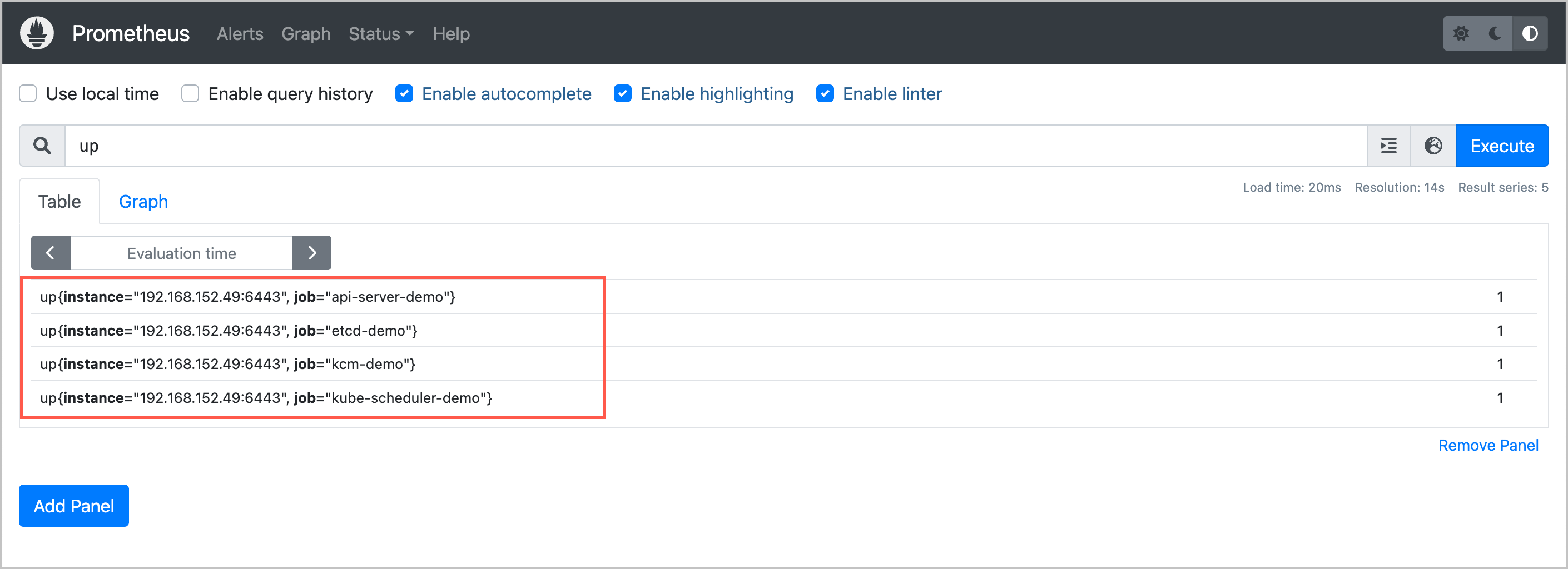
- Enter the up command to view whether the specified collection task functions as expected.
- The expected result is as follows. Take the API server observability task as an example. up{instance="xxx.xxx.xxx.xxx:6443", job="api-server-demo"} indicates the corresponding collection task. When its value is 1, it indicates the task is running as expected.
-
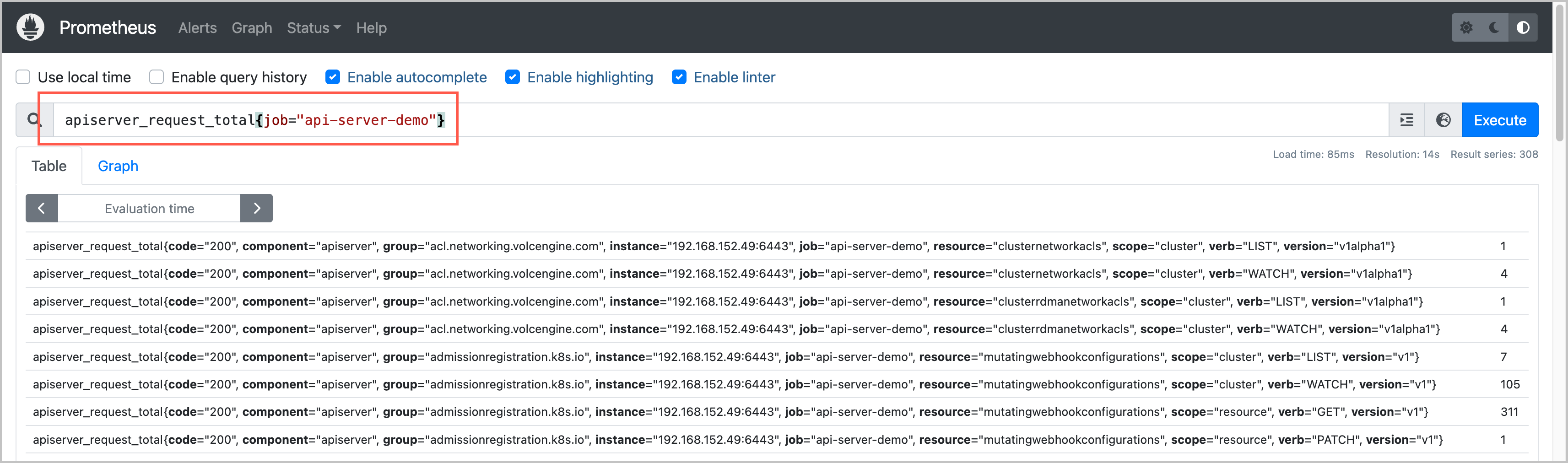
- Enter the following metrics to check whether the data can be displayed as expected.
- apiserver_request_total{job="api-server-demo"}
- The expected result is similar to the following one. If metrics and data can be queried as expected, the self-managed Prometheus can collect metrics of the core components from the cluster.
-
Last updated: 2026.07.24 10:53:34
All rights reserved © Beijing Volcano Engine Technology Co., Ltd2024
