Volcengine Kubernetes Engine
Volcengine Kubernetes Engine


Document

- Documentation
 Volcengine Kubernetes EngineVolcengine Kubernetes EngineUser guideNetworkingIngressMigrating IngressesMigrating from NGINX Ingresses to ALB Ingresses
 Copy page
 Download PDF
Migrating Ingresses
Migrating from NGINX Ingresses to ALB Ingresses
Copy pageDownload PDFMigrating from NGINX Ingresses to ALB Ingresses
As the Ingress NGINX Controller has entered the retirement process, continuing to use NGINX Ingresses will gradually introduce risks to scalability, security, and stability. To ensure business security, we recommend promptly migrating from NGINX Ingresses to other Ingress alternatives. This topic describes how to safely migrate from NGINX Ingresses to ALB Ingresses.
Background
Issues caused by the EOM of NGINX Ingresses
NGINX Ingress maintenance will be discontinued soon (see [Product announcement] NGINX Ingress EOM for details). Continued use of NGINX Ingresses will lead to the following problems:
- Security risks: No future security patches will be available. As a result, your applications are exposed to unfixed vulnerabilities.
- Functional bottlenecks: No new features will be developed. This makes it difficult to support business needs for complex scenarios such as advanced API governance (rate limiting, circuit breaking, and so on) and multi-protocol support (gRPC and WebSocket).
- Long-term stability risks: Lack of official technical support will make it challenging to resolve issues quickly, affecting business continuity.
Feasibility of ALB Ingresses as an alternative
Volcano Engine Application Load Balancer (ALB) is a cloud-based load balancing product used for Layer 7 business scenarios. In a VKE cluster, compared with the traditional Nginx Ingress, the ALB Ingress features the following core advantages:
- Higher capacity and stronger protocol support: A single instance can handle millions of QPS and natively supports multiple application-layer protocols, such as HTTP, HTTPS, HTTP/2, WebSocket, and QUIC. Therefore, it adapts to complex business scenarios, such as e-commerce, audio and video, and high-traffic scenarios. It significantly outperforms the community-based Nginx Ingress solution in throughput capacity and protocol coverage.
- Fully managed service without manual O&M: ALB is the official managed service of Volcano Engine. The version updates, feature upgrades, and infrastructure maintenance of ALB are managed by the platform in a central manner. You only need to use standard Kubernetes Ingress rules and annotations to manage traffic, without the need to perform O&M on gateway add-ons. Compared with the traditional Nginx Ingress, which relies on community version iterations and requires you to maintain version upgrades and troubleshoot issues, the ALB Ingress greatly reduces the costs of long-term O&M.
- Native Kubernetes ecosystem integration: In a VKE cluster, the ALB Ingress can function as a replacement for the Kubernetes native Nginx Ingress. The ALB Ingress can quickly associate services within the cluster with ALB instances, and you do not need to develop or deploy additional gateway add-ons. The ALB Ingress can effectively improve the overall traffic stability and service availability of the cluster by leveraging the high-performance forwarding capabilities and comprehensive advanced routing features of ALB.
- Comprehensive observability capabilities: ALB natively provides complete Layer 7 access logs, including core fields such as the client IP, request path, server response status, and latency. These logs can be integrated with TLS for user behavior analysis, refined O&M, and quick fault location. You do not need to deploy additional log collection add-ons.
Automatically converted annotations
When you use the automatic migration tool to migrate Nginx Ingresses in a cluster, the migration tool automatically converts the Nginx Ingress annotations listed in the following table to ALB Ingress annotations.
warning
- Nginx Ingress annotations that are not listed in the following table will be retained during conversion and displayed in the conversion results. Check whether the settings of the ALB Ingress meet your expectations after the conversion is complete, and whether any Nginx Ingress annotations that are not converted exist. This prevents inconsistencies between the settings after the conversion and your business requirements.
- For a detailed description of ALB Ingress annotations, see Using annotations to configure ALB Ingresses.
Feature | Original Nginx Ingress annotation | ALB annotation after conversion |
Scheduler | nginx.ingress.kubernetes.io/load-balance | ingress.vke.volcengine.com/loadbalancer-scheduler |
CORS | nginx.ingress.kubernetes.io/enable-cors | |
| nginx.ingress.kubernetes.io/cors-allow-methods | |
| nginx.ingress.kubernetes.io/cors-allow-origin | |
| nginx.ingress.kubernetes.io/cors-max-age | |
| nginx.ingress.kubernetes.io/cors-allow-headers | |
Redirect | nginx.ingress.kubernetes.io/ssl-redirectnginx.ingress.kubernetes.io/force-ssl | |
Rewrite | nginx.ingress.kubernetes.io/rewrite-target | |
Protocol | nginx.ingress.kubernetes.io/backend-protocol | ingress.vke.volcengine.com/loadbalancer-protocol |
Migration process
Assume that you have deployed a business application in a VKE cluster and configured an NGINX Ingress that contains domain and path forwarding policies. You also have configured DNS to resolve a custom domain name (example.com). The NGINX Ingress will forward client-initiated requests targeting example.com to the Pod for the corresponding Service based on the forwarding policies.
To align with your business development needs and considerations for maintainability and security, you decide to migrate from the NGINX Ingress to an ALB Ingress. To maintain business stability, the migration is expected to be complete without changing service domain names or backend service settings. In this scenario, you can deploy an ALB Ingress within the VKE cluster, configuring it with forwarding policies identical to those of the NGINX Ingress, and then perform traffic migration by adjusting the weight settings in DNS resolution.
When all traffic is transferred to the ALB Ingress after the migration, delete the NGINX Ingress resolution record from the DNS and the NGINX Ingress resource from the cluster. The entire migration is seamless and transparent to clients.
Migration steps
warning
- We recommend migrating traffic during off-peak business hours.
- Before migrating traffic, first compare the forwarding policies and functionality of the NGINX Ingress and ALB Ingress, and conduct thorough testing to ensure strict functional consistency. This practice helps prevent undesired influences on your business from the migration. If the capabilities or annotations supported by ALB do not meet your business requirements, submit a ticket or contact our technical support.
- Using ALB will incur fees. For details, see Billing rules.
Step 1: Configure conversion
VKE clusters allow you to configure conversion from Nginx Ingresses to ALB Ingresses via an automatic conversion tool. The tool does not directly create available ALB resources. Instead, it reads the Nginx Ingress settings in the clusters and returns ALBInstance and Ingress YAML files for manual confirmation. After verifying the settings are correct, you manually apply them.
Procedure:
- Create the YAML file for the automatic conversion tool. This file includes the Job required to execute the conversion task and the corresponding RBAC permissions. The code of the sample nginxingress2albconfig.yaml file is as follows:
-
- Run the following command to create the automatic conversion task.
-
- The expected output is as follows:
-
- View the status of the pod executing the conversion task.
-
- The expected output is as follows. When STATUS of the Pod changes to Completed, it indicates that the configuration conversion task is complete.
-
- Run the following command to view the logs of the Pod for the configuration conversion task and obtain the final ALB configuration file. Replace nginxingress2albconfig-6m*** with the actual Job name.
-
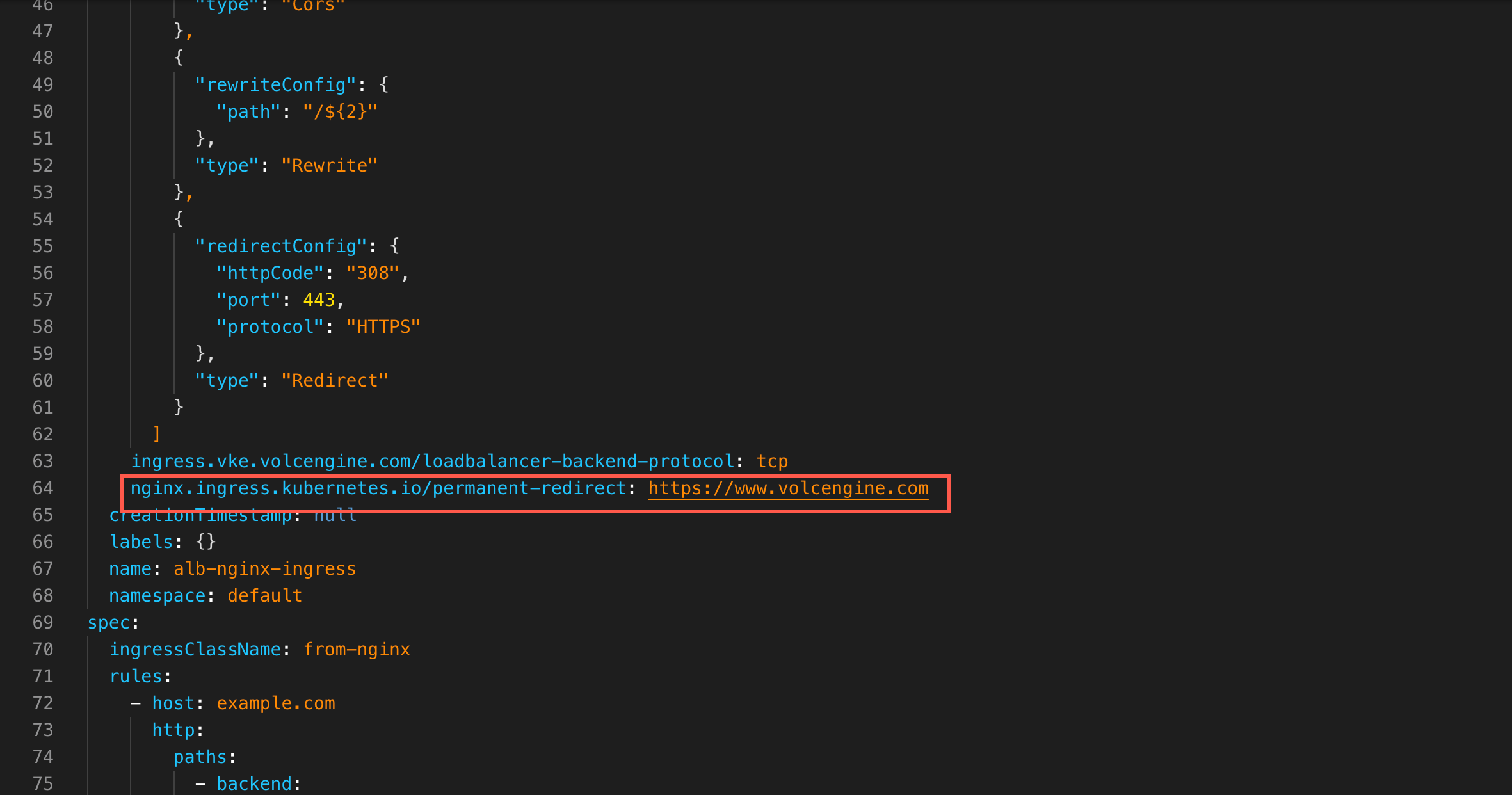
- The expected result is as follows. The automatic conversion tool will return a detailed configuration overview, the ALBInstance settings, and the Ingress rules after conversion.
-
Note
Nginx Ingress annotations that do not support automatic conversion will be retained during conversion and displayed in the conversion results. For example, nginx.ingress.kubernetes.io/permanent-redirect: https://www.volcengine.com in this example. Check whether the settings of the ALB Ingress meet your expectations after the conversion is complete. This prevents inconsistencies between the settings after the conversion and your business requirements.
Step 2: Create an ALB Ingress
After confirming that the YAML file generated in the automatic conversion tool log is correct:
- Copy the ALBInstance settings from the log and save them as the alb-instance.yaml file. Set the subnetId, certificateID, and other parameters to actual values.
-
- Run the following command to apply the ALBInstance settings to the cluster.
-
- Copy the Ingress settings from the log and save them as the alb-ingress.yaml file.
-
- Run the following command to apply the ALB Ingress settings to the cluster.
-
Step 3: Switch traffic
Assume that before the migration, you have added an A record that points the domain name to the public address of the NGINX Ingress. At this point, you can add the IP address of the ALB instance to the original DNS record and enable load balancing. Then, adjust the DNS resolution weight to gradually switch traffic originally to the NGINX Ingress to the ALB Ingress.
In this topic, the DNS service on Volcano Engine is used for demonstration.
- Log in to the DNS console.
- In the left navigation bar, click Domain management.
- In the domain name list, click the target domain name to go to the domain name details page.
- Edit the DNS record for the target domain name. Enable Load balancing, and add the IP address of the ALB instance in the Record value section, and then configure the weight.
- After you complete the configuration, check whether DNS resolution and services function as expected.
- DNS query: Use the dig or nslookup command to query the domain name.
-
- The expected result is as follows: The returned IP address list includes both the Nginx Ingress address and the ALB Ingress address.
-
- Business verification: Check whether the business traffic is forwarded as expected, and whether error codes or exceptions exist. Verify that traffic has been forwarded to the ALB Ingress, with no exceptions.
- Log in to the ALB console.
- In the left navigation bar, click Instance. Click the name of the target instance to go to the instance details page.
- Click the Monitoring information tab. Check whether exceptions occur in the traffic of the ALB instance.
- Gradually adjust the DNS resolution weight until all traffic has been forwarded to the ALB Ingress.
Step 4: Delete redundant resources
After traffic is forwarded by the ALB Ingress as expected and all persistent connections of the NGINX Ingress are processed, you can monitor traffic forwarding for a certain period of time. If no anomalies are detected, you can then delete redundant resources.
- Delete or disable the DNS record of the NGINX Ingress. After the DNS time to live (TTL) has elapsed, all new requests will be routed to the ALB instance.
- Delete the NGINX Ingress resource from the cluster. Only perform this after confirming that no traffic is on the NGINX Ingress via continuous monitoring using the Ingress service observability feature of VKE cloud-native observability.
Other considerations
Common events
- listener is not exist in alb: Indicates that the listener (such as 80/HTTP and 443/HTTPS) requested by the Ingress has not been created on the associated ALB instance. Check the definitions of listeners in the ALBInstance.
- none certificate found for host: Indicates that TLS is enabled for a domain name in the Ingress, but ALB cannot find a certificate that matches the domain name. Check whether the configurations of the certificate source, such as the Secret and automatic discovery, are valid and whether the certificate is valid.
Incompatible annotations and features
During migration, you may encounter Nginx-specific annotations or features that are not supported by the ALB Ingress. In this case, you can submit a ticket or contact technical support.
Rollback process
If an exception is detected during or after migration to the ALB instance, you can roll back the traffic migration. Rollback is the reverse process of migration, with the same basic principle: Achieving lossless rollback by changing the IP address in the DNS record from the IP address for the ALB instance to the one associated with the NGINX Ingress.
- Gradually reduce the weight of DNS records pointing to ALB to 0, or directly restore the original Nginx Ingress DNS records.
- Continuously monitor business access success rate, error code, latency, and backend service health status.
- After you confirm that the rollback is complete and the business is stable, troubleshoot ALB configuration issues.
Last updated: 2026.06.10 19:07:47
All rights reserved © Beijing Volcano Engine Technology Co., Ltd2024
