Volcengine Kubernetes Engine
Volcengine Kubernetes Engine
Volcengine Kubernetes Engine


Document
Volcengine Kubernetes Engine
What's New
History feature release notes
Kubernetes version release notes
Containerd runtime release notes
Add-on release notes
Monitoring add-ons
Scheduling add-ons
DNS add-ons
Security add-ons
GPU add-ons
Sandbox add-on
Security announcements
Product Announcement
Historical announcements
Overview
Getting started
User guide
Clusters
Creating clusters
Connecting to clusters
Upgrading clusters
Node pool
Creating node pools
Scaling out/in node pools
Nodes
Authorization management
Image
Namespaces
Networking
Cluster network
Container Network
Service
LoadBalancer
CLB
Ingress
APIG Ingress
ALB Ingress
Customize ALB Ingress forwarding rules
Certificate and security
CLB Ingress
Nginx Ingress
Gateway API
Workloads
Creating workloads
Configure workloads
Pods
Configuration management
Image acceleration
Storage
FSX client
EBS Volumes
TOS Volumes
NAS volumes
FSX access methods
NFS access methods
EFS volumes
vePFS volumes
FSX access methods
vePFS Client access methods
NFS access methods
CloudFS volumes
Local volumes
Autoscale
Node autoscaler
Workload autoscaler
Horizontal Pod Autoscaler (HPA)
Cron Horizontal Pod Autoscaler (CronHPA)
Intelligent Horizontal Pod Autoscaler (IHPA)
Horizontal Pod Autoscaler based on event-driven (KEDA)
Add-on management
Network add-ons
Storage add-ons
Monitoring add-ons
Scheduling add-ons
DNS add-ons
GPU add-ons
Core add-ons
Sandbox add-on
Upgrading add-ons
Heterogeneous computing
NVIDIA GPU
mGPU scheduling
RDMA high-performance computing
Scheduling management
Topology-aware scheduling
QoS-aware scheduling
Observability
Log management
Basic observation
Setup & Configuration
Cluster observation
Storage observation
Other observation
Using metrics
Full stack observation
Alert management
Diagnosis and inspection
Node check and self-healing
Application center
Backup center
Stability
Large-scale cluster management
Best practices
Authorization
Clusters
Nodes and node pools
Networking
Storage
Scheduling
Observability
Solution
Security and compliance
API reference
Cluster management
NodePool management
Node management
Virtual nodes management
Add-on management
Tag management
Access policy management
Instance images management
Cloud native observability
Inspection and diagnosis
Task management
Volcengine Container Instance
Appendix
SDK reference
Development guide
Terraform
FAQs
General FAQs
Cluster FAQ
cluster management
cluster network
cluster upgrade
Node and Node pool FAQs
Authorization FAQs
Workload FAQs
Service and Ingress FAQs
Storage FAQs
Heterogeneous computing FAQs
Observability FAQs
Quota FAQs
Add-on FAQs
Cloud-native AI
ServingKit
LLM applications
ComfyUI application
Deploying the Al inference application through Helm
Deepseek practices
Qwen practices
Kimi practice
Seed practices
Best practices
DeepSeek model deployment
GLM model deployment
MiniMax model deployment
Qwen model deployment
Kimi model deployment
Volcengine Container Instance
What's new
Historical feature release notes
Product Announcement
Overview
Billing
User guide
Integrating with VCI
Virtual node
VKE cluster uses virtual nodes
Self-managed/third-party cluster uses virtual node
Creating an instance
General purpose instance
GPU-accelerated computing instance
VCI Agent Sandbox
Startup acceleration
E2B-based management
Upgrade guide
Networking
Monitoring
Scheduling
Container configuration
VCI Image Cache
Best practices
Security and compliance
FAQs
- Documentation
 Volcengine Kubernetes EngineVolcengine Container InstanceUser guideVCI Agent SandboxInstallation guide
 Copy page
 Download PDF
VCI Agent Sandbox
Installation guide
Copy pageDownload PDFInstallation guide
This topic primarily describes the installation method for VCI Agent Sandbox.
Prerequisites
- A cluster required by the VCI service has been created. For details, see Using VCI in VPC-CNI clusters and Using VCI in Flannel clusters.
- The vci-virtual-kubelet add-on has been installed in the cluster. For detailed instructions, see vci-virtual-kubelet.
Procedure
- Log in to the VKE console.
- In the left navigation bar, click Application center > Application template. On the page that appears, click the AI tab.
- Find agent-sandbox, hover the pointer over the application template card, and then click Deploy.
- On the Deploy application page, specify the agent-sandbox parameter.
- ParameterDescriptionParameterDescriptionOrchestration templateApplication templatesSelect a Chart version of agent-sandbox. We recommend the latest version.Parameter configurationThe YAML file content of the VCI Agent Sandbox controller. Click the edit icon next to values.yaml to view the YAML file content.tipFor the descriptions of the YAML file, see the values.yaml file content and parameter descriptions section of this topic.NameSpecify a custom name for the application based on the on-screen naming rules.Deployment environmentCluster typeThe type of cluster for which you want to deploy agent-sandbox. Select Managed version.ClusterSelect the VCI-based cluster that you created in Prerequisites.NamespaceThe namespace where the agent-sandbox application is deployed in the target cluster.ProtocolRead and understand the agreement before selecting it.
- values.yaml file content and parameter descriptions
warning
- Update the userConfig configuration in the YAML file based on your business requirements. Resource settings can be verified and adjusted based on the actual concurrency scenario. For other parameters, refer to the YAML parameter descriptions to specify custom configurations, or keep the default values.
- The following section provides a YAML example and parameter descriptions for the latest Chart version of agent-sandbox. Feature parameters supported by the latest version are not built into some earlier versions. We recommend using the latest Chart version to obtain the latest features and performance optimizations.
- Complete YAML exampleYAML parameter descriptionuserConfig:# The Access Key of Volcano Engine. It needs to be explicitly provided during the deployment of the application template.ak: ""# The Secret Key of Volcano Engine. It needs to be explicitly provided during the deployment of the application template.sk: ""region: "cn-beijing"# The VCI API URL. For details, visit https://www.volcengine.com/docs/6460/1899855.vciHost: "open.volcengineapi.com"# The deployment mode. Valid values: Node (deployed on ECS nodes) and VirtualNode (deployed based on VCIs).deployNodeType: "Node"namespace:# create controls whether the namespace is created by the current Chart.create: truename: agent-sandbox-systemcontroller:enableExtensions: true# If you do not specify whether to create a Service for the Sandbox CR, the defaultSandboxService determines whether to create a Service by default.defaultSandboxService: truereplicaCount: 1resources:requests:cpu: 500mmemory: 512MisandboxClaimConcurrentWorkers: 32sandboxWarmPoolConcurrentWorkers: 32sandboxTemplateConcurrentWorkers: 32sandboxConcurrentWorkers: 32kubeApiQps: 100kubeApiBurst: 200image:registry: vke-cn-beijing.cr.volces.com/vkeimage: agent-sandbox-controllertag: "v0.4.6-vke.1"pullPolicy: AlwaysvciPodAnnotations:vke.volcengine.com/burst-to-vci: enforce##### Parameters that are not specified will be omitted.# clusterDomain: "cluster.local"leaderElect: true# leaderElectionNamespace: ""# enableTracing: false# enablePprof: false# enablePprofDebug: false# pprofBlockProfileRate: 1000000# pprofMutexProfileFraction: 10##### The following Workers are active only if controller.enableExtensions=true.##### extraArgs is used to pass additional flags not listed above, such as Zap logging flags.extraArgs: []nodeSelector: {}tolerations: []affinity: {}e2bConfig:enableE2BServer: falseserviceAccountName: agent-sandbox-controller-e2b# The domain name suffix of the E2B service. It will be passed to the control plane and data plane. This will affect domain name concatenation and access behavior.domain: e2b.comcontrolPlane:name: agent-sandbox-control-planeserviceName: agent-sandbox-control-planereplicas: 1resources:requests:cpu: 500mmemory: 512Mi# Whether to enable control-plane authentication. After this feature is enabled, the provided API key will be validated during subsequent access to E2B APIs.enableAuth: true# The administrator key. If it is not specified, a random API key will be generated and saved in the e2b-key-store Secret.adminKey: ""# The idle connection timeout. It is a Go duration string, such as 600s.idleTimeout: 600s# The response write timeout. It is a Go duration string. If the value is small, long-running requests may be interrupted.writeTimeout: 600s# The sandbox lifecycle timeout. It is a Go duration string. If the value is small, APIs used for creating or modifying a sandbox may time out before completion.sandboxTimeout: 600s# The QPS limit for Kubernetes API access.restClientQps: 50# The maximum burst requests to the Kubernetes API.restClientBurst: 100service:port: 8081image:name: control-plane-gatewaytag: v0.4.6-vke.1pullPolicy: AlwaysdataPlane:name: agent-sandbox-data-planeserviceName: agent-sandbox-data-planereplicas: 1resources:requests:cpu: 500mmemory: 512Miservice:port: 8080image:name: data-plane-gatewaytag: v0.4.6-vke.1pullPolicy: AlwaysagentRuntime:image:name: agent-runtimetag: v0.0.4crdUpgrade:enabled: trueimage:tag: v0.1.0-vke.1pullPolicy: AlwaysParameter description for each parameter in the YAML file is as follows:ParameterTypeDefault valueDescriptionParameterTypeDefault valueDescriptionuserConfigak-StringNoneEnter the API access key (AK and SK) of your Volcano Engine root user to grant VCI-related resource permissions. For instructions on obtaining the AK and SK, see Access key. warningMake sure that your Volcano Engine root user (including IAM users) has been configured with the VKEFullAccess system preset policy, or that the custom policy includes the following minimum set of authorization items (Actions). This ensures that the current account can access and manage resources by using VCI Agent Sandbox:
- ExecContainerImageCommitment
- DescribeContainerImageCommitments
- CreateSnapshot
- DeleteSnapshot
- DescribeSnapshots
- CreateImageCache
- ListImageCaches
sk-StringNoneregion-Stringcn-beijingThe region where the cluster belongs. It must be consistent with that of the selected VCI-related cluster.vciHost-Stringopen.volcengineapi.comThe service address that corresponds to the region where the cluster belongs. For detailed descriptions, see Service addresses.deployNodeType-StringNodeThe deployment mode of the agent-sandbox application. Valid values:- Node: Deploy the application on ECS nodes.
- VirtualNode: Deploy the application on virtual nodes through VCI instances.
namespacecreate-BooleantrueWhether to create a namespace with this Chart:- true: Create a namespace when deploying this Chart.
- false: Reuse an existing namespace.
name-Stringagent-sandbox-systemThe name of the namespace in which the controller is running.controllerenableExtensions-BooleantrueWhether to enable extension features such as Snapshot, Commit, SandboxWarmPool, SandboxTemplate, and SandboxClaim.- true: Enable extension features. We strongly recommend keeping the default value.
- false: Disable extension features.
defaultSandboxService-BooleantrueWhen you do not specify whether to create a Service for the Sandbox CR, this controller parameter determines whether to create a Service. Valid values:- true: Create services.
- false: Do not create services.
replicaCount-Integer1The number of controller pod replicas. When you configure multiple replicas, they need to be used together with the leaderElect parameter.resourcesrequests.cpuString500mThe CPU and memory requests of the controller. We recommend adjusting the specifications of the controller based on your business requirements.requests.memoryString512MiimageregistryStringNoneThe controller image repository. Do not update the configurations.imageStringagent-sandbox-controllerThe controller image name. Do not update the configurations.tagStringv0.4.6-vke.1The controller image tag. Do not update the configurations.pullPolicyStringAlwaysThe image pull policy. Do not update the configurations.leaderElect-BooleanTRUEWhether to enable the leader election mechanism.- true: Yes.
- false: Disable.
warningWhen you deploy the sandbox with multiple replicas (replicaCount > 1), the value needs to be set to true to prevent resource contention caused by multiple replicas executing business logic simultaneously.leaderElectionNamespace-String""The namespace where leader election resources are located. If it is left empty, the namespace will be automatically detected.clusterDomain-Stringcluster.localThe Kubernetes cluster domain, which is used to generate the Service FQDN. We recommend keeping the default value.kubeApiQps-Float100The rate limiting parameter for calling the Kubernetes API, which is used to prevent the management add-on from placing excessive load on the API server.kubeApiBurst-Integer200sandboxConcurrentWorkers-Integer32The maximum number of concurrent reconciliations for the Sandbox controller.sandboxClaimConcurrentWorkers-Integer32The maximum number of concurrent reconciliations for the SandboxClaim controller.sandboxWarmPoolConcurrentWorkers-Integer32The maximum number of concurrent reconciliations for the SandboxWarmPool controller.sandboxTemplateConcurrentWorkers-Integer32The maximum number of concurrent reconciliations for the SandboxTemplate controller.enableTracing-BooleanfalseWhether to enable the OpenTelemetry OTLP tracing solution.- true: Yes.
- false: Disable.
enablePprof-BooleanfalseWhether to enable the CPU Profiling Endpoint on the Metrics Server, which is an HTTP endpoint for accessing CPU performance analysis data.- true: Yes.
- false: Disable.
enablePprofDebug-BooleanfalseWhether to enable all Pprof Endpoints.- true: Yes.
- false: Disable.
pprofBlockProfileRate-Integer1000000The Block Profile sampling rate in Pprof Debug mode.pprofMutexProfileFraction-Integer10The Mutex contention sampling rate in Pprof debug mode.extraArgs-List[]Pass additional startup flags, such as Zap logging parameters and other flags that are not individually abstracted.nodeSelector-Map{}The node selector for controller Pod.tolerations-List[]The toleration for the controller Pod.affinity-Map{}The controller Pod affinity rule.e2bConfigenableE2BServer-BooleanfalseSpecify whether to enable the E2B service.- false: Disable.
- true: Enable E2B.
serviceAccountName-Stringagent-sandbox-controller-e2bThe service account name. We recommend keeping the default value. If you want to specify a custom name, make sure that the name format meets the requirements of Kubernetes.domain-Stringe2b.comThe domain name suffix of the E2B service. It will be passed to the control plane and data plane. This will affect domain name concatenation and access behavior. We recommend keeping the default value.After deploying the application template, configure ALB Ingress rules in the VKE cluster to point e2b.com to the control plane workload and *.e2b.com to the data plane workload. For detailed operations, see the What to do next section in this topic.tip- control-plane: The E2B API control plane add-on. It is a stateless management add-on that functions as the entry point for the E2B protocol and handles API requests such as Sandbox creation and deletion.
- data-plane: The E2B API data plane add-on. It is a stateless add-on that forwards API requests for operations, such as code execution and command execution, to sandboxes.
controlPlanenameStringagent-sandbox-control-planeThe add-on name that corresponds to the control-plane. We recommend keeping the default value.serviceNameStringagent-sandbox-control-planeThe name of the control-plane service. We recommend keeping the default value.replicasInteger1The number of replicas for control-plane. You can adjust the number of replicas based on the file size and file/code operation frequency.resources.requests.cpuString500mThe control-plane CPU requests. You can adjust CPU requests based on the file size and file/code operation frequency.resources.requests.memoryString512MiThe control-plane memory requests. You can adjust memory requests based on the file size and file/code operation frequency.enableAuthBooleantrueSpecify whether to enable control-plane authentication.- false: Disable.
- true: Yes. During subsequent access to E2B APIs, the provided API key will be validated.
adminKeyString""The E2B API key. You can specify a custom string or leave it unspecified.If you do not specify it, a random API key will be generated and saved in the Secret named e2b-key-store under the agent-sandbox-system namespace.idleTimeoutString600sThe idle connection timeout. It is a Go duration string. We recommend keeping the default value.writeTimeoutString600sThe response write timeout. It is a Go duration string. If the value is small, long-running requests may be interrupted. We recommend keeping the default value.sandboxTimeoutString600sThe Sandbox lifecycle timeout. It is a Go duration string. If the value is small, APIs used for creating or modifying a Sandbox may time out before completion. We recommend keeping the default value.restClientQpsInteger50The QPS limit for Kubernetes API access. We recommend keeping the default value.restClientBurstInteger100The maximum burst requests to the Kubernetes API. We recommend keeping the default value.service.portInteger8081The control-plane service port. We recommend keeping the default value.image.nameStringcontrol-plane-gatewayThe control-plane image name. Do not update the configurations.image.tagStringv0.4.6-vke.1The control-plane image tag. Do not update the configurations.image.pullPolicyStringAlwaysThe control-plane image pull policy. Do not update the configurations.dataPlanenameStringagent-sandbox-data-planeThe name of the data-plane add-on. We recommend keeping the default value. If you want to specify a custom name, make sure that the name format meets the requirements of Kubernetes.serviceNameStringagent-sandbox-data-planeThe data-plane service name. We recommend keeping the default value.replicasInteger1The number of replicas for data-plane. You can adjust the number of replicas based on the file size and file/code operation frequency.resources.requests.cpuString500mThe CPU requests of data-plane. You can adjust CPU requests based on the file size and file/code operation frequency.resources.requests.memoryString512MiThe data-plane memory requests. You can adjust memory requests based on the file size and file/code operation frequency.service.portInteger8080The data-plane service port. We recommend keeping the default value.image.nameStringdata-plane-gatewayThe name of the data-plane image. Do not update the configurations.image.tagStringv0.4.6-vke.1The data-plane image tag. Do not update the configurations.image.pullPolicyStringAlwaysThe data-plane image pull policy. Do not update the configurations.agentRuntimeimage.nameStringagent-runtimeThe agent-runtime image name. Do not update the configurations.image.tagStringv0.0.4The agent-runtime image tag. Do not update the configurations.crdUpgradeenabled-BooleantrueWhether to enable the CRD upgrade Hook Job.- true: Enable this Job. This means that when a Helm Upgrade is performed, the CRD will be automatically updated.
- false: Disable this Job. The CRD will not be automatically updated during a version upgrade.
imagetagStringv0.1.0-vke.1The image tag for the CRD upgrade Job. Do not update the configurations.pullPolicyStringAlwaysThe image pull policy for the CRD upgrade Job. Do not update the configurations.
- Click Confirm to start deployment.
- After the application is deployed, it is displayed on the Helm page. Select the target project, cluster, and namespace, find the application deployed based on the agent-sandbox template, and view the application status. If Deployed is displayed in the Status column, it indicates the application has been deployed.
Validating results
After the application is deployed, you can verify the installation result by using the following method:
- On the details page of the agent-sandbox application, click the Overview tab and click the name of the associated cluster.
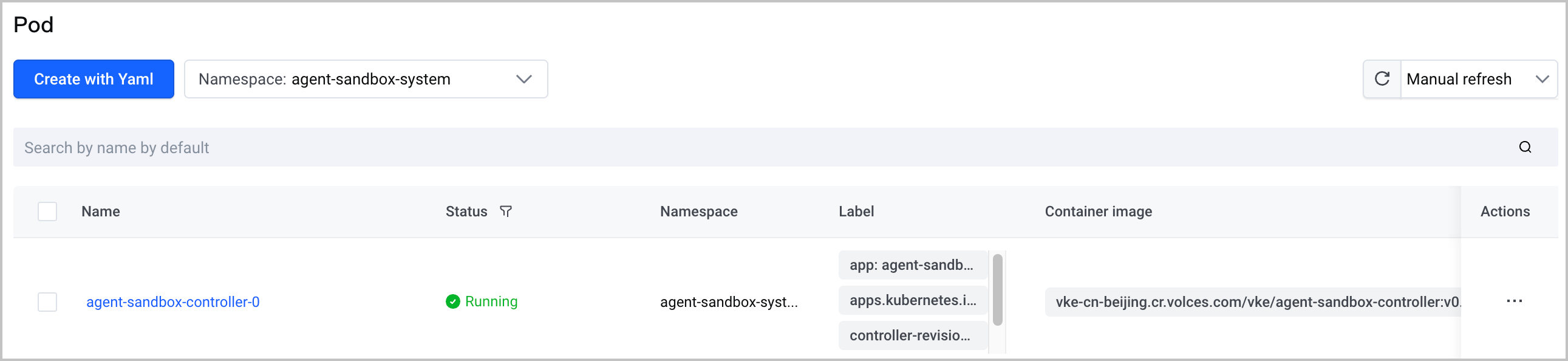
- On the cluster management page, click Workload > Pod in the left navigation bar. Check whether a pod named agent-sandbox-controller in the Running state exists under agent-sandbox-system or the namespace you specify.
-
What to do next
Expose the E2B service via the Ingress
If the E2B service is enabled in the deployed VCI Agent Sandbox controller (e2bConfig.enableE2BServer: true), you need to use an ALB Ingress to route the root domain name and wildcard domain name of the E2B service to the control plane and data plane services. Then, point the DNS records of the root domain name and wildcard domain name to the IP address exposed by the ALB Ingress to expose the E2B service externally.
- Create an ALB Ingress. The parameters mentioned below need to be configured as described. Other parameters can be configured by referring to Creating an ALB Ingress through the console.
-
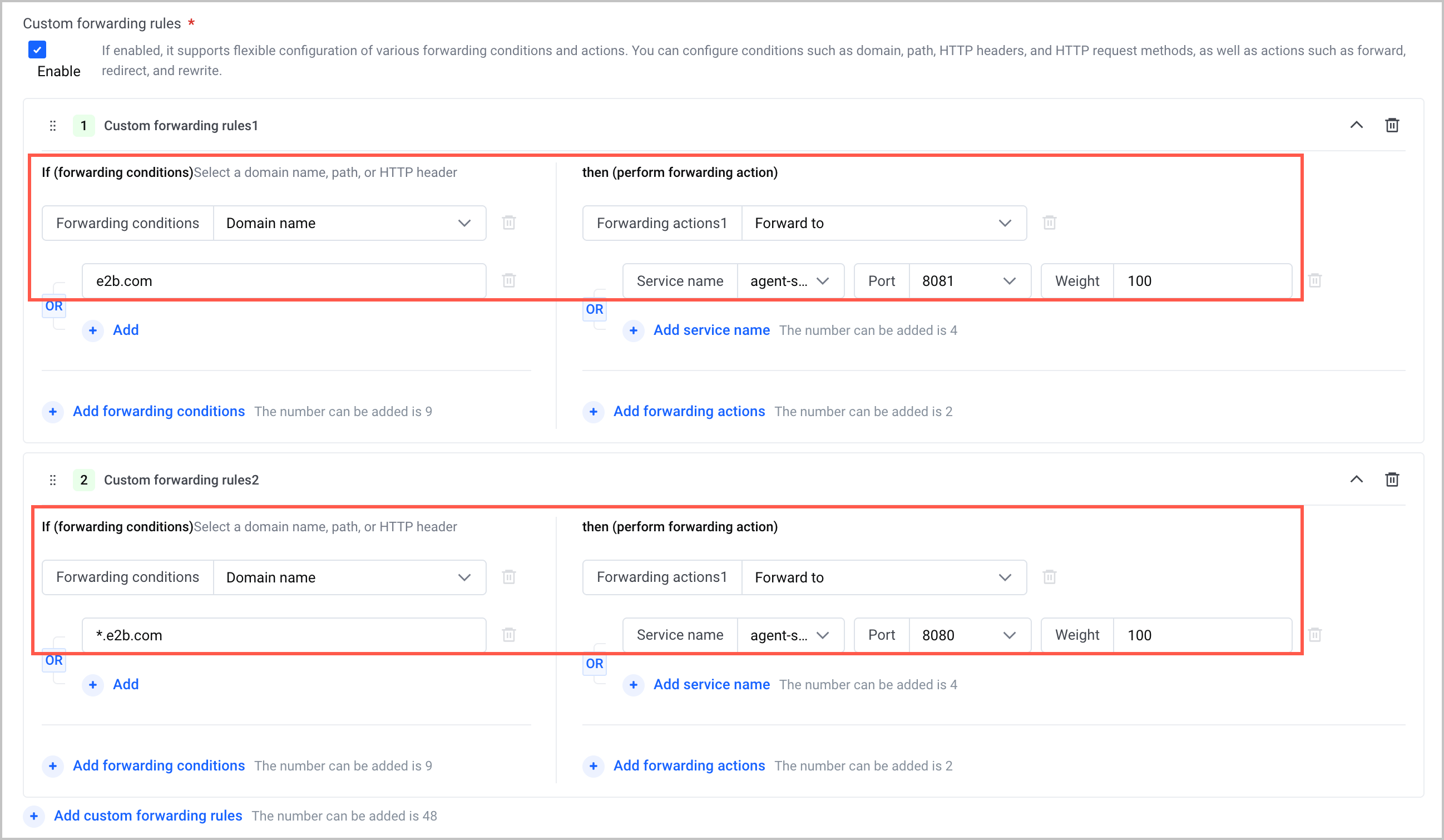
- ParameterDescriptionParameterDescriptionForwarding configurationCustom forwarding rulesConfigure the following two custom forwarding rules:
- Custom forwarding rule 1
- Forwarding conditions: Select Domain name and enter the root domain name configured in e2bConfig.domain (the default root domain name is e2b.com).
- Forwarding actions: Select Forward to and configure the following forwarding actions.
- Service name: Set the value to agent-sandbox-control-plane.
- Port: Only one port is available, which is the control-plane service port configured in the YAML file of the VCI Agent Sandbox controller.
- Weight: Keep the default value.
- Custom forwarding rule 2
- Forwarding conditions: Select Domain name and enter the wildcard domain name configured in e2bConfig.domain (the default wildcard domain name is *.e2b.com).
- Forwarding actions: Select Forward to and configure the following forwarding actions.
- Service name: Set the value to agent-sandbox-data-plane.
- Port: Only one port is available, which is the data-plane service port configured in the YAML file of the VCI Agent Sandbox controller.
- Weight: Keep the default value.
- Configure DNS resolution. Point the DNS resolution (A records) of the root domain name and wildcard domain name to the IP address exposed by the ALB Ingress. This routes external traffic to ALB.
- You can use the capabilities of the VolcanoEngine DNS service to configure DNS resolution. You need to add an A record for both the root domain name and the wildcard domain name (a total of two records). For details, see Adding A records.
Last updated: 2026.07.24 16:18:07
All rights reserved © Beijing Volcano Engine Technology Co., Ltd2024
