Volcengine Kubernetes Engine
Volcengine Kubernetes Engine


Document

- Documentation
 Volcengine Kubernetes EngineVolcengine Kubernetes EngineSolutionWorkload migration solutions for disaster recovery from node failures
 Copy page
 Download PDF
Solution
Workload migration solutions for disaster recovery from node failures
Copy pageDownload PDFWorkload migration solutions for disaster recovery from node failures
This topic describes solutions for disaster recovery and migration of workloads in case of node failures.
Background information
Your container workloads run on Kubernetes nodes. As a recommended VKE best practice, deploy workloads with multiple replicas across multiple nodes. This prevents overall business unavailability if a single node fails, as pods cannot be migrated instantly.
An example YAML for multiple-replica and multi-node workload deployment is shown below. For more information, see the official Kubernetes documentation.
However, in actual business scenarios, node failures may result in pods being unable to migrate for various reasons and consequent business losses. This topic provides disaster recovery and migration solutions for various workloads (especially StatefulSets) to help minimize impacts and losses in case of node failures.
Kubernetes state machine changes
When a node fails (before manual intervention and recovery), different Kubernetes resources exhibit distinct behaviors.
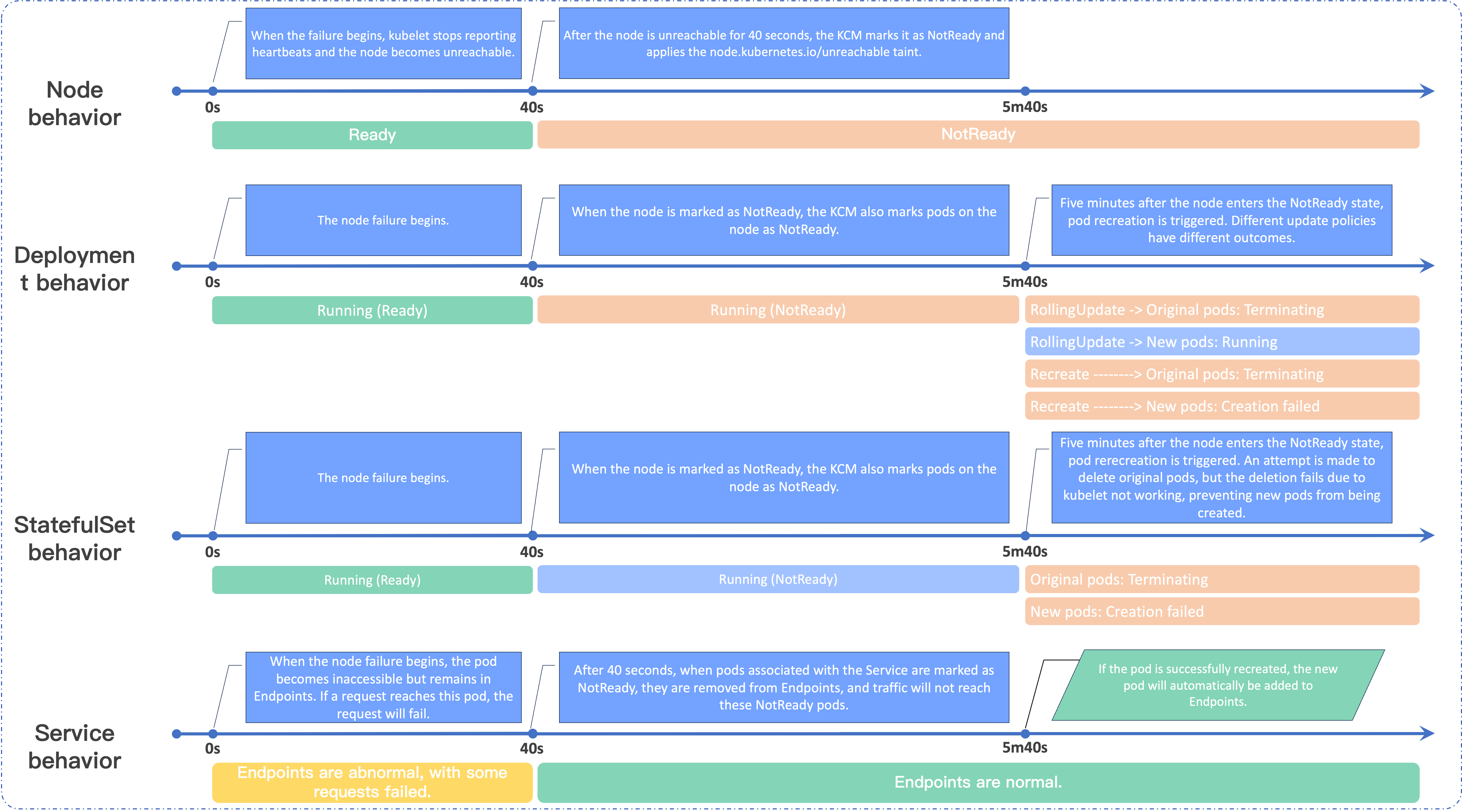
Node behavior
- After a node fails, the kubelet cannot report its heartbeat status, causing the node to become unreachable.
- Forty seconds after the node becomes unreachable, the kube-controller-manager (KCM) marks it as NotReady and adds the node.kubernetes.io/unreachable taint.
tip
The duration of node statuses is controlled by the following KCM parameters:
- node-monitor-period: The interval at which the node controller checks the status of each node. The default is 5 seconds.
- node-monitor-grace-period: The time window for the node controller to consider a node failed. The default is 40 seconds, meaning a node is considered failed if no status updates are received within 40 seconds.
Deployment behavior
- When a node is marked as NotReady, the KCM simultaneously marks all pods on that node as NotReady.
- If the node remains in the NotReady state for five minutes, the KCM triggers pod recreation.
- If the pod recreation policy is RollingUpdate, a new pod is created first, and then the original pod in the NotReady state is deleted. However, due to node failure, the kubelet cannot delete the original pod on the node, so it will remain indefinitely in the Terminating state (unless the node recovers or the pod is forcibly deleted).
- If the pod recreation policy is ReCreate, the original pod is deleted first, and then a new pod is created. However, because the original pod cannot be deleted, the new pod cannot be created.
tip
The duration of node statuses is controlled by the following kube-apiserver parameters:
- default-not-ready-toleration-seconds: The tolerance duration for the NotReady:NoExecute taint, in seconds. The default is 300 seconds. By default, this toleration is added to every pod that does not already have this toleration.
- default-unreachable-toleration-seconds: The toleration duration for the taint Unreachable:NoExecute, in seconds. The default is 300 seconds. By default, this toleration is added to every pod that does not already have this toleration.
StatefulSet behavior
- When a node is marked as NotReady, the KCM simultaneously marks all pods on that node as NotReady.
- If the node remains in the NotReady state for five minutes, the KCM triggers pod recreation. For a StatefulSet, the original pod is deleted first and then a new pod is created. However, due to node failure, the kubelet cannot delete the original pod on the node, so the original pod is stuck in the Terminating state and the new pod cannot be created.
tip
If the pod is bound to a PersistentVolumeClaim (PVC), migration of the StatefulSet will involve releasing and rebinding the PersistentVolume (PV). In case of a node failure, the associated PV cannot be disassociated from the node.
Service behavior
- In case of a node failure, pods on the node may not be accessible. If the pod is associated with a Service, the pod will not be removed from the Endpoints immediately. When requests are routed to the pod through the Service, the requests will fail.
- After the node remains in the NotReady state for 40 seconds, as the pod is marked as NotReady, the corresponding Service-related Endpoints will add NotReady pod information via the subsets.notReadyAddresses parameter. At this point, Service traffic will not reach the NotReady pods.
Manual recovery steps
Limits
Before performing manual recovery, pay attention to the following restrictions:
- The cluster must have other available nodes (in addition to the failed node) that can sufficiently accommodate the workloads to be migrated.
- Do not operate on virtual nodes during manual intervention. Otherwise, VCI pods will be evicted. If you must operate on a virtual node, submit a ticket to get professional technical support.
- Node failures are generally categorized into three types: graceful node shutdown, non-graceful node shutdown, and kubelet exception. Among these types, graceful node shutdown does not require manual intervention. This topic provides load migration solutions for the other two types of node failures:
- Graceful node shutdown: If the graceful node shutdown feature is enabled, when the system shuts down, the kubelet will attempt to detect this event and gracefully shut down the pods running on the node. This enables automatic load migration without requiring manual intervention. Enabling this feature requires certain conditions to be met. For details, see the Kubernetes documentation.
- Non-graceful node shutdown: The node shutdown event cannot be detected by kubelet (for example, node crashes or disabled graceful shutdown). This leads to the Kubernetes state machine changes described earlier.
- Kubelet exception: The node loses connection with the control plane, but the workloads on the node may still run normally. For this scenario, it is recommended to first try to restart kubelet or attempt to restore the node. If restoration is not possible, remove the node from the cluster via the VKE console to prevent workloads on the node from interfering with business operations when they are out of Kubernetes management (for example, for RPC frameworks with independent service discovery like Dubbo).
Deployments
- Ensure that the update policy of these workloads is RollingUpdate.
-
- Manually run the rollout command to quickly recreate pods under the Deployment.
-
tip
deployment/nginx is the Deployment name or the pod name within the Deployment. You need to replace it with your actual information.
- The expected response is as follows:
-
StatefulSets
Before Kubernetes v1.26
Implement load migration by forcibly deleting the pod and waiting for exclusive resources to be disassociated and released. The detailed steps are as follows:
- Forcibly delete the original pod on the failed node so that exclusive resources are disassociated from the original pod.
tip
If exclusive resources are not disassociated from the original pod, the new pod will be stuck in the Creating state.
-
- The expected response is as follows:
-
- Wait for exclusive resources (if any) to be released.
- PVs associated with the pod: After six minutes, the KCM automatically disassociates PVCs from the pod. The csi-controller will watch this action and then call the DetachVolume API to disassociate the cloud disk, completing resource release.
- Static IP for the pod (Trunk ENI): The static IP of a pod is released immediately.
- View pod information.
-
- The expected response is as follows:
-
- After resources are released, the new pod successfully has these resources bound and its status changes to Running. At this point, load migration is completed.
-
- The expected response is as follows:
-
Kubernetes v1.26 and later
Implement load migration by adding a specific taint to the failed node to trigger the NodeOutOfServiceVolumeDetach feature gate. The detailed steps are as follows:
- Ensure that the ECS instance (the target node) is in the closed or powered off state, and that the target node is not a virtual node.
tip
The node state must not be Running and the ECS instance state corresponding to the node must not be Restarting. Otherwise, it may lead to unpredictable behaviors such as residual mount points on the node and pod read/write anomalies.
- Ensure that the workload (Pod) to be migrated does not tolerate the node.kubernetes.io/out-of-service taint.
-
tip
<sts-name> is the name of the StatefulSet. You need to replace it with your actual workload name.
- The following content is the expected response, where the value of key indicates the taint tolerated by the pod (in this example, the temp taint). If the response is empty, it means that no taint is tolerated.
-
- Run the following command to specify a taint for the failed node.
-
tip
Replace <node-name> with the name of the failed node.
- After the taint is successfully specified, the original pod will be deleted by the KCM, and the associated exclusive resources will be immediately disassociated. A new pod will be recreated on a different node to replace the deleted one, completing migration.
Last updated: 2026.10.16 17:40:20
All rights reserved © Beijing Volcano Engine Technology Co., Ltd2024
