Volcengine Kubernetes Engine
Volcengine Kubernetes Engine


Document

- Documentation
 Volcengine Kubernetes EngineVolcengine Container InstanceUser guideVCI Agent SandboxFeature introduction
 Copy page
 Download PDF
VCI Agent Sandbox
Feature introduction
Copy pageDownload PDFFeature introduction
This topic describes VCI Agent Sandbox and its core features in detail.
Background
AI Agents are driving a new wave of transformation in the software industry. With the core capabilities of autonomously planning and executing complex, multi-step tasks, AI Agent can render existing software intelligent. This helps enterprises achieve significant improvements in both operational efficiency and user experience. However, these powerful capabilities also bring new challenges. The behavior of AI Agents involves a certain degree of uncertainty. It is hard to fully predict the generated code, executed instructions, and triggered browser operations. When you use AI Agents, security risks such as prompt injection also need to be mitigated. Without a comprehensive security protection and O&M support system, these uncertainties may lead to business risks.
In addition, AI Agents raise infrastructure requirements that traditional applications do not have. The core requirement is the efficient orchestration of thousands of sandbox environments. This achieves quick creation and destruction of sandboxes, and ensures that the whole network access process is fully controllable and compliant. Kubernetes, with its mature and stable architecture, reliable security mechanisms, and outstanding scalability, is the preferred solution for running AI Agents. To better adapt to the characteristics of AI Agents and unlock their full potential, Google, in collaboration with the Kubernetes community, developed a new Kubernetes CRD resource: Agent Sandbox, to manage the code execution environments for AI Agents.
Introduction to VCI Agent Sandbox
VCI is built on the Community Agent Sandbox. It is integrated with the public cloud general product capabilities of Volcano Engine and deeply developed to serve as a carrier for running AI Agents at scale. It builds a dedicated code execution environment for managing AI Agents, providing strong process isolation, storage isolation, and network isolation.
Role
VCI Agent Sandbox functions as an Agent management solution under the Kubernetes technical architecture:
- Community compatibility and in-depth development
- Fully compatible with the Community Agent Sandbox CRD, it supports the management of sandboxes throughout their entire lifecycle, such as creation, scheduled deletion, suspension, and restoration.
- By using the Kata Container isolation technology, it achieves strong process isolation, storage isolation, and network isolation. This can effectively prevent security risks during AI agent operation.
- Deeply developed by integrating the capabilities of general products, such as EBS and CR, it provides core capabilities, such as stable identifiers and persistent storage.
- State persistence
- It supports snapshot creation, restoration, and management for the Pod read-write layer (system volume), with snapshots stored in EBS.
- It supports committing containers in sandboxes to new images. Image caches are automatically created upon successful committing.
- Cold start optimization
- Agent image pulling time is reduced through the VCI image cache capabilities. This accelerates sandbox startups.
- A batch of sandboxes is created in advance through SandboxWarmPool, which can be directly allocated when needed. This significantly reduces startup latencies and ensures that sandbox creation is complete within seconds.
- The running state of a sandbox can be quickly restored based on snapshots, which achieves quick sandbox restarts and state restoration.
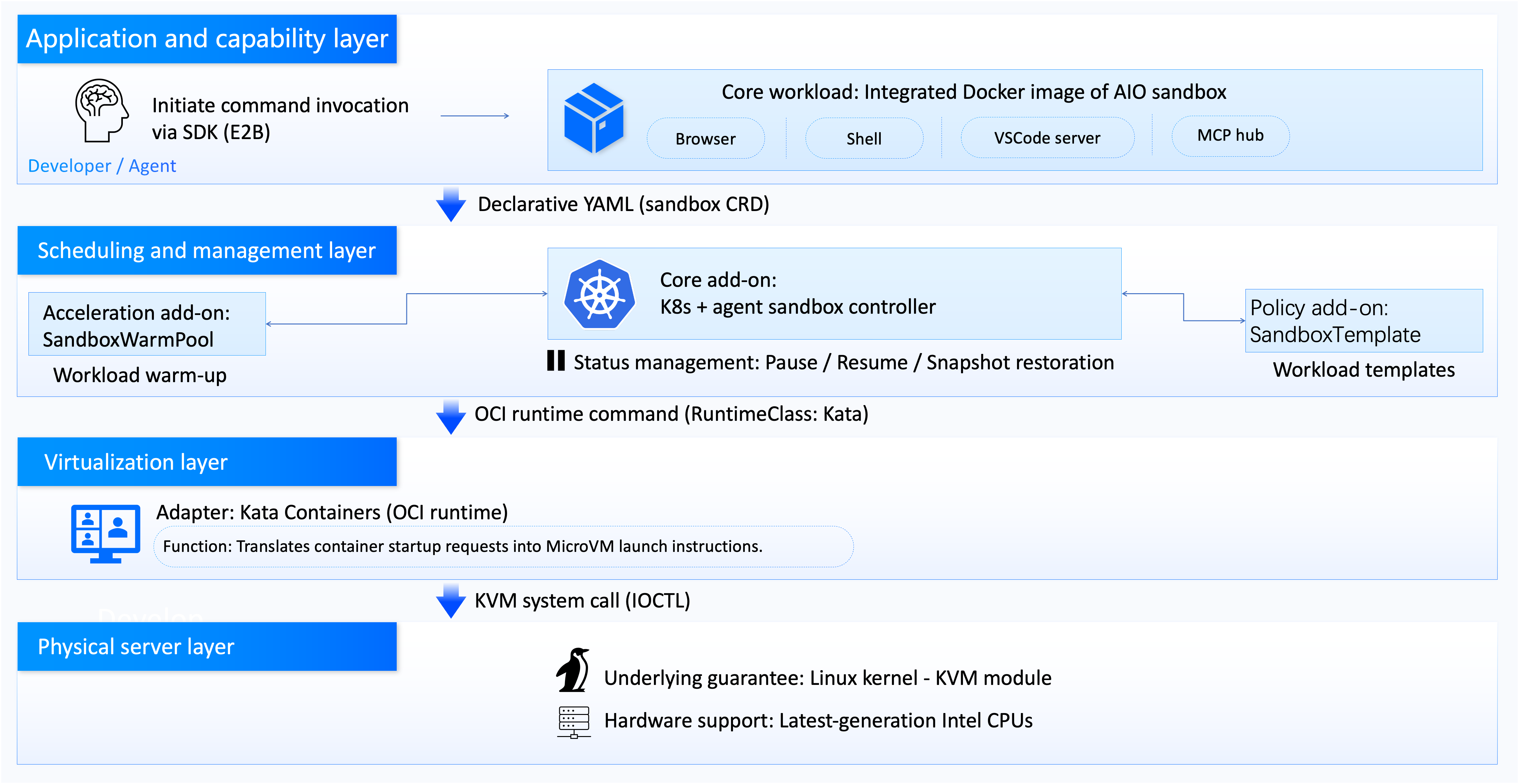
Core capabilities
- Stable identifier: Each sandbox has a stable hostname and network identifier, which remain unchanged after sandbox restarts.
- Persistent storage: The sandbox can be configured with PVs, and data is retained after sandbox restarts.
- Lifecycle management: The sandbox controller is used for managing Pods throughout the entire lifecycle, including creation, scheduled deletion, suspension, and restoration.
Advantages
- Kubernetes advantages
- De facto standard for cloud-native application orchestration: Serves as the de facto standard for cloud-native application orchestration, effectively addressing challenges in application scalability.
- Robust network capability: Capable of providing robust network support to meet the operational requirements of cloud-native applications.
- Mature ecosystem: Provides a highly mature ecosystem with comprehensive support for the deployment, management, and scaling of cloud-native applications.
- VCI advantages
- Multi-tenant isolated deployment: VCI runtime, based on KataContainer, provides VM-level strongly isolated execution environments for OpenClaw gateway instances across enterprise multi-tenant/multi-department scenarios and independent sessions of multiple AI agents within the same instance. Through network security groups, RBAC, and resource quotas, it enables permission, resource, and data boundary control between tenants/sessions, supporting large-scale cluster deployment.
- Execution security protection: For system-level autonomous operations of AI agents within the OpenClaw skills framework, including code/shell execution, file operations, API calls, and browser automation, it provides least-privilege isolated sandboxes. Uses seccomp/AppArmor, read-only mounts, and system call restrictions to block attack escapes and unauthorized operations, achieving end-to-end risk isolation and auditing for execution.
- Elastic job scheduling: Provides standardized image packaging and sandbox execution environments for OpenClaw modular skill units and on-demand triggered AI Agent jobs. Leverages K8s elastic scaling, self-healing, and on-demand start/stop capabilities to accommodate high-concurrency sessions and burst task scheduling, optimizing cluster resource utilization.
Extension add-ons
In addition to the core Sandbox CRD, VCI Agent Sandbox also provides the following extension add-ons:
- SandboxTemplate: Used to define reusable sandbox templates, such as Python 3.11 environment and Node.js 20 environment.
- SandboxClaim: The user only needs to declare that a Python environment is required, and the system will automatically create one from the template.
- SandboxWarmPool: Used to warm up a sandbox pool by creating a batch of sandboxes in advance, which can be directly allocated when needed. This significantly reduces startup latencies.
Application scenarios
VCI Agent Sandbox application scenarios are as follows:
- AgentServing scenario: For online agent services such as in-depth research, tool invocation, multi-turn conversations, and intelligent programming assistants, provides strongly isolated execution environments, cold-start acceleration and warm-up pool capabilities, balancing response experience and operational costs.
- OpenClaw personal assistant deployment scenario: For rapid deployment scenarios of personal assistant/digital employee applications, supports multiple tool execution environments such as browsers, script commands, and code. Enables quick integration with ecosystems, including Feishu office and Seed large models.
- AgentRL scenario: For reinforcement learning and training frameworks of large model agents, addresses scenarios such as multi-turn interaction, autonomous decision-making, tool invocation, and long-term planning. Supports concurrent creation of large-scale sandboxes and state persistence, improving training throughput and resource utilization.
Considerations
Take note of the following items when you use VCI Agent Sandbox.
- When you create a sandbox by using a snapshot, make sure that the image used to create the snapshot is consistent with that specified in the Sandbox YAML. For details, see Lifecycle management.
- The time required to create a system volume snapshot is related to the size of temporary data generated in the system volume. Therefore, you need to avoid restoring sandboxes before the system volume snapshot is created. For details, see Data persistence.
- VCI does not automatically clean up images in image registries. Therefore, you need to pay attention to the image registry capacity usage. For details, see Image commit.
- In a sandbox, both the number of Pod replicas and the number of Containers are 1. For details, see Lifecycle management.
- Repeatedly committing containers to an image accumulates many layers. This may exceed the maximum number of layers an image can have, which is set to 128 layers. For details, see Image commit.
Last updated: 2026.07.24 16:18:06
All rights reserved © Beijing Volcano Engine Technology Co., Ltd2024
