Volcengine Kubernetes Engine
Volcengine Kubernetes Engine
Volcengine Kubernetes Engine


Document
Volcengine Kubernetes Engine
What's New
History feature release notes
Kubernetes version release notes
Containerd runtime release notes
Add-on release notes
Monitoring add-ons
Scheduling add-ons
DNS add-ons
Security add-ons
GPU add-ons
Sandbox add-on
Security announcements
Product Announcement
Historical announcements
Overview
Getting started
User guide
Clusters
Creating clusters
Connecting to clusters
Upgrading clusters
Node pool
Creating node pools
Scaling out/in node pools
Nodes
Authorization management
Image
Namespaces
Networking
Cluster network
Container Network
Service
LoadBalancer
CLB
Ingress
APIG Ingress
ALB Ingress
Customize ALB Ingress forwarding rules
Certificate and security
CLB Ingress
Nginx Ingress
Gateway API
Workloads
Creating workloads
Configure workloads
Pods
Configuration management
Image acceleration
Storage
FSX client
EBS Volumes
TOS Volumes
NAS volumes
FSX access methods
NFS access methods
EFS volumes
vePFS volumes
FSX access methods
vePFS Client access methods
NFS access methods
CloudFS volumes
Local volumes
Autoscale
Node autoscaler
Workload autoscaler
Horizontal Pod Autoscaler (HPA)
Cron Horizontal Pod Autoscaler (CronHPA)
Intelligent Horizontal Pod Autoscaler (IHPA)
Horizontal Pod Autoscaler based on event-driven (KEDA)
Add-on management
Network add-ons
Storage add-ons
Monitoring add-ons
Scheduling add-ons
DNS add-ons
GPU add-ons
Core add-ons
Sandbox add-on
Upgrading add-ons
Heterogeneous computing
NVIDIA GPU
mGPU scheduling
RDMA high-performance computing
Scheduling management
Topology-aware scheduling
QoS-aware scheduling
Observability
Log management
Basic observation
Setup & Configuration
Cluster observation
Storage observation
Other observation
Using metrics
Full stack observation
Alert management
Diagnosis and inspection
Node check and self-healing
Application center
Backup center
Stability
Large-scale cluster management
Best practices
Authorization
Clusters
Nodes and node pools
Networking
Storage
Scheduling
Observability
Solution
Security and compliance
API reference
Cluster management
NodePool management
Node management
Virtual nodes management
Add-on management
Tag management
Access policy management
Instance images management
Cloud native observability
Inspection and diagnosis
Task management
Volcengine Container Instance
Appendix
SDK reference
Development guide
Terraform
FAQs
General FAQs
Cluster FAQ
cluster management
cluster network
cluster upgrade
Node and Node pool FAQs
Authorization FAQs
Workload FAQs
Service and Ingress FAQs
Storage FAQs
Heterogeneous computing FAQs
Observability FAQs
Quota FAQs
Add-on FAQs
Cloud-native AI
ServingKit
LLM applications
ComfyUI application
Deploying the Al inference application through Helm
Deepseek practices
Qwen practices
Kimi practice
Seed practices
Best practices
DeepSeek model deployment
GLM model deployment
MiniMax model deployment
Qwen model deployment
Kimi model deployment
Volcengine Container Instance
What's new
Historical feature release notes
Product Announcement
Overview
Billing
User guide
Integrating with VCI
Virtual node
VKE cluster uses virtual nodes
Self-managed/third-party cluster uses virtual node
Creating an instance
General purpose instance
GPU-accelerated computing instance
VCI Agent Sandbox
Startup acceleration
E2B-based management
Upgrade guide
Networking
Monitoring
Scheduling
Container configuration
VCI Image Cache
Best practices
Security and compliance
FAQs
- Documentation
 Volcengine Kubernetes EngineVolcengine Kubernetes EngineBest practicesAuthorizationAccess control based on IAM for the VKE console
 Copy page
 Download PDF
Authorization
Access control based on IAM for the VKE console
Copy pageDownload PDFAccess control based on IAM for the VKE console
This topic mainly describes how to use Volcano Engine IAM in the VKE console to manage access permissions for Kubernetes clusters.
tip
This feature is currently in the public beta stage.
Background information
In modern cloud-native applications, Kubernetes has become a standard platform for building and managing containerized applications. However, protecting Kubernetes clusters from the risk of unauthorized access is critical. This topic mainly describes how to effectively manage and protect access to your Kubernetes clusters in the VKE console by using the IAM service provided by Volcano Engine.
IAM functions as an access control service provided by Volcano Engine, which is used to manage access permissions on cloud resources. By configuring IAM policies, you can manage the access methods and permissions of users, roles, or entities on specific resources in a fine-grained manner. For more information, see IAM.
Notes
The solution described in this topic applies only to permissions for accessing Kubernetes clusters in the VKE console. It does not apply to permissions for accessing APIs of Kubernetes clusters via tools such as kubectl. When you access a cluster by using an API, you can directly access the cluster by using the API server of Kubernetes, which is not controlled by IAM of Volcano Engine.
IAM-based access control policies
VKE allows you to operate pods, similar to running the kubectl exec -it {your_container_name} -- /bin/bash command in the cluster. This feature lets you interact directly with containers to simplify operations.
However, users with strict security needs require both ease of use and stricter access controls. To restrict VKE console access to specific IP addresses, use the solutions in this topic to configure access policies. This enhances cluster security, prevents unauthorized access, and ensures system stability and data security.
The sample policy code is as follows:
{
"Statement": [
{
"Effect": "Deny",
"Action": [
"vke:GetTerminal"
],
"Resource": [
"*"
],
"Condition": {
"NotIpAddressIfExists": {
"volc:SourceIp": [
"192.168.xx.xx"
]
}
}
}
]
}
The preceding sample policy indicates that access to the VKE console will be denied unless the request originates from the IP address 192.168.xx.xx. When used with common cluster policies where Effect is set to Allow, such as VKEReadOnlyAccess, this sample policy can effectively prevent insecure network access to pods in the VKE console. The following table describes the policy code parameters.
Parameters | Description |
Parameters | Description |
Effect | The result of the access policy in this example is set to Deny, which indicates the deny operation. For more syntax details, see Effect. |
Action | The specific operation that is denied. In this example, the value is set to vke:GetTerminal, which rejects (prohibits) obtaining terminal access for the Kubernetes cluster. For more syntax details, see Action. |
Resource | Specify the resource on which the specified operation is performed based on your business requirements. You can also specify a specific cluster ID to prohibit obtaining terminal access for the cluster. For more syntax details, see Resource.
tip In actual business scenarios, replace {your_region} with the actual business region and {your_clusterid} with the specified cluster ID, such as trn:vke:cn-shanghai:*:cluster/ccuu2o48q8******. |
Condition | Specify the condition under which the policy takes effect. In this example, NotIpAddressIfExists is used, which indicates that if the request contains the volc:SourceIp field and its value is 192.168.xx.xx, access is allowed. Otherwise, access is denied. For more syntax details, see Condition. |
tip
The Deny IAM access control policy prevails over other policies. As a result, if multiple policies are used, of which a Deny policy is included, the final effect will be Deny. Therefore, you can combine the preceding policy with any cluster allow policy.
Applying IAM policies
You can apply IAM policies by performing the following steps to protect the access permissions on your Kubernetes cluster:
- Create an IAM policy.
- Create the preceding policy in the IAM console. For detailed operations, see Creating user-defined policies.
- Associate the policy.
- Associate the created policy with the IAM user or IAM role for which you want to restrict access. For detailed operations, see Managing users.
- In addition to the preceding IAM permission control for accessing the VKE console, Kubernetes also has its own RBAC permission control. Make sure that the IAM user or IAM role has the other RBAC permissions required to manage the cluster. For RBAC-related descriptions, see Configuring user RBAC permissions.
tip
In this example, make sure that the IAM user or IAM role to which the policy is attached has exec permissions on pods. Otherwise, the result of permission control cannot be tested.
- Test the policy.
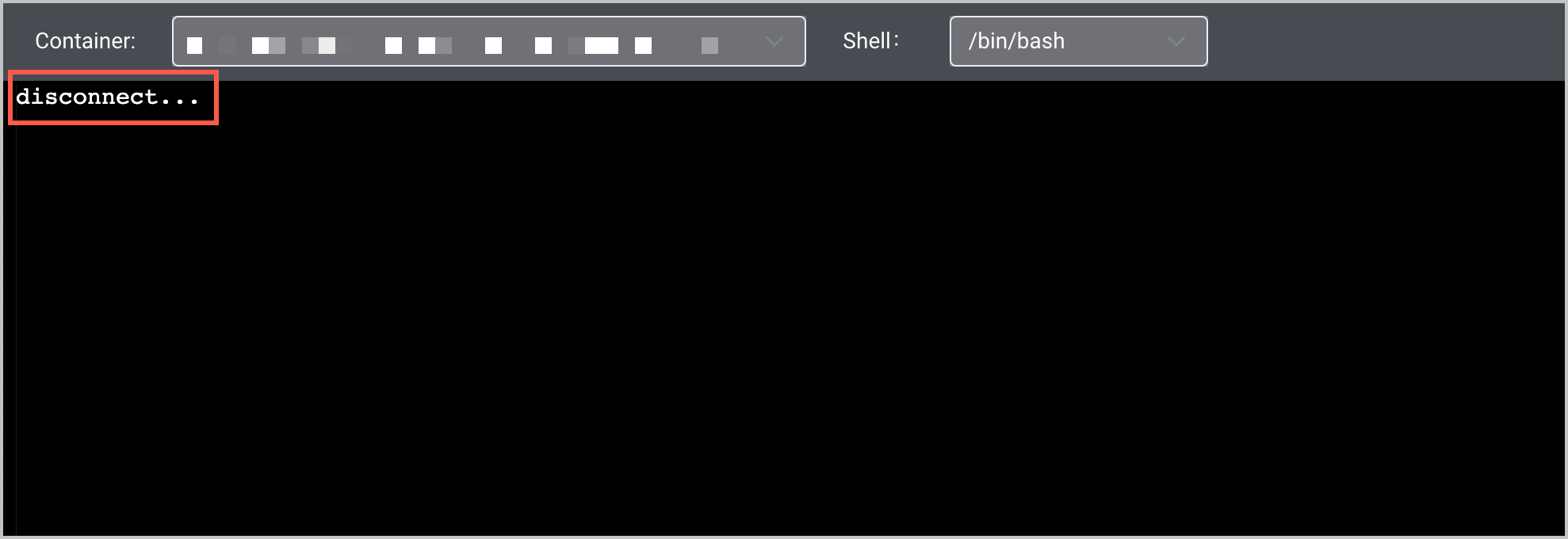
- Verify whether the policy works as expected by using both authorized and unauthorized IP addresses. The pod console will directly display disconnect for blocked requests, which is shown in the following figure.
-
- Monitor and optimize the policy.
- Regularly review and optimize IAM policies to ensure that they are secure and efficient.
- Monitor the logs and audit information of policies to promptly identify and address security risks.
Last updated: 2026.07.23 11:53:58
All rights reserved © Beijing Volcano Engine Technology Co., Ltd2024
