Volcengine Kubernetes Engine
Volcengine Kubernetes Engine
Volcengine Kubernetes Engine


Document
Volcengine Kubernetes Engine
What's New
History feature release notes
Kubernetes version release notes
Containerd runtime release notes
Add-on release notes
Monitoring add-ons
Scheduling add-ons
DNS add-ons
Security add-ons
GPU add-ons
Sandbox add-on
Security announcements
Product Announcement
Historical announcements
Overview
Getting started
User guide
Clusters
Creating clusters
Connecting to clusters
Upgrading clusters
Node pool
Creating node pools
Scaling out/in node pools
Nodes
Authorization management
Image
Namespaces
Networking
Cluster network
Container Network
Service
LoadBalancer
CLB
Ingress
APIG Ingress
ALB Ingress
Customize ALB Ingress forwarding rules
Certificate and security
CLB Ingress
Nginx Ingress
Gateway API
Workloads
Creating workloads
Configure workloads
Pods
Configuration management
Image acceleration
Storage
FSX client
EBS Volumes
TOS Volumes
NAS volumes
FSX access methods
NFS access methods
EFS volumes
vePFS volumes
FSX access methods
vePFS Client access methods
NFS access methods
CloudFS volumes
Local volumes
Autoscale
Node autoscaler
Workload autoscaler
Horizontal Pod Autoscaler (HPA)
Cron Horizontal Pod Autoscaler (CronHPA)
Intelligent Horizontal Pod Autoscaler (IHPA)
Horizontal Pod Autoscaler based on event-driven (KEDA)
Add-on management
Network add-ons
Storage add-ons
Monitoring add-ons
Scheduling add-ons
DNS add-ons
GPU add-ons
Core add-ons
Sandbox add-on
Upgrading add-ons
Heterogeneous computing
NVIDIA GPU
mGPU scheduling
RDMA high-performance computing
Scheduling management
Topology-aware scheduling
QoS-aware scheduling
Observability
Log management
Basic observation
Setup & Configuration
Cluster observation
Storage observation
Other observation
Using metrics
Full stack observation
Alert management
Diagnosis and inspection
Node check and self-healing
Application center
Backup center
Stability
Large-scale cluster management
Best practices
Authorization
Clusters
Nodes and node pools
Networking
Storage
Scheduling
Observability
Solution
Security and compliance
API reference
Cluster management
NodePool management
Node management
Virtual nodes management
Add-on management
Tag management
Access policy management
Instance images management
Cloud native observability
Inspection and diagnosis
Task management
Volcengine Container Instance
Appendix
SDK reference
Development guide
Terraform
FAQs
General FAQs
Cluster FAQ
cluster management
cluster network
cluster upgrade
Node and Node pool FAQs
Authorization FAQs
Workload FAQs
Service and Ingress FAQs
Storage FAQs
Heterogeneous computing FAQs
Observability FAQs
Quota FAQs
Add-on FAQs
Cloud-native AI
ServingKit
LLM applications
ComfyUI application
Deploying the Al inference application through Helm
Deepseek practices
Qwen practices
Kimi practice
Seed practices
Best practices
DeepSeek model deployment
GLM model deployment
MiniMax model deployment
Qwen model deployment
Kimi model deployment
Volcengine Container Instance
What's new
Historical feature release notes
Product Announcement
Overview
Billing
User guide
Integrating with VCI
Virtual node
VKE cluster uses virtual nodes
Self-managed/third-party cluster uses virtual node
Creating an instance
General purpose instance
GPU-accelerated computing instance
VCI Agent Sandbox
Startup acceleration
E2B-based management
Upgrade guide
Networking
Monitoring
Scheduling
Container configuration
VCI Image Cache
Best practices
Security and compliance
FAQs
- Documentation
 Volcengine Kubernetes EngineVolcengine Container InstanceUser guideCreating an instanceGPU-accelerated computing instanceCreate a GPU-accelerated instance by specifying a VCI specification.
 Copy page
 Download PDF
GPU-accelerated computing instance
Create a GPU-accelerated instance by specifying a VCI specification.
Copy pageDownload PDFCreate a GPU-accelerated instance by specifying a VCI specification.
You can create VCIs by specifying VCI specifications. This topic mainly describes how to specify VCI specifications to create GPU-accelerated instances.
Usage limits
- The supported regions and availability zones vary based on different GPU-accelerated instance families. For details, see Regions and availability zones.
- When you create a GPU Accelerated instance, different configurations match different VCI instance specifications. For the detailed specification matching logic, see Instance specification normalization.
Prerequisites
- A cluster for VCI applications has been created. For details, see Using VCI in VPC-CNI clusters and Using VCI in Flannel clusters.
- A VPC and its subnet have been created. For details, see Creating VPCs.
Creating instances by using Kubernetes
When you create a pod or a workload, including a Deployment, StatefulSet, Job, and CronJob, specify VCI specifications by adding an annotation.
The following table describes the annotation.
Annotation key | Annotation sample value | Description | Required |
Annotation key | Annotation sample value | Description | Required |
vci.vke.volcengine.com/preferred-instance-types | vci.g1v.8xlarge | The instance specifications include the GPU model, number of GPUs, number of CPUs, and amount of memory. You can specify the vCPU, memory, and GPU quantity for each container by defining the request and limit for the container. For detailed specifications, see GPU-accelerated. tip
| Required for this scenario |
vci.vke.volcengine.com/gpu-driver-version | tesla-470.129.06 | Specify the driver version of the GPU-accelerated instance. The annotation value is in the following format: tesla-{NVIDIA driver version}. The available {NVIDIA driver version} varies depending on the GPU accelerated specifications specified in preferred-instance-family. For details, see Supported GPU driver versions. tip If you do not specify this annotation, the system automatically specifies the default NVIDIA driver version that corresponds to the GPU-accelerated instance family that you selected. | Optional |
The following sample code shows how to create a Deployment.
apiVersion: apps/v1
kind: Deployment
metadata:
name: nginx-deployment
spec:
replicas: 2
selector:
matchLabels:
app: nginx
template:
metadata:
annotations:
vke.volcengine.com/burst-to-vci: enforce # Force the use of VCI.
vci.vke.volcengine.com/preferred-instance-types: vci.g1v.8xlarge # Specify the instance GPU specification.
vci.vke.volcengine.com/gpu-driver-version: tesla-470.129.06 # Specify the instance GPU driver.
labels:
app: nginx
spec:
containers:
- image: doc-cn-beijing.cr.volces.com/vke/nginx-demo:v1.0 # The address and version of the container image. Replace the value with your actual information. If you need to use a public image, make sure that the cluster can access the public network.
imagePullPolicy: Always
name: nginx
resources:
requests: # Specify the vCPU, memory, and GPU for containers.
cpu: "500m"
memory: "1024Mi"
nvidia.com/gpu: 1 # Both limit and request can be configured, but the values must be identical.
limits:
cpu: "1"
memory: "2048Mi"
nvidia.com/gpu: 1 # Specify GPU count (as in native Kubernetes).
tip
The GPU settings under Pod.spec.container[].resources must align with native Kubernetes capabilities and limitations.
- Use <vendor>.com/gpu to specify GPU resources.
- The limits option is required.
- Both limits and requests can be configured, but their values must be identical.
- If the requests option is left empty, Kubernetes will use the limits value as the requests value by default.
- GPU cannot be shared and overcommitted.
- The number of GPUs must be an integer.
Using the console
- Install the nvidia-device-plugin add-on in the VCI cluster. For details, see Installing add-ons.
- Specify the following parameters when you create a workload.
- Basic information: Select Volcengine Container Instance for the Computing power type parameter.
- Container configuration: Configure GPU resources in the ResourceQuota section.
- Specify the parameter in the red box in the following figure. Set the GPU resource type parameter to Nvidia. Specify other parameters based on your business requirements.
tip
The mGPU resource type is not supported in VCI scenarios.
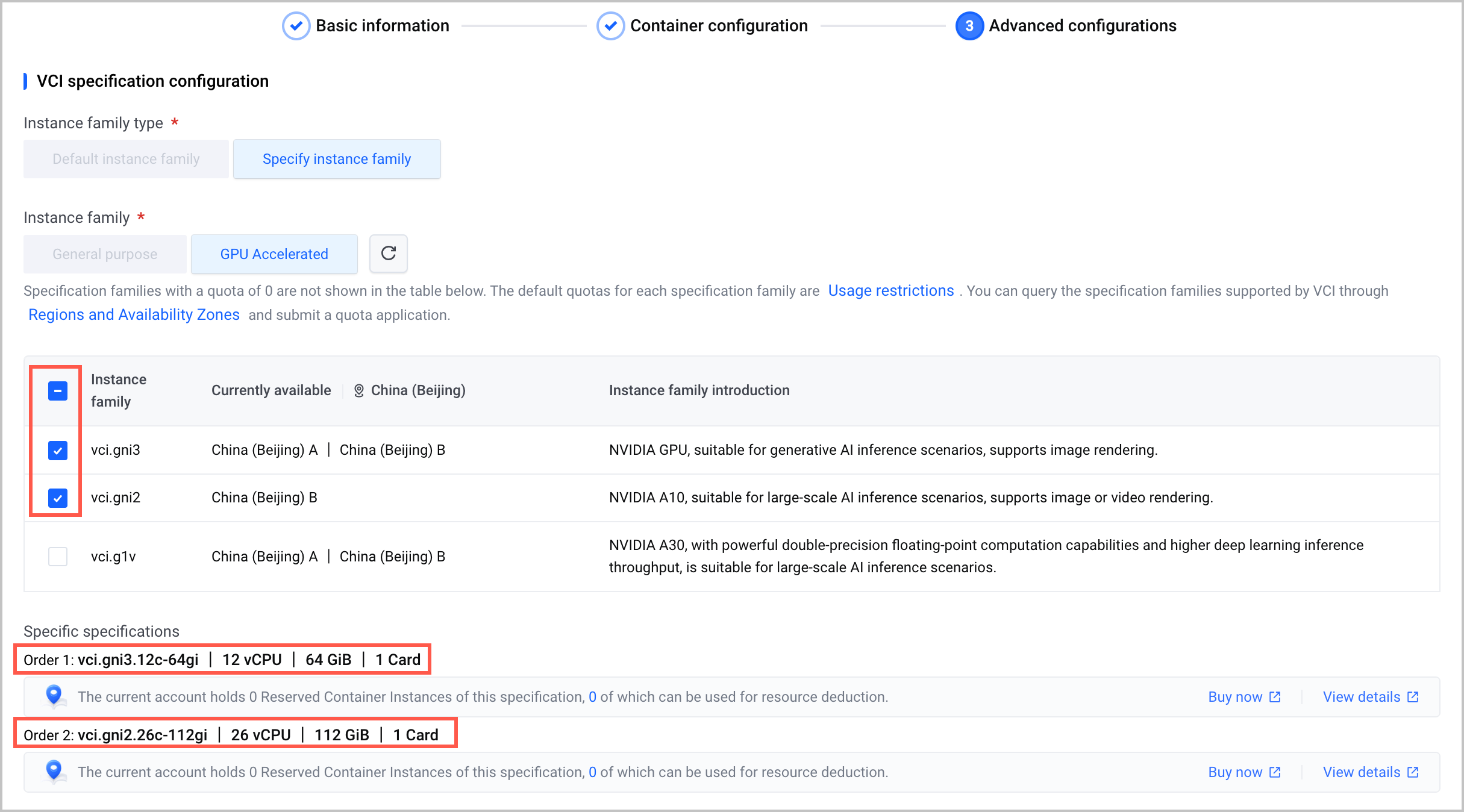
- Advanced settings: Configure the instance specifications in the VCI specification settings section. You can use the default instance family or specify a custom instance family.
- When you specify instance families, you can select multiple instance families of the same instance type. The priority is determined by the order in which they are selected (For parameter descriptions, see Specific specifications). If the higher-priority specification family has no available resources, the lower-priority specification family will be used to create instances.
-
Last updated: 2026.09.03 15:56:09
All rights reserved © Beijing Volcano Engine Technology Co., Ltd2024
