Volcengine Kubernetes Engine
Volcengine Kubernetes Engine
Volcengine Kubernetes Engine


Document
Volcengine Kubernetes Engine
What's New
History feature release notes
Kubernetes version release notes
Containerd runtime release notes
Add-on release notes
Monitoring add-ons
Scheduling add-ons
DNS add-ons
Security add-ons
GPU add-ons
Sandbox add-on
Security announcements
Product Announcement
Historical announcements
Overview
Getting started
User guide
Clusters
Creating clusters
Connecting to clusters
Upgrading clusters
Node pool
Creating node pools
Scaling out/in node pools
Nodes
Authorization management
Image
Namespaces
Networking
Cluster network
Container Network
Service
LoadBalancer
CLB
Ingress
APIG Ingress
ALB Ingress
Customize ALB Ingress forwarding rules
Certificate and security
CLB Ingress
Nginx Ingress
Gateway API
Workloads
Creating workloads
Configure workloads
Pods
Configuration management
Image acceleration
Storage
FSX client
EBS Volumes
TOS Volumes
NAS volumes
FSX access methods
NFS access methods
EFS volumes
vePFS volumes
FSX access methods
vePFS Client access methods
NFS access methods
CloudFS volumes
Local volumes
Autoscale
Node autoscaler
Workload autoscaler
Horizontal Pod Autoscaler (HPA)
Cron Horizontal Pod Autoscaler (CronHPA)
Intelligent Horizontal Pod Autoscaler (IHPA)
Horizontal Pod Autoscaler based on event-driven (KEDA)
Add-on management
Network add-ons
Storage add-ons
Monitoring add-ons
Scheduling add-ons
DNS add-ons
GPU add-ons
Core add-ons
Sandbox add-on
Upgrading add-ons
Heterogeneous computing
NVIDIA GPU
mGPU scheduling
RDMA high-performance computing
Scheduling management
Topology-aware scheduling
QoS-aware scheduling
Observability
Log management
Basic observation
Setup & Configuration
Cluster observation
Storage observation
Other observation
Using metrics
Full stack observation
Alert management
Diagnosis and inspection
Node check and self-healing
Application center
Backup center
Stability
Large-scale cluster management
Best practices
Authorization
Clusters
Nodes and node pools
Networking
Storage
Scheduling
Observability
Solution
Security and compliance
API reference
Cluster management
NodePool management
Node management
Virtual nodes management
Add-on management
Tag management
Access policy management
Instance images management
Cloud native observability
Inspection and diagnosis
Task management
Volcengine Container Instance
Appendix
SDK reference
Development guide
Terraform
FAQs
General FAQs
Cluster FAQ
cluster management
cluster network
cluster upgrade
Node and Node pool FAQs
Authorization FAQs
Workload FAQs
Service and Ingress FAQs
Storage FAQs
Heterogeneous computing FAQs
Observability FAQs
Quota FAQs
Add-on FAQs
Cloud-native AI
ServingKit
LLM applications
ComfyUI application
Deploying the Al inference application through Helm
Deepseek practices
Qwen practices
Kimi practice
Seed practices
Best practices
DeepSeek model deployment
GLM model deployment
MiniMax model deployment
Qwen model deployment
Kimi model deployment
Volcengine Container Instance
What's new
Historical feature release notes
Product Announcement
Overview
Billing
User guide
Integrating with VCI
Virtual node
VKE cluster uses virtual nodes
Self-managed/third-party cluster uses virtual node
Creating an instance
General purpose instance
GPU-accelerated computing instance
VCI Agent Sandbox
Startup acceleration
E2B-based management
Upgrade guide
Networking
Monitoring
Scheduling
Container configuration
VCI Image Cache
Best practices
Security and compliance
FAQs
- Documentation
 Volcengine Kubernetes EngineVolcengine Kubernetes EngineUser guideObservabilityAI profiling
 Copy page
 Download PDF
Observability
AI profiling
Copy pageDownload PDFAI profiling
When you deploy large language models (LLM) in a VKE cluster, you can analyze the AI profiling results of specified containers. This facilitates detection and optimization throughout the LLM life cycle, including training, inference, and optimization. This topic describes how to configure the AI profiling feature.
Background
With the rise of LLM, the requirements for performance detection and optimization in AI training and inference are rapidly growing. For LLM running on GPU nodes, online performance analysis of GPU containers is especially important. AI profiling supports non-intrusive data collection and analysis by leveraging eBPF and dynamic process injection technologies. It is tailored for Kubernetes container scenarios and can perform online detection on container processes that run GPU tasks.
The following table describes the collection items that are supported by AI profiling.
Collection item | Description |
Collection item | Description |
CUDA | The CUDA kernel functions. This item can be used for monitoring and analyzing the status of the underlying GPU resources for LLM, such as GPU busy time, distribution of GPU kernel functions, and timeline analysis (such as the analysis of a training step, including data loading, forward propagation, backward propagation, and optimizer update). |
PyTorch | The PyTorch operators can be used for accurately identifying model performance issues and providing data support for optimizing model efficiency, accelerating training and inference, and reducing resource consumption. The following information is included:
|
Python | The Python process call stack. As a dynamic language, Python has flexible and variable code execution paths, such as conditional branches and dynamic function calls. The call stack can anchor scattered performance data, such as latency and resource usage, to specific code locations. For complex AI systems, such as large model training and distributed inference, call stack analysis is required for solving performance issues across modules and hardware. For example:
|
Usage limits
Containers for which you want to configure AI profiling need to meet the following environment and version requirements.
Requirement categories | Environment requirements |
Requirement categories | Environment requirements |
Basic environment |
|
Additional requirements for PyTorch |
|
Toolchain |
|
Add-on version |
|
Prerequisites
TOS has been activated, and a TOS bucket has been created in the same region as the target VKE cluster. For details, see Creating buckets.
Procedure
Step 1: Configure diagnosis
- Log in to the VKE console.
- In the left navigation bar, click Cluster.
- On the cluster list page, click the target cluster.
- In the left navigation bar of the cluster management page, click AI Profiling. On the page that appears, click Diagnosis settings.
- Select the created TOS bucket and configure the subdirectory. The TOS bucket and directory are used to store data collected by AI profiling.
- ParametersDescriptionParametersDescriptionBucket nameSelect the created TOS bucket from the drop-down list.SubdirectorySpecify the path where the packet capture results are saved in the TOS bucket. If this parameter is not specified, the path is /.
- Click Confirm.
Step 2: Create a diagnosis task
- Click Create diagnosis job and configure the task details.
- ParametersDescriptionParametersDescriptionNamespaceSelect the namespace where the diagnosis task target is located.PodsSelect the target pod of the packet capture task.ContainerSelect the target container for the packet capture task.Collection itemConfigure the collection items of the collection target. Valid values:
- cuda: the CUDA kernel function. The data of the target container can be collected only if it uses a GPU.
- pytorch: the PyTorch operator
- python: the Python process call stack
Collection durationSpecify the detection duration.tipWe recommend that you set the detection duration to 60 seconds or less. AI profiling collects data in real time. If it collects too much data, the memory and disk may be insufficient.
- Click Confirm.
Validating results
- After the diagnosis task is configured, the system starts diagnosing. When the task state changes to Finish, it indicates that the diagnosis task is complete.
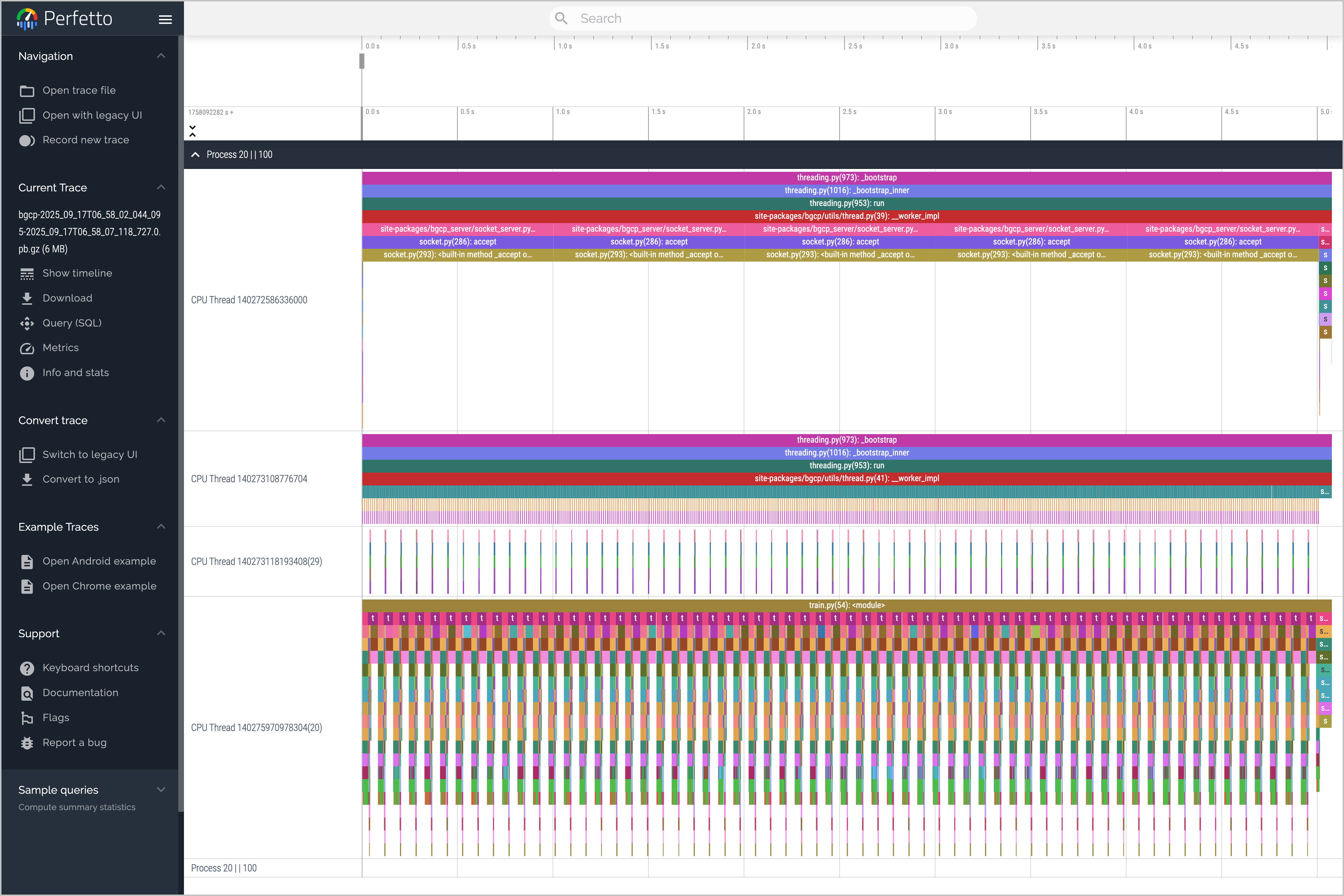
- Click the task name to go to the task details page. Click Download in the Diagnosis result section to download the AI profiling diagnostic result file to your on-premises computer. You can upload the profiling file to the Perfetto online tool for visualized analysis.
-
Last updated: 2026.07.24 10:53:33
All rights reserved © Beijing Volcano Engine Technology Co., Ltd2024
