Volcengine Kubernetes Engine
Volcengine Kubernetes Engine


Document

- Documentation
 Volcengine Kubernetes EngineVolcengine Container InstanceUser guideVCI Image CacheCreating VCIs by using manually created image caches
 Copy page
 Download PDF
VCI Image Cache
Creating VCIs by using manually created image caches
Copy pageDownload PDFCreating VCIs by using manually created image caches
During container creation, image pulling often takes a long time. To address this problem, you can use the manual image caching solution to accelerate VCI creation.
Usage limits
- Each Volcano Engine root user, including IAM users, can have up to 20 image caches, excluding image caches that are being deleted (status: [Deleting,*]). If this upper limit is reached, new image caches cannot be created. You can delete image caches that are no longer used, or submit a ticket to apply for a quota increase.
- VCI supports instant availability of EBS to shorten the time from image cache creation to availability. This feature is currently in beta in EBS. To use it, contact your account manager of Volcano Engine.
Usage methods
Step 1: Prepare a container image
Prepare the container image to be used for creating a VCI. You can use images from Volcano Engine CR as well as images from third-party container registries. To upload an image to CR, see Pushing and pulling images.
Step 2: Create an image cache
- Log in to the VKE console.
- In the left navigation bar, click Volcengine Container Instance > Image Cache. On the page that appears, click Create Image Cache.
- On the Create Image Cache page, complete Image Cache configuration according to the system prompts.
- ParameterDescriptionBasic configurationNameSet the image cache name based on the on-screen prompts. The image cache name must be unique within the same region.VPCSelect a VPC for the image cache. A VPC provides an isolated, self-configurable, and self-managed virtual network environment for image caches. If no VPC is available, follow the steps described in Creating VPC to create one.SubnetSelect a subnet within the selected VPC to provide a subnet CIDR block for the image cache. If no subnet is available, click Create subnet to create one. For details, see Creating subnets.tipThe first subnet is used by default to create the temporary pod resources required for the image cache.Security groupTo ensure that the image cache and related features can function normally, associate the security groups of the selected VPC.Image Cache capacitySet the size of the image cache. The default is 40 GiB, and the size range is 40 GiB to 500 GiB.Container image settingsContainer imageSelect or enter the container image that will be used to create the image cache. The following image sources are supported:
- If the container registry is Volcano Engine CR, enter the CR image address or click Choose your own image to select an image from the target CR instance in the panel that pops up on the right.
warningAfter selecting the target CR image, you also need to specify an image tag. If no tag is selected, the image with the tag latest will be pulled by default. If no image with the latest tag exists, the image cache creation will fail.- If the container registry is a third-party container registry, enter the address of the third-party container registry. The entered image address can include a tag (such as example.com/namespace/repository:v1), or the tag can be entered in the Image tag field.
Click Add container image to add multiple images.Container Registry configurationContainer Registry access credentialsWhen the added container image is private, click Add access credentials to configure container registry access credentials.- Access domain name: The domain name of the container registry. Note that you should not include the http:// or https:// prefix. An example is cr-cn-beijing.volces.com.
- Username: The username for accessing the container registry.
- Password: The password of the username for accessing the container registry.
Advanced settingsAnnotationConfigure an annotation for the image cache. You can only configure the following two annotations to configure bill splitting for the image cache:- vci.volcengine.com/image-cache-resource-tags: Add tags for the image cache to perform bill splitting based on tags. The requirements for custom tags are as follows:
- The supported format is string.
- Each tag consists of a key-value pair in the key:value format. Multiple tags are separated by commas (,). For example, "k1:v1,k2:v2" means that two tags are set for the image cache: k1:v1 and k2:v2.
- The requirements for a tag key are as follows:
- It cannot start with volc: in any case variation.
- It can only contain characters, digits, spaces, and special characters _.:/=+-@.
- The length is limited to 1 to 128 characters.
- The requirements for a tag value are as follows:
- This can be left blank.
- It can only contain characters, digits, spaces, and the following special characters: _.:/=+-@.
- Its length does not exceed 256 characters.
- A single image cache supports up to 50 tags.
- If a tag with the same key already exists for the image cache, adding the tag key again through this annotation overwrites the original tag value.
- Tag keys and values do not allow leading or trailing spaces.
warningAfter adding tags for the image cache, you need to enable bill tags in the billing center console at Billing management - Bill tags and apply the corresponding tags to the bill details. For details, see Cost tags and Tag-based bill splitting.- vci.volcengine.com/image-cache-project-name: Associate a project with the image cache to perform bill splitting based on projects. Take note of the following items when you enter the project name:
- If you enter a project name that does not exist, an error is reported when you create the image cache.
- If this annotation is not configured, which means that no project is associated, the image cache uses the default project by default.
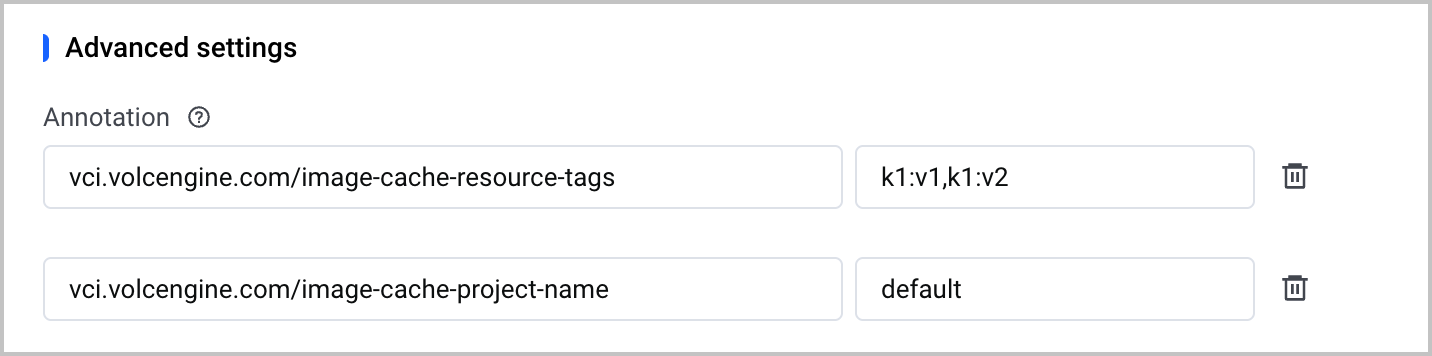 Image Cache incremental productionIf you select Enable, specify an existing base image cache and enable incremental image cache creation. The newly created image cache will reuse the image layer of the specified image cache, which accelerates cache creation.
- Click Next: Configuration confirmation to confirm the image cache configuration and read the terms of service.
- If you confirm that the configuration is correct and have no objections to the terms of service, check I have read and agree to Volcengine Kubernetes Engine Specific Terms of Service and click Confirm to create the image cache.
tip
After the image cache is created, its default expiration time is 15 days. If the image cache is used for creation of a VCI, the expiration time is refreshed to "Time of matching + 15 days." If it is not used for 15 consecutive days, it is automatically cleaned up. To modify the expiration time of an image cache, call the API UpdateImageCacheRetentionDays.
Step 3: Accelerate VCI creation with manual image caching
After confirming that the target image cache is available, you can use it to create a large number of VCI pods. You can use the following methods:
tip
- To ensure that a VCI created using an image cache can function normally, manually specify the system disk size by adding a pod annotation when creating the VCI. This practice helps ensure enough space for storing the image cache and deploying VCI system components. For more information, see Pod annotations.
- The annotation key is vci.vke.volcengine.com/desired-system-storage, and the annotation value should be set according to the following principles:
- Automatic image cache matching: Image size × 2 to image size × 2.5. For example, if the image size selected for VCI creation is 20 GiB, you need to specify a system volume size of 40 GiB to 50 GiB.
- Manually specified image cache: Image cache capacity + 20 GiB. For example, if your image cache size is 60 GiB, you need to specify a system volume size of 80 GiB.
- The capability of manually specifying the system volume size is in beta. To use this capability, submit an application.
When creating a VCI, select an image that has already been cached. For details, see Creating instances.
The system automatically matches the optimal image cache based on the matching strategy to create VCIs. For the strategy of automatically matching image caches, see Using image caches.
Add a specific annotation to spec·template·metadata of the VCI. For details, see Creating instances. The specified image cache will be used to create the VCI.
warning
VCI will perform pre-checks on the status of the image cache specified by vci.vke.volcengine.com/image-cache-id. Ensure the specified image cache is in the Available or [Ready.Ok] state. Otherwise, an error will occur and the VCI pod cannot be created.
Related documentation
Last updated: 2026.08.13 20:38:29
All rights reserved © Beijing Volcano Engine Technology Co., Ltd2024
