Volcengine Kubernetes Engine
Volcengine Kubernetes Engine
Volcengine Kubernetes Engine


Document
Volcengine Kubernetes Engine
What's New
History feature release notes
Kubernetes version release notes
Containerd runtime release notes
Add-on release notes
Monitoring add-ons
Scheduling add-ons
DNS add-ons
Security add-ons
GPU add-ons
Sandbox add-on
Security announcements
Product Announcement
Historical announcements
Overview
Getting started
User guide
Clusters
Creating clusters
Connecting to clusters
Upgrading clusters
Node pool
Creating node pools
Scaling out/in node pools
Nodes
Authorization management
Image
Namespaces
Networking
Cluster network
Container Network
Service
LoadBalancer
CLB
Ingress
APIG Ingress
ALB Ingress
Customize ALB Ingress forwarding rules
Certificate and security
CLB Ingress
Nginx Ingress
Gateway API
Workloads
Creating workloads
Configure workloads
Pods
Configuration management
Image acceleration
Storage
FSX client
EBS Volumes
TOS Volumes
NAS volumes
FSX access methods
NFS access methods
EFS volumes
vePFS volumes
FSX access methods
vePFS Client access methods
NFS access methods
CloudFS volumes
Local volumes
Autoscale
Node autoscaler
Workload autoscaler
Horizontal Pod Autoscaler (HPA)
Cron Horizontal Pod Autoscaler (CronHPA)
Intelligent Horizontal Pod Autoscaler (IHPA)
Horizontal Pod Autoscaler based on event-driven (KEDA)
Add-on management
Network add-ons
Storage add-ons
Monitoring add-ons
Scheduling add-ons
DNS add-ons
GPU add-ons
Core add-ons
Sandbox add-on
Upgrading add-ons
Heterogeneous computing
NVIDIA GPU
mGPU scheduling
RDMA high-performance computing
Scheduling management
Topology-aware scheduling
QoS-aware scheduling
Observability
Log management
Basic observation
Setup & Configuration
Cluster observation
Storage observation
Other observation
Using metrics
Full stack observation
Alert management
Diagnosis and inspection
Node check and self-healing
Application center
Backup center
Stability
Large-scale cluster management
Best practices
Authorization
Clusters
Nodes and node pools
Networking
Storage
Scheduling
Observability
Solution
Security and compliance
API reference
Cluster management
NodePool management
Node management
Virtual nodes management
Add-on management
Tag management
Access policy management
Instance images management
Cloud native observability
Inspection and diagnosis
Task management
Volcengine Container Instance
Appendix
SDK reference
Development guide
Terraform
FAQs
General FAQs
Cluster FAQ
cluster management
cluster network
cluster upgrade
Node and Node pool FAQs
Authorization FAQs
Workload FAQs
Service and Ingress FAQs
Storage FAQs
Heterogeneous computing FAQs
Observability FAQs
Quota FAQs
Add-on FAQs
Cloud-native AI
ServingKit
LLM applications
ComfyUI application
Deploying the Al inference application through Helm
Deepseek practices
Qwen practices
Kimi practice
Seed practices
Best practices
DeepSeek model deployment
GLM model deployment
MiniMax model deployment
Qwen model deployment
Kimi model deployment
Volcengine Container Instance
What's new
Historical feature release notes
Product Announcement
Overview
Billing
User guide
Integrating with VCI
Virtual node
VKE cluster uses virtual nodes
Self-managed/third-party cluster uses virtual node
Creating an instance
General purpose instance
GPU-accelerated computing instance
VCI Agent Sandbox
Startup acceleration
E2B-based management
Upgrade guide
Networking
Monitoring
Scheduling
Container configuration
VCI Image Cache
Best practices
Security and compliance
FAQs
- Documentation
 Volcengine Kubernetes EngineVolcengine Kubernetes EngineUser guideClustersConnecting to clustersManaging access credentials
 Copy page
 Download PDF
Connecting to clusters
Managing access credentials
Copy pageDownload PDFManaging access credentials
VKE enables you to manage cluster access credentials. This topic describes how to manage the KubeConfig access credentials for clusters.
Considerations
- For each Volcano Engine root user and its IAM users, up to five KubeConfig files for private access and five KubeConfig files for public access can be generated in a single cluster. The quotas of a root user and its IAM users are counted separately. For more information about limits, see Limit.
- When a cluster KubeConfig file is about to expire (with a validity period of less than 30 days), the system will report an event to the Cloud Monitor event center. You can configure an alerting rule for the KubeConfig file expiration event. For detailed instructions, see Creating event rules.
Manage KubeConfig
- Log in to the VKE console.
- In the left navigation bar, click Cluster. In the right part of the page, click the target cluster name to open the management page of this cluster.
- On the Overview page, click the Connection tab to manage the cluster KubeConfig access credentials.
-
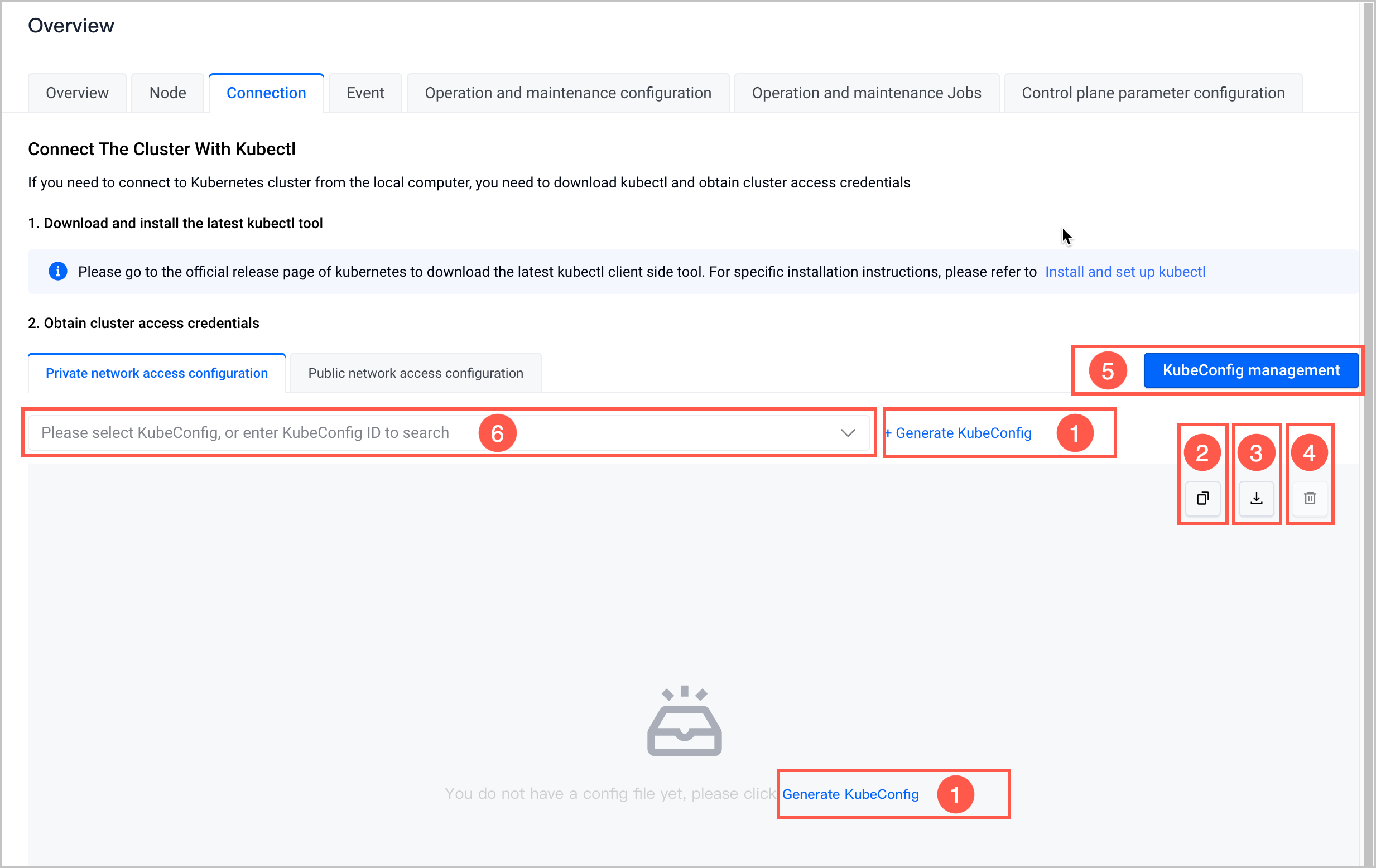
- No.FeatureDescriptionNo.FeatureDescription①Generate KubeConfigClick Generate KubeConfig. Specify the Valid period and Description parameters, and then click Confirm to generate a new KubeConfig file for public access or private access. The Description parameter is optional.②Copy KubeConfigCopy the current KubeConfig file content to the temporary clipboard.③Download KubeConfigDownload the current KubeConfig file to your on-premises computer.④Revoke KubeConfigRevoke (delete) the current KubeConfig file.warningRevoking a valid KubeConfig file is irreversible and will affect the connection to the related cluster. Proceed with caution.⑤Manage KubeConfigManage and view the generated KubeConfig file within the current account.tip
- You can view and manage the KubeConfig files generated within the current account and all its IAM users as a Volcano Engine root user.
- [Beta · Apply for Trial] You can view all generated KubeConfig files in the current cluster as an IAM user granted cluster administrator permissions.
⑥Switch KubeConfigYou can switch to view the KubeConfig files generated within the current account.
Last updated: 2026.08.20 14:07:21
All rights reserved © Beijing Volcano Engine Technology Co., Ltd2024
