Volcengine Kubernetes Engine
Volcengine Kubernetes Engine
Volcengine Kubernetes Engine


Document
Volcengine Kubernetes Engine
What's New
History feature release notes
Kubernetes version release notes
Containerd runtime release notes
Add-on release notes
Monitoring add-ons
Scheduling add-ons
DNS add-ons
Security add-ons
GPU add-ons
Sandbox add-on
Security announcements
Product Announcement
Historical announcements
Overview
Getting started
User guide
Clusters
Creating clusters
Connecting to clusters
Upgrading clusters
Node pool
Creating node pools
Scaling out/in node pools
Nodes
Authorization management
Image
Namespaces
Networking
Cluster network
Container Network
Service
LoadBalancer
CLB
Ingress
APIG Ingress
ALB Ingress
Customize ALB Ingress forwarding rules
Certificate and security
CLB Ingress
Nginx Ingress
Gateway API
Workloads
Creating workloads
Configure workloads
Pods
Configuration management
Image acceleration
Storage
FSX client
EBS Volumes
TOS Volumes
NAS volumes
FSX access methods
NFS access methods
EFS volumes
vePFS volumes
FSX access methods
vePFS Client access methods
NFS access methods
CloudFS volumes
Local volumes
Autoscale
Node autoscaler
Workload autoscaler
Horizontal Pod Autoscaler (HPA)
Cron Horizontal Pod Autoscaler (CronHPA)
Intelligent Horizontal Pod Autoscaler (IHPA)
Horizontal Pod Autoscaler based on event-driven (KEDA)
Add-on management
Network add-ons
Storage add-ons
Monitoring add-ons
Scheduling add-ons
DNS add-ons
GPU add-ons
Core add-ons
Sandbox add-on
Upgrading add-ons
Heterogeneous computing
NVIDIA GPU
mGPU scheduling
RDMA high-performance computing
Scheduling management
Topology-aware scheduling
QoS-aware scheduling
Observability
Log management
Basic observation
Setup & Configuration
Cluster observation
Storage observation
Other observation
Using metrics
Full stack observation
Alert management
Diagnosis and inspection
Node check and self-healing
Application center
Backup center
Stability
Large-scale cluster management
Best practices
Authorization
Clusters
Nodes and node pools
Networking
Storage
Scheduling
Observability
Solution
Security and compliance
API reference
Cluster management
NodePool management
Node management
Virtual nodes management
Add-on management
Tag management
Access policy management
Instance images management
Cloud native observability
Inspection and diagnosis
Task management
Volcengine Container Instance
Appendix
SDK reference
Development guide
Terraform
FAQs
General FAQs
Cluster FAQ
cluster management
cluster network
cluster upgrade
Node and Node pool FAQs
Authorization FAQs
Workload FAQs
Service and Ingress FAQs
Storage FAQs
Heterogeneous computing FAQs
Observability FAQs
Quota FAQs
Add-on FAQs
Cloud-native AI
ServingKit
LLM applications
ComfyUI application
Deploying the Al inference application through Helm
Deepseek practices
Qwen practices
Kimi practice
Seed practices
Best practices
DeepSeek model deployment
GLM model deployment
MiniMax model deployment
Qwen model deployment
Kimi model deployment
Volcengine Container Instance
What's new
Historical feature release notes
Product Announcement
Overview
Billing
User guide
Integrating with VCI
Virtual node
VKE cluster uses virtual nodes
Self-managed/third-party cluster uses virtual node
Creating an instance
General purpose instance
GPU-accelerated computing instance
VCI Agent Sandbox
Startup acceleration
E2B-based management
Upgrade guide
Networking
Monitoring
Scheduling
Container configuration
VCI Image Cache
Best practices
Security and compliance
FAQs
- Documentation
 Volcengine Kubernetes EngineVolcengine Kubernetes EngineUser guideClustersCluster overview
 Copy page
 Download PDF
Clusters
Cluster overview
Copy pageDownload PDFCluster overview
In Volcengine Kubernetes Engine (VKE), a cluster corresponds to a Kubernetes cluster and is a collection of computing, storage, and network resources in VKE.
Cluster type
Managed cluster
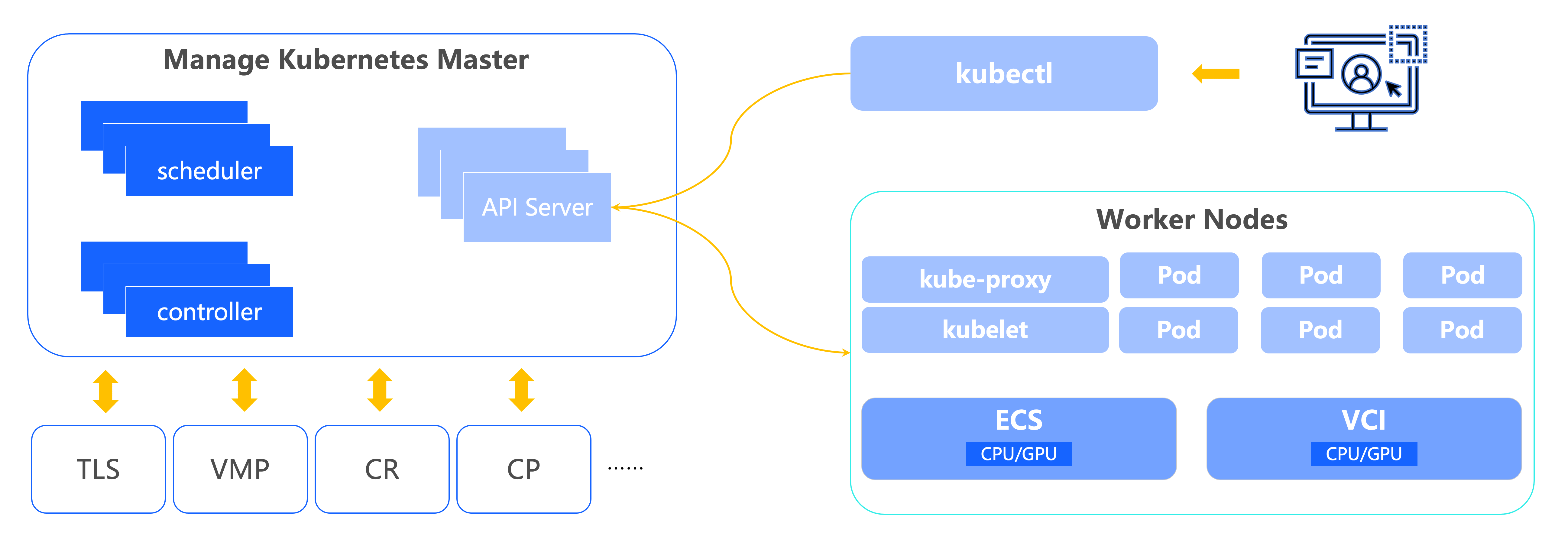
A managed cluster supports three node types: ECS instances, VCI instances, or a combination of both. This provides great node provisioning flexibility in addition to standard Kubernetes functionality such as workload scheduling, orchestration, and observability. VKE automates management and maintenance of master nodes, eliminating the complexity and infrastructure costs of self-managed Kubernetes. You can focus on worker nodes that run your business workloads.
Registered cluster
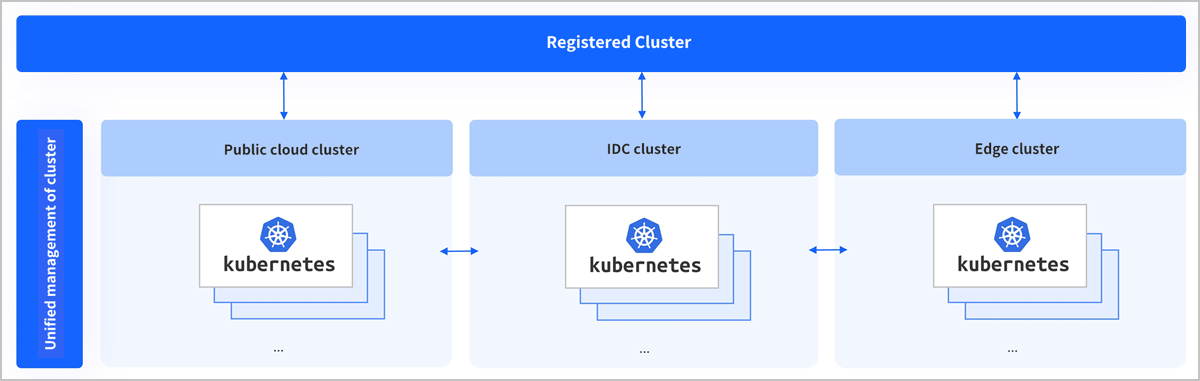
Registered clusters can be connected to standard Kubernetes clusters across different regions and infrastructures, and can also manage them. Registered clusters can manage the following clusters: local clusters, third-party public cloud clusters, IDC self-built clusters, edge clusters, and other Kubernetes clusters that meet Cloud Native Computing Foundation (CNCF) standards, such as Alibaba Cloud ACK, Tencent Cloud TKE, Huawei Cloud CCE, Google Cloud GKE, Amazon EKS, Baidu Cloud CCE, and custom clusters.
tip
[Beta - apply for trial] Registered clusters are currently at the beta stage. To use this feature, submit an application.
Cluster features
Feature | Managed cluster | Registered cluster |
Feature | Managed cluster | Registered cluster |
Cluster management |
|
|
Node and node pool | Leverage custom or managed node pools with global scaling capabilities to streamline node management and adapt to diverse operational scenarios. | Node pools do not exist in registered clusters. You can only view and perform basic management operations on infrastructure resources (nodes) and cannot perform creation and deletion operations. |
Workload/application management |
|
|
Authorization management |
|
|
Observability | Utilize robust observability through a comprehensive set of metrics and flexible dashboard settings to effectively monitor containerized applications with complex architectures and dynamic resource demands. | Provides monitoring and collection add-ons, which can collect metrics, send the metrics to VMP for storage, and provide preset monitoring dashboards. |
Scheduling | Rich scheduling policies meet business requirements in different scenarios, such as online and offline workloads. Examples include task scheduling, topology-aware scheduling, ResourcePolicy, and CPU Burst, helping maximize resource utilization while ensuring application performance. | Scheduling capabilities depend on the original Kubernetes cluster. VKE does not provide additional scheduling enhancements. |
Storage management | Seamlessly integrate with various storage resources, such as EBS, TOS, and FileNAS to provide container applications with a wide range of persistent storage options. For more information, see Storage overview. | You can manage storage in registered clusters by using YAML. The storage types and usage methods vary based on different cloud providers. The specific YAML parameters and configurations are subject to the definitions provided by each cloud provider in actual scenarios. |
Add-on management | You can install and manage various add-ons, including add-ons of the Network, Storage, Monitoring, DNS, Security, Image, and GPU types, to meet your different business requirements. | VKE provides the following two add-ons for the registered cluster:
|
Cluster lifecycle
The lifecycle of a cluster encompasses all possible states that it transitions through, from creation to deletion. For a description of the cluster lifecycle and state transitions, see Resource status description.
Last updated: 2026.07.24 10:53:31
All rights reserved © Beijing Volcano Engine Technology Co., Ltd2024
