Volcengine Kubernetes Engine
Volcengine Kubernetes Engine
Volcengine Kubernetes Engine


Document
Volcengine Kubernetes Engine
What's New
History feature release notes
Kubernetes version release notes
Containerd runtime release notes
Add-on release notes
Monitoring add-ons
Scheduling add-ons
DNS add-ons
Security add-ons
GPU add-ons
Sandbox add-on
Security announcements
Product Announcement
Historical announcements
Overview
Getting started
User guide
Clusters
Creating clusters
Connecting to clusters
Upgrading clusters
Node pool
Creating node pools
Scaling out/in node pools
Nodes
Authorization management
Image
Namespaces
Networking
Cluster network
Container Network
Service
LoadBalancer
CLB
Ingress
APIG Ingress
ALB Ingress
Customize ALB Ingress forwarding rules
Certificate and security
CLB Ingress
Nginx Ingress
Gateway API
Workloads
Creating workloads
Configure workloads
Pods
Configuration management
Image acceleration
Storage
FSX client
EBS Volumes
TOS Volumes
NAS volumes
FSX access methods
NFS access methods
EFS volumes
vePFS volumes
FSX access methods
vePFS Client access methods
NFS access methods
CloudFS volumes
Local volumes
Autoscale
Node autoscaler
Workload autoscaler
Horizontal Pod Autoscaler (HPA)
Cron Horizontal Pod Autoscaler (CronHPA)
Intelligent Horizontal Pod Autoscaler (IHPA)
Horizontal Pod Autoscaler based on event-driven (KEDA)
Add-on management
Network add-ons
Storage add-ons
Monitoring add-ons
Scheduling add-ons
DNS add-ons
GPU add-ons
Core add-ons
Sandbox add-on
Upgrading add-ons
Heterogeneous computing
NVIDIA GPU
mGPU scheduling
RDMA high-performance computing
Scheduling management
Topology-aware scheduling
QoS-aware scheduling
Observability
Log management
Basic observation
Setup & Configuration
Cluster observation
Storage observation
Other observation
Using metrics
Full stack observation
Alert management
Diagnosis and inspection
Node check and self-healing
Application center
Backup center
Stability
Large-scale cluster management
Best practices
Authorization
Clusters
Nodes and node pools
Networking
Storage
Scheduling
Observability
Solution
Security and compliance
API reference
Cluster management
NodePool management
Node management
Virtual nodes management
Add-on management
Tag management
Access policy management
Instance images management
Cloud native observability
Inspection and diagnosis
Task management
Volcengine Container Instance
Appendix
SDK reference
Development guide
Terraform
FAQs
General FAQs
Cluster FAQ
cluster management
cluster network
cluster upgrade
Node and Node pool FAQs
Authorization FAQs
Workload FAQs
Service and Ingress FAQs
Storage FAQs
Heterogeneous computing FAQs
Observability FAQs
Quota FAQs
Add-on FAQs
Cloud-native AI
ServingKit
LLM applications
ComfyUI application
Deploying the Al inference application through Helm
Deepseek practices
Qwen practices
Kimi practice
Seed practices
Best practices
DeepSeek model deployment
GLM model deployment
MiniMax model deployment
Qwen model deployment
Kimi model deployment
Volcengine Container Instance
What's new
Historical feature release notes
Product Announcement
Overview
Billing
User guide
Integrating with VCI
Virtual node
VKE cluster uses virtual nodes
Self-managed/third-party cluster uses virtual node
Creating an instance
General purpose instance
GPU-accelerated computing instance
VCI Agent Sandbox
Startup acceleration
E2B-based management
Upgrade guide
Networking
Monitoring
Scheduling
Container configuration
VCI Image Cache
Best practices
Security and compliance
FAQs
- Documentation
 Volcengine Kubernetes EngineVolcengine Kubernetes EngineUser guideNodesNode operation and maintenanceCalculating schedulable Pod density for nodes
 Copy page
 Download PDF
Node operation and maintenance
Calculating schedulable Pod density for nodes
Copy pageDownload PDFCalculating schedulable Pod density for nodes
This topic describes how schedulable Pod density is calculated for nodes in Volcengine Kubernetes Engine (VKE). Based on these rules, you can choose higher-specification and newer ECS instance types according to your workload requirements.
View schedulable Pods for nodes
VKE allows you to view schedulable Pod density for nodes in the console.
- Log in to the VKE console.
- In the left navigation bar, click Cluster.
- On the Cluster page, find the target cluster and click its name.
- In the left navigation pane on the cluster management page, click Nodes > Node.
- View the schedulable Pod density for each node on the Node page.
-

-
- ParameterDescriptionParameterDescriptionAllocated amountThe number of Pods already scheduled onto the current node.Total amountThe theoretical number of schedulable Pods for the current node is the value of the kubelet parameter max-pods for the node.warning
- The value displayed in the total amount column is the theoretical number of schedulable Pods. The actual number of schedulable Pods for the node depends on the network model of the cluster where the node resides, as well as the instance specification of the corresponding ECS instance. For detailed calculation methods, see the Calculate schedulable Pods for nodes section of this topic.
- VKE allows you to modify the max-pods value of a node by using custom kubelet parameters. For detailed operations, see Specifying node kubelet parameters.
Calculate schedulable Pods for nodes
The method for calculating schedulable Pod density on nodes varies among clusters that use different container network models.
Flannel cluster
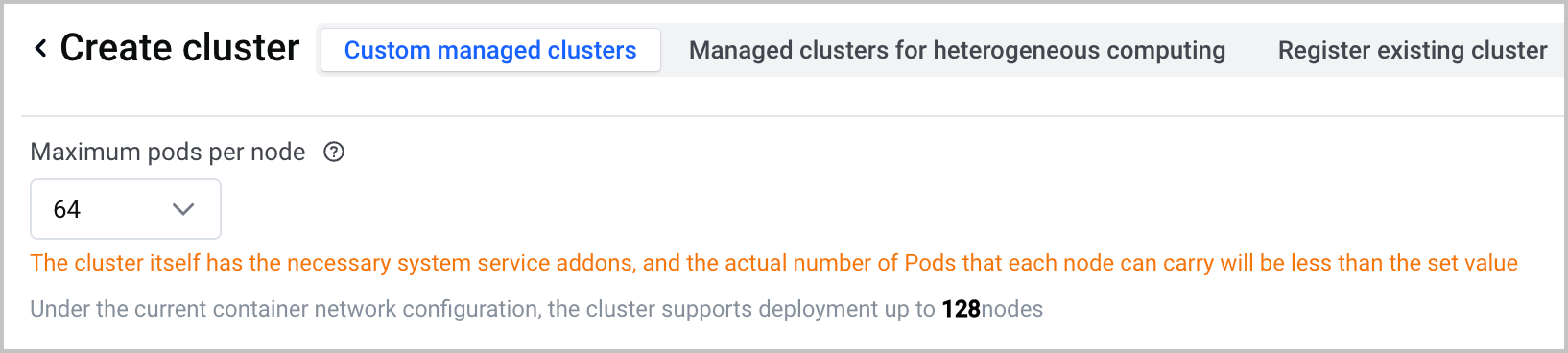
In a Flannel cluster, the actual number of schedulable Pods per node is the minimum value between the node kubelet parameter max-pods and the Maximum number of Pod instances per node parameter specified in the console. For example, if max-pods is set to 110 and Maximum number of Pod instances per node is set to 64, the actual schedulable Pod density per node in the current cluster is 64.
tip
Maximum number of Pod instances per node is a parameter that can be specified when you create a Flannel cluster in the console. Its value cannot be modified after the cluster is created. For detailed operations, see Creating managed clusters.
VPC-CNI cluster
With this network model, pod density on each node depends on the ECS specification.
If the ECS instance type of a node supports Trunk ENIs and the current cluster has Trunk ENI enabled, Pod density is calculated by using the following formula:
- Pod density = (Total number of elastic ENIs supported by the ECS specification for the node - 2) × Number of IP addresses that can be assigned to a single ENI + One Pod used by the VPC-CNI add-on + Number of Branch
- If the Trunk ENI mode is not enabled for the current cluster, the pod density is calculated via the following formula:
- Pod density = (Total number of elastic ENIs supported by the ECS specification for the node - 1) × Number of IP addresses that can be assigned to a single ENI + One Pod used by the VPC-CNI add-on
tip
- The preceding formula calculates the Pod density assigned to a node by the cluster. To calculate the actual Pod density available to the user, subtract the Pods used by the VPC-CNI add-on. If the value of the node kubelet parameter max-pods is less than the value calculated through the preceding formula, the actual schedulable Pod density of the node is subject to the value of max-pods.
- In a VPC-CNI cluster, the number of pods allowed on a node depends on the number of elastic network interfaces (ENI) available for an ECS instance that corresponds to a node. The formula above can help you select an appropriate ECS specification.
- Different specifications of ECS instances vary in the number of ENIs. For details, see Instance specifications.
Last updated: 2026.07.24 14:51:35
All rights reserved © Beijing Volcano Engine Technology Co., Ltd2024
