Volcengine Kubernetes Engine
Volcengine Kubernetes Engine


Document

- Documentation
 Volcengine Kubernetes EngineVolcengine Kubernetes EngineUser guideHeterogeneous computingmGPU schedulingImplementing online-offline hybrid deployment based on mGPUs
 Copy page
 Download PDF
mGPU scheduling
Implementing online-offline hybrid deployment based on mGPUs
Copy pageDownload PDFImplementing online-offline hybrid deployment based on mGPUs
The mGPU online/offline hybrid deployment is applied on the same GPU card within VKE clusters. This maximizes GPU resource utilization and effectively reduces computing costs. This topic provides a detailed introduction to the technical principles and implementation steps of the scheduling solution for mGPU online/offline hybrid deployment.
Background
Feature overview
By default, mGPU employs a fair‑scheduling policy to allocate GPU resources. Its kernel driver assigns equal GPU time slices to different types of tasks. However, different GPU computing tasks exhibit significant variations in their operation characteristics and priorities, leading to correspondingly diverse resource requirements. At this point, online/offline hybrid deployment technology can be leveraged to completely unlock the potential of GPU computing power. For example, real‑time inference tasks are sensitive to GPU resource latency and require quick access to computing power to complete calculations, yet their resource utilization is typically low. On the other hand, model training tasks demand substantial computing resources but are less sensitive to latency and can tolerate a certain degree of computation throttling. By deploying with the hybrid online/offline technology, the overall GPU resource utilization can be effectively improved, maximizing the value of computing power.
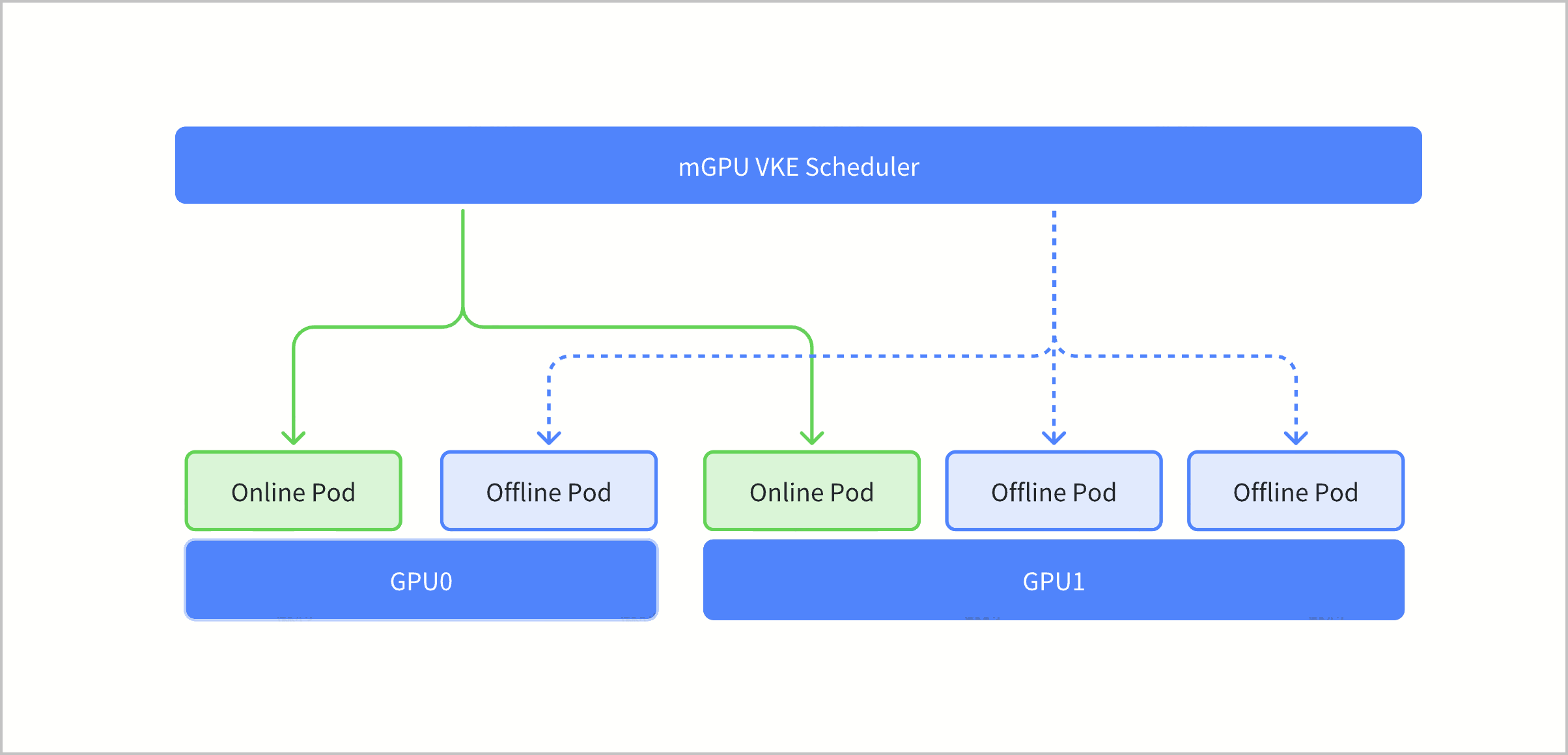
The online-offline hybrid deployment feature of mGPU deploys online tasks and offline tasks on the same GPU. At the kernel and driver level, this feature enables offline tasks to use 100% idle computing power and enables online tasks to preempt offline tasks with absolute priority, which maximizes GPU resource utilization and minimizes GPU costs.
Application scenario
For business scenarios where GPU computing demands are complementary, adopting online/offline hybrid deployment can maximize the potential of GPU resources.
Typical scenario | Scenario description |
Hybrid deployment of online and offline inference | Search, recommendation, and other real-time inference tasks require performing logical reasoning based on existing data to generate results, imposing stringent demands on the real-time capabilities of GPU computing power. In contrast, data preprocessing and other offline inference tasks primarily serve offline data cleaning and processing workflows and have relatively looser requirements regarding the real‑time availability of computing resources. By specifying the two types of jobs as online and offline jobs, and assigning them to a single GPU card, a significant improvement in GPU resource utilization can be achieved. |
Hybrid deployment of online inference and offline training | Search, recommendation, and other real‑time inference tasks require logical reasoning based on existing data to generate results. Their key characteristic is a high demand for real‑time GPU computing performance, while their actual resource consumption is relatively low. In contrast, model training tasks encompass stages such as data preparation, parameter configuration, model evaluation, and tuning, which demand large‑scale GPU computing resources but are less sensitive to latency. Configuring real‑time inference as high‑priority online tasks and model training as low‑priority offline tasks, then assigning them to a single GPU card, can further enhance GPU resource utilization efficiency. |
Technical principles
- 100% utilization of idle GPU computing power by offline pods.
After an offline pod is scheduled to the GPU of a node, if the GPU computing power is not currently occupied by online pods, the offline pod can fully utilize the entire GPU computing capacity. When multiple offline pods share GPU resources, the allocation of computing power will follow the pre‑defined computing scheduling policy of mGPU.
- 100% absolute preemption of offline pod computing power by online pods.
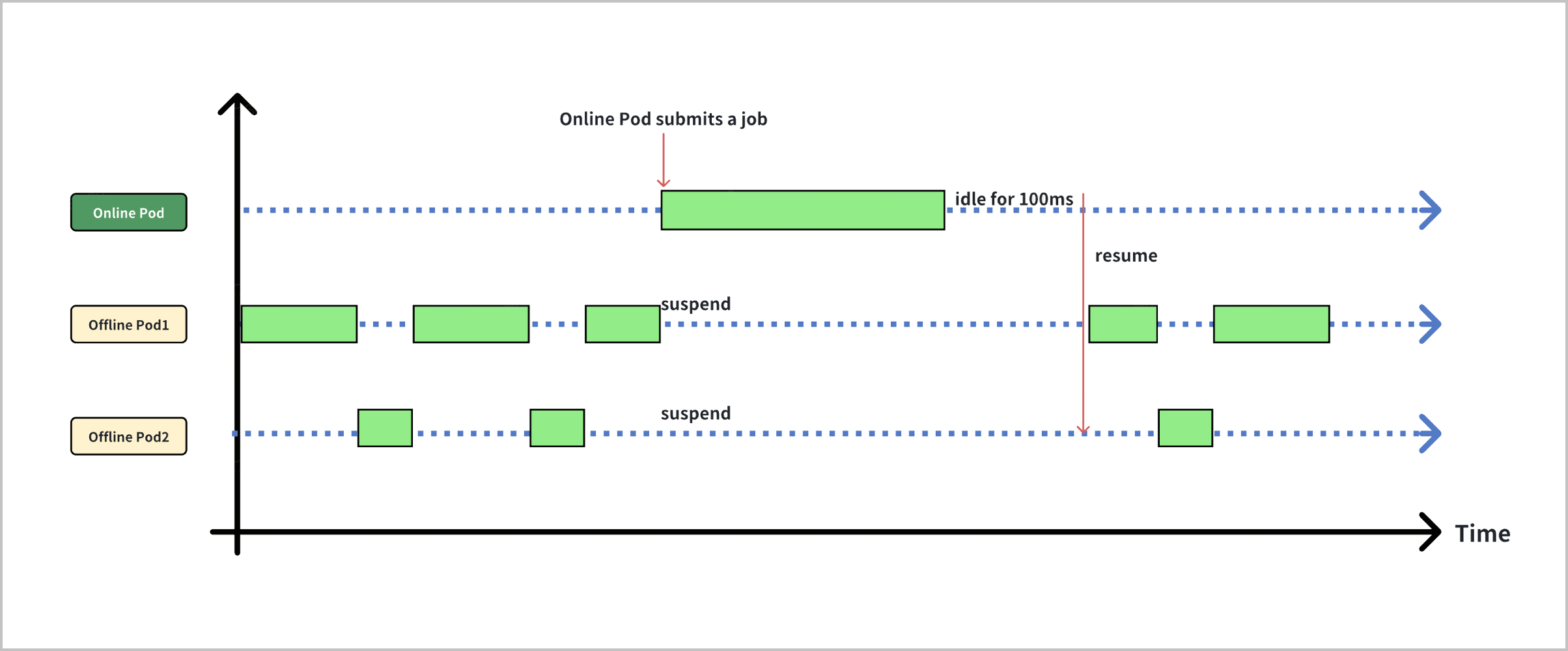
The mGPU driver layer incorporates a priority-based absolute preemption mechanism, with the specific implementation logic detailed below:
- Instant resource scheduling: When an online pod submits a computing task that requires GPU resources, the mGPU driver immediately allocates the full GPU computing power to that pod. If multiple online pods share computing resources, the allocation rules also follow the mGPU computing scheduling policy. When no online pod has active tasks running, the driver releases the occupied computing power after 100 ms and reallocates the resources to offline pods.
- Task checkpoint and resume: The mGPU driver supports the suspension and resumption of computing tasks. When an online pod requests computing resources, any offline pod currently occupying GPU resources is immediately suspended and its computing power is released. Once the online pod task is completed, the offline pod is automatically resumed and continues its computation from the point of interruption.
Prerequisites
- mGPU resource configuration has been completed, including installing the mGPU component and creating GPU nodes. For details, see How to use mGPU.
- The mGPU computing power allocation policy has been configured. For the online/offline hybrid deployment scenario, mGPU supports the fixed‑share and guaranteed‑burst‑share policies. For details, see Configuring mGPU computing power allocation policies.
Usage limits
- In the online/offline hybrid deployment scenario, only the fixed‑share and guaranteed‑burst‑share computing power allocation policies are currently supported. The native‑burst‑share policy is not yet available for this use case. To guarantee the maximum performance for online jobs, we recommend using the guaranteed‑burst‑share computing power allocation policy.
- Multi-card sharing mode does not support online-offline hybrid deployment.
- Preemption between online and offline tasks is exclusively available for computing power but is unavailable for memory.
- Nodes that use the velinux2.0/ubuntu22.04 image do not support online-offline hybrid deployment.
Procedure
Step 1: Configure a cluster
The mGPU online/offline hybrid deployment feature relies on multiple components within the container cluster. We recommend deploying it on a newly created cluster and nodes. If you want to use existing clusters and nodes, submit a ticket to obtain technical support to upgrade dependency add-ons. Detailed requirements for each add-on are as follows:
Dependency add-on | Version restrictions | View method |
Kubernetes |
| You can visit the console of the cluster and find the current version of Kubernetes in the cluster basic information page. See How to find the Kubernetes version of a cluster? for details. |
mGPU driver | 0.07.35.23 and later | Log in to the Elastic Compute Service (ECS) instance associated with mGPU, and run the mgpu-cli version command to view the mGPU driver version. |
mGPU add-on | v0.6.0 and later | |
general-webhook | v1.20.0 and later | The managed add-on, which is invisible in the console. New clusters already use the add-on of the latest version. For existing clusters, you need to contact official technical support to check or upgrade the add-on version. |
Step 2: Configure businesses
You can deploy both online and offline pods within the cluster and schedule them to the same GPU card to compete for computing resources, thereby fulfilling the requirement for online/offline hybrid deployment.
You can identify offline pods by using the annotation katalyst.kubewharf.io/qos_level: reclaimed_cores and request offline computing power by using vke.volcengine.com/reclaimed-mgpu-core. An example YAML for an offline pod is as follows:
You can identify online pods either by using the annotation katalyst.kubewharf.io/qos_level: shared_cores or by omitting this annotation, and request online computing power by using vke.volcengine.com/mgpu-core. An example YAML for an online pod is as follows:
Validating results
After configuration is complete, you can observe the resource contention between online and offline jobs based on the scheduling status of the business pods:
- The scenario where only online tasks are running on a single GPU is not considered an online-offline hybrid deployment scenario. In this case, the original computing power allocation strategy takes effect.
- The scenario where only offline tasks are running on a single GPU is not considered an online-offline hybrid deployment scenario. In this case, the original computing power allocation strategy takes effect.
- The scenario where both online and offline tasks are running on a single GPU is considered an online-offline hybrid deployment scenario. In this case, when an online task is running, offline computing power will be completely suppressed, even if the online task does not fully utilize GPU computing power. When the actual GPU usage of the online task is zero, offline tasks can utilize 100% idle computing power.
Therefore, you can determine whether colocation is taking effect by monitoring the GPU compute utilization of both online and offline tasks on the GPU cards. For example, on the same GPU card, if an online task continuously uses GPU compute resources to process requests, the GPU compute utilization of the offline task will be consistently throttled to 0%.
Last updated: 2026.07.07 19:32:58
All rights reserved © Beijing Volcano Engine Technology Co., Ltd2024
