Volcengine Kubernetes Engine
Volcengine Kubernetes Engine
Volcengine Kubernetes Engine


Document
Volcengine Kubernetes Engine
What's New
History feature release notes
Kubernetes version release notes
Containerd runtime release notes
Add-on release notes
Monitoring add-ons
Scheduling add-ons
DNS add-ons
Security add-ons
GPU add-ons
Sandbox add-on
Security announcements
Product Announcement
Historical announcements
Overview
Getting started
User guide
Clusters
Creating clusters
Connecting to clusters
Upgrading clusters
Node pool
Creating node pools
Scaling out/in node pools
Nodes
Authorization management
Image
Namespaces
Networking
Cluster network
Container Network
Service
LoadBalancer
CLB
Ingress
APIG Ingress
ALB Ingress
Customize ALB Ingress forwarding rules
Certificate and security
CLB Ingress
Nginx Ingress
Gateway API
Workloads
Creating workloads
Configure workloads
Pods
Configuration management
Image acceleration
Storage
FSX client
EBS Volumes
TOS Volumes
NAS volumes
FSX access methods
NFS access methods
EFS volumes
vePFS volumes
FSX access methods
vePFS Client access methods
NFS access methods
CloudFS volumes
Local volumes
Autoscale
Node autoscaler
Workload autoscaler
Horizontal Pod Autoscaler (HPA)
Cron Horizontal Pod Autoscaler (CronHPA)
Intelligent Horizontal Pod Autoscaler (IHPA)
Horizontal Pod Autoscaler based on event-driven (KEDA)
Add-on management
Network add-ons
Storage add-ons
Monitoring add-ons
Scheduling add-ons
DNS add-ons
GPU add-ons
Core add-ons
Sandbox add-on
Upgrading add-ons
Heterogeneous computing
NVIDIA GPU
mGPU scheduling
RDMA high-performance computing
Scheduling management
Topology-aware scheduling
QoS-aware scheduling
Observability
Log management
Basic observation
Setup & Configuration
Cluster observation
Storage observation
Other observation
Using metrics
Full stack observation
Alert management
Diagnosis and inspection
Node check and self-healing
Application center
Backup center
Stability
Large-scale cluster management
Best practices
Authorization
Clusters
Nodes and node pools
Networking
Storage
Scheduling
Observability
Solution
Security and compliance
API reference
Cluster management
NodePool management
Node management
Virtual nodes management
Add-on management
Tag management
Access policy management
Instance images management
Cloud native observability
Inspection and diagnosis
Task management
Volcengine Container Instance
Appendix
SDK reference
Development guide
Terraform
FAQs
General FAQs
Cluster FAQ
cluster management
cluster network
cluster upgrade
Node and Node pool FAQs
Authorization FAQs
Workload FAQs
Service and Ingress FAQs
Storage FAQs
Heterogeneous computing FAQs
Observability FAQs
Quota FAQs
Add-on FAQs
Cloud-native AI
ServingKit
LLM applications
ComfyUI application
Deploying the Al inference application through Helm
Deepseek practices
Qwen practices
Kimi practice
Seed practices
Best practices
DeepSeek model deployment
GLM model deployment
MiniMax model deployment
Qwen model deployment
Kimi model deployment
Volcengine Container Instance
What's new
Historical feature release notes
Product Announcement
Overview
Billing
User guide
Integrating with VCI
Virtual node
VKE cluster uses virtual nodes
Self-managed/third-party cluster uses virtual node
Creating an instance
General purpose instance
GPU-accelerated computing instance
VCI Agent Sandbox
Startup acceleration
E2B-based management
Upgrade guide
Networking
Monitoring
Scheduling
Container configuration
VCI Image Cache
Best practices
Security and compliance
FAQs
- Documentation
 Volcengine Kubernetes EngineVolcengine Kubernetes EngineUser guideAdd-on managementStorage add-onssnapshot-controller
 Copy page
 Download PDF
Storage add-ons
snapshot-controller
Copy pageDownload PDFsnapshot-controller
The snapshot-controller is a storage snapshot control add-on. This topic describes its functionality, use cases, core resources, and how to install and upgrade it.
Add-on overview
snapshot-controller is a standard Kubernetes add-on that introduces a series of CustomResourceDefinitions (CRDs) and enables users to manage snapshots of PersistentVolumes (PVs) through a declarative API. In short, it provides unified snapshot management logic for CSI-compatible storage add-ons.
After the add-on is installed in a cluster, the system will create the following Kubernetes resources under the kube-system namespace.
Resource name | Resource type | Resource description |
Resource name | Resource type | Resource description |
snapshot-controller | Deployment | The core controller of the add-on. It is responsible for monitoring and processing API objects related to storage snapshots. |
VolumeSnapshot/VolumeSnapshotContent | CRD | User-created snapshot requests, and objects that represent a specific snapshot instance in the storage system. |
VolumeSnapshotClass | CRD | Defines a policy for creating a snapshot. For example, it describes the CSI driver to use and the snapshot reclaim policy. |
tip
The preceding table only lists the main resources of the add-on, as well as resources that may be used when the add-on or the corresponding feature is configured. This helps you understand the main components of this add-on. Other resources, such as ConfigMap and Secret, related to the add-on are not described here. You should refer to the actual resources in the cluster.
Add-on versions
For information about the historical release records of the add-on, as well as new features and optimization descriptions for each version, see Add-on release records.
Install the add-on
- Log in to the VKE console.
- In the left navigation pane, click Cluster. Click the target cluster name to go to the management page of this cluster.
- In the left navigation pane, select Addons and click the Storage tab.
- Move the pointer over the add-on card, click Deploy, and configure the add-on parameters.
- ParameterDescriptionParameterDescriptionDeployment methodThe deployment method of the add-on. This parameter is fixed and cannot be modified.Deployment modeThis parameter is displayed only for clusters for which the vci-virtual-kubelet add-on is installed. You can deploy the add-on on the following two types of nodes.
- Elastic Compute Service deployment: deploys the add-on on ECS nodes in the cluster.
- Volcengine Container Instance deployment: Deploys the add-on on a VCI with 2 vCPUs and 4 GiB specifications. This will incur extra fees. For a detailed description of fees, see VCI service billing.
Node Label SelectorThis parameter can be specified only when the Deployment form parameter is set to Elastic Compute Service deployment. After you enable this feature, you can specify node labels, and the core workloads of the add-on will be scheduled onto nodes with the specified labels.Pod scheduling based on taints and tolerationsThis parameter can be specified only when the Deployment form parameter is set to Elastic Compute Service deployment. After it is enabled, you can configure taint tolerations, allowing the core workloads of the add-on to be scheduled to nodes with the specified taints.Resource configurationSpecify the CPU requests, CPU limits, memory requests, and memory limits of various resources in the add-on.
- Click Confirm to finish configuration.
Upgrading add-ons
New versions of the add-on are released at irregular intervals to provide new features or fix known issues. When the add-on card displays that a new version is available, we recommend upgrading the add-on promptly. To ensure a smooth service transition, perform the upgrade during off-peak hours whenever possible. For upgrade procedures and considerations, see Upgrading add-ons.
Monitoring and alerting
Add-on observability
The stability and performance of the snapshot-controller add-on directly affect its functionality and effectiveness. We recommend enabling add-on observability in your cluster to monitor add-on health in real time. For details, see CSI Storage observability.
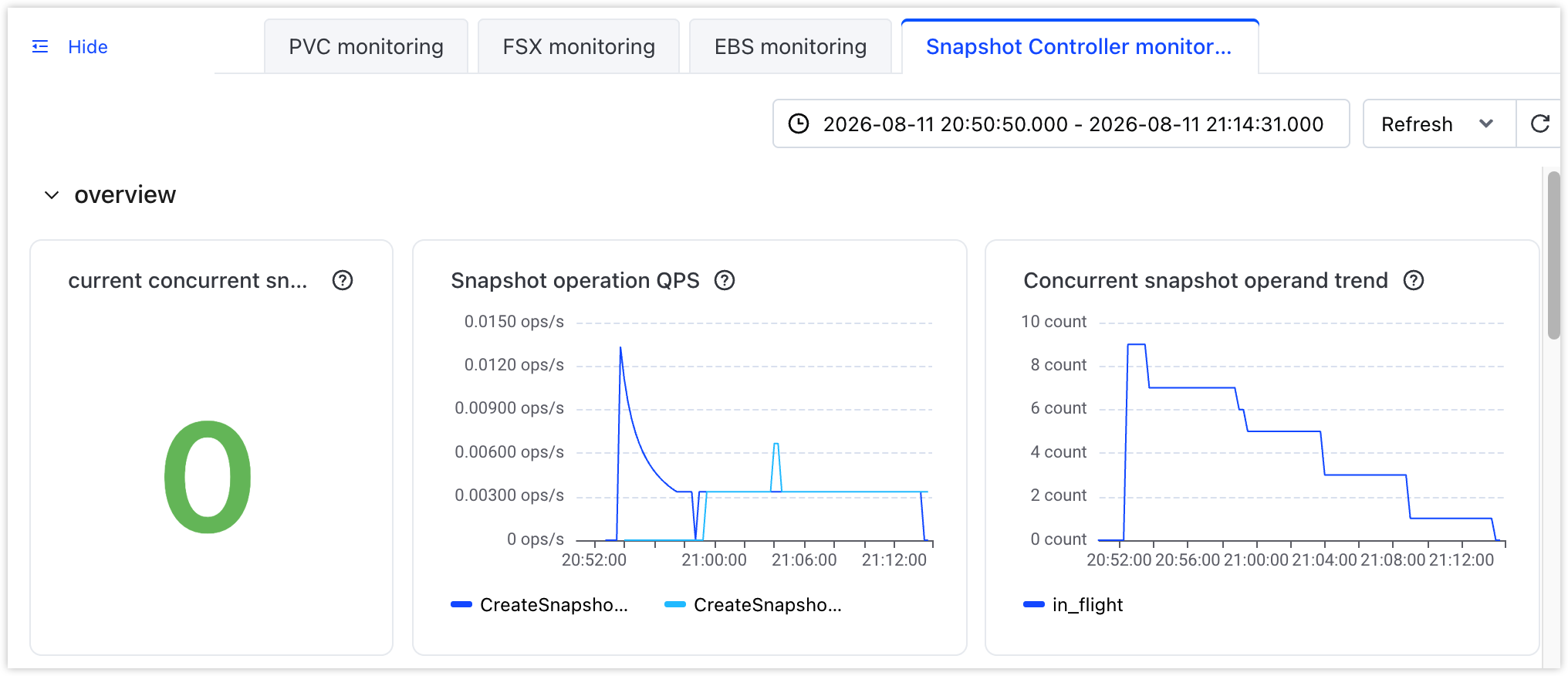
After you enable add-on observability, you can view the preset observability dashboard for the add-on in the console. This dashboard primarily displays the real-time load and end-to-end latency of snapshot operations handled by the snapshot-controller add-on. It includes sections such as overview, snapshot creation (CSI invocation phase), and end-to-end snapshot creation (including waiting for Ready). The dashboard covers metrics such as the number of concurrent snapshot operations, QPS, average/P90/P99 latency, and latency distribution comparison among different operation stages. You can specify a custom time range for querying information and set the information refresh mode to manual or automatic refresh.
- In the left navigation pane of the cluster management page, click Monitoring center > Dashboard.
- In the left dashboard list, select Storage service monitoring > Snapshot Controller monitoring to view the monitoring dashboard.
-
-
Configuring alerts
VKE provides comprehensive cluster monitoring and alerting capabilities based on VMP. You can quickly create alert rule groups by using system preset templates or configure custom alert rules by using PromQL statements based on your business requirements. You can also export preset templates in YAML format, adjust the rules, and save them as custom alert templates for reuse across multiple clusters. For details, see the following topics:
Preset alert templates are provided by the system based on common O&M scenarios. They are applicable to building an alert system for the first time or quickly supplementing basic monitoring items. This helps you promptly detect insufficient resources or abnormal operation of add-ons. For details about the alert rules in preset alert templates, see Preset alert templates.
Related documentation
Last updated: 2026.09.03 10:38:28
All rights reserved © Beijing Volcano Engine Technology Co., Ltd2024
