Volcengine Kubernetes Engine
Volcengine Kubernetes Engine
Volcengine Kubernetes Engine


Document
Volcengine Kubernetes Engine
What's New
History feature release notes
Kubernetes version release notes
Containerd runtime release notes
Add-on release notes
Monitoring add-ons
Scheduling add-ons
DNS add-ons
Security add-ons
GPU add-ons
Sandbox add-on
Security announcements
Product Announcement
Historical announcements
Overview
Getting started
User guide
Clusters
Creating clusters
Connecting to clusters
Upgrading clusters
Node pool
Creating node pools
Scaling out/in node pools
Nodes
Authorization management
Image
Namespaces
Networking
Cluster network
Container Network
Service
LoadBalancer
CLB
Ingress
APIG Ingress
ALB Ingress
Customize ALB Ingress forwarding rules
Certificate and security
CLB Ingress
Nginx Ingress
Gateway API
Workloads
Creating workloads
Configure workloads
Pods
Configuration management
Image acceleration
Storage
FSX client
EBS Volumes
TOS Volumes
NAS volumes
FSX access methods
NFS access methods
EFS volumes
vePFS volumes
FSX access methods
vePFS Client access methods
NFS access methods
CloudFS volumes
Local volumes
Autoscale
Node autoscaler
Workload autoscaler
Horizontal Pod Autoscaler (HPA)
Cron Horizontal Pod Autoscaler (CronHPA)
Intelligent Horizontal Pod Autoscaler (IHPA)
Horizontal Pod Autoscaler based on event-driven (KEDA)
Add-on management
Network add-ons
Storage add-ons
Monitoring add-ons
Scheduling add-ons
DNS add-ons
GPU add-ons
Core add-ons
Sandbox add-on
Upgrading add-ons
Heterogeneous computing
NVIDIA GPU
mGPU scheduling
RDMA high-performance computing
Scheduling management
Topology-aware scheduling
QoS-aware scheduling
Observability
Log management
Basic observation
Setup & Configuration
Cluster observation
Storage observation
Other observation
Using metrics
Full stack observation
Alert management
Diagnosis and inspection
Node check and self-healing
Application center
Backup center
Stability
Large-scale cluster management
Best practices
Authorization
Clusters
Nodes and node pools
Networking
Storage
Scheduling
Observability
Solution
Security and compliance
API reference
Cluster management
NodePool management
Node management
Virtual nodes management
Add-on management
Tag management
Access policy management
Instance images management
Cloud native observability
Inspection and diagnosis
Task management
Volcengine Container Instance
Appendix
SDK reference
Development guide
Terraform
FAQs
General FAQs
Cluster FAQ
cluster management
cluster network
cluster upgrade
Node and Node pool FAQs
Authorization FAQs
Workload FAQs
Service and Ingress FAQs
Storage FAQs
Heterogeneous computing FAQs
Observability FAQs
Quota FAQs
Add-on FAQs
Cloud-native AI
ServingKit
LLM applications
ComfyUI application
Deploying the Al inference application through Helm
Deepseek practices
Qwen practices
Kimi practice
Seed practices
Best practices
DeepSeek model deployment
GLM model deployment
MiniMax model deployment
Qwen model deployment
Kimi model deployment
Volcengine Container Instance
What's new
Historical feature release notes
Product Announcement
Overview
Billing
User guide
Integrating with VCI
Virtual node
VKE cluster uses virtual nodes
Self-managed/third-party cluster uses virtual node
Creating an instance
General purpose instance
GPU-accelerated computing instance
VCI Agent Sandbox
Startup acceleration
E2B-based management
Upgrade guide
Networking
Monitoring
Scheduling
Container configuration
VCI Image Cache
Best practices
Security and compliance
FAQs
- Documentation
 Volcengine Kubernetes EngineVolcengine Container InstanceBest practicesUsing VCI to run Spark data processing jobs
 Copy page
 Download PDF
Best practices
Using VCI to run Spark data processing jobs
Copy pageDownload PDFUsing VCI to run Spark data processing jobs
When you use VCI to run Spark data processing jobs, you can flexibly create pods based on your business requirements without the limitations on the node computing capacity of VKE clusters. This effectively reduces computing costs. This topic mainly describes how to install Spark Operator in a VKE cluster and use VCI to run Spark data processing jobs.
Background
This topic describes how to use VCI to run Spark jobs by using the native Kubernetes Spark Operator. The main steps are as follows:
- Create a cluster.
- Connect to the cluster.
- Install spark-operator.
- Test spark-operator.
To use more advanced features of VCI, you can configure VCI by specifying annotations. For details, see Pod annotations.
Usage limits
The following content introduces the proven practices of VCI. To achieve the expected results and conform to the limits of VCI, you need to perform operations by following the solution described in this topic or on the recommended resources. If you need to change your solution, you can consult the Account Manager of the Volcano Engine.
Prerequisites
- The kubectl tool has been installed in the local environment. For detailed instructions, see Installing kubectl.
- The Helm tool has been installed in the local environment. For detailed instructions, see Installing Helm.
- Before you create a cluster, make sure that the preparations are complete. For details, see Preparations.
- VCI has been activated. For detailed instructions, see VCI quick guide.
Step 1: Create a VPC-CNI cluster
- Log in to the VKE console.
- In the top navigation bar, select the region closest to your business.
- In the left navigation bar, click Cluster. On the page that appears, click Create cluster.
- In the Create cluster dialog box, click Create now in the Custom managed clusters section.
- On the Create cluster page, create a cluster that uses the VPC-CNI network model by following the wizard. The configurations of some parameters are as follows. For other parameters, see the instructions in Creating managed clusters.
tip
When you add nodes during cluster creation, select appropriate node specifications based on your business requirements. Ensure the specifications meet the requirements for installing and running Spark Operator. This ensures that the vCPUs and memory of the nodes meet your needs.
- It takes 15 to 20 minutes to create a cluster. You can view the creation progress and check whether the cluster has been created in the cluster list.
Step 2: Connect to the cluster
- On the Cluster page of the VKE console, find the cluster created in Step 1, and click its name.
- On the Overview page of the cluster, click the Connection tab.
- Obtain the cluster access credentials on the Public network access configuration tab.
- Log in to the kubectl client, access the .kube directory, and modify the config file.
- cd .kubevi config
- Import the obtained cluster access credentials into the config file, press the ESC key to exit edit mode, and then run the :wq command to save the file.
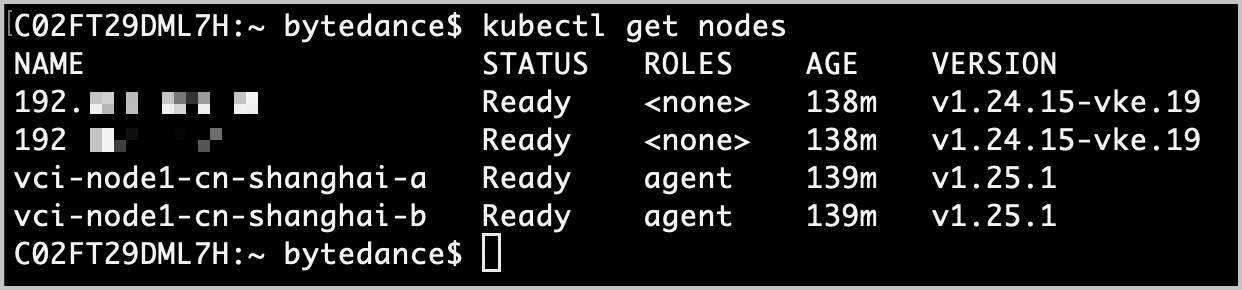
- Verify whether the cluster is connected.
- kubectl get nodes
- If you see messages similar to the following, kubectl is successfully connected to the cluster.
-
Step 3: Install Spark Operator
Install Spark Operator by using the kubectl client.
- Create a serviceaccount.
- kubectl create serviceaccount sparkkubectl create clusterrolebinding spark-role --clusterrole=edit --serviceaccount=default:spark --namespace=default
- Create a namespace named spark-operator in the cluster.
- kubectl create namespace spark-operator
- Install Spark Operator.
- helm repo add spark-operator https://googlecloudplatform.github.io/spark-on-k8s-operatorhelm install my-release spark-operator/spark-operator --namespace spark-operator --set enableBatchScheduler=true --set enableWebhook=true
warning
If you fail to pull the spark-operator image when installing Spark Operator, you can go to the Deployment page of the target cluster in the VKE console, and update the image address of the my-release workload under the spark-operator namespace to doc-cn-beijing.cr.volces.com/vke/spark:v1beta2-1.3.8-3.1.1. This ensures that Spark Operator can be installed.
Step 4: Use VCI to run Spark jobs
This topic provides an example of how to create a Deployment named spark-pi via a YAML file.
- On the Cluster page of the VKE console, find the cluster created in Step 1, and click its name.
- In the left navigation bar of the cluster management page, click Workload > Deployment.
- Click Create with Yaml. On the page that appears, select Custom from the Type drop-down list, enter the following sample code in the Yaml code editor, and then click Confirm.
tip
Pulling images directly from Git is often unstable. CR is an effective solution to this issue. In this example, you can directly use the following image address:
cr-share-cn-shanghai.cr.volces.com/spark/spark-operator:v3.1.1
- # Copyright 2017 Google LLC## Licensed under the Apache License, Version 2.0 (the "License");# you may not use this file except in compliance with the License.# You may obtain a copy of the License at## https://www.apache.org/licenses/LICENSE-2.0## Unless required by applicable law or agreed to in writing, software# distributed under the License is distributed on an "AS IS" BASIS,# WITHOUT WARRANTIES OR CONDITIONS OF ANY KIND, either express or implied.# See the License for the specific language governing permissions and# limitations under the License.apiVersion: "sparkoperator.k8s.io/v1beta2"kind: SparkApplicationmetadata:name: spark-pinamespace: defaultspec:type: Scalamode: clusterimage: "cr-share-cn-shanghai.cr.volces.com/spark/spark-operator:v3.1.1" #Use the CR URL of Volcano Engine as the official URL.imagePullPolicy: AlwaysmainClass: org.apache.spark.examples.SparkPimainApplicationFile: "local:///opt/spark/examples/jars/spark-examples_2.12-3.1.1.jar"sparkVersion: "3.1.1"restartPolicy:type: Nevervolumes:- name: "test-volume"hostPath:path: "/tmp"type: Directorydriver:cores: 1coreLimit: "1200m"memory: "512m"labels:version: 3.1.1serviceAccount: sparkvolumeMounts:- name: "test-volume"mountPath: "/tmp"executor:annotations:vke.volcengine.com/burst-to-vci: enforce #Specify that the Spark job runs on the VCI.cores: 1instances: 1memory: "512m"labels:version: 3.1.1volumeMounts:- name: "test-volume"mountPath: "/tmp"
- Run the following command to verify the result.
- kubectl get sparkapplication
- If information similar to the following content is returned, it indicates that the Spark job has been run.
-

- After the Spark job is run, you can run the following command to obtain the details about the Spark job.
- kubectl describe sparkapplication spark-pi
- Expected response:
- Name: spark-piNamespace: defaultLabels: <none>Annotations: <none>API Version: sparkoperator.k8s.io/v1beta2Kind: SparkApplicationMetadata:Creation Timestamp: 2023-11-27T15:45:20ZGeneration: 1Resource Version: 24933UID: ad8fa50c-1d45-4a33-97bd-2c1de4155f7bSpec:Driver:Core Limit: 1200mCores: 1Labels:Version: 3.1.1Memory: 512mService Account: sparkVolume Mounts:Mount Path: /tmpName: test-volumeExecutor:Annotations:vke.volcengine.com/burst-to-vci: enforceCores: 1Instances: 1Labels:Version: 3.1.1Memory: 512mVolume Mounts:Mount Path: /tmpName: test-volumeImage: cr-share-cn-shanghai.cr.volces.com/spark/spark-operator:v3.1.1Image Pull Policy: AlwaysMain Application File: local:///opt/spark/examples/jars/spark-examples_2.12-3.1.1.jarMain Class: org.apache.spark.examples.SparkPiMode: clusterRestart Policy:Type: NeverSpark Version: 3.1.1Type: ScalaVolumes:Host Path:Path: /tmpType: DirectoryName: test-volumeStatus:Application State:State: COMPLETEDDriver Info:Pod Name: spark-pi-driverWeb UI Address: 10.234.70.207:0Web UI Port: 4040Web UI Service Name: spark-pi-ui-svcExecution Attempts: 1Executor State:spark-pi-4a08948c1174fd43-exec-1: FAILEDLast Submission Attempt Time: 2023-11-27T15:45:23ZSpark Application Id: spark-aadd883935dd422eb0526412b846c9b1Submission Attempts: 1Submission ID: 923c3ed6-50de-4b65-a0e2-7c506b72dd2aTermination Time: 2023-11-27T15:48:10ZEvents:Type Reason Age From Message---- ------ ---- ---- -------Normal SparkApplicationAdded 18m spark-operator SparkApplication spark-pi was added, enqueuing it for submissionNormal SparkApplicationSubmitted 18m spark-operator SparkApplication spark-pi was submitted successfullyNormal SparkDriverRunning 18m spark-operator Driver spark-pi-driver is runningNormal SparkExecutorPending 18m spark-operator Executor [spark-pi-4a08948c1174fd43-exec-1] is pendingNormal SparkExecutorRunning 16m spark-operator Executor [spark-pi-4a08948c1174fd43-exec-1] is runningNormal SparkDriverCompleted 16m spark-operator Driver spark-pi-driver completedNormal SparkApplicationCompleted 16m spark-operator SparkApplication spark-pi completedWarning SparkExecutorFailed 15m spark-operator Executor [spark-pi-4a08948c1174fd43-exec-1 %!s(int=-1) Unknown (Container not Found)] failed with ExitCode: %!d(MISSING), Reason: %!s(MISSING)
Spark job log collection
You can collect VCI logs by using TLS of Volcano Engine. For more information, see Collecting VCI container logs.
Image cache usage
If the Spark image is large (over 2 GB), pulling it takes a long time. You can speed up image pulling with image cache. For more information, see Image caches.
Last updated: 2026.07.24 16:18:05
All rights reserved © Beijing Volcano Engine Technology Co., Ltd2024
