Volcengine Kubernetes Engine
Volcengine Kubernetes Engine
Volcengine Kubernetes Engine


Document
Volcengine Kubernetes Engine
What's New
History feature release notes
Kubernetes version release notes
Containerd runtime release notes
Add-on release notes
Monitoring add-ons
Scheduling add-ons
DNS add-ons
Security add-ons
GPU add-ons
Sandbox add-on
Security announcements
Product Announcement
Historical announcements
Overview
Getting started
User guide
Clusters
Creating clusters
Connecting to clusters
Upgrading clusters
Node pool
Creating node pools
Scaling out/in node pools
Nodes
Authorization management
Image
Namespaces
Networking
Cluster network
Container Network
Service
LoadBalancer
CLB
Ingress
APIG Ingress
ALB Ingress
Customize ALB Ingress forwarding rules
Certificate and security
CLB Ingress
Nginx Ingress
Gateway API
Workloads
Creating workloads
Configure workloads
Pods
Configuration management
Image acceleration
Storage
FSX client
EBS Volumes
TOS Volumes
NAS volumes
FSX access methods
NFS access methods
EFS volumes
vePFS volumes
FSX access methods
vePFS Client access methods
NFS access methods
CloudFS volumes
Local volumes
Autoscale
Node autoscaler
Workload autoscaler
Horizontal Pod Autoscaler (HPA)
Cron Horizontal Pod Autoscaler (CronHPA)
Intelligent Horizontal Pod Autoscaler (IHPA)
Horizontal Pod Autoscaler based on event-driven (KEDA)
Add-on management
Network add-ons
Storage add-ons
Monitoring add-ons
Scheduling add-ons
DNS add-ons
GPU add-ons
Core add-ons
Sandbox add-on
Upgrading add-ons
Heterogeneous computing
NVIDIA GPU
mGPU scheduling
RDMA high-performance computing
Scheduling management
Topology-aware scheduling
QoS-aware scheduling
Observability
Log management
Basic observation
Setup & Configuration
Cluster observation
Storage observation
Other observation
Using metrics
Full stack observation
Alert management
Diagnosis and inspection
Node check and self-healing
Application center
Backup center
Stability
Large-scale cluster management
Best practices
Authorization
Clusters
Nodes and node pools
Networking
Storage
Scheduling
Observability
Solution
Security and compliance
API reference
Cluster management
NodePool management
Node management
Virtual nodes management
Add-on management
Tag management
Access policy management
Instance images management
Cloud native observability
Inspection and diagnosis
Task management
Volcengine Container Instance
Appendix
SDK reference
Development guide
Terraform
FAQs
General FAQs
Cluster FAQ
cluster management
cluster network
cluster upgrade
Node and Node pool FAQs
Authorization FAQs
Workload FAQs
Service and Ingress FAQs
Storage FAQs
Heterogeneous computing FAQs
Observability FAQs
Quota FAQs
Add-on FAQs
Cloud-native AI
ServingKit
LLM applications
ComfyUI application
Deploying the Al inference application through Helm
Deepseek practices
Qwen practices
Kimi practice
Seed practices
Best practices
DeepSeek model deployment
GLM model deployment
MiniMax model deployment
Qwen model deployment
Kimi model deployment
Volcengine Container Instance
What's new
Historical feature release notes
Product Announcement
Overview
Billing
User guide
Integrating with VCI
Virtual node
VKE cluster uses virtual nodes
Self-managed/third-party cluster uses virtual node
Creating an instance
General purpose instance
GPU-accelerated computing instance
VCI Agent Sandbox
Startup acceleration
E2B-based management
Upgrade guide
Networking
Monitoring
Scheduling
Container configuration
VCI Image Cache
Best practices
Security and compliance
FAQs
- Documentation
 Volcengine Kubernetes EngineVolcengine Kubernetes EngineUser guideHeterogeneous computingRDMA high-performance computingUsing RDMA resources (InfiniBand) in VKE clusters
 Copy page
 Download PDF
RDMA high-performance computing
Using RDMA resources (InfiniBand) in VKE clusters
Copy pageDownload PDFUsing RDMA resources (InfiniBand) in VKE clusters
Volcengine Kubernetes Engine (VKE) can use Remote Direct Memory Access (RDMA) resources through add-ons to eliminate bottlenecks of computing tasks brought by traditional network communication. This article introduces how a VKE cluster uses RDMA resources provided by InfiniBand high-performance compute clusters.
tip
[Public beta]: VKE clusters featured with access to RDMA resources are currently in public beta.
Background information
RDMA overview
- RDMA is a high-performance network protocol that reduces CPU usage and memory bandwidth bottlenecks, as well as improves bandwidth utilization. It comes with the following advantages:
- Zero Copy: Applications can transfer data without involving the network software stack, allowing data to be directly sent to the buffer or directly received from the buffer without being copied to the network layer.
- Kernel Bypass: RDMA provides a proprietary Verbs interface, allowing applications to transfer data directly from user space without switching context between kernel and user modes.
- CPU Offload: Applications can access memory on remote hosts without consuming any CPUs on those hosts. Remote memory will be read without any help from remote processes (or CPUs), and the content read from them will not be written into the remote CPU caches.
- The High Performance Compute (HPC) cluster is a cluster computing environment used to handle large-scale computing tasks, usually composed of a large number of compute nodes interconnected by an RDMA high-speed network. It supports both RoCE and InfiniBand.
- An HPC cluster can provide powerful computing capability, large memory, high-speed storage, and networks to meet the demands of compute-intensive, data-intensive, or combined workloads. In an HPC cluster, computing tasks are assigned to each compute node for parallel processing, fully utilizing the computing power of multiple nodes to accelerate computation and improve efficiency. For more details, please refer to the HPC cluster overview.
RDMA add-on mode
In the InfiniBand network mode, the RDMA add-on supports the following modes. The following table describes different modes and their usage restrictions.
RDMA add-on mode | Mode description | Limit |
RDMA add-on mode | Mode description | Limit |
ib-shared (shared) | Create a shared virtual network interface for pods in the cluster by virtualizing the RDMA physical network interface. | Each RDMA physical network interface can only provide one shared virtual network interface. |
ib-shared-multi (1:N shared) | Create multiple shared virtual network interfaces for pods as needed in the cluster by virtualizing the RDMA physical network interface. | We recommend that you do not use this mode with GPUs. |
tip
If your pods need to use HostNetwork, we recommend that you use RDMA resources provided by open source add-ons. For details, see the open source documentation.
Cautions
The following content introduces the proven practices of VKE. Reading the Limits and strictly following the steps described below are highly recommended. If you want to use another solution, consult your account manager.
Limits
- A pod cannot use mGPU and RDMA add-ons simultaneously.
- RDMA devices can only work with the VPC-CNI network model and it is required to use version v1.7.1 or higher VPC-CNI cluster networking components.
- Kubernetes version v1.24.15-vke.12 or higher, or version starts from v1.20.15-vke.18 in v1.20 series is required. You can visit the console of the cluster and find the current version of Kubernetes in the cluster basic information page. See How to find the Kubernetes version of a cluster? for details.
- RDMA metrics feedback and RDMA topology-aware scheduling are not available when using RDMA of an InfiniBand HPC cluster.
- If a NCCL network error occurs in an environment running RDMA, please refer to FAQ for solutions.
Steps
Step 1: Create HPC cluster
- Log in to the HPC cluster console.
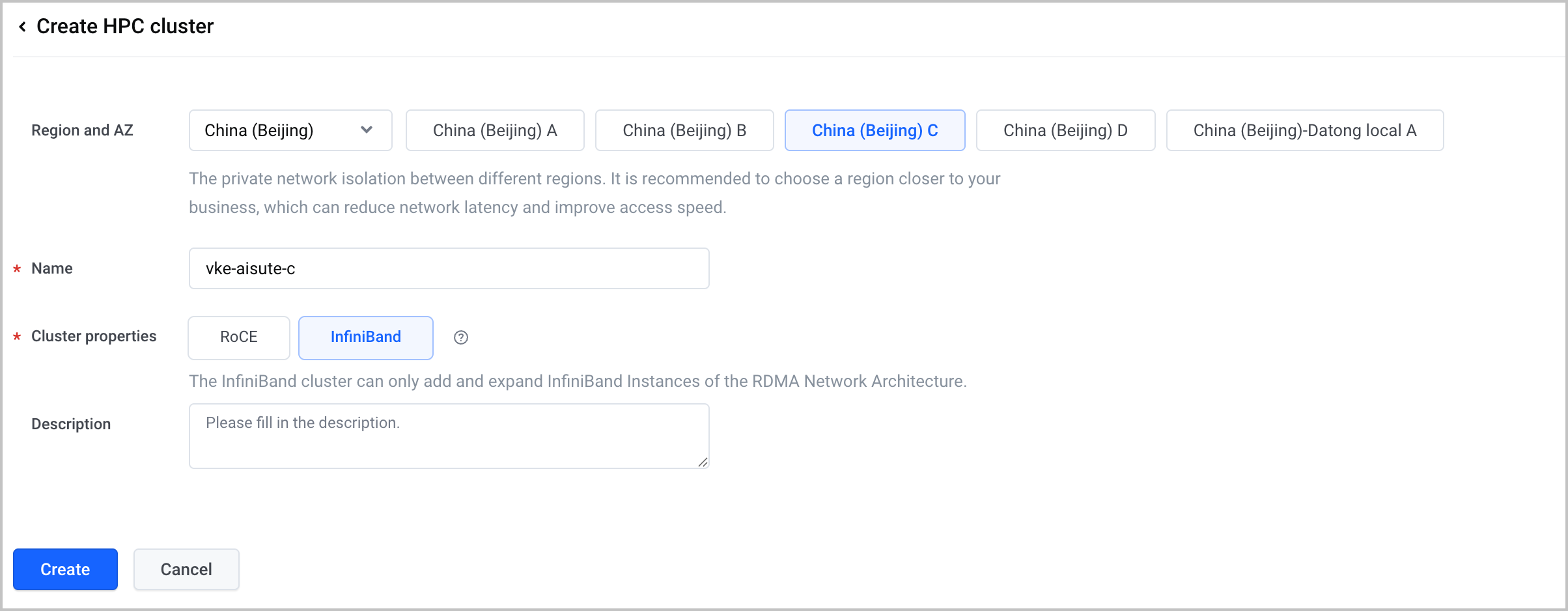
- Click create HPC cluster and finish configurations based on the parameter descriptions in the table below.
Parameters | Description |
Parameters | Description |
Region and AZ | Intranets within different regions are completely isolated. It is recommended to select a region as close as possible to where your business is located to reduce network latency and improve access speed. AZ (Availability Zones) refers to areas isolated from each other in terms of electricity and network. In this case, resources such as node subnets, instance types and HPC clusters are required to stay in a single availability zone. For example: Availability zone C. |
Name | Enter a name for HPC cluster. |
Cluster properties | Select a property for HPC cluster. Each property has its own limits. Select InfiniBand in this case.
tip
|
Description | Provide descriptions or comments for the HPC cluster. |
Step 2: Create a cluster and prepare resources
tip
This step only covers the key parts of configuring RDMA resources, such as creating a node pool, adding node labels, setting Kubelet custom parameters, and installing RDMA add-ons. For creating and configuring a new cluster,see Create a cluster.
- Log in to the VKE console. Click Cluster in the left navigation bar to go to the cluster management page.
- Click Create cluster and finish the configurations for the step 1 cluster configuration, then click Next: node pool configuration.
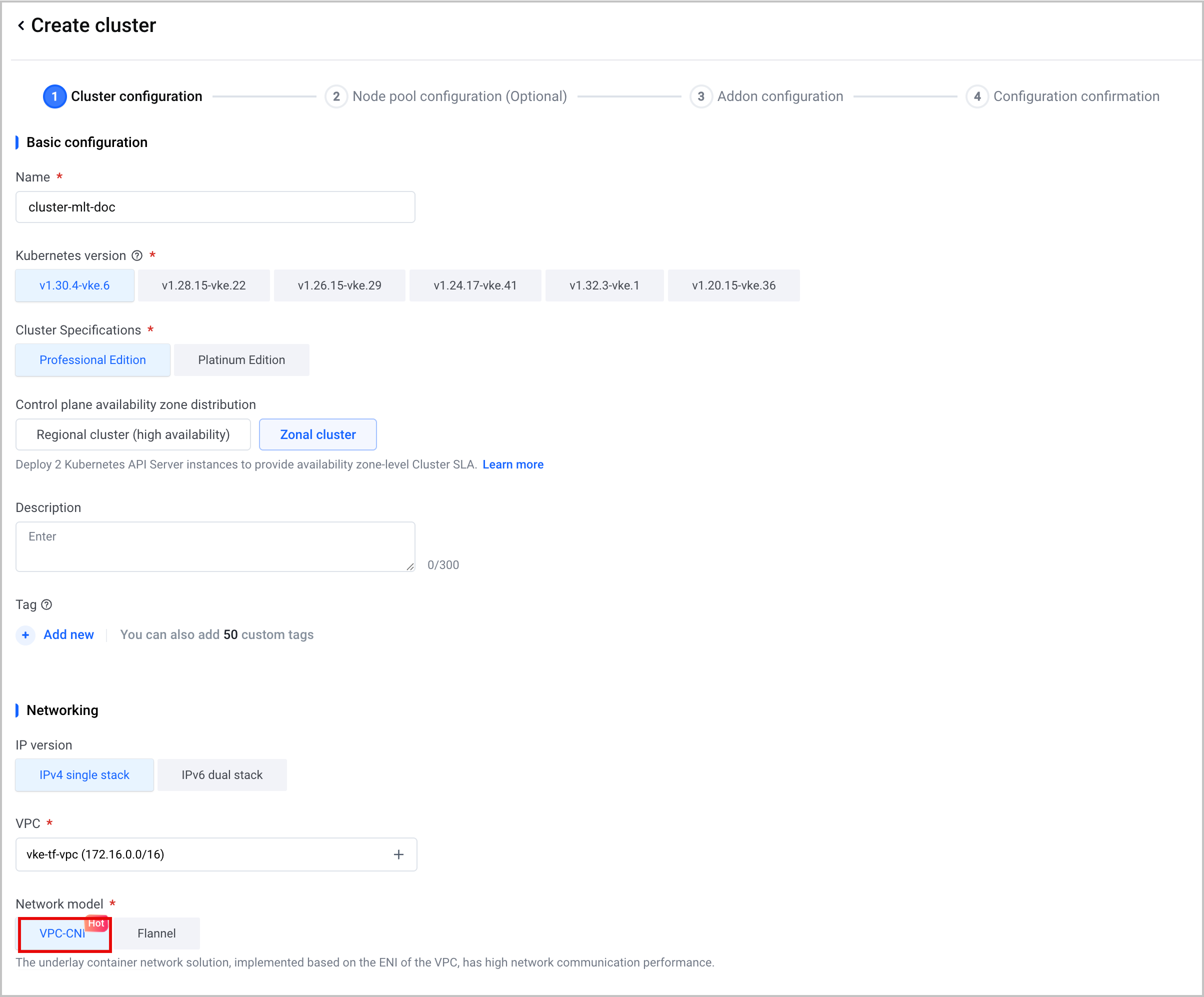
The table below contains instructions as well as descriptions of key parameters in this step. Please follow the instructions in the table and configure the rest as needed.
Parameters | Description |
Parameters | Description |
Network model | Select a Container Network Interface (CNI) for the cluster. In this case, VPC-CNI is required.
|
- On the Node pool configuration (optional) page, you need to finish key configurations, including settings of a new node pool, node labels, and Kubelet custom parameters. Click Next: Addon configuration when you finish all necessary settings on this page.
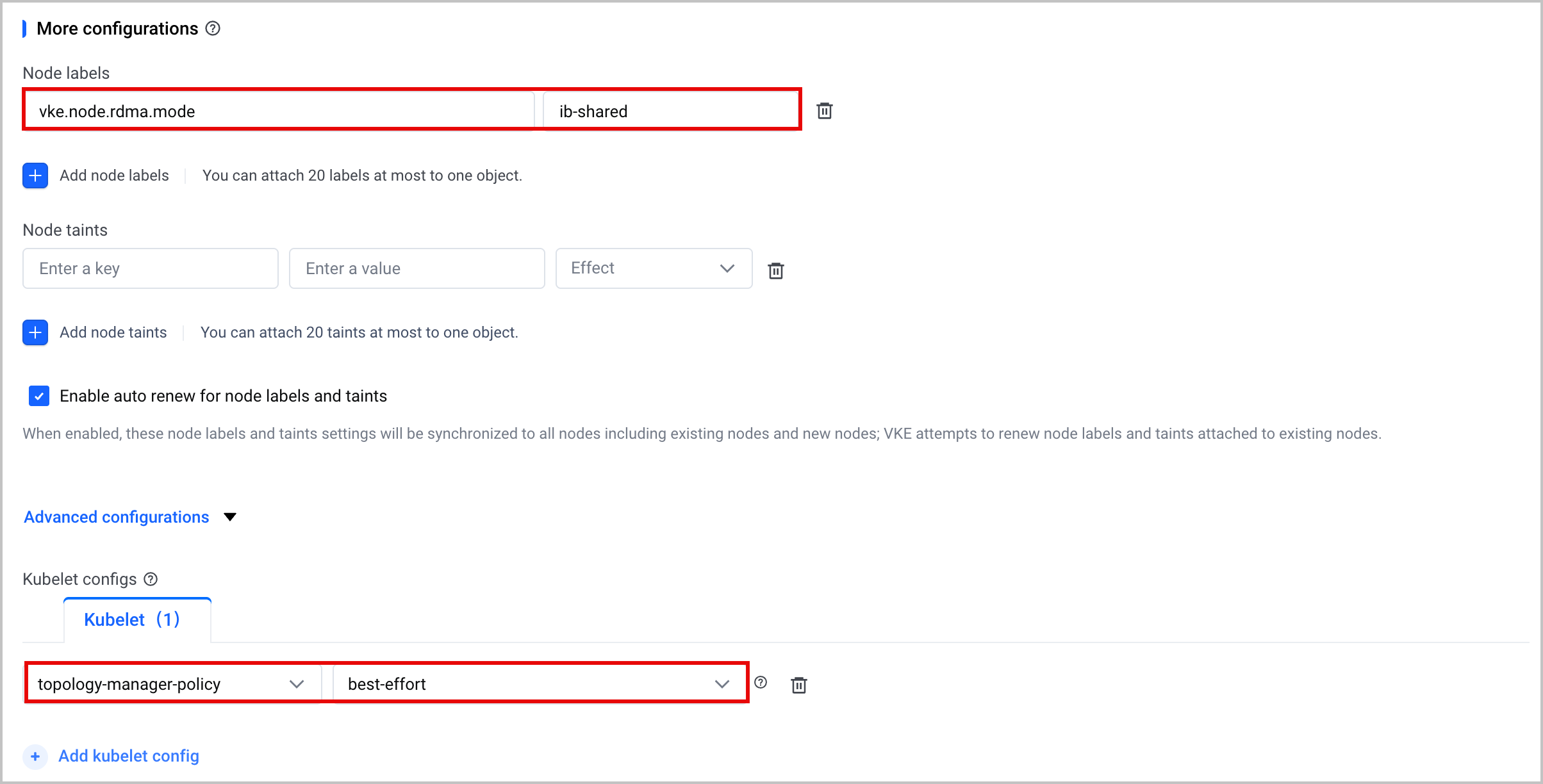
The table below contains instructions as well as descriptions of key parameters in this step. Please follow the instructions in the table and configure the rest as needed.
Parameter | Description |
Parameter | Description |
Worker node | Select Create now. |
Node source | Select Create node in this case. |
Availability zone | Availability zones (AZ) are physically isolated infrastructure units within a single region, featuring independent power and networking systems. AZs communicate over internal networks. Different regions have their own availability zones. See Regions and Availability Zones for details. In this case, resources such as node subnets, instance types and HPC clusters are required to stay in a single availability zone. For example: Availability zone C. |
Node subnet | Select subnets available in the list for the nodes. |
Instance type | Instance type defines resources such as CPU, memory, GPU, RDMA of a node. In this case, instance types enabled with RDMA device are required, e.g., High Performance Computing Optimized instances. |
High Performance Computing Optimized | A cluster computing environment used to handle large-scale computing tasks, typically consisting of a large number of worker nodes interconnected through a high-speed RDMA network to process complex tasks collaboratively. In this case, the InfiniBand-powered HPC cluster created in step 1 should be selected. |
Node labels | This is the same as the Label in Kubernetes, which is used to define attributes for nodes, facilitating later operations on nodes such as filtering. A label can be added to all the nodes in the pool in batch. In this case, the label vke.node.rdma.mode: {value} is added manually to indicate what RDMA mode the node pool is working in. The available modes include ib-shared (shared) and ib-shared-multi (1:N shared). warning
|
Kubelet configs | For businesses that are highly sensitive to latency, Kubelet custom parameters can be used to create NUMA affinity policy. The resources allocated for a Container (or Pod) can be mapped to one (or more) NUMA nodes to improve business performance. In this case, the custom parameter topologyManagerPolicy: best-effort is required, so that GPU and RDMA can be allocated to the same NUMA node. |
- On the Addon configuration page, ensure that rdma-device-plugin is checked. Other add-ons can be selected as needed. Click Next: Configuration confirmation to go to the next page.
- Ensure that all the information of the new cluster and billing details are correct, read the "VKE Dedicated Service Terms" and click the checkbox to agree, then click Confirm on the page to start creating the cluster.
Step 3: Use RDMA Resources
- Connect to the cluster using kubectl. See Connecting to cluster for details.
- Use RDMA resources through YAML. The following example shows how to enable RDMA for a pod.
apiVersion: v1
kind: Pod
metadata:
name: rdma-test
spec:
containers:
- name: rdma-test
image: busybox
command:
- /bin/sh
- -c
- sleep 10000
resources:
limits:
vke.volcengine.com/infiniband-rdma: 1
securityContext:
capabilities:
add:
- IPC_LOCK
volumeMounts:
- mountPath: /dev/shm
name: cache-volume
- name: nvidia-topology # Non-bare metal instance types need to mount this directory. NCCL will obtain the real topology from virtualTopology.xml.
mountPath: /var/run/nvidia-topologyd
readOnly: true
volumes:
- emptyDir:
medium: Memory
name: cache-volume
- name: nvidia-topology
hostPath:
path: /var/run/nvidia-topologyd
type: DirectoryOrCreate
Last updated: 2026.07.24 14:51:38
All rights reserved © Beijing Volcano Engine Technology Co., Ltd2024
