Volcengine Kubernetes Engine
Volcengine Kubernetes Engine


Document

- Documentation
 Volcengine Kubernetes EngineVolcengine Container InstanceUser guideNetworkingUsing a NetworkPolicy to implement network access control for VCI Pods
 Copy page
 Download PDF
Networking
Using a NetworkPolicy to implement network access control for VCI Pods
Copy pageDownload PDFUsing a NetworkPolicy to implement network access control for VCI Pods
A Kubernetes NetworkPolicy implements policy-based network access control. This topic describes how to use a NetworkPolicy to implement Pod network access control in VCI scenarios.
Background
VCI uses a nodeless architecture, so Pods do not run on nodes that you can view or manage. Traditional NetworkPolicy solutions that rely on node DaemonSets, such as calico-node, cannot be used directly in VCI scenarios. A VCI NetworkPolicy uses the capabilities of a centralized control plane and Cello/Cilium to inject and enforce access policies directly at the pod network layer. It provides the following capabilities:
- Alignment with Kubernetes standards: This resource is fully compatible with NetworkPolicy resources of networking.k8s.io/v1, allowing you to migrate existing policies from other Kubernetes environments at no cost.
- Adaptation to the nodeless architecture: Policies take effect dynamically with the Pod lifecycle. You do not need to deploy additional agents on Pods or nodes.
- L3/L4 access control: The resource supports Ingress and Egress rules based on Pod labels, namespace labels, and CIDR. You can specify TCP/UDP ports and port ranges.
For basic concepts, field meanings, and complete YAML syntax of Kubernetes NetworkPolicies, see the Kubernetes community documentation.
Usage instructions
- The following describes the capabilities supported by VCI NetworkPolicies.
- Ingress and Egress policies. You can use podSelector, namespaceSelector, and ipBlock (CIDR) to select traffic sources and destinations.
- Port and port range matching based on TCP and UDP.
- Combining multiple from/to rules in a single policy. You can specify ipBlock, podSelector, and namespaceSelector in the same rule. These rules apply the OR relationship.
- VCI NetworkPolicy cannot be used in hybrid deployment scenarios that combine regular nodes (ECS nodes) and virtual nodes. For information on how to use NetworkPolicies in regular node scenarios in VKE clusters, see Using a NetworkPolicy to implement network access control.
- VCI NetworkPolicies, VPC security groups, and network ACLs for VCI scenarios apply access control at different layers. Traffic must pass through multiple layers of checks in sequence. They work together and cannot replace each other:
- NetworkPolicy: Applies at the VCI Pod level, aligns closely with application semantics, and dynamically follows the VCI pod lifecycle.
- Security group: Applies at the VCI instance (ENI) level, with instance-level granularity.
- Network ACL: Applies at the subnet level and has the coarsest granularity.
- For specialized capabilities such as Web Application Firewall (WAF) and Cloud Firewall, we recommend using the corresponding professional cloud security services. NetworkPolicies focus on L3/L4 traffic within clusters.
- VCI NetworkPolicy is consistent with its Kubernetes-native object and uses the following default behavior:
- If no policy selects a Pod in a specific direction (Ingress/Egress), all traffic in that direction is allowed.
- Once a policy in a certain direction (Ingress/Egress) selects a Pod and that direction is defined, only traffic that explicitly matches allow rules is allowed. All other traffic is denied.
Prerequisites
- A cluster required by the VCI service has been created. For details, see Using VCI in VPC-CNI clusters and Using VCI in Flannel clusters.
- The vci-virtual-kubelet add-on has been installed in the cluster. For detailed instructions, see vci-virtual-kubelet.
Procedure
Step 1: Enable NetworkPolicy in the workload
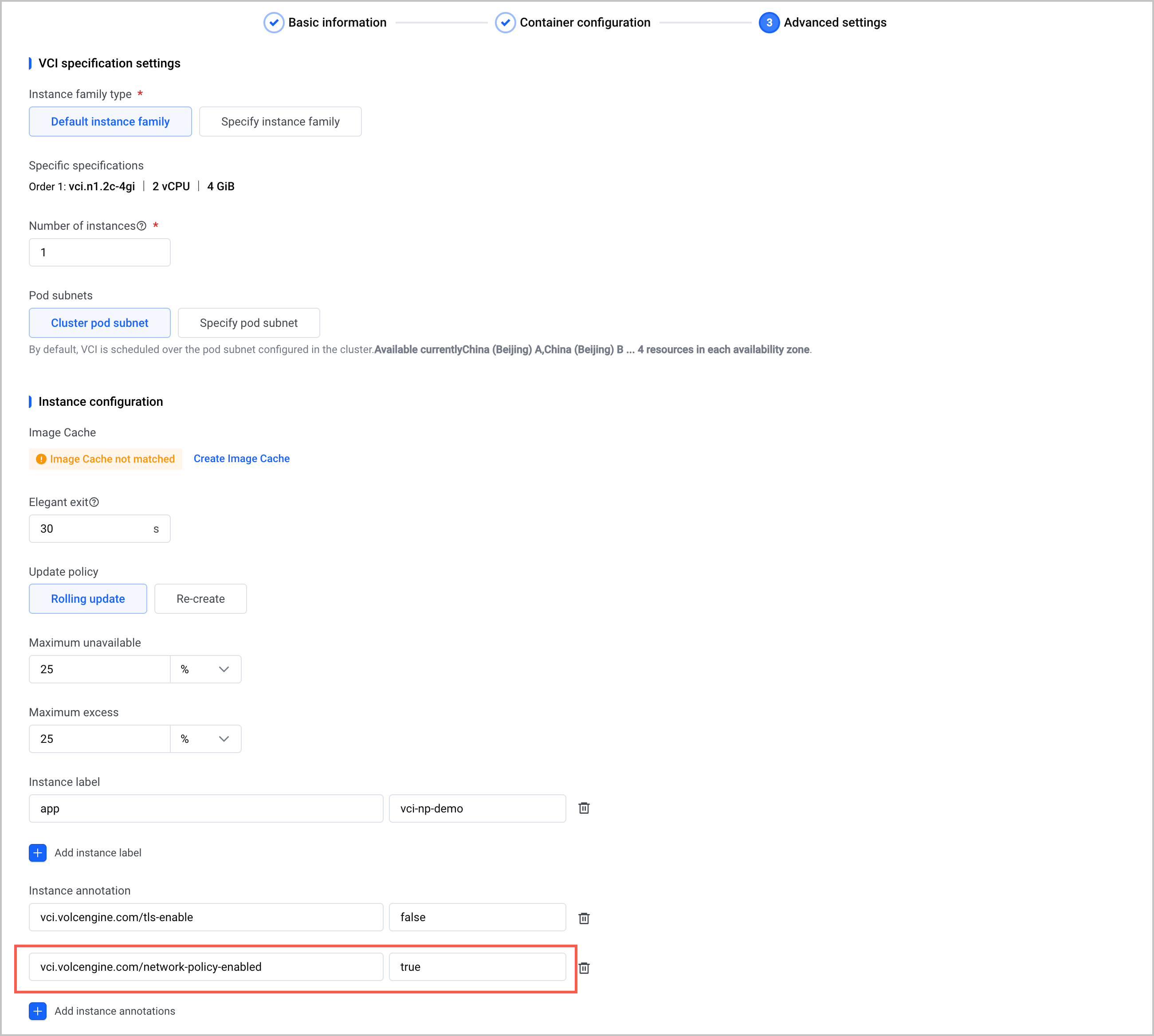
To enable VCI NetworkPolicy, add the Pod annotation to your workloads that are deployed by using VCI.
warning
A VCI NetworkPolicy supports only workloads fully deployed using VCI and does not support hybrid deployment scenarios combining VCI and ECS.
When creating or updating a workload deployed using the VCI method, in the Advanced settings step, add the following instance annotation: vci.volcengine.com/network-policy-enabled: "true". For detailed instructions, see Creating workloads and Managing workloads.
When creating or updating workloads fully deployed using the VCI method (vke.volcengine.com/burst-to-vci: enforce), add the following Pod annotation: vci.volcengine.com/network-policy-enabled: "true". The following example uses a Deployment YAML file for demonstration. For more workload types and methods to create or update their YAML files, see Creating workloads and Managing workloads.
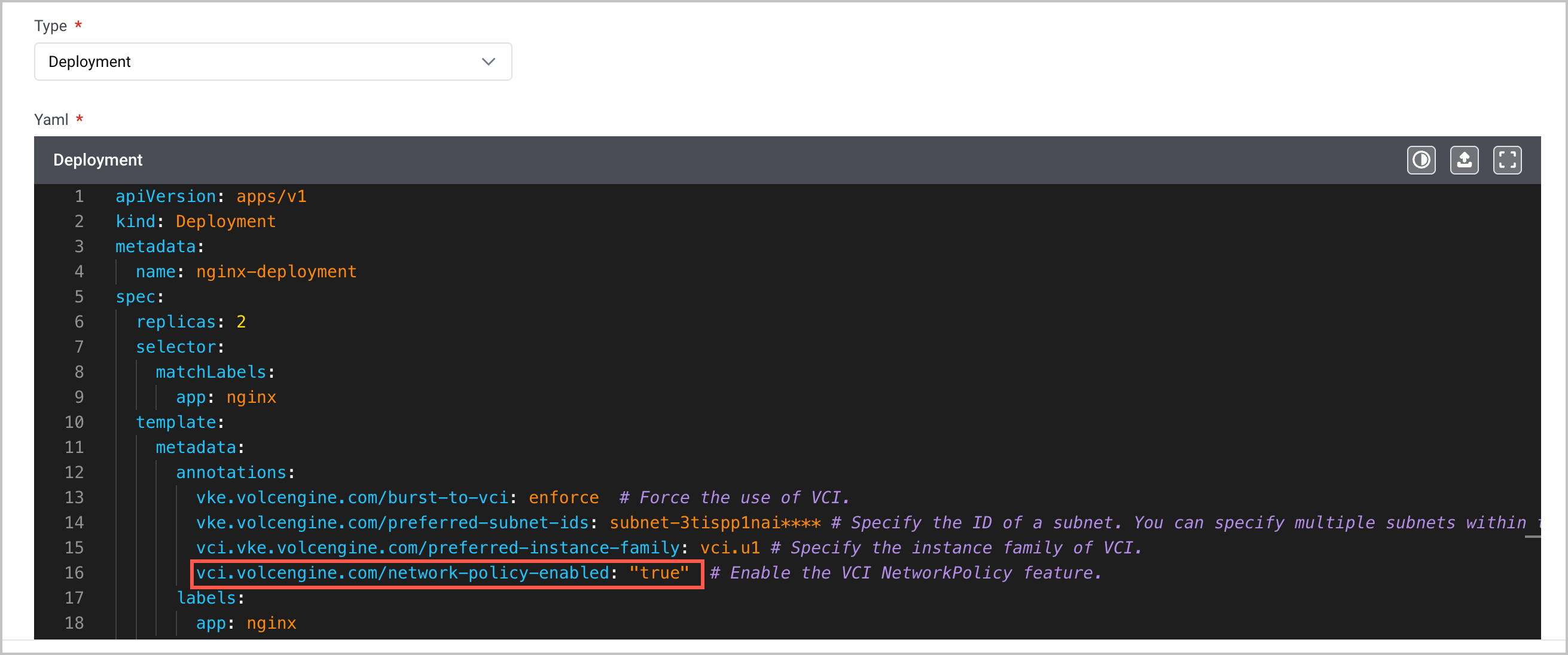
A complete sample YAML file is shown below.
Step 2: Write a NetworkPolicy YAML file
Write a standard Kubernetes NetworkPolicy YAML file based on your business requirements. For the complete semantics of fields and YAML syntax, see the Kubernetes NetworkPolicy documentation.
The following examples use the ai-agent-prod namespace in the AI Agent production environment to demonstrate common policy combinations. Replace the values of selectors such as app with your actual information. All IP addresses in the examples are placeholders. Replace them with your actual target CIDR blocks.
Before defining fine-grained policies, you can first place the workload in an isolated environment as a baseline for zero-trust (a security architecture) to ensure business security.
The following example policy selects all Pods in the ai-agent-prod namespace, declares both Ingress and Egress directions, but provides no allow rules, denying all inbound/outbound traffic for Pods in this namespace.
In scenarios where multiple agents do not directly access each other, you can configure a central control service in a NetworkPolicy to restrict direct access between agents.
The following sample policy assumes that two groups of agents, analyzer-agent and retriever-agent, interact through the control-center control service. The policy precisely allows both groups of agents to access port 8080 of control-center and blocks any other Pods from accessing control-center. Together with the default deny policy in scenario 1, the two agents cannot communicate directly with each other.
In scenarios where an AI agent needs to access external LLM endpoints or vector databases, you can configure a NetworkPolicy to limit the egress traffic. This prevents the agent from accessing malicious websites or leaking data.
The following sample policy limits the outbound traffic of the AI agent analyzer-agent, allowing access only to the internal control-center service, DNS, the specified external LLM endpoint, and the vector database. All other outbound traffic is denied.
warning
DNS-related egress rules are required in almost all egress allowlist scenarios. Omitting these rules will cause domain name resolution to fail, resulting in abnormal connections.
NetworkPolicy follows an allowlist model, where only traffic from allowlisted namespaces is allowed and access from all other namespaces not on the allowlist is implicitly denied, achieving strict data isolation.
The following is an example policy that allows pods only within the ai-agent-prod namespace to access production environment data in prod-database and automatically denies cross-namespace traffic.
Step 3: Deliver the policy to the cluster
- Use kubectl to connect to the target VCI cluster. For details, see Connecting to a cluster.
- Run the following command to deliver the policy to the target namespace.
-
- After delivery, the policy will take effect in the cluster for VCI Pods that have this Pod annotation: vci.volcengine.com/network-policy-enabled: "true". Newly scheduled Pods to VCI will automatically match against existing policy rules during the network initialization stage.
Step 4: Verify that the policy takes effect
- Run the following command to confirm whether the policy has been created.
-
- The expected result is that the response includes the target policy name, and POD-SELECTOR matches the labels of the target Pods you expect to select.
-
- Run the following command to confirm whether the rule meets expectations.
-
- The expected result is that the response includes PodSelector, allowed Ingress/Egress traffic, traffic source or destination selectors, and port information.
-
- Run the following command to confirm which Pods are selected by the rule.
-
- The expected response is as follows:
-
- Run the following command to verify whether the selected Pod has the VCI NetworkPolicy annotation.
-
- The expected response is true.
- Initiate access from the source Pod allowed by the policy and confirm whether the connection is successful.
-
- If 200 is returned, access is successful.
- Initiate access from a source Pod that is expected to be denied by the policy and confirm whether the connection times out or is denied.
-
- The expected result is a connection timeout, no response, or connection refusal.
What to do next
Change the policy
- Directly update the corresponding YAML.
- Run the following command to recreate the policy. The policy will be recalculated in the cluster and applied to the matching Pods.
warning
We recommend first verifying changes to default deny baseline policies in the test environment to avoid accidentally blocking production traffic.
-
Delete the policy
warning
- After the policy is deleted, traffic that was restricted by the policy may be allowed again.
- If other policies still select the same Pod, the final effect is based on the allowed rules after all policies are merged. Make sure that the deletion does not expand access to production traffic.
NetworkPolicies are a standard Kubernetes resource. To delete a NetworkPolicy, follow the steps below.
- Deleting a namespace will automatically clean up all NetworkPolicy resources under it.
- Use the following command to delete a single NetworkPolicy resource.
-
Last updated: 2026.09.03 15:56:09
All rights reserved © Beijing Volcano Engine Technology Co., Ltd2024
