Volcengine Kubernetes Engine
Volcengine Kubernetes Engine
Volcengine Kubernetes Engine


Document
Volcengine Kubernetes Engine
What's New
History feature release notes
Kubernetes version release notes
Containerd runtime release notes
Add-on release notes
Monitoring add-ons
Scheduling add-ons
DNS add-ons
Security add-ons
GPU add-ons
Sandbox add-on
Security announcements
Product Announcement
Historical announcements
Overview
Getting started
User guide
Clusters
Creating clusters
Connecting to clusters
Upgrading clusters
Node pool
Creating node pools
Scaling out/in node pools
Nodes
Authorization management
Image
Namespaces
Networking
Cluster network
Container Network
Service
LoadBalancer
CLB
Ingress
APIG Ingress
ALB Ingress
Customize ALB Ingress forwarding rules
Certificate and security
CLB Ingress
Nginx Ingress
Gateway API
Workloads
Creating workloads
Configure workloads
Pods
Configuration management
Image acceleration
Storage
FSX client
EBS Volumes
TOS Volumes
NAS volumes
FSX access methods
NFS access methods
EFS volumes
vePFS volumes
FSX access methods
vePFS Client access methods
NFS access methods
CloudFS volumes
Local volumes
Autoscale
Node autoscaler
Workload autoscaler
Horizontal Pod Autoscaler (HPA)
Cron Horizontal Pod Autoscaler (CronHPA)
Intelligent Horizontal Pod Autoscaler (IHPA)
Horizontal Pod Autoscaler based on event-driven (KEDA)
Add-on management
Network add-ons
Storage add-ons
Monitoring add-ons
Scheduling add-ons
DNS add-ons
GPU add-ons
Core add-ons
Sandbox add-on
Upgrading add-ons
Heterogeneous computing
NVIDIA GPU
mGPU scheduling
RDMA high-performance computing
Scheduling management
Topology-aware scheduling
QoS-aware scheduling
Observability
Log management
Basic observation
Setup & Configuration
Cluster observation
Storage observation
Other observation
Using metrics
Full stack observation
Alert management
Diagnosis and inspection
Node check and self-healing
Application center
Backup center
Stability
Large-scale cluster management
Best practices
Authorization
Clusters
Nodes and node pools
Networking
Storage
Scheduling
Observability
Solution
Security and compliance
API reference
Cluster management
NodePool management
Node management
Virtual nodes management
Add-on management
Tag management
Access policy management
Instance images management
Cloud native observability
Inspection and diagnosis
Task management
Volcengine Container Instance
Appendix
SDK reference
Development guide
Terraform
FAQs
General FAQs
Cluster FAQ
cluster management
cluster network
cluster upgrade
Node and Node pool FAQs
Authorization FAQs
Workload FAQs
Service and Ingress FAQs
Storage FAQs
Heterogeneous computing FAQs
Observability FAQs
Quota FAQs
Add-on FAQs
Cloud-native AI
ServingKit
LLM applications
ComfyUI application
Deploying the Al inference application through Helm
Deepseek practices
Qwen practices
Kimi practice
Seed practices
Best practices
DeepSeek model deployment
GLM model deployment
MiniMax model deployment
Qwen model deployment
Kimi model deployment
Volcengine Container Instance
What's new
Historical feature release notes
Product Announcement
Overview
Billing
User guide
Integrating with VCI
Virtual node
VKE cluster uses virtual nodes
Self-managed/third-party cluster uses virtual node
Creating an instance
General purpose instance
GPU-accelerated computing instance
VCI Agent Sandbox
Startup acceleration
E2B-based management
Upgrade guide
Networking
Monitoring
Scheduling
Container configuration
VCI Image Cache
Best practices
Security and compliance
FAQs
- Documentation
 Volcengine Kubernetes EngineVolcengine Kubernetes EngineUser guideNetworkingIngressALB IngressCustomize ALB Ingress forwarding rulesConfiguring redirection for traffic forwarding
  Copy page
 Download PDF
Customize ALB Ingress forwarding rules
Configuring redirection for traffic forwarding
Copy pageDownload PDFConfiguring redirection for traffic forwarding
ALB Ingresses allow you to configure traffic redirection. When requests pass through ALB instances, the ALB instances can redirect specific access requests to specified paths.
warning
Prerequisites
- The cluster has been connected. For details, see Connecting to clusters.
- An ALB instance has been created. For details, see Creating ALB Ingresses via kubectl.
- The alb-ingress-controller add-on has been installed and upgraded to v0.35.0 or later. For details, see Upgrading add-ons.
Limits
- Supported configuration methods vary based on different ALB instance types.
- Standard edition: You can configure this type of instance by using the console or YAML.
- Basic edition: You can configure this type of instance only by using YAML.
- You can configure only one Redirect to forwarding action for a single forwarding rule.
- You cannot configure the Redirect to forwarding action together with other forwarding actions. For more limits and considerations, see Creating forwarding rules (Standard edition).
Procedure
Configure through the console
tip
You can only use the console to configure an ALB ingress that uses a Standard edition ALB instance. To use a Basic edition ALB instance, see the following YAML configuration.
- Log in to the VKE console.
- In the left navigation bar, click Cluster.
- On the cluster list page, click the target cluster for which you need to configure an Ingress.
- In the left navigation bar of the cluster management page, click Services and Ingresses > Ingress. Then click Create Ingress.
- Select Application Load Balancer (ALB) for Ingress type.
- Enable Custom forwarding rules and configure the details of the forwarding rules.
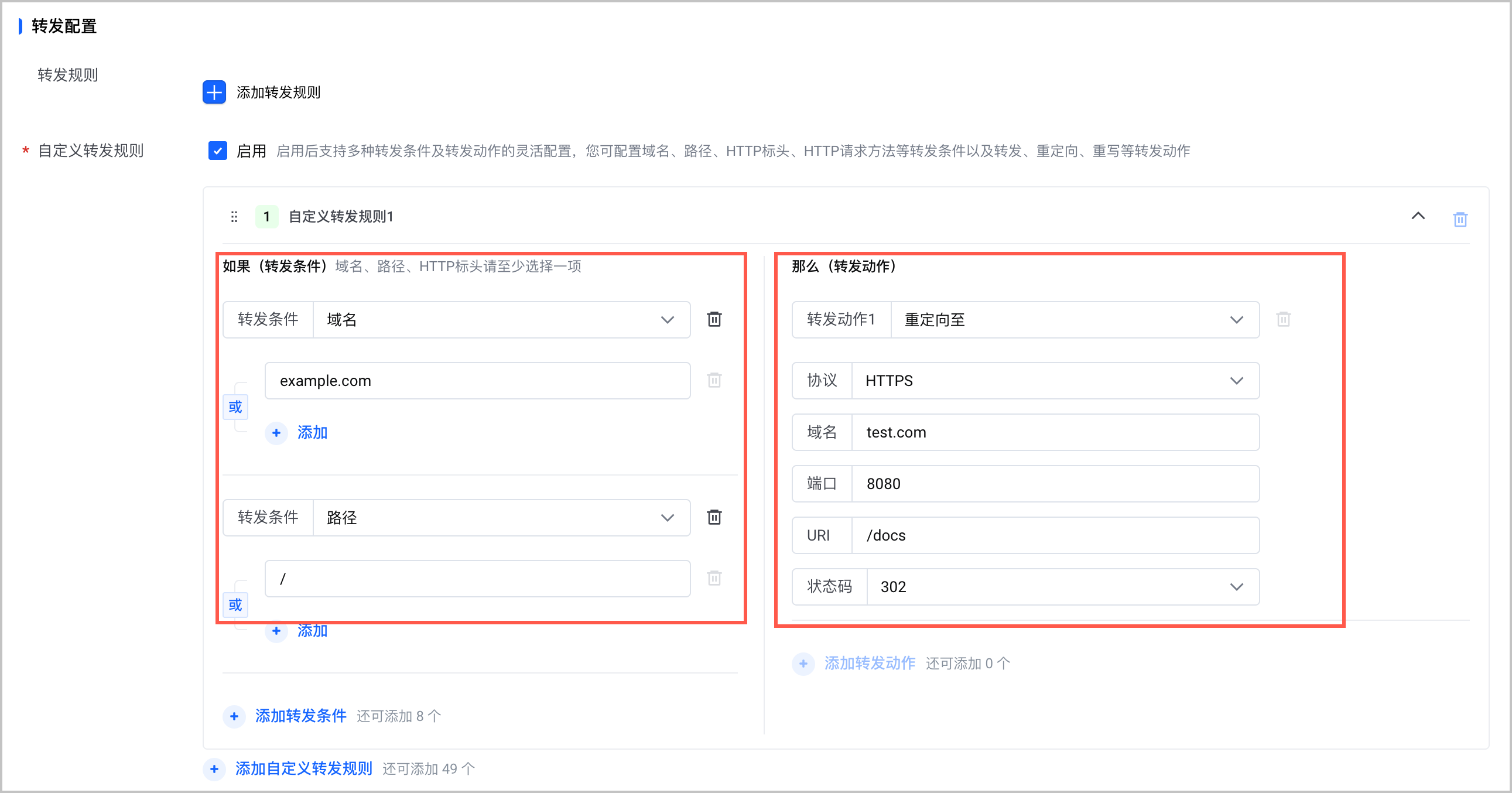
Parameter | Description |
Parameter | Description |
Forwarding conditions | Configure forwarding conditions, including the domain name, path, and HTTP header.
|
Forwarding actions | Select Redirect to for the Forwarding actions parameter and configure the redirection rule.
|
- Click Confirm to finish.
Use kubectl
warning
If both detailed and quick configurations are provided, forwarding uses the detailed configuration.
Detailed configuration
ALB Ingress allows you to configure traffic redirection rules by using an annotation. The configuration slightly varies based on whether the ALB Ingress uses a Standard edition ALB instance or a Basic edition ALB instance.
Standard edition ALB
Basic edition ALB
The following content provides sample configurations and annotation descriptions for an ALB Ingress that uses a Standard ALB instance.
warning
The {{service-name}} field in the annotation must match the name of the back-end service configured in spec.rules. For example, in this case, the correct annotation is ingress.vke.volcengine.com/loadbalancer-actions.service-demo.
apiVersion: networking.k8s.io/v1
kind: Ingress
metadata:
name: alb-ingress # The custom Ingress name.
namespace: default # Namespace of the Ingress
annotations:
ingress.vke.volcengine.com/loadbalancer-actions.{{service-name}}: | # Replace {{service-name}} with the name of the service.
[
{
"type": "Redirect",
"redirectConfig": {
"host": "example.com",
"path": "/",
"httpCode": "301",
"port": 443,
"protocol": "HTTPS"
}
}
]
spec:
ingressClassName: alb
rules:
- host: example.com
http:
paths:
- pathType: Prefix
path: /
backend:
service:
name: service-demo # The service name. The name needs to be consistent with the value of {{service-name}} in the loadbalancer-actions.{{service-name}} annotation.
port:
name: use-annotation # The fixed value. When you configure redirection, port.name must be use-annotation.
tls:
- hosts:
- example.com
secretName: example-tls-secret # The name of the Secret that stores the certificate.
The following table describes fields in the ingress.vke.volcengine.com/loadbalancer-actions.{{service-name}} annotation.
Field | Type | Description | Default value |
Field | Type | Description | Default value |
type | String | The action type of the custom forwarding rule. When you configure redirection, you need to set the value to Redirect. | None |
redirectConfig.host | String | The target domain name for redirection. Exact domain matching is supported. | None |
redirectConfig.path | String | The target URI for redirection. It must start with a forward slash (/). It can contain letters, digits, and special characters (-, _, /, ., %, ?, #, &, and =). The length is limited to 1 to 128 characters. | None |
redirectConfig.httpCode | String | The redirection status code. Supports redirection status codes: 301, 302, 307, and 308. | None |
redirectConfig.port | Integer | The port for redirection. The value can range from 1 to 65535. | None |
redirectConfig.protocol | String | The protocol for redirection. Supported protocols include HTTP and HTTPS. | None |
The following content provides sample configurations and annotation descriptions for an ALB Ingress that uses a Basic ALB instance.
apiVersion: networking.k8s.io/v1
kind: Ingress
metadata:
name: alb-ingress
annotations:
ingress.vke.volcengine.com/loadbalancer-rules-configs: |
[
{
"host": "first.example.com",
"path": "/",
"ruleAction": "Redirect",
"redirectConfig":
{
"domain": "test.com",
"uri": "/docs",
"port": 8080,
"httpCode": "302",
"protocol": "HTTPS"
}
}
]
spec:
ingressClassName: alb # The name of the ALBInstance resource.
rules:
- host: first.example.com
http:
paths:
- pathType: Prefix
path: /
backend:
service:
name: redirect # The fixed value 'redirect' indicate redirecting.
port:
name: use-annotation # The fixed value 'redirect' indicate redirecting.
- host: second.example.com
http:
paths:
- pathType: Prefix
path: /
backend:
service:
name: service-demo
port:
number: 80
The following table describes fields in the ingress.vke.volcengine.com/loadbalancer-rules-configs annotation.
Field | Type | Description | Default value |
Field | Type | Description | Default value |
host | String | The domain name that incoming requests must match. | None |
path | String | The path pattern to match. | None |
ruleAction | String | The action to take when rule conditions are met. Valid values:
| Redirect |
redirectConfig | Array of redirectConfig | The redirection rules. | None |
redirectConfig
Field | Type | Description | Default value |
Field | Type | Description | Default value |
domain | String | The target domain name for redirection. Exact domain matching is supported. If this parameter is not specified, it will be assigned the default value (null), which means it will match the requested domain. | None |
uri | String | The target URI for redirection. It must start with a forward slash (/). It can contain letters, digits, and special characters (-, _, /, ., %, ?, #, &, and =). The length is limited to 1 to 128 characters. If this parameter is not specified, it will be assigned the default value (null), which means it will match the requested URI. | nu |
port | Integer | The port for redirection. The value can range from 1 to 65535. If this parameter is not specified, it will be assigned the default value (null), which means it will match the request port. | nu |
httpCode | String | The redirection status code. Supports redirection status codes: 301, 302, 307, and 308. The default value is 301. | 301 |
protocol | String | The protocol for redirection. Supported protocols include HTTP and HTTPS. The default protocol is HTTPS. | HTTPS |
Quick configuration
ALB Ingress supports configuring HTTP-to-HTTPS redirection via annotations.
tip
- Quick configuration only supports redirecting HTTP port 80 to HTTPS. This redirection must be configured on a forwarding rule with a listening port of 80.
- The ALB Ingress must also be configured with an HTTPS listener on port 443.
apiVersion: networking.k8s.io/v1
kind: Ingress
metadata:
name: alb-ingress # The custom Ingress name.
namespace: default # Namespace of the Ingress
annotations:
ingress.vke.volcengine.com/ssl-redirect: "true" # Enable HTTP-to-HTTPS redirection
spec:
ingressClassName: alb
rules:
- host: example.com
http:
paths:
- pathType: Prefix
path: / # The matching path for the request.
backend:
service:
name: service-demo # Service name
port:
number: 80 # The port number of the Service
Validate results
View settings
tip
The details pages of forwarding rules differ between Standard edition ALB instances and Basic edition ALB instances. This topic provides an example of viewing the details page of a forwarding rule for a Standard edition ALB instance.
- Log in to the ALB console.
- Click Instance in the left navigation bar. In the instance list, find the target ALB instance and click Listener in the Actions column.
- On the listener details page, find the target listener. In the Actions column, click Edit forwarding rules to view the existing forwarding rules of the listener. You can view the newly added redirection forwarding rule.
- For a forwarding rule, click
 to view rule details. The rule details should be consistent with the configured ones.
Verify access
tip
Before verification, make sure that you have deployed back-end applications and services in the cluster. In this example, an Nginx image is used and the service path is /. For deployment steps, see Using ALB Ingresses for service deployment.
Access the service by using the domain name configured in the ALB Ingress. In this example, 14.***.***.*** is the public IP address of the ALB instance.
curl -H "Host: example.com" http://14.***.***.***
The expected result is as follows: When example.com is accessed over HTTP, ALB Ingress redirects the traffic to the HTTPS endpoint, and the backend service can then be accessed successfully.
<!DOCTYPE html>
<html>
<head>
<title>Welcome to nginx!</title>
<style>
html { color-scheme: light dark; }
body { width: 35em; margin: 0 auto;
font-family: Tahoma, Verdana, Arial, sans-serif; }
</style>
</head>
<body>
<h1>Welcome to nginx!</h1>
<p>If you see this page, the nginx web server is successfully installed and
working. Further configuration is required.</p>
<p>For online documentation and support please refer to
<a href="http://nginx.org/">nginx.org</a>.<br/>
Commercial support is available at
<a href="http://nginx.com/">nginx.com</a>.</p>
<p><em>Thank you for using nginx.</em></p>
</body>
</html>
Last updated: 2026.09.03 16:11:39
All rights reserved © Beijing Volcano Engine Technology Co., Ltd2024
