Volcengine Kubernetes Engine
Volcengine Kubernetes Engine


Document

- Documentation
 Volcengine Kubernetes EngineCloud-native AIServingKitDeploying the Al inference application through HelmKimi practiceQuickly deploying Kimi-K2-Instruct with SGLang
 Copy page
 Download PDF
Kimi practice
Quickly deploying Kimi-K2-Instruct with SGLang
Copy pageDownload PDFQuickly deploying Kimi-K2-Instruct with SGLang
This topic describes how to quickly deploy the Kimi-K2-Instruct model inference service based on SGLang by using Volcengine Kubernetes Engine (VKE).
Solution introduction
This solution has integrated multiple acceleration technologies of the Volcano Engine to provide the methods of quickly deploying Kimi-K2-Instruct Large Language Model (LLM) in the Kubernetes clusters:
Kimi-K2-Instruct model is a 2nd-generation product of the Kimi LLM series which is officially released in July 2025 by the Moonshot AI company. It has made remarkable breakthroughs in terms of performance, features, and application scenarios.
Deployment information
- Model: kimi-k2-instruct
- Inference engine: SGlang
- Recommended specification: ecs.hpcpni3le.60xlarge × 1 unit
Supported capabilities
- Parallel policy: TP
- Observability: Volcengine Managed Service for Prometheus (VMP)
- Access: API Gateway (APIG)
Notes
- In this example, many add-ons are used, which are dependent on each other and have complex configurations. To achieve the expected results, you must perform operations according to the guidance in this article.
- To achieve the expected results and conform to the limits of VKE, you need to perform operations by following the solution described in this article or on the recommended resources. If you need to change your solution, you can consult the Account Manager of the Volcano Engine.
- Do not use mGPU on GPU resources.
- A full deployment depends on some beta capabilities of the Volcano Engine. Contact the Account Manager of the Volcano Engine to apply for the beta trial of the following features:
- Beta feature/resourceProduct involvedDescriptionHigh-performance Compute-optimized GPU of hpcpni3le specificationThe HPC instance, providing computing power. The DeepSeek model has a large number of parameters. Therefore, you need to apply for a GPU instance with large memory, such as ecs.hpcpni3le.60xlarge.Capability of mounting nodes to local disksYou can configure the local disk mounting in the VKE cluster.
Prerequisites
Creating an HPC cluster
The high-performance compute cluster is used to achieve logical isolation of HPC GPU instances (compute nodes). Instances in the same cluster are interconnected by Remote Direct Memory Access (RDMA) networks. For details, see Creating HPC clusters.
tip
The region and availability zone where the high-performance compute cluster is located need to be consistent with the region and availability zone of the VKE nodes.
Creating a VKE cluster
The following parameters need to be configured as described in the table when creating a cluster by using VKE. For details on other parameters, see Creating clusters.
Configuration item | Description |
Cluster configuration | |
Kubernetes version | Select version v1.28 or later. |
Network model | Select VPC-CNI. |
Node pool configuration | |
Managed node pool | Enable managed node pool. |
Availability zone | Same availability zone as the High-Performance Compute Cluster. |
Instance type | Select the ecs.hpcpni3le.60xlarge instance family of the High Performance Computing Optimized type that you applied for the beta trial. |
High Performance Computing Cluster | Select the HPC cluster you created. |
Number of nodes | 1 node. |
Data volume | Configure the following two data volumes:
Warning
|
Addon configuration | |
nvidia-device-plugin | (Required) The NVIDIA device driver. It allows use of management add-ons for GPUs in containers. |
apig-controller | (Required) API Gateway controller provides the AI Gateway capability of cloud-native, which can complete the intelligent load balancing of the inference traffic according to different policies. |
csi-ebs | (Required) It enables VKE clusters to use the standard CSI implementation for Elastic Block Storage (EBS). |
prometheus-agent | (Required) Volcengine Managed Service for Prometheus (VMP) monitoring add-on collects the monitoring metrics data of the Kubernetes cluster to VMP. |
cr-credential-controller | (Recommended) It can pull Container Registry (CR) images without passwords, which simplifies deployment operations. |
keda | (Recommended) The event-driven autoscaler based on Kubernetes completes the autoscaler tasks of the inference service based on complex metrics. |
vci-virtual-kubelet | (Recommended) It can deploy CPU-consuming workloads such as system add-ons by using Volcengine Container Instance (VCI), which eliminates the need for operation and maintenance (O&M) and does not occupy the computing resources of GPU nodes. |
Procedure
Step 1: Deploy kimi-k2-instruct-sglang
The VKE provides the Kimi-K2-Instruct model application based on the SGLang framework. You can quickly deploy this model application through an application template.
- In the left navigation bar of the VKE console, click Application center > Application template.
- On the Application template page, find kimi-k2-instruct-sglang application template and click Deploy.
- On the Deploy application page, configure the service parameters of kimi-k2-instruct-sglang.
- Configuration itemDescriptionOrchestration templateApplication templateSelect the Chart version of kimi-k2-instruct-sglang. We recommend that you select the latest version.Parameter configurationThe configuration method of kimi-k2-instruct-sglang. Click Edit icon, you can view the configuration description of various parameters in the values.yaml file or edit YAML file.NameCustomize the application name according to the naming requirements prompted by the interface.Deployment environmentClusterSelect the VKE cluster created in Prerequisites.NamespaceCustomize and select the namespace under the target cluster.ProtocolRead and understand the agreement before selecting it.
- Click Confirm to start deployment.
- The applications that are already deployed can be found on the Helm page. Select the target project, cluster, and namespace, and find the deployed application kimi-k2-instruct-sglang. Click the application name and enter the details page to view the basic information, the workloads, services, and other resources created in association with this application.
tip
The service names that match the pattern <application name>-api-svc indicate those services will be working as the external access points of their applications, and therefore supposed to be used when configuring routing and verifying model deployment.
- On the Deployment page of the VKE clusters, view the load status of the application kimi-k2-instruct-sglang.
- In the left navigation bar of the VKE console, click Cluster. Find the target cluster and click the cluster name.
- On the management page of the target cluster, select Workload > Deployment, and then search for the name of the application kimi-k2-instruct-sglang to view the relevant load status.
Step 2: Configure routing
Configure model routing through APIG Ingress. APIG Ingress can function as a managed cloud-native gateway based on the Volcano Engine APIG, realizing high availability and scalability in Ingress traffic management that are required in cloud-native applications.
- On the left navigation bar on the cluster management page, select Services and Ingresses > Ingress, and click Create Ingress. Use API Gateway to expose the model service externally in the cluster. The parameters mentioned below need to be configured as described. Other parameters can be configured by referring to the Creating APIG Ingress through the console.
- Configuration ItemDescriptionBasic configurationNamespaceSelect the namespace where the kimi-k2-instruct-sglang application template is deployed to associate the service exposed by the application.Ingress configurationIngress typeSelect Cloud-native API gateway.APIG specification settingsBackend upstreamWe recommend that you set the Load balancing algorithm parameter to Round Robin. It is more applicable to the scenarios of upgrading back-ends if the back-end loads are approximately balanced.Listener configurationProtocolSelect a protocol as needed. If you select HTTPS, configure the certificate based on the requirements in the APIG Ingress topic.Forwarding configurationDomain nameFill in the Ingress domain name to be exposed. The A (Address) record of this domain name needs to be configured later with the public or private IP address generated when the Ingress is successfully created.ServiceWhen you select to deploy the application template kimi-k2-instruct-sglang, you should associate it with the service created in the <application name>-api-svc format, and set the port number to 8080.
- (Optional) Configure authentication for an APIG.
- Log in to the API Gateway console.
- Create consumer: On the left navigation bar, select Consumer management, and click Create consumer.
- Generate an API-KEY: In the consumer list, click the name of the target consumer to enter the consumer details page. In the API Key information area, click Generate API Key.
- In the pop-up dialog box, select Automatically create.
- Click Confirm to generate API Key credential information.
- Enable Key Auth add-on: In the left navigation bar, click Plugin Center. On the page that appears, select Key Auth and then click Create Plugin.
- Effective level: Select Routing level and configure the instance, service, and route to which the add-on belongs.
- Authentication configuration: Select header and enter the text "Authorization" in the textbox on the right side to indicate that API Key will be included in the Authorization header of requests.
- Consumer: Select the consumer created in Step 1.
- Other options can remain as default.
- Obtain the Ingress address.
- VIP: includes both public and private IP addresses.
- Backend service: includes the backend service name and access domain name.
- Configure domain name resolution.
- To test the DNS in the local environment, you can implement a domain-to-IP resolution locally.
- In a production environment, configure an access domain name for the Ingress at the domain name provider, and make sure that the public or private IP address of the Ingress is configured in the A record of the Ingress access domain name.
Step 3: Enable observability configuration
Based on basic observability, this application provides monitoring metrics of AI resources and inference services.
- In the left navigation bar of the page for a specific cluster, select Overview under Cloud native observability, then click Enable on the page to start monitoring. For more configuration details, refer to Enable observability and VKE observability.
- After turning on observability, the application metrics of SGLang will be collected into the Volcengine Managed Service for Prometheus (VMP). You can use Explore to query metrics in the VMP console. An example is as follows:
- There is a built-in VMP dashboard that allows you to view the metrics collected from SGLang-based applications. To do that, you can go to the VMP console, select Monitoring dashboard in the left navigation bar and search for SGLang to open dashboard as shown below:
-
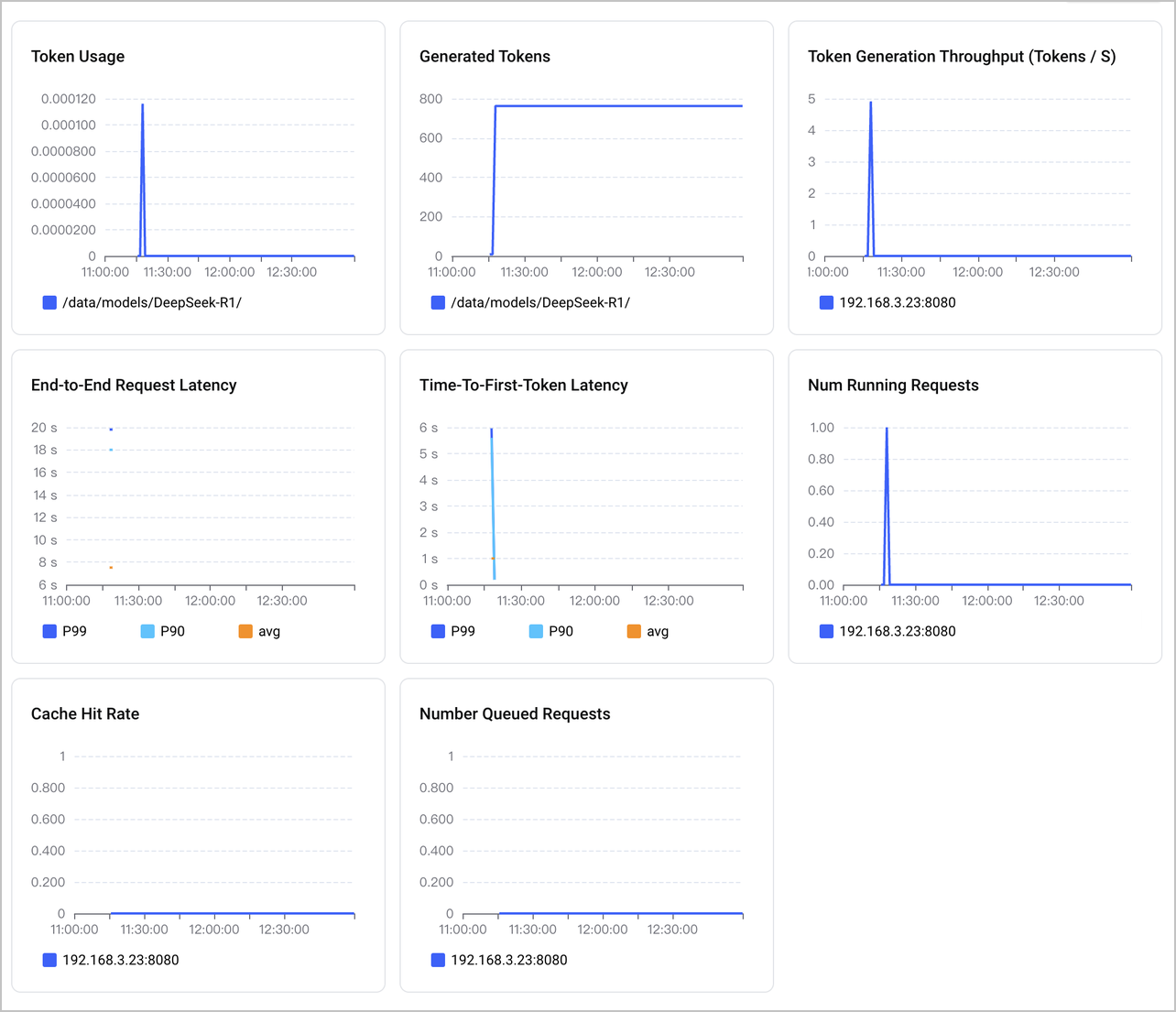
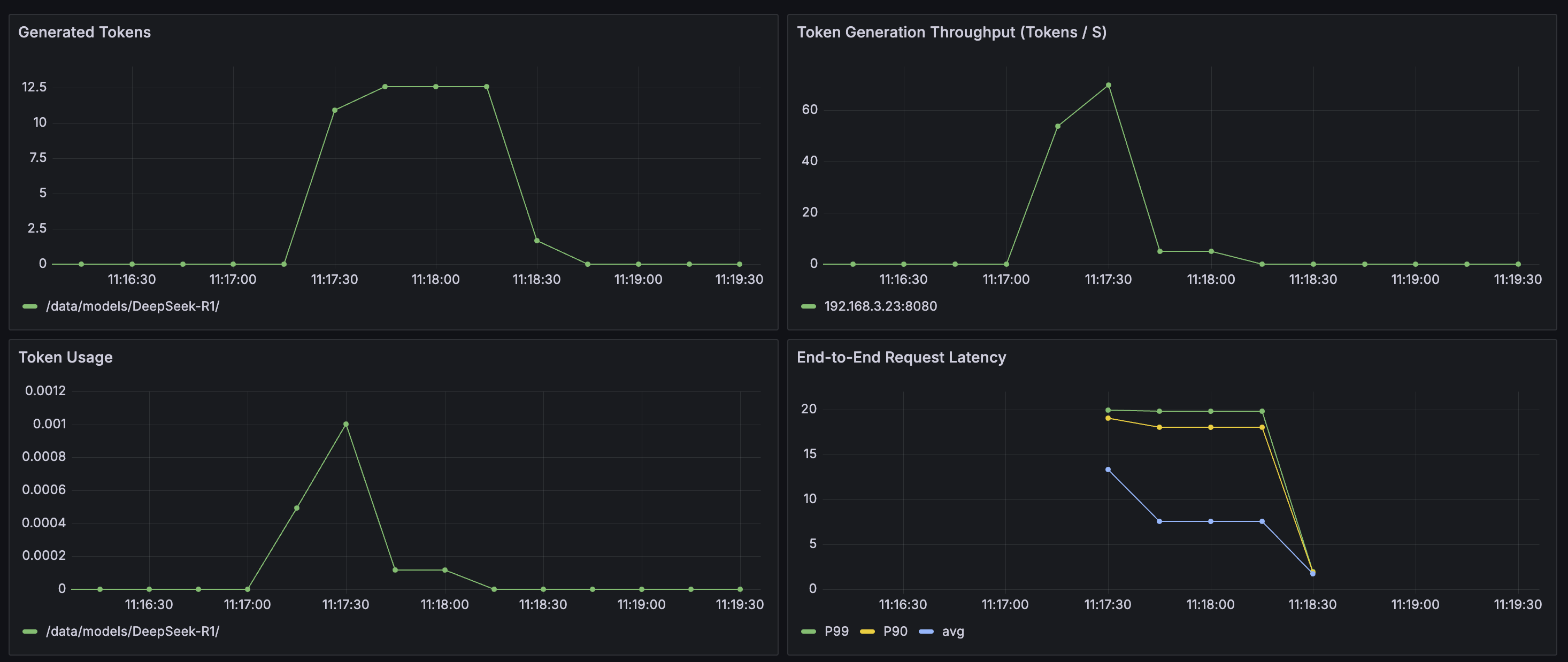
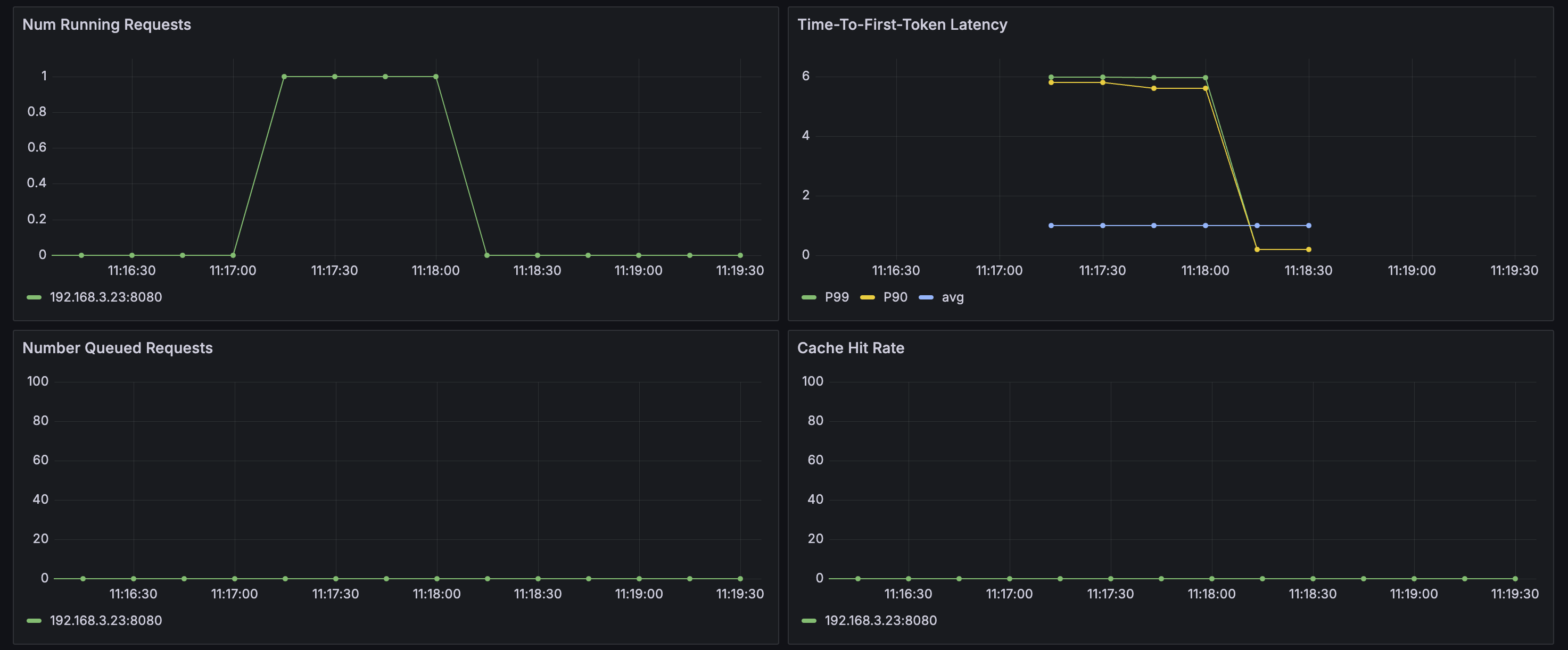
- You can also build a Grafana on your own and establish the monitoring dashboard of sglang. For more details, refer to Deploying Grafana in a VKE cluster and integrating Grafana with a workspace.
- Log in to the above Grafana and select Import the JSON file of the following dashboard:
- The effect after import is shown in the figure:
-
-
Model verification
Method 1: Access via Service
After deploying the kimi-k2-instruct-sglang application template, associate it with the service whose name is in the format of <application name>-api-svc, which provides an HTTP API endpoint (port 8080). You can call the service endpoint by using the OpenAI API.
The sample code is as follows.
tip
- Replace ****** in http://****** with the endpoint of your <application name>-api-svc Service.
- The parameter content is what you want to type to chat with LLMs.
You can, in the Workload area of the Helm application details page corresponding to the kimi-k2-instruct-sglang application, click to associate with the workload created. Then the page will redirect to the Deployment page. Click Console in the upper-right corner of the page, and log in to the Pod of the application, to execute API invocations.
Method 2: Access via APIG
When enabling the authentication feature of the APIG, you need to add an authentication token in the request.
The following example is provided for reference.
tip
- Replace example.com in the http://example.com with the Ingress backend service access domain name obtained in Step 2: Configure routing.
- Replace eyJhbGciOiJSUzI****** with the API Key generated in Step 2: Configure routing.
- The content parameter specifies the text you input to chat with LLMs.
Last updated: 2026.07.24 15:50:48
All rights reserved © Beijing Volcano Engine Technology Co., Ltd2024
