Volcengine Kubernetes Engine
Volcengine Kubernetes Engine
Volcengine Kubernetes Engine


Document
Volcengine Kubernetes Engine
What's New
History feature release notes
Kubernetes version release notes
Containerd runtime release notes
Add-on release notes
Monitoring add-ons
Scheduling add-ons
DNS add-ons
Security add-ons
GPU add-ons
Sandbox add-on
Security announcements
Product Announcement
Historical announcements
Overview
Getting started
User guide
Clusters
Creating clusters
Connecting to clusters
Upgrading clusters
Node pool
Creating node pools
Scaling out/in node pools
Nodes
Authorization management
Image
Namespaces
Networking
Cluster network
Container Network
Service
LoadBalancer
CLB
Ingress
APIG Ingress
ALB Ingress
Customize ALB Ingress forwarding rules
Certificate and security
CLB Ingress
Nginx Ingress
Gateway API
Workloads
Creating workloads
Configure workloads
Pods
Configuration management
Image acceleration
Storage
FSX client
EBS Volumes
TOS Volumes
NAS volumes
FSX access methods
NFS access methods
EFS volumes
vePFS volumes
FSX access methods
vePFS Client access methods
NFS access methods
CloudFS volumes
Local volumes
Autoscale
Node autoscaler
Workload autoscaler
Horizontal Pod Autoscaler (HPA)
Cron Horizontal Pod Autoscaler (CronHPA)
Intelligent Horizontal Pod Autoscaler (IHPA)
Horizontal Pod Autoscaler based on event-driven (KEDA)
Add-on management
Network add-ons
Storage add-ons
Monitoring add-ons
Scheduling add-ons
DNS add-ons
GPU add-ons
Core add-ons
Sandbox add-on
Upgrading add-ons
Heterogeneous computing
NVIDIA GPU
mGPU scheduling
RDMA high-performance computing
Scheduling management
Topology-aware scheduling
QoS-aware scheduling
Observability
Log management
Basic observation
Setup & Configuration
Cluster observation
Storage observation
Other observation
Using metrics
Full stack observation
Alert management
Diagnosis and inspection
Node check and self-healing
Application center
Backup center
Stability
Large-scale cluster management
Best practices
Authorization
Clusters
Nodes and node pools
Networking
Storage
Scheduling
Observability
Solution
Security and compliance
API reference
Cluster management
NodePool management
Node management
Virtual nodes management
Add-on management
Tag management
Access policy management
Instance images management
Cloud native observability
Inspection and diagnosis
Task management
Volcengine Container Instance
Appendix
SDK reference
Development guide
Terraform
FAQs
General FAQs
Cluster FAQ
cluster management
cluster network
cluster upgrade
Node and Node pool FAQs
Authorization FAQs
Workload FAQs
Service and Ingress FAQs
Storage FAQs
Heterogeneous computing FAQs
Observability FAQs
Quota FAQs
Add-on FAQs
Cloud-native AI
ServingKit
LLM applications
ComfyUI application
Deploying the Al inference application through Helm
Deepseek practices
Qwen practices
Kimi practice
Seed practices
Best practices
DeepSeek model deployment
GLM model deployment
MiniMax model deployment
Qwen model deployment
Kimi model deployment
Volcengine Container Instance
What's new
Historical feature release notes
Product Announcement
Overview
Billing
User guide
Integrating with VCI
Virtual node
VKE cluster uses virtual nodes
Self-managed/third-party cluster uses virtual node
Creating an instance
General purpose instance
GPU-accelerated computing instance
VCI Agent Sandbox
Startup acceleration
E2B-based management
Upgrade guide
Networking
Monitoring
Scheduling
Container configuration
VCI Image Cache
Best practices
Security and compliance
FAQs
- Documentation
 Volcengine Kubernetes EngineVolcengine Container InstanceUser guideVCI Agent SandboxUpgrade guideUpgrading VCI Agent Sandbox
 Copy page
 Download PDF
Upgrade guide
Upgrading VCI Agent Sandbox
Copy pageDownload PDFUpgrading VCI Agent Sandbox
This topic describes how to upgrade an Agent Sandbox. Before upgrading, thoroughly review the target version's changes and impact analysis to ensure a full understanding of the changes.
Preparations
- You have confirmed Kubernetes compatibility, version changes, and impacts. For details, see Version change log.
- You have administrator permissions for the cluster where the Agent Sandbox application is deployed. For details, see Configuring RBAC permissions.
- As updates to some versions involve associated impacts, assess the scope of impact in advance and perform the upgrade during off-peak business hours.
- If the current version is v0.1.1 and the warm pool feature is used, first scale in the number of warm pool replicas to 0 before the upgrade.
- If you need to retain the ability to access the Sandbox via a Kubernetes Service, plan the value of the controller.defaultSandboxService parameter in advance.
Upgrade procedure
- Log in to the VKE console.
- In the left navigation bar, click Application center > Helm.
- On the Helm page, select the target cluster and namespace, and then find the Agent Sandbox application to upgrade.
- On the right side of the Agent Sandbox application, click ...> Update in the Actions column.
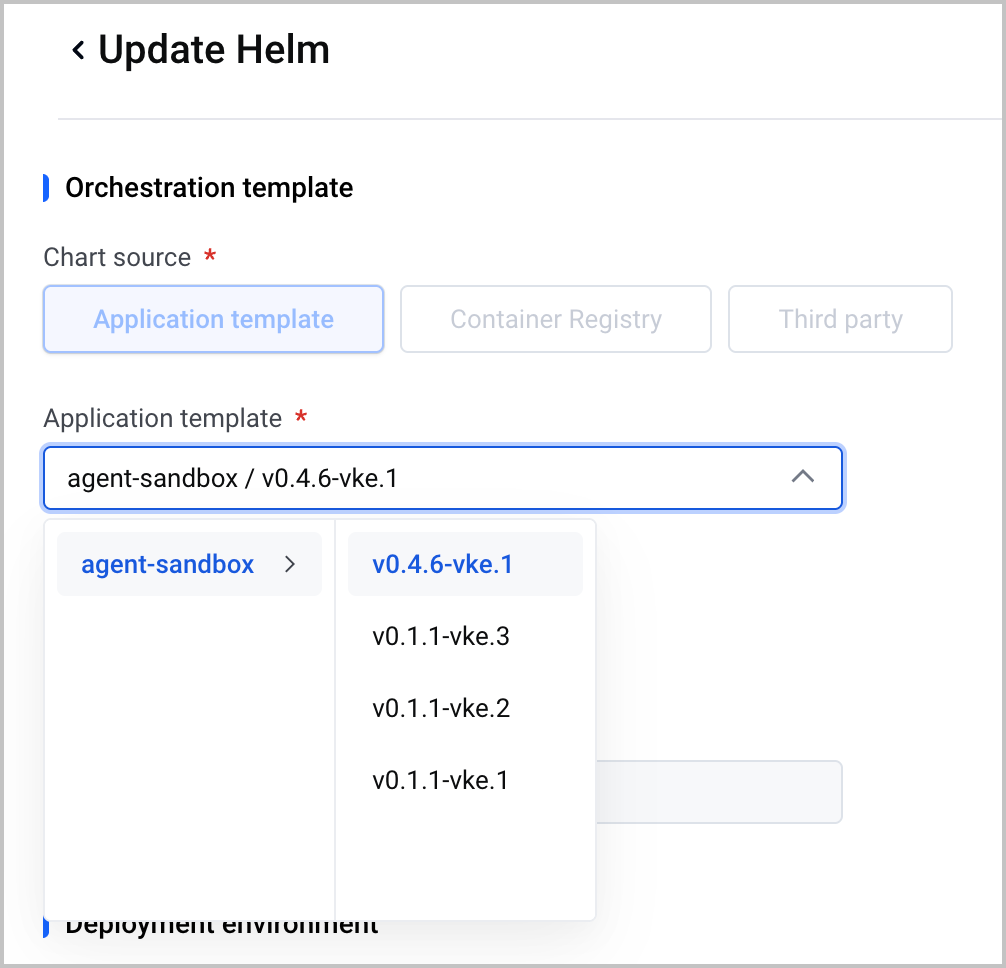
- On the Update Helm page, expand agent-sandbox from the Application template drop-down list in the Orchestration template section, and then select the target version.
-
- Click the edit icon next to values.yaml and fill in the deployment parameters. For parameter details, see the installation guide.
- After confirming the parameters are correct, click Confirm at the bottom of the page to submit the update.
- VKE will automatically complete the rolling upgrade of the Helm Release. You can observe the release status and workload changes on the Helm details page.
Post-upgrade verification
After the upgrade is complete, we recommend performing checks in the following order to ensure that the application is running normally.
- On the Helm page, confirm that the agent-sandbox application status is Deployed and its Chart version matches the target version.
- Click the Helm application name. On the Helm details page, check the workload type and status of agent-sandbox-controller. The expected results are that the type has switched to Deployment, and that all its Pods are in the Running status.
tip
- The agent-sandbox-controller workload type is Deployment in v0.4.6 or later, and StatefulSet before this version.
- The status of all agent-sandbox-controller resources must be ready (the Status column shows Ready: n/n).
- Create a test Sandbox to verify that it can normally reach the Running state and be accessed. For detailed instructions, see Lifecycle management.
- (Optional) If anomalies occur after the upgrade, roll back to the previous stable version on the Helm page using the Historical version feature. Rollback will also result in a brief window during which the add-on is unavailable. Proceed with caution.
Last updated: 2026.07.24 18:38:16
All rights reserved © Beijing Volcano Engine Technology Co., Ltd2024
