Volcengine Kubernetes Engine
Volcengine Kubernetes Engine


Document

- Documentation
 Volcengine Kubernetes EngineVolcengine Kubernetes EngineGetting startedUsing VKE via the console
 Copy page
 Download PDF
Getting started
Using VKE via the console
Copy pageDownload PDFUsing VKE via the console
This topic describes how to create a cluster and deploy applications in the cluster in the VKE console.
Step 1: Create a cluster
- Log in to the VKE console.
- In the top navigation bar, select the region closest to your business.
- In the left navigation bar, click Cluster.
- On the Cluster page, click Create cluster.
- In the Create cluster dialog box, go to the Custom managed clusters section and click Create now.
- On the Create cluster page, follow the wizard to configure the cluster.
- This quick start uses the parameter settings shown in the table below. For unmentioned parameters, keep their default settings. For details, see Creating clusters.
- ParameterDescriptionExampleScreenshotBasic configuration
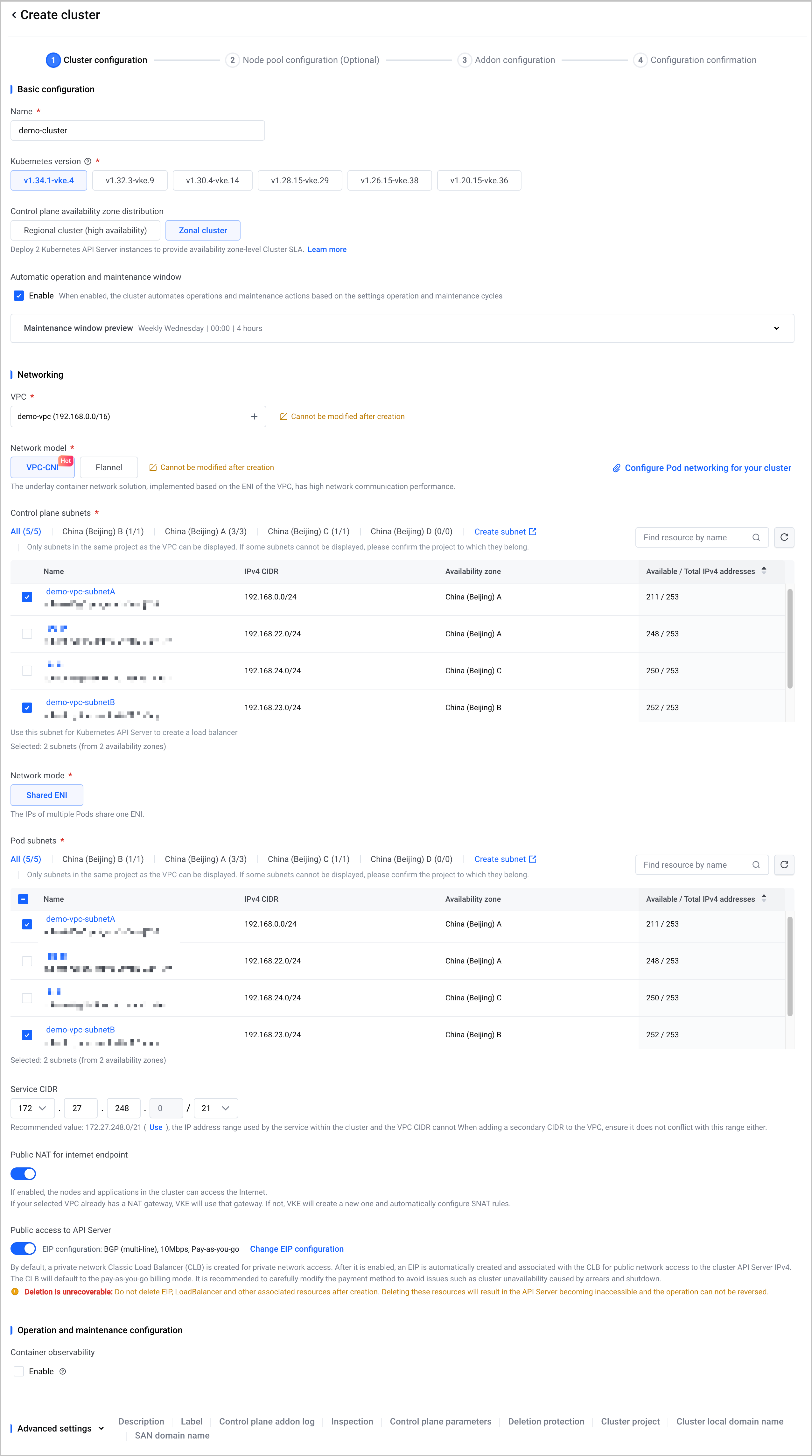 NameSpecify a name for the cluster.demo-clusterKubernetes versionSelect the version of the Kubernetes cluster to deploy.Latest Kubernetes versionNetworkingVPCdemo-vpc (192.168.0.0/16)Network modelConfigure pod networking (CNI) solution for the cluster.
- VPC-CNI: an underlay container network solution implemented based on the elastic network interface (ENI) of a VPC. Under the VPC-CNI network model, VPC subnets can be selected for pod networking.
- Flannel: an underlay network solution (Flannel HostGateway) that allows you to use custom CIDR for pod networking of Kubernetes clusters.
VPC-CNIControl plane subnetsSelect subnets in the VPC.demo-vpc-subnetA and demo-vpc-subnetBPod subnetsSelect the VPC subnets that pods deployed in the cluster will use.demo-vpc-subnetA and demo-vpc-subnetBPublic NAT for internet endpointAfter this feature is enabled, use a NAT gateway to provide public access for nodes and applications within the cluster.- If the VPC of cluster has a NAT gateway, VKE will use that gateway.
- If the VPC of cluster does not have a NAT gateway, VKE creates one and automatically configures SNAT rules. The newly created NAT gateway uses the Pay-by-CU billing mode. For billing details, see NAT Gateway billing.
EnableInternet access to API ServerAfter this feature is enabled, VKE automatically creates an EIP of the BGP (Multipath) type and associates it with a CLB instance. This enables the cluster to be accessed over the public network.EnableOperation and maintenance configurationContainer observabilityThis feature is enabled by default. When enabled, this feature monitors the metrics of basic cluster resources (such as nodes, kubelet, and kube-state-metrics) and control plane components (such as kube-apiserver, kube-scheduler, and etcd).Disable
- In the lower-right corner of the page, click Next: Node pool configuration to configure a node pool.
- ParameterDescriptionExampleScreenshotNode
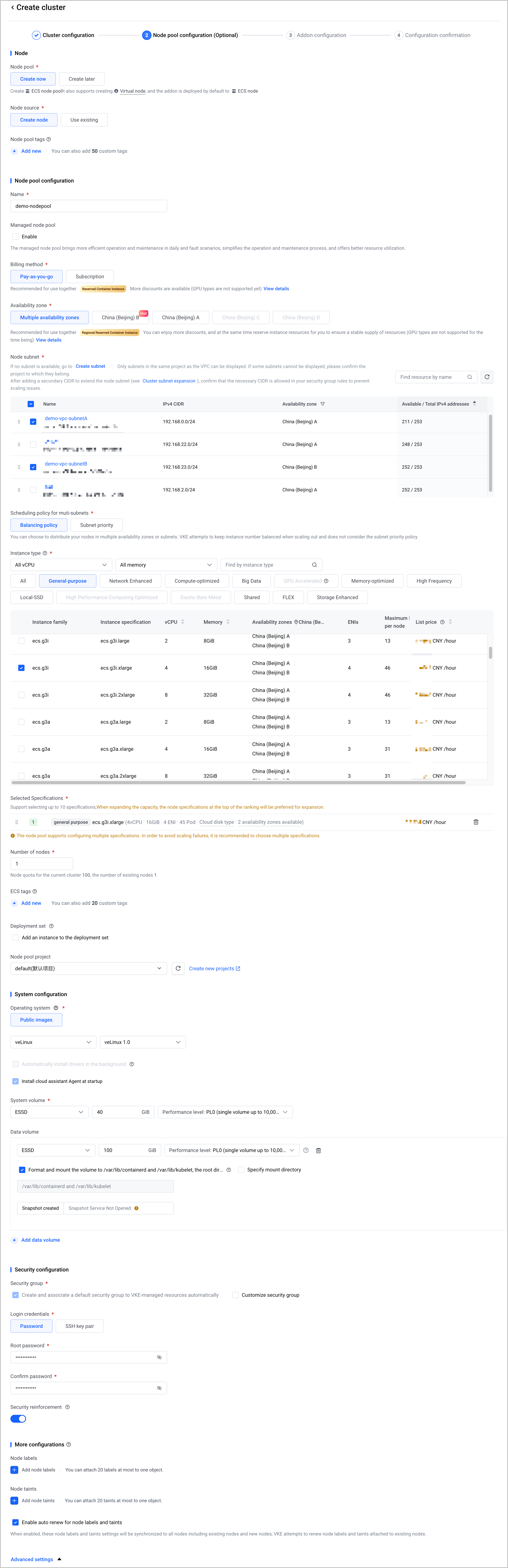 Node pool managementConfigure whether to create a node pool:
- Create now: Creates a node pool containing ECS nodes. This node pool also supports simultaneous creation of virtual nodes, and by default, uses ECS nodes to deploy add-ons.
- Create later: The system automatically creates virtual nodes, and by default, deploys add-ons to VCIs.
Create nowNode sourceThe way in which the worker nodes are obtained.Create nodeNode pool settingNameSpecify a name for the node pool.demo-nodepoolBilling typeThe billing model applied to ECS resources allocated to nodes.Pay-as-you-goAvailability zoneSelect the availability zone for the new node. AZs refer to physical areas isolated from each other in terms of electricity and network in the same region. AZs communicate with each other over internal networks.Multiple availability zonesNode subnetSelect the subnet for the new node.demo-vpc-subnetA and demo-vpc-subnetBInstance typeSelect the instance specifications for the new node (ECS instance). You can select multiple instance specifications. For details about the instance specifications, see Instance specification list.General-purpose ecs.g3i.xlarge (4 vCPU | 16 GiB)Number of nodesSpecify the number of nodes. The fees for ECS resources depend on the number of nodes. Make sure only the necessary nodes are running in the cluster.1Security configurationLogin methodsTwo authentication mechanisms are supported for logging into nodes: Password and SSH key pair.Select Password and specify a strong password
- In the lower-right corner of the page, click Next: Addon configuration. You need to configure all functional add-ons and essential system add-ons supported by the cluster.
- In this case, you can keep the default configuration.
- In the lower-right corner of the page, click Next: Configuration confirmation. Confirm your cluster configuration. If nothing is wrong, select the I have read and agree to Volcengine Kubernetes Engine Specific Terms of Service check box and then click Confirm in the lower-right corner of the page to start creating the cluster.
- Cluster creation takes 15 to 20 minutes. You can click Cluster list to perform other operations or stay on the cluster creation page to monitor the creation progress.
Step 2: Deploy an application
After the cluster is created, deploy an application using a Deployment.
- In the left navigation bar of the demo-cluster cluster management page, click Workload > Deployment.
- On the Deployment page, click Create Deployment.
- On the Create Deployment page, specify the parameters of the Deployment by following the wizard.
- This quick start uses the parameter settings shown in the table below. For unmentioned parameters, keep their default settings. For parameter details, see Creating Deployments.
- Basic Information
-
- Container configuration
-
- Advanced settings
- No advanced configuration is required in this example. Keep all default settings and then click Confirm in the lower-right corner of the page.
- On the Deployment page, view the created Deployment.
- Click the Deployment name to go to the details page. Then, click the List of instances tab to view the running status of the pod instances for the Deployment. If Running is displayed in the Status column, it indicates that the Deployment runs as expected.
Step 3: Access the application
After you deploy the application, you can access the application on the Service tab to check whether the application is deployed.
- On the Deployment details page, click the Access method tab.
- On the Access method tab, click the Service tab, and then click Create Service.
- On the Create Service page, configure service information. After you complete the configuration, click Confirm in the lower-right corner of the page.
- This quick start uses the parameter settings shown in the table below. For unmentioned parameters, keep their default settings. For detailed parameter settings, see Creating CLB services using the console.
-
- After you create the service, copy the address in the External endpoint column on the Service tab of the Access method tab.
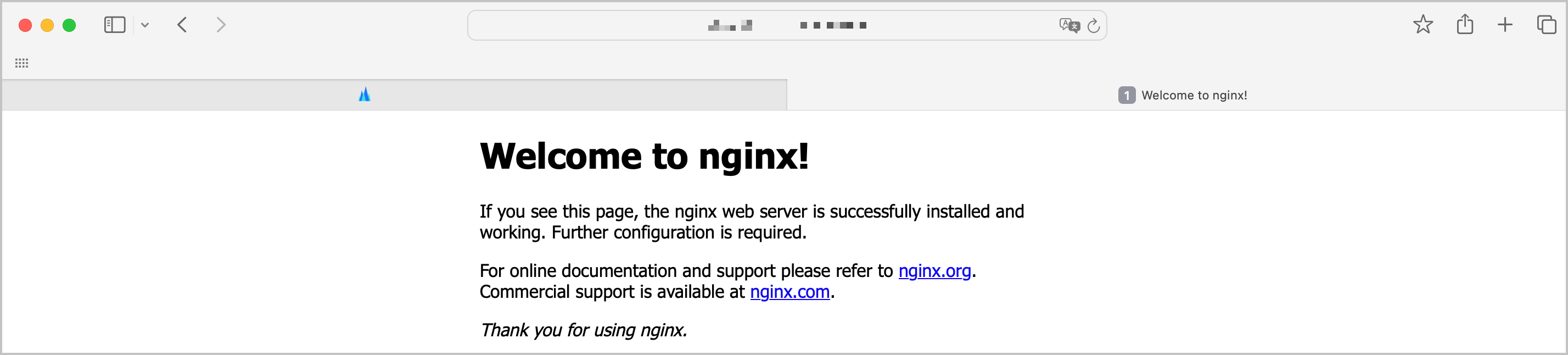
- Enter the external endpoint address in the browser address bar to go to the Nginx welcome page.
-
Step 4: Monitor the application
After the application is deployed, you can use cloud-native observability to monitor its status, including CPU and memory usage, to facilitate subsequent O&M work. For details, see Enabling observability.
Release resources
If you no longer need a cluster, delete it and its associated resources by following the instructions in Deleting Clusters. To keep the cluster running without interruptions, ensure that your Volcano Engine account balance is at least CNY 100 (including any vouchers) and greater than zero (excluding vouchers).
If you continue to use VKE clusters, you will be charged the following two types of fees. For details, see Product billing.
- Cluster management fees charged by VKE.
- Cloud infrastructure costs: Volcano Engine resources used in the cluster, such as NAT Gateway, CLB, EIP, and EBS, are billed separately by the corresponding cloud services.
Last updated: 2026.09.24 15:22:31
All rights reserved © Beijing Volcano Engine Technology Co., Ltd2024
