Volcengine Kubernetes Engine
Volcengine Kubernetes Engine


Document

- Documentation
 Volcengine Kubernetes EngineVolcengine Kubernetes EngineBest practicesClustersUsing KubeCm to manage the kubeconfig files of multiple clusters
 Copy page
 Download PDF
Clusters
Using KubeCm to manage the kubeconfig files of multiple clusters
Copy pageDownload PDFUsing KubeCm to manage the kubeconfig files of multiple clusters
KubeCm facilitates you in flexibly switching between multiple clusters when you use kubectl for cluster management. This topic describes how to use KubeCm to manage VKE clusters of Volcano Engine.
Background information
kubectl is the native command-line tool provided by Kubernetes. You can use the kubectl client to connect to a Kubernetes cluster and perform operations, such as creation, viewing, and deletion, on the cluster.
When connecting to the target cluster with kubectl, first obtain the cluster's kubeconfig access credentials. Then copy them to the $HOME/.kube/config file on your local computer.
However, if you manage multiple clusters at the same time, you need to constantly modify the content of the $HOME/.kube/config file. Manual merging of kubeconfig files for multiple clusters is inefficient and error-prone. This topic describes a method of efficiently managing the kubeconfig access credentials of multiple clusters to quickly switch the access credentials.
What is KubeCm?
KubeCm is a tool for managing the kubeconfig credentials of multiple clusters. KubeCm lets you view, switch between, add, and delete kubeconfig credentials in the $HOME/.kube/conf file, simplifying multi-cluster management.
tip
Prerequisites
Preparing environment
The kubectl tool has been installed in the local environment. For details, see Installing and setting up kubectl.
Installing KubeCm
After KubeCm is installed, run the kubecm command. If the following content is displayed, it indicates that KubeCm is installed.
Obtaining cluster access credentials
- In the left navigation bar, click Cluster.
- On the Cluster page, click the name of the target cluster to go to the cluster management page.
- In the left navigation bar, click Overview. On the page that appears, click the Connection tab.
- Click the Public network tab, click Generate KubeConfig, and then specify the Valid period parameter to generate the cluster access credentials.
- Click
 to download the access credentials to your local computer.
Common operations
Adding access credential
- Run the following command to add an access credential.
Replay
00:00
/
00:11
Live
Play
00:00
Fullscreen
Cssfullscreen
Click and hold to drag
tip
- kube.conf is a sample file name for the kubeconfig access credentials. You need to replace it with your file name accordingly.
- Before you run the command, make sure that the $HOME/.kube directory already contains the config file. If the file does not exist, an error will be reported when you run the command.
- When you run the command, if you select True, the access credentials will be written to the $HOME/.kube/config file. If you select False, a ./kubecm.config file will be generated in the current folder.
- If you want to modify the name of the cluster access credentials when you add the credentials, you can add the -c parameter and use the --context-name parameter to specify the name.
Replay
00:00
/
00:31
Live
Play
00:00
Fullscreen
Cssfullscreen
Click and hold to drag
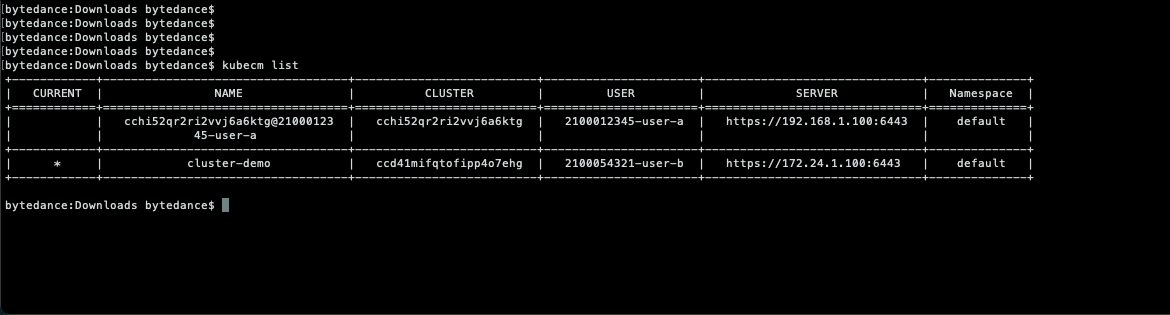
Viewing the cluster list
Run the following command to view all access credentials.
Switching clusters
Run the following command to switch to another access credential.
Replay
00:00
/
00:13
Live
Play
00:00
Fullscreen
Cssfullscreen
Click and hold to drag
Rename access credentials
Run the following command to rename the cluster access credentials.
Replay
00:00
/
00:25
Live
Play
00:00
Fullscreen
Cssfullscreen
Click and hold to drag
Removing clusters
Run the following command to remove the cluster access credentials.
Replay
00:00
/
00:09
Live
Play
00:00
Fullscreen
Cssfullscreen
Click and hold to drag
Last updated: 2026.07.23 11:53:57
All rights reserved © Beijing Volcano Engine Technology Co., Ltd2024
