Volcengine Kubernetes Engine
Volcengine Kubernetes Engine
Volcengine Kubernetes Engine


Document
Volcengine Kubernetes Engine
What's New
History feature release notes
Kubernetes version release notes
Containerd runtime release notes
Add-on release notes
Monitoring add-ons
Scheduling add-ons
DNS add-ons
Security add-ons
GPU add-ons
Sandbox add-on
Security announcements
Product Announcement
Historical announcements
Overview
Getting started
User guide
Clusters
Creating clusters
Connecting to clusters
Upgrading clusters
Node pool
Creating node pools
Scaling out/in node pools
Nodes
Authorization management
Image
Namespaces
Networking
Cluster network
Container Network
Service
LoadBalancer
CLB
Ingress
APIG Ingress
ALB Ingress
Customize ALB Ingress forwarding rules
Certificate and security
CLB Ingress
Nginx Ingress
Gateway API
Workloads
Creating workloads
Configure workloads
Pods
Configuration management
Image acceleration
Storage
FSX client
EBS Volumes
TOS Volumes
NAS volumes
FSX access methods
NFS access methods
EFS volumes
vePFS volumes
FSX access methods
vePFS Client access methods
NFS access methods
CloudFS volumes
Local volumes
Autoscale
Node autoscaler
Workload autoscaler
Horizontal Pod Autoscaler (HPA)
Cron Horizontal Pod Autoscaler (CronHPA)
Intelligent Horizontal Pod Autoscaler (IHPA)
Horizontal Pod Autoscaler based on event-driven (KEDA)
Add-on management
Network add-ons
Storage add-ons
Monitoring add-ons
Scheduling add-ons
DNS add-ons
GPU add-ons
Core add-ons
Sandbox add-on
Upgrading add-ons
Heterogeneous computing
NVIDIA GPU
mGPU scheduling
RDMA high-performance computing
Scheduling management
Topology-aware scheduling
QoS-aware scheduling
Observability
Log management
Basic observation
Setup & Configuration
Cluster observation
Storage observation
Other observation
Using metrics
Full stack observation
Alert management
Diagnosis and inspection
Node check and self-healing
Application center
Backup center
Stability
Large-scale cluster management
Best practices
Authorization
Clusters
Nodes and node pools
Networking
Storage
Scheduling
Observability
Solution
Security and compliance
API reference
Cluster management
NodePool management
Node management
Virtual nodes management
Add-on management
Tag management
Access policy management
Instance images management
Cloud native observability
Inspection and diagnosis
Task management
Volcengine Container Instance
Appendix
SDK reference
Development guide
Terraform
FAQs
General FAQs
Cluster FAQ
cluster management
cluster network
cluster upgrade
Node and Node pool FAQs
Authorization FAQs
Workload FAQs
Service and Ingress FAQs
Storage FAQs
Heterogeneous computing FAQs
Observability FAQs
Quota FAQs
Add-on FAQs
Cloud-native AI
ServingKit
LLM applications
ComfyUI application
Deploying the Al inference application through Helm
Deepseek practices
Qwen practices
Kimi practice
Seed practices
Best practices
DeepSeek model deployment
GLM model deployment
MiniMax model deployment
Qwen model deployment
Kimi model deployment
Volcengine Container Instance
What's new
Historical feature release notes
Product Announcement
Overview
Billing
User guide
Integrating with VCI
Virtual node
VKE cluster uses virtual nodes
Self-managed/third-party cluster uses virtual node
Creating an instance
General purpose instance
GPU-accelerated computing instance
VCI Agent Sandbox
Startup acceleration
E2B-based management
Upgrade guide
Networking
Monitoring
Scheduling
Container configuration
VCI Image Cache
Best practices
Security and compliance
FAQs
- Documentation
 Volcengine Kubernetes EngineCloud-native AIServingKitComfyUI applicationUsing ComfyUI to implement digital human lip-sync podcasts
 Copy page
 Download PDF
ComfyUI application
Using ComfyUI to implement digital human lip-sync podcasts
Copy pageDownload PDFUsing ComfyUI to implement digital human lip-sync podcasts
This topic describes how to deploy and use ComfyUI in ServingKit and use it to implement the basic capability of digital human lip-sync podcasts based on Wan2.1 and InfiniteTalk.
Solution introduction
ServingKit provides a ComfyUI Workflow tailored for digital human lip-sync podcasts. This Workflow integrates acceleration nodes from ServingKit, adopts FP8 precision for models, and enables 8-GPU parallelism, FP8 activation quantization, and asynchronous offloading via the acceleration nodes. As a result, the generation time for a 1-minute podcast video is shortened to 437.72 seconds (compared to 2451.9 seconds with a non-accelerated workflow that has identical configurations). This ComfyUI workflow reduces the generation time by 80% and significantly improves creative efficiency.
The following content describes the parameters of each node in the workflow.
Resource Pool
Parameter | Description |
Parameter | Description |
works_per_node | works_per_node indicates the number of workers per node in the resource pool. nnodes indicates the total number of cluster nodes. The values must meet the following condition: works_per_node × nnodes = gpu_num.
|
nnodes | |
use_gpu | Whether to use GPU resources. Valid values:
|
max_colocate_count | The maximum number of workers. If the model requires three loaders: DiT, CLIP, and VAE, max_colocate_count needs to be set to 3. |
pool_num | The name of the resource pool. |
OpenVefuser WanVideo Model Loader
Parameter | Description |
Parameter | Description |
ulysess_degree | The Ulysses parallelism degree. The value needs to be divisible by head_num of the model. For example, if head_num of the Wan2.1-14B model is 40, ulysess_degree can be set to 40, 80, or another value that is divisible by 40. |
ring_degree | The Ring Attention parallelism degree. |
cfg_degree | The Classifier-Free Guidance (CFG) parallelism degree. Maximum value: 2. The Wan and HiDream models are supported. The values must meet the following condition: ulysess_degree x ring_degree x cfg_degree = gpu_num. |
base_precision | Base computation precision during model inference:
|
quantization | Quantization configuration of the model. To obtain FP8 activation quantization, select the xxx_fast mode. |
load_device | Model storage location:
|
attention_mode | Attention operator type. It is recommended to use sageattn in this scenario. This type indicates Sage Attention. Sage Attention significantly reduces VRAM usage through 8-bit quantization technology while maintaining performance. Sage Attention is suitable for devices with limited VRAM resources. |
rms_norm_function | RMS Normalization (RMSNorm) implementation:
|
OpenVefuser WanVideo Sampler
tip
Compared with native nodes, only the offloading logic is modified, while all other input items remain unchanged.
Parameter | Description |
Parameter | Description |
steps | The number of sampling steps, which is the number of denoising iterations. More steps achieve higher generation quality but take longer. |
cfg | The guidance strength of the prompt. A higher value exerts a stronger influence on the generated result, but excessively high values may cause image distortion. |
shift | A node extension parameter that controls the offset during the sampling process. |
seed | The seed value, which is a random number generated during denoising. When the seed value and other parameter configurations are consistent, the generated image is reproducible. Different seed values achieve different random results. |
control after generate | Controls the behavior of the seed after it is generated. Valid values:
|
force_offload | Whether to forcibly offload model components to devices such as CPU temporarily after sampling:
|
scheduler | The noise scheduling policy, which controls the pace of noise variation during sampling. This parameter affects generation quality and efficiency. |
riflex_freq_index | Frequency channel index targeted by the RIFLEX module. A value of 0 disables the module. The default value is 6, which enables new frame generation without looping. |
denoise_strength | The level of denoising applied to the initial noise. A value of 1.0 indicates complete denoising. A lower value indicates higher randomness of the generated image. The value range is 0 to 1.0. A value of 1.0 means complete denoising, generating entirely new content based on the initial latent variables. Values less than 1.0 mean modifying the original content. |
batched_cfg | Whether to calculate CFG (Classifier-Free Guidance) in batch mode:
|
rope_function | Rotary Position Embedding (RoPE) implementation logic:
|
start_step | The starting step for sampling. 0 means full sampling. Otherwise, sampling starts from the specified step. |
end_step | The ending step for sampling. -1 indicates full sampling. Otherwise, sampling stops at the specified step. |
add_noise_to_samples | The sample noise addition switch for specifying whether to add initial noise to video samples before sampling:
|
Preparation
Before you use the ComfyUI application, you need to prepare the required cloud service resources, environment, and other dependencies for ComfyUI.
Cloud service | Required | Preparation | Reference |
Cloud service | Required | Preparation | Reference |
GPU Cloud Computing | Yes | Provides GPU computing resources. For the video generation scenario described in this topic, it is recommended to use the following GPU Cloud Computing instance types:
tip [Beta] The preceding GPU Cloud Computing instance types are in beta. Contact your account manager of Volcano Engine to apply for a beta trial. | |
TOS | Recommended | Achieves persistent storage for the ComfyUI application. tip TOS storage can be mounted to containers only via FSX. If you use existing managed VKE clusters for heterogeneous computing, make sure that csi-fsx and fsx-service add-ons are installed in the clusters. These add-ons are automatically installed in newly created managed clusters for heterogeneous computing. | |
IAM | Required when TOS is used | Obtains the API access keys (AK and SK) of IAM to access TOS through VKE. | |
VKE | Yes | Provides managed clusters for heterogeneous computing for deploying the ComfyUI application. | |
APIG | Optional | Achieves Layer 7 routing through APIG instances. These instances are required in session persistence scenarios. warning
| |
Internet express | Recommended | Add-on installation requires content pulled from GitHub and HuggingFace, and the Internet Express service. warning
| None |
Step 1: Deploy the ComfyUI application
Deploy your ComfyUI application by using the ComfyUI application template provided by ServingKit. The following table describes specific configurations in this example. For other parameter configurations and detailed operations, see Deploying the ComfyUI application.
Parameter | Description |
Parameter | Description |
Select framework and orchestration | |
Deployment method | Select Predefined template deployment. |
Model | Select Wan2.1 and Infinite Talk. |
Application configuration | |
ComfyUI configuration | We recommend selecting Permanent storage for Storage location. You can configure other parameters according to your application. ServingKit will create the commonly used directories of ComfyUI in the corresponding paths, including the custom_nodes, input, output, models, and user directories. |
Instance configuration | |
Instance specification | Set Number of GPU cards to 8 and set other parameters as needed. |
More configuration |
warning
|
Service configuration | |
API Gateway | Enable API Gateway and associate the prepared APIG instance. warning Make sure that the selected APIG instance and the cluster where the application is deployed are located in the same VPC. |
Step 2: Access the ComfyUI application
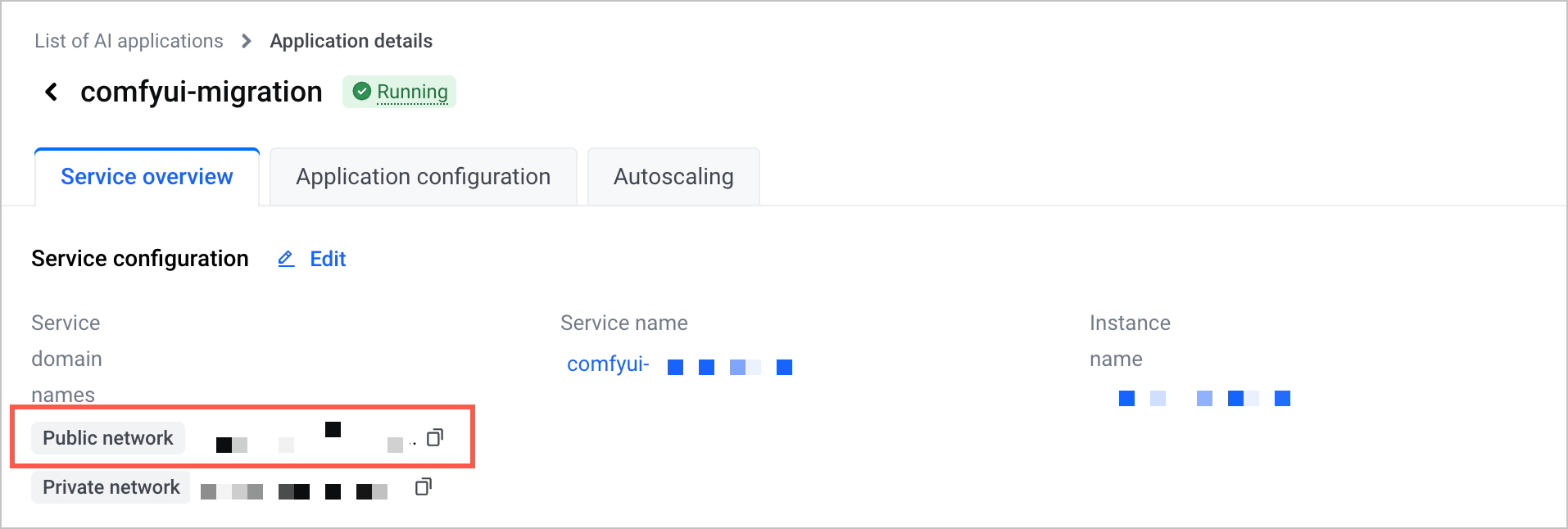
After you deploy the application, go to the Application details page. Click the Service overview tab and copy the value of the Service domain names parameter in the Service configuration section. Enter the domain name in the address bar of your browser to access the ComfyUI application.
Step 3: Use the ComfyUI application to implement the digital human lip-sync podcast capability
- Prepare the audio and images required for the digital human lip-sync podcast.
- You can use the test audio and images provided by ServingKit, or use your own audio and images.
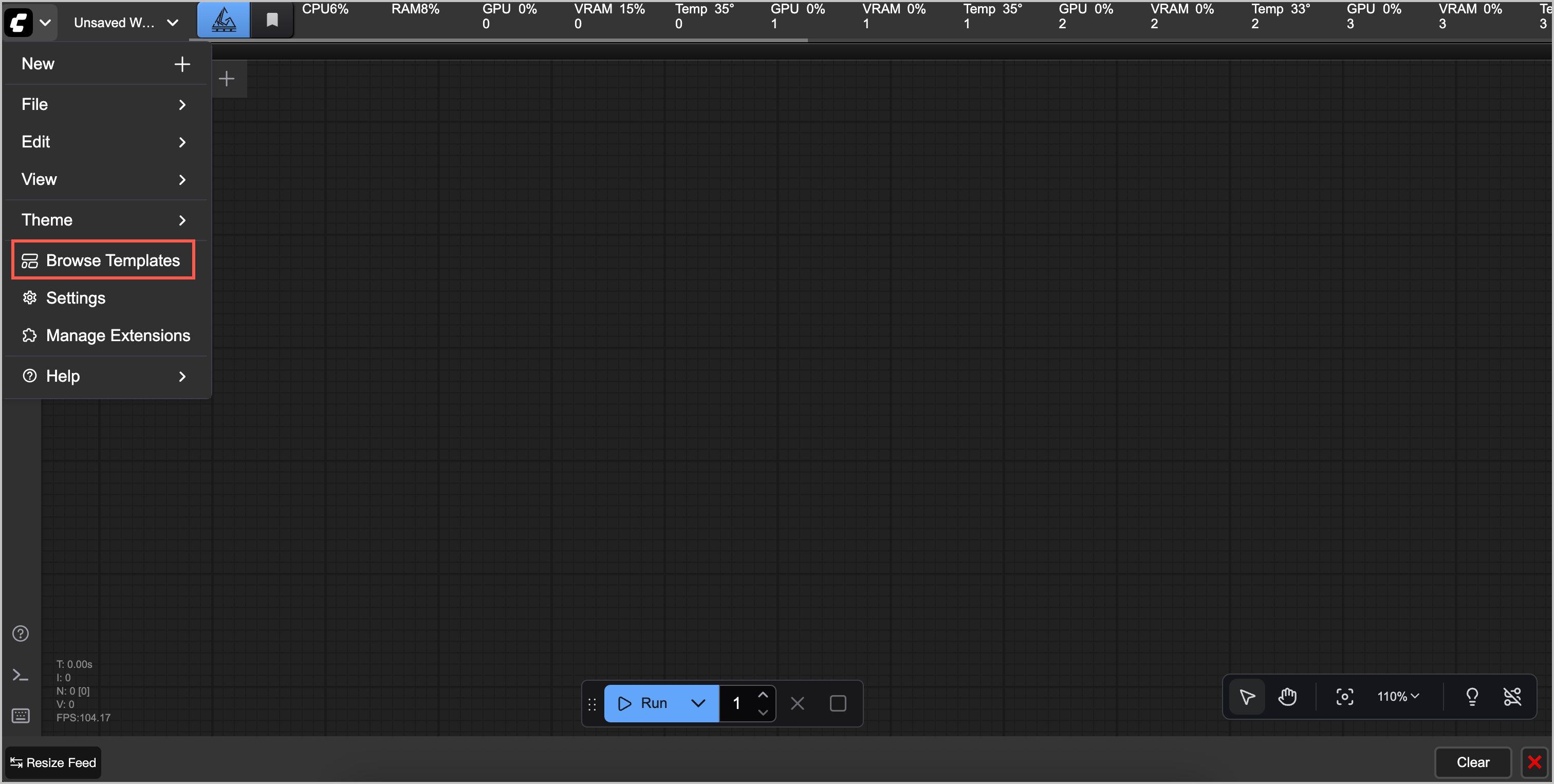
- On the ComfyUI application page, click the dropdown menu icon in the upper left corner. Click Browse Templates, click the vefuser_comfyui series templates in the EXTENSIONS section, and find the vefuser-infinitetalk-lipsync-8gpus template.
-
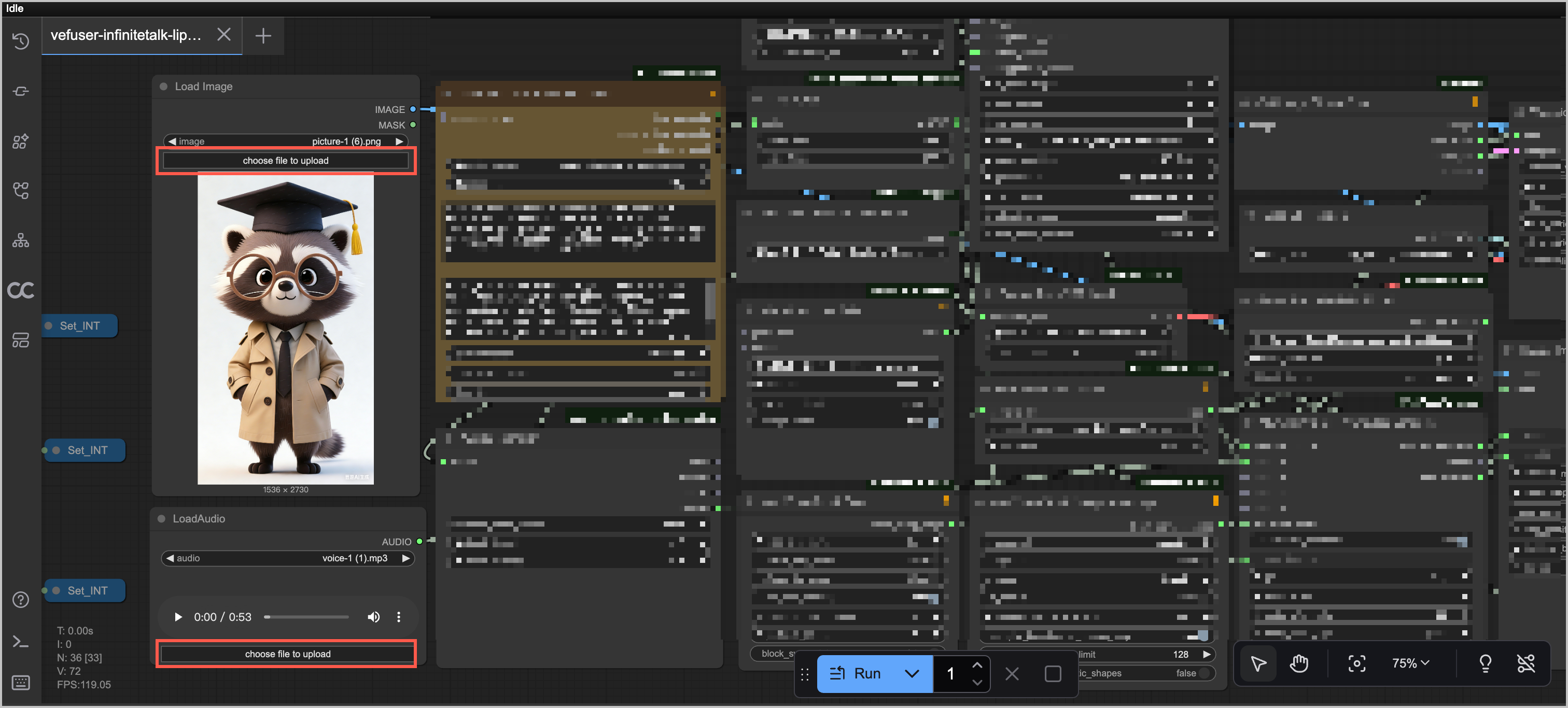
- Import the audio and images into the workflow.
-
- Click Run. Wait for the job to finish.
- After the job execution is complete, the "Little Raccoon Digital Human Podcast" is created.
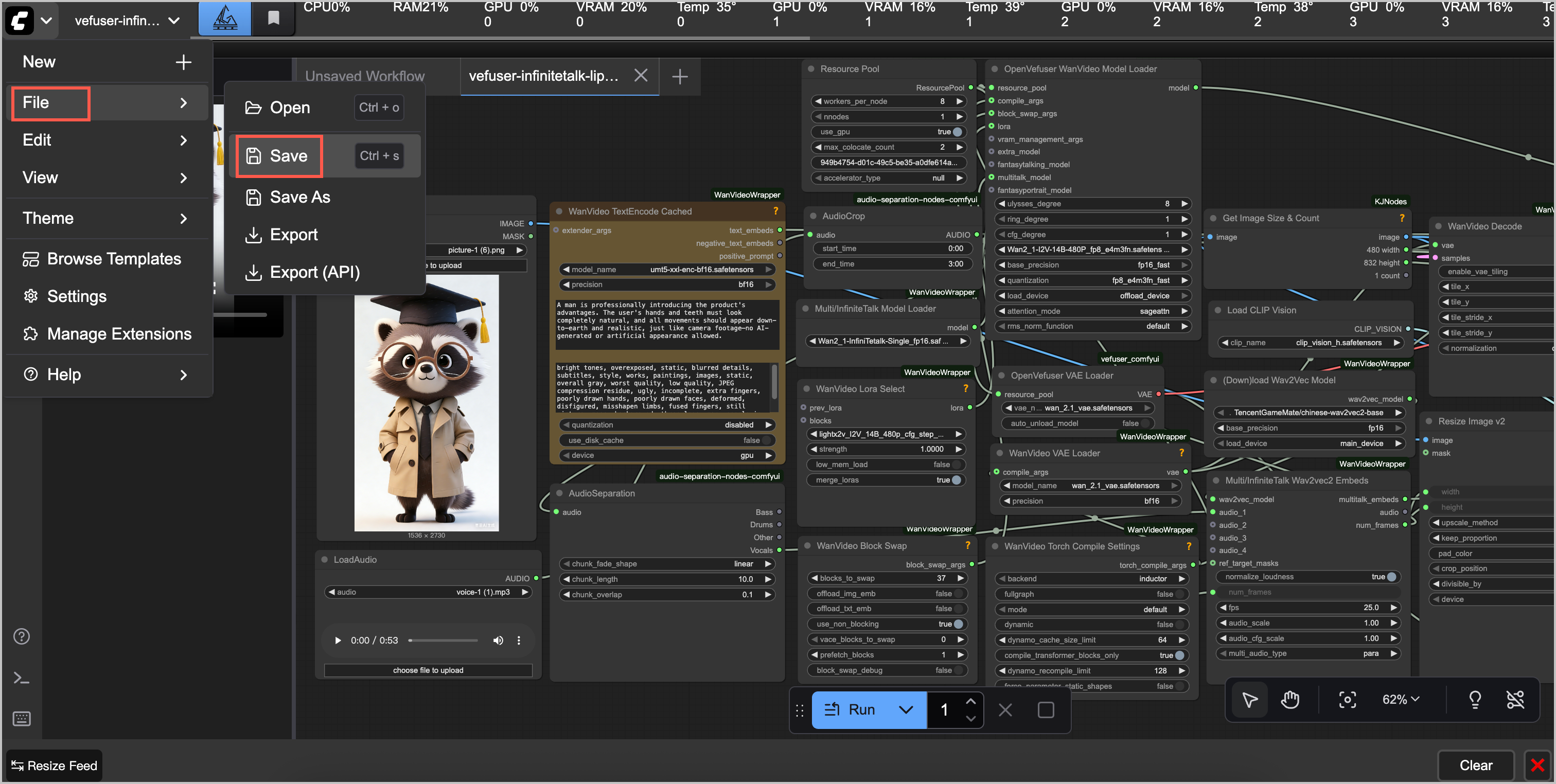
- If the output meets your expectations, click the drop-down menu icon in the upper-left corner and click File > Save to save the pipeline. You can use this workflow later to easily create podcasts based on your custom audio, images, and scenes.
-
Subsequent operations
You can modify parameter configurations based on the workflow node parameter descriptions in the Solution introduction section to achieve different results.
Last updated: 2026.10.16 20:33:48
All rights reserved © Beijing Volcano Engine Technology Co., Ltd2024
