Volcengine Kubernetes Engine
Volcengine Kubernetes Engine


Document

- Documentation
 Volcengine Kubernetes EngineVolcengine Kubernetes EngineUser guideClustersUpgrading clustersUpgrading clusters
 Copy page
 Download PDF
Upgrading clusters
Upgrading clusters
Copy pageDownload PDFUpgrading clusters
Volcengine Kubernetes Engine (VKE) allows you to upgrade clusters. This topic mainly describes the instructions and steps for upgrading the Kubernetes version of a cluster.
Upgrade process
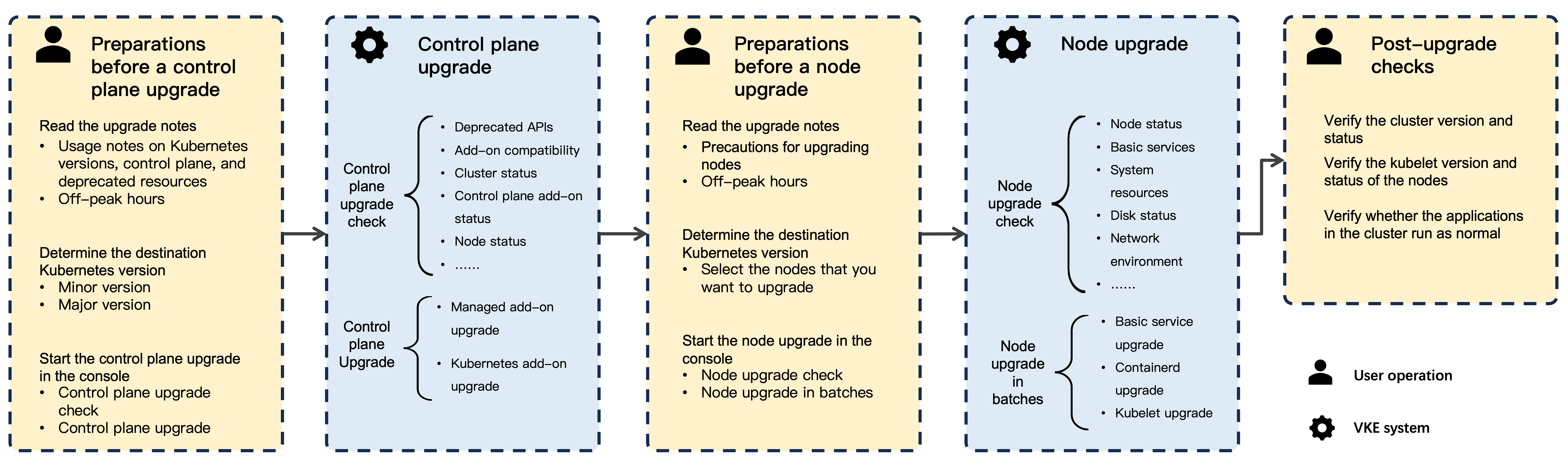
Before you upgrade
Cluster upgrade consists of two parts: control plane upgrade and node upgrade. Each part includes two stages: upgrade check and upgrade execution. Before you start an upgrade, carefully read the instructions described in the Upgrade policy, Control plane upgrade considerations, and Node upgrade considerations sections in this topic.
Upgrade policy
VKE guarantees the stable operation of the latest three minor versions of Kubernetes. Clusters running expired versions may encounter risks such as unstable operation and failed upgrades. However, this does not affect existing businesses. We recommend that you upgrade your cluster version in a timely manner. For more information, see the following topics:
Control plane upgrade considerations
- The upgrade of a Kubernetes minor version may involve changes to Kubernetes resource versions. Before upgrading, check if your application uses deprecated resources. If the chart of your application uses deprecated resources, update the resource versions in the chart to the latest ones and then update the chart in the cluster. For detailed descriptions of resource changes and deprecations, see Kubernetes version release notes.
- During the upgrade of the Kubernetes version for the cluster control plane (master nodes), applications in the cluster are not interrupted. If the applications have a strong dependency on the API server, the applications may be affected for a short period of time.
- Five to ten minutes are taken to upgrade the cluster control plane. During this period, you cannot perform operations on your cluster.
- During the upgrade of the cluster control plane, the system automatically performs a pre-upgrade check. Therefore, before the upgrade, we recommend that you independently perform a pre-upgrade check and make sure that all check items have passed the check. This ensures a smooth upgrade.
- The pre-upgrade check is performed on deprecated APIs for running resources.
- You cannot roll back the upgrade of the cluster control plane. Proceed with caution.
- If a custom operating system image is used in the cluster, the success of cluster upgrades cannot be guaranteed because this type of image is not strictly validated by VKE.
- The control plane can be upgraded only if the Kubernetes version of the nodes and the control plane are consistent.
- When you consecutively upgrade the minor version of Kubernetes for the same cluster, we recommend an interval of over 24 hours between upgrades. This ensures stable cluster operation. For example, after you upgrade the cluster control plane from Kubernetes v1.20 to v1.24 and the cluster has stably run for 24 hours, upgrade the cluster to v1.26.
- Parameter incompatibilities may occur after you upgrade the minor version of Kubernetes. Therefore, custom Kubelet parameters and other parameters of the cluster will not be retained after a minor version upgrade. In this case, you need to specify the parameters after the upgrade to ensure that the expected custom configurations are applied to new nodes. For related operations, see Custom cluster kubelet parameters.
- When the control plane of a cluster that uses the VPC-CNI network model is upgraded from Kubernetes v1.20 to v1.24, you need to manually obtain the EndpointSlices resource. For detailed operations and descriptions, see the Appendix section of this topic.
- The Kubernetes community has updated the value configuration method for kube-proxy's conntrack_max parameter in versions after v1.29. The conntrack_max parameter value is now calculated and updated based on the kube-proxy configuration and the node's CPU core count. For details, see #120448. In VKE clusters running Kubernetes v1.28 or earlier, kube-proxy does not override the conntrack_max parameter value manually set by the cluster administrator. After upgrading the cluster to v1.30, kube-proxy may automatically lower the conntrack_max parameter value based on its new logic. Therefore, before upgrading your cluster, set parameters such as conntrack_max in the ConfigMap of kube-proxy to prevent them from being overwritten. For detailed instructions, see FAQ.
Node upgrade considerations
- Kubernetes node upgrades can affect running applications. During the upgrade, pod probers and lifecycle hooks may fail, and in-place restarts of pods may occur. Therefore, before the upgrade, you need to check whether the cluster is in a healthy state and whether applications are at off-peak hours. This helps you determine whether to start upgrading nodes.
- During the upgrade of the node Kubernetes version, the system automatically performs a pre-upgrade check. Therefore, before the upgrade, we recommend that you independently perform a pre-upgrade check and make sure that all check items have passed the check. This ensures a smooth upgrade.
- You cannot roll back the upgrade of the node Kubernetes version. Proceed with caution.
- If you have modified the kubelet or containerd parameter configuration on the nodes, only compatible parameters will be retained during the node upgrade, and incompatible parameters will be removed. After the nodes are upgraded, you need to check the configuration again.
- When you upgrade nodes to v1.28 or later, the system updates the default values of kubelet parameters to the latest values. For details, see Configuring Kubelet parameters for node pools.
- The target Kubernetes version of the node upgrade cannot be later than the Kubernetes version of the control plane.
Prerequisites
- The Kubernetes version of the target cluster is Upgradable, which indicates that the version is not the latest Kubernetes version released by VKE. For more information, see Kubernetes version release notes.
- The Status of the target cluster must be Running.
- Make sure that the business operations of the target cluster are performed during off-peak hours.
Upgrading the control plane
Step 1: Check before the upgrade
Before you upgrade the control plane, check and resolve all issues that may affect the cluster upgrade.
- Log in to the VKE console.
- In the left navigation bar, click Cluster.
- On the Cluster page, click the name of the target cluster.
- In the left navigation bar of the cluster management page, click Cluster upgrade.
- On the Cluster upgrade page, click the Kubernetes upgrade check tab to run the pre-upgrade check.
- Click Control plane upgrade check, and then click Confirm to start the control plane pre-upgrade check.
- After the check is complete, perform the next step based on the value displayed in the Check status column:
- Pass: The upgrade can be performed.
- Fail: Click View details in the Actions column and address the failed check items based on the on-screen instructions. After fixing the items, run the control-plane upgrade check again. Ensure that Pass appears in the Check status column before upgrading. For check item descriptions and fixes, see Cluster upgrade check items.
tip
- During cluster upgrades, the system analyzes cluster audit logs to assess upgrade risks. If you have confirmed and resolved the relevant alerts, you may ignore them during upgrade execution. The specific check items are as follows:
- Important: check for Kubernetes APIs removal from audit logs
- [Important] VPC-CNI compatibility check
- Check for deprecated Kubernetes APIs in audit logs
- Clusters running Kubernetes v1.36 or later no longer support nodes or node configurations that use containerd 1.x. Before upgrading the control plane version, first upgrade the node container runtime version and update the container runtime configurations of the node pools. For detailed instructions, see Managing node pools.
- Clusters running Kubernetes v1.36 or later no longer support cgroup v1 nodes. Before upgrading the control plane, first perform a rolling upgrade of nodes to cgroup v2. For detailed instructions, see FAQ.
Step 2: Upgrade the control plane
- On the Cluster upgrade page, click the Kubernetes upgrade tab. Then, click Control plane upgrade.
- In the Control plane Kubernetes upgrade dialog box, check the upgrade information.
-
- Click Confirm upgrade to upgrade the control plane.
- During the upgrade process, you can click View details in the Actions column to view the control plane Kubernetes upgrade progress.
- View upgrade results. If Pass is displayed in the Status column, it indicates that the Kubernetes upgrade is complete.
- (Optional) If the upgrade fails, perform the operation again based on the on-screen instructions. If you encounter any further issues during the upgrade, submit a ticket for technical support.
Upgrading nodes
tip
- When the Kubernetes version of the control plane is the same as that of the nodes, you need to upgrade the control plane before performing node upgrades. You can perform upgrades if there are no restrictions on upgrade pre-checks.
- When the Kubernetes version of the control plane is later than that of the nodes, the nodes can be upgraded to the same Kubernetes version as the control plane.
Step 1: Check before the upgrade
- Log in to the VKE console.
- In the left navigation bar, click Cluster.
- On the Cluster page, click the name of the target cluster.
- In the left navigation bar of the cluster management page, click Cluster upgrade.
- On the Cluster upgrade page, click the Kubernetes upgrade check tab. Then, click Node upgrade check.
- Specify parameters on the Node upgrade check page.
- ParameterDescriptionBasic informationSelect Upgrade content based on your actual requirements:
- Kubernetes version: Select the target Kubernetes version (a patch or minor version) to upgrade to. For version information, see Kubernetes version release history.
- Container runtime: Select a container runtime version.
tipVKE currently supports only the containerd container runtime. If the runtime version is upgradable, the system will display available versions. For more information about containerd versions, see the containerd release notes.Node upgrade dimensionBy default, VKE performs node upgrade checks at the node level. After you apply for a trial, you can upgrade nodes from the following dimensions:- Node: Select nodes to be upgraded.
- Node pool: Select the node pools whose nodes are to be upgraded.
Select the upgrade check node- When you set the Node upgrade dimension parameter to Node, you can select All nodes or Partial nodes in the cluster to perform a node upgrade check.
- When you set the Node upgrade dimension parameter to Node pool, you can select a node pool to perform a node upgrade check on all its nodes.
- After the check is complete, perform the next step based on the value displayed in the Check status column:
- Pass: The upgrade can be performed.
- Fail or Warning: Click View details in the Actions column and address the failed check items based on the on-screen instructions. After fixing issues, perform the node upgrade check again. Ensure that Pass appears in the Check status column before upgrading. For check item descriptions and fixes, see Cluster upgrade check items.
tip
If you confirm that pre-upgrade check items with a check result of Warning do not affect your business operations, you can ignore these items and proceed with the Kubernetes upgrade.
Step 2: Upgrade nodes
- On the Cluster upgrade page, click the Kubernetes upgrade tab. Then, click Node upgrade.
- In the Node Kubernetes upgrade message, carefully read Upgrade instructions. Then, click Confirm upgrade.
- On the Node Kubernetes upgrade page, check the upgrade information.
-
- Click Confirm to upgrade the nodes.
- During the upgrade process, you can click View details in the Actions column to view the Kubernetes upgrade progress of nodes.
- View upgrade results. If Pass is displayed in the Status column, it indicates that the Kubernetes upgrade is complete.
- (Optional) If the upgrade fails, perform the operation again based on the on-screen instructions. If you encounter any further issues during the upgrade, submit a ticket for technical support.
Post-upgrade check
After the upgrade is complete, verify the Kubernetes versions for the cluster and nodes, and cluster status on the Overview page of the cluster. Also, check whether other applications in your cluster are running as expected. If your applications are abnormal, view the relevant events and logs for further processing. You can also submit a ticket for technical support.
Appendix
In a VPC-CNI network model cluster, after the cluster control plane is upgraded from Kubernetes v1.20 to v1.24, you need to restart the Cello DaemonSet that belongs to the vpc-cni add-on to obtain the new version of the EndpointSlices resource. Perform the following steps to restart Cello DaemonSet:
- Connect to the upgraded cluster by using kubectl. For more details, see Connecting to clusters.
- Run the following command to restart Cello DaemonSet that belongs to the vpc-cni add-on.
-
Last updated: 2026.07.24 18:38:15
All rights reserved © Beijing Volcano Engine Technology Co., Ltd2024
