Volcengine Kubernetes Engine
Volcengine Kubernetes Engine
Volcengine Kubernetes Engine


Document
Volcengine Kubernetes Engine
What's New
History feature release notes
Kubernetes version release notes
Containerd runtime release notes
Add-on release notes
Monitoring add-ons
Scheduling add-ons
DNS add-ons
Security add-ons
GPU add-ons
Sandbox add-on
Security announcements
Product Announcement
Historical announcements
Overview
Getting started
User guide
Clusters
Creating clusters
Connecting to clusters
Upgrading clusters
Node pool
Creating node pools
Scaling out/in node pools
Nodes
Authorization management
Image
Namespaces
Networking
Cluster network
Container Network
Service
LoadBalancer
CLB
Ingress
APIG Ingress
ALB Ingress
Customize ALB Ingress forwarding rules
Certificate and security
CLB Ingress
Nginx Ingress
Gateway API
Workloads
Creating workloads
Configure workloads
Pods
Configuration management
Image acceleration
Storage
FSX client
EBS Volumes
TOS Volumes
NAS volumes
FSX access methods
NFS access methods
EFS volumes
vePFS volumes
FSX access methods
vePFS Client access methods
NFS access methods
CloudFS volumes
Local volumes
Autoscale
Node autoscaler
Workload autoscaler
Horizontal Pod Autoscaler (HPA)
Cron Horizontal Pod Autoscaler (CronHPA)
Intelligent Horizontal Pod Autoscaler (IHPA)
Horizontal Pod Autoscaler based on event-driven (KEDA)
Add-on management
Network add-ons
Storage add-ons
Monitoring add-ons
Scheduling add-ons
DNS add-ons
GPU add-ons
Core add-ons
Sandbox add-on
Upgrading add-ons
Heterogeneous computing
NVIDIA GPU
mGPU scheduling
RDMA high-performance computing
Scheduling management
Topology-aware scheduling
QoS-aware scheduling
Observability
Log management
Basic observation
Setup & Configuration
Cluster observation
Storage observation
Other observation
Using metrics
Full stack observation
Alert management
Diagnosis and inspection
Node check and self-healing
Application center
Backup center
Stability
Large-scale cluster management
Best practices
Authorization
Clusters
Nodes and node pools
Networking
Storage
Scheduling
Observability
Solution
Security and compliance
API reference
Cluster management
NodePool management
Node management
Virtual nodes management
Add-on management
Tag management
Access policy management
Instance images management
Cloud native observability
Inspection and diagnosis
Task management
Volcengine Container Instance
Appendix
SDK reference
Development guide
Terraform
FAQs
General FAQs
Cluster FAQ
cluster management
cluster network
cluster upgrade
Node and Node pool FAQs
Authorization FAQs
Workload FAQs
Service and Ingress FAQs
Storage FAQs
Heterogeneous computing FAQs
Observability FAQs
Quota FAQs
Add-on FAQs
Cloud-native AI
ServingKit
LLM applications
ComfyUI application
Deploying the Al inference application through Helm
Deepseek practices
Qwen practices
Kimi practice
Seed practices
Best practices
DeepSeek model deployment
GLM model deployment
MiniMax model deployment
Qwen model deployment
Kimi model deployment
Volcengine Container Instance
What's new
Historical feature release notes
Product Announcement
Overview
Billing
User guide
Integrating with VCI
Virtual node
VKE cluster uses virtual nodes
Self-managed/third-party cluster uses virtual node
Creating an instance
General purpose instance
GPU-accelerated computing instance
VCI Agent Sandbox
Startup acceleration
E2B-based management
Upgrade guide
Networking
Monitoring
Scheduling
Container configuration
VCI Image Cache
Best practices
Security and compliance
FAQs
- Documentation
 Volcengine Kubernetes EngineVolcengine Kubernetes EngineUser guideNode poolMonitoring node pool resources
 Copy page
 Download PDF
Node pool
Monitoring node pool resources
Copy pageDownload PDFMonitoring node pool resources
After a node pool is created, you can leverage the resource monitoring feature to view its resource usage, such as CPU utilization, memory utilization, network, and TCP connections. This topic describes how to view node pool resource monitoring and explains the charts in the resource monitoring dashboard for the node pool.
Prerequisites
- A node pool has been created. For details, see Creating a managed node pool.
- Cloud-native observability has been enabled. For details, see Enabling observability.
tip
For more information about the cluster resource monitoring dashboard and metrics, see Container service observability.
Observability dashboards
- Log in to the VKE console.
- In the left navigation bar, click Cluster. Click the target cluster name to go to the management page of this cluster.
- In the left navigation pane, click Node pool. In the node pool list, click the target node pool name to go to the node pool details page.
- Click the Resource monitoring tab to view the resource usage of the node pool. You can specify a custom time range for querying information and set the information refresh mode to manual or automatic refresh.
-
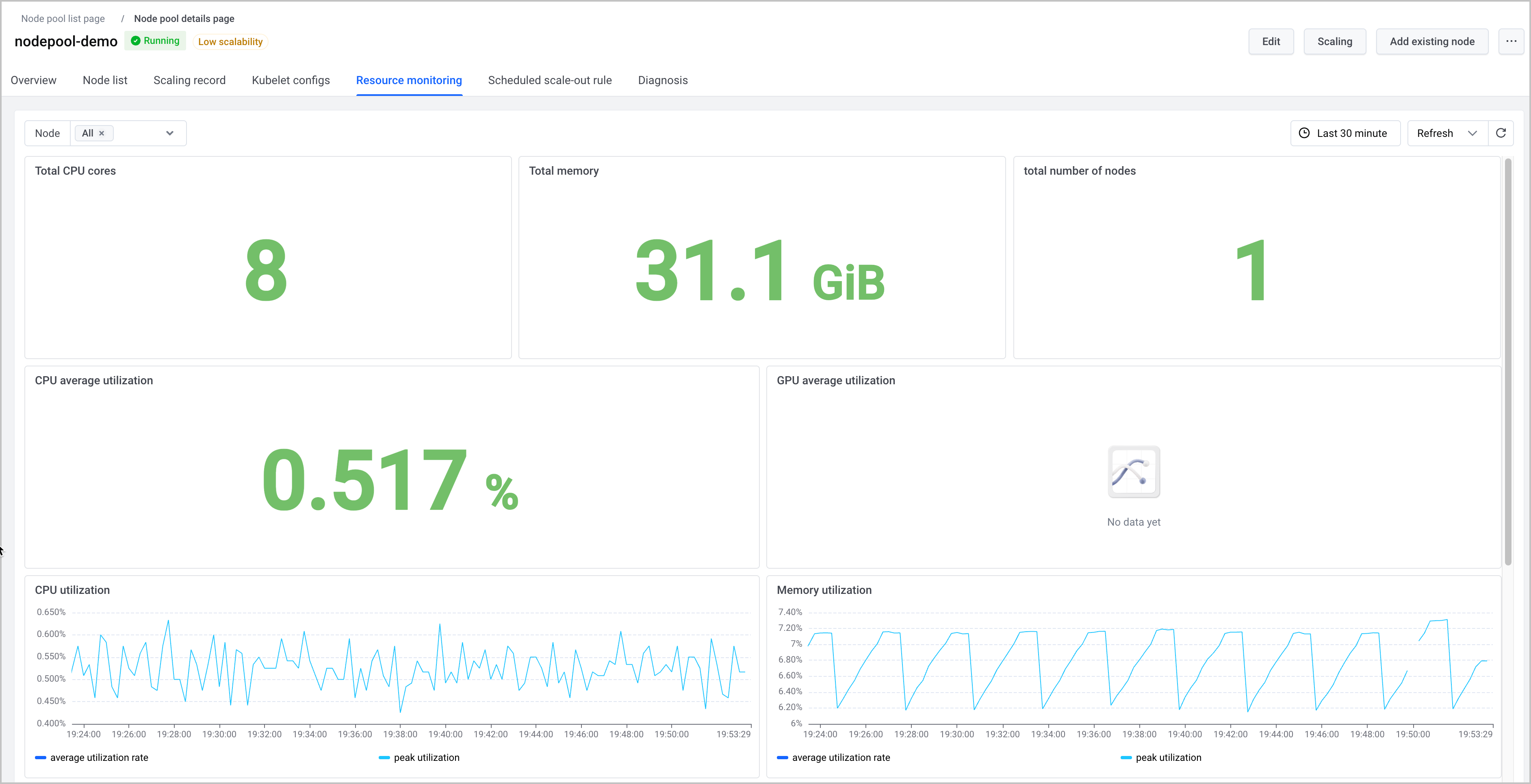
- The following table describes the charts in the node pool resource monitoring dashboard.
Description
For the method of obtaining the PromQL statements that correspond to the charts, see Using dashboards.
- Chart nameUnitChart descriptionChart nameUnitChart descriptionTotal CPU corescoresThe total amount of CPU resources across all nodes in the node pool. It is mainly used for capacity evaluation and validation before and after scaling. You can evaluate whether the node pool can handle workload growth or whether resources are overprovisioned based on Pod CPU requests, CPU utilization, and node pool specifications.If the total core count is lower than expected, possible causes include an insufficient number of nodes, nodes that failed to join the cluster, scaling not yet complete, or monitoring data not reported for some nodes.Total memoryBytesThe total amount of memory resources across all nodes in the node pool. It is mainly used for memory capacity checking, node specification verification, and scaling effect validation. You can evaluate whether memory capacity meets workload requirements based on Pods' memory requests, memory utilization, and OOM events.If total memory is lower than expected, node specifications may be incorrect, the number of nodes may be insufficient, nodes may be offline unexpectedly, or monitoring data may be missing. If total memory is sufficient but workloads still run out of memory, possible causes include memory usage growth of workloads, unreasonable resource configuration, or uneven load distribution.Total number of nodesCountThe number of nodes in the node pool. It is used to verify whether the node pool size meets expectations. It is mainly used for node pool size verification and node status troubleshooting. After you create a node pool, change its size, or enable autoscaling, first check whether the total node count changes as expected.If the total node count does not match expectations, possible causes include unfinished scaling operations, failed node joining, node removals, abnormal node status, or the monitoring system's failure to cover all nodes. If the total node count is normal but total cores or total memory is abnormal, possible causes include inconsistent node specifications or abnormal resource data reporting.CPU average utilization%The average CPU utilization of nodes in the node pool over the past 5 minutes. It is used to determine whether compute resources are under pressure or underutilized. You can combine the total core count, total number of nodes, business traffic, and Pod CPU requests to determine whether to scale out, scale in, or rebalance the workload distribution.If the average CPU utilization remains consistently high, possible causes include increased business traffic, uneven Pod distribution, hotspots on a small number of nodes, or CPU requests set too low. If it remains consistently low over a long period, possible causes include resource redundancy, decreased workload, oversized node specifications, or idle resources not being reclaimed by autoscaling promptly.GPU average utilization%Average GPU utilization of nodes in the node pool. This metric applies to node pools that contain GPU-type nodes. It is mainly used to analyze whether GPU resources are fully utilized. You can determine whether GPUs are idle, overloaded, or unevenly distributed based on the number of GPU workloads, job queues, Pod resource requests, and per-node GPU usage.If average GPU utilization stays low, possible causes include jobs not being scheduled to this node pool, insufficient parallelism, I/O bottlenecks, or unreasonable GPU resource requests. If it stays high, possible causes include insufficient GPU-type nodes in the node pool, queued jobs, or jobs being concentrated on a small number of nodes.CPU utilization%The CPU utilization of nodes in the node pool over the past 5 minutes. It is mainly used to determine whether the overall workload is busy and whether single-node hotspots exist.
- Average utilization: Reflects overall CPU usage of the node pool. If this value is high, overall compute resource pressure in the node pool is high.
- Peak utilization: Reflects the CPU level of the nodes with the highest utilization. If this value is significantly higher than the average utilization, resource pressure may be concentrated on a small number of nodes. If this value remains close to the upper limit for a long time, the possible causes include concentrated compute-intensive tasks, uneven Pod distribution, or node hotspots.
tipIf both average and peak utilization increase, possible causes include increased overall business traffic or insufficient node pool capacity.Memory usage%The memory utilization of nodes in the node pool. It is mainly used to check whether memory resources are sufficient and to identify OOM risks early. - Average utilization: Reflects overall memory utilization of the node pool. If this value keeps increasing, overall memory pressure in the node pool is high. This may be caused by workload growth, memory leaks, or insufficient node pool capacity.
- Peak utilization: Reflects the utilization of the nodes with the highest memory usage. If this value is much higher than the average utilization, memory pressure may be concentrated on a small number of nodes. If this value remains close to the upper limit for a long time, possible causes include concentrated memory-intensive tasks, uneven Pod distribution, application memory leaks, or a high risk of single-node OOM.
tipIf both average utilization and peak utilization rise, possible causes are an overall increase in business load or insufficient memory capacity for the node pool.CPU usagecoresCPU usage of nodes in the node pool over the past 5 minutes. It is mainly used to determine the overall CPU consumption of the node pool and whether a single node has excessive CPU consumption. - Average usage: Reflects the average CPU usage of nodes in the node pool. If this value keeps increasing, the overall CPU consumption of the node pool rises.
- Peak usage: Reflects actual CPU consumption of the node with the highest CPU usage. If this value is significantly higher than the average usage, CPU consumption may be concentrated on a small number of nodes.
tip- If both the average and peak usage increase, the overall business traffic has increased, or the node pool's capacity may be insufficient.
- If only the peak usage increases, we recommend troubleshooting node hotspots and Pod distribution first.
Memory usageBytesMemory usage of nodes in the node pool. It is mainly used to determine overall memory consumption and whether a single node uses excessive memory. - Average usage: Reflects the average memory usage of nodes in the node pool at the current time. If this value keeps increasing, the overall memory consumption increases.
- Peak usage: Reflects actual memory consumption of the node with the highest memory usage. If this value is significantly higher than the average usage, memory pressure may be concentrated on a small number of nodes.
tip- If both average and peak usage increase, possible causes include increased overall load or insufficient memory in the node pool.
- If only the peak usage increases, we recommend checking whether a single workload uses excessive memory or whether workloads are unevenly distributed.
CPU allocation rate (request)%The CPU request allocation ratio of the node pool. It is mainly used to determine whether the CPU resources declared by workloads are close to the CPU capacity that the node pool can provide. - Average allocation ratio: Reflects the average proportion of CPU requests on nodes in the node pool at the current time. A higher value indicates less schedulable CPU capacity remaining in the node pool.
- Peak allocation ratio: Reflects the allocation on the node with the highest CPU request proportion. If this value is significantly higher than the average allocation ratio, some nodes may be close to the allocatable limit.
tip- If both the average and peak allocation ratios are high, you may need to scale out the node pool or adjust workloads' requests.
- If only the peak allocation ratio is high, we recommend checking whether Pod scheduling is concentrated on a small number of nodes.
Memory allocation rate (request)%The memory allocation ratio of the node pool. It is mainly used to determine whether the memory resources declared by workloads are close to the total memory capacity of the node pool. - Average allocation ratio: Reflects the average proportion of memory requests on nodes in the node pool at the current time. A higher value indicates less schedulable memory capacity remaining in the node pool.
- Peak allocation ratio: Reflects the allocation on the node with the highest memory request proportion. If this value is significantly higher than the average allocation ratio, some nodes may have scheduling pressure.
tip- If both the average and peak allocation ratios are high, you may need to scale out the node pool or adjust workloads' requests.
- If only the peak allocation ratio is high, we recommend checking whether memory-intensive Pods are scheduled to a small number of nodes.
Network inbound and outbound traffic rateBytes/sReal-time inbound and outbound traffic rate of each network interface in the node network. It is used to observe inbound and outbound traffic changes on different interfaces. Each curve in the chart corresponds to a network interface and a traffic direction, such as eth0_receive, eth0_transmit, lo_receive, and cilium_host_transmit.- If inbound or outbound traffic on a network interface spikes, possible causes include an access volume increase, large data transfers, many image pulls, or excessive traffic on a single node.
- If traffic on the lo interface rises abnormally, the possible cause is frequent communication between internal components on the node.
- If traffic on virtual interfaces such as cilium_host or ipvl is abnormal, we recommend further troubleshooting based on the container network path and Pod distribution.
Inbound and outbound packet rateppsThe real-time packet sending and receiving rates for each network interface in the node network. It is used to view changes in packet counts across different interfaces in both the inbound and outbound directions. Each curve in the chart corresponds to a network interface and a traffic direction, such as eth0_receive, eth0_transmit, lo_receive, and cilium_host_transmit.- If the packet rate on a specific interface increases sharply but the traffic rate shows little change, possible causes include a large number of small packet requests, increased short-lived connections, or abnormal probe traffic.
- If the packet rate is abnormal on interfaces such as lo, cilium_host, or ipvl, we recommend further investigation in combination with intra-node communication, the container network path, and Pod distribution.
Inflow and outflow packet loss rate%The packet loss ratio in inbound and outbound directions on a node. It is used to determine whether network transmission is stable. The dashboard splits curves by node IP address and traffic direction, such as 192.168.2.152_transmit and 192.168.2.152_receive. It is mainly used to locate node-level network quality issues. You can identify the node with packet loss based on the node IP address, and then check the inbound or outbound direction to determine whether the issue is more likely on the receiving path, sending path, container network, or upstream or downstream network.- If the packet loss ratio on a node IP address increases, possible causes include network congestion, high network interface pressure on the node, container network anomalies, or degraded upstream/downstream link quality.
- If both the outbound and inbound directions show an increase, we recommend checking the node network, container network, and link congestion first.
- If only one direction increases, we recommend identifying upstream or downstream issues in that direction.
TCP connectioncount/sTCP connection count, connection status, and connection establishment on a node. These metrics are mainly used to determine whether the node is under abnormal connection pressure. - TCP_sock_inuse: The number of TCP sockets currently in use. A sustained increase may indicate growing connection counts or connections not being released promptly.
- TCP_sock_alloc: The number of allocated TCP sockets, including sockets that have not yet established a connection. A significant increase may indicate that the system is allocating a large number of connection resources.
- TCP_sock_tw: the number of connections in the TIME_WAIT state. A persistently high value may indicate too many short-lived connections or insufficient connection reuse.
- CurrEstab: The number of connections currently in the ESTABLISHED state. It is used to monitor the scale of active connections.
- TCP_ActiveOpens / TCP_PassiveOpens: The number of actively initiated and passively accepted TCP connections. It is used to distinguish between connection growth on the client side and the server side.
- TCP_ext_ListenDrops: The number of drops caused by listen queue overflow. An increase in this value indicates that connection requests may have exceeded the service's processing capacity.
View metrics
- To query integrated or non-integrated metrics in the cluster, or to understand metric meanings, see Querying metrics.
- You can use the Explore feature of VMP to quickly query and display metric data. For details, see Querying metrics.
Last updated: 2026.09.02 11:27:20
All rights reserved © Beijing Volcano Engine Technology Co., Ltd2024
