Volcengine Kubernetes Engine
Volcengine Kubernetes Engine
Volcengine Kubernetes Engine


Document
Volcengine Kubernetes Engine
What's New
History feature release notes
Kubernetes version release notes
Containerd runtime release notes
Add-on release notes
Monitoring add-ons
Scheduling add-ons
DNS add-ons
Security add-ons
GPU add-ons
Sandbox add-on
Security announcements
Product Announcement
Historical announcements
Overview
Getting started
User guide
Clusters
Creating clusters
Connecting to clusters
Upgrading clusters
Node pool
Creating node pools
Scaling out/in node pools
Nodes
Authorization management
Image
Namespaces
Networking
Cluster network
Container Network
Service
LoadBalancer
CLB
Ingress
APIG Ingress
ALB Ingress
Customize ALB Ingress forwarding rules
Certificate and security
CLB Ingress
Nginx Ingress
Gateway API
Workloads
Creating workloads
Configure workloads
Pods
Configuration management
Image acceleration
Storage
FSX client
EBS Volumes
TOS Volumes
NAS volumes
FSX access methods
NFS access methods
EFS volumes
vePFS volumes
FSX access methods
vePFS Client access methods
NFS access methods
CloudFS volumes
Local volumes
Autoscale
Node autoscaler
Workload autoscaler
Horizontal Pod Autoscaler (HPA)
Cron Horizontal Pod Autoscaler (CronHPA)
Intelligent Horizontal Pod Autoscaler (IHPA)
Horizontal Pod Autoscaler based on event-driven (KEDA)
Add-on management
Network add-ons
Storage add-ons
Monitoring add-ons
Scheduling add-ons
DNS add-ons
GPU add-ons
Core add-ons
Sandbox add-on
Upgrading add-ons
Heterogeneous computing
NVIDIA GPU
mGPU scheduling
RDMA high-performance computing
Scheduling management
Topology-aware scheduling
QoS-aware scheduling
Observability
Log management
Basic observation
Setup & Configuration
Cluster observation
Storage observation
Other observation
Using metrics
Full stack observation
Alert management
Diagnosis and inspection
Node check and self-healing
Application center
Backup center
Stability
Large-scale cluster management
Best practices
Authorization
Clusters
Nodes and node pools
Networking
Storage
Scheduling
Observability
Solution
Security and compliance
API reference
Cluster management
NodePool management
Node management
Virtual nodes management
Add-on management
Tag management
Access policy management
Instance images management
Cloud native observability
Inspection and diagnosis
Task management
Volcengine Container Instance
Appendix
SDK reference
Development guide
Terraform
FAQs
General FAQs
Cluster FAQ
cluster management
cluster network
cluster upgrade
Node and Node pool FAQs
Authorization FAQs
Workload FAQs
Service and Ingress FAQs
Storage FAQs
Heterogeneous computing FAQs
Observability FAQs
Quota FAQs
Add-on FAQs
Cloud-native AI
ServingKit
LLM applications
ComfyUI application
Deploying the Al inference application through Helm
Deepseek practices
Qwen practices
Kimi practice
Seed practices
Best practices
DeepSeek model deployment
GLM model deployment
MiniMax model deployment
Qwen model deployment
Kimi model deployment
Volcengine Container Instance
What's new
Historical feature release notes
Product Announcement
Overview
Billing
User guide
Integrating with VCI
Virtual node
VKE cluster uses virtual nodes
Self-managed/third-party cluster uses virtual node
Creating an instance
General purpose instance
GPU-accelerated computing instance
VCI Agent Sandbox
Startup acceleration
E2B-based management
Upgrade guide
Networking
Monitoring
Scheduling
Container configuration
VCI Image Cache
Best practices
Security and compliance
FAQs
- Documentation
 Volcengine Kubernetes EngineVolcengine Kubernetes EngineUser guideNetworkingServiceNodePort
 Copy page
 Download PDF
Service
NodePort
Copy pageDownload PDFNodePort
NodePort exposes a service by opening a static port on the IP of every node in the cluster. This topic describes how to configure a NodePort service.
Background information
When you create a NodePort service in a cluster, the system opens a static port on the IP of every node. Other applications can then access the service by sending requests to Node_IP:Node_Port.
The IP address of a node can be either private or public. Therefore, NodePort services can be made available internally or externally.
Prerequisites
Deployments have been created. For details, see Creating Deployments, Creating StatefulSets, and Creating DaemonSets.
tip
Currently, only Deployment, StatefulSet, and DaemonSet are supported.
Procedure
Creating via console
- Log in to the VKE console.
- Click Cluster in the left navigation bar.
- On the cluster list page, click the name of the cluster in which you want to create services.
- On the cluster management page, select Services and Ingresses > Service in the left navigation bar, then click Create Service.
- Basic information
- ParameterDescriptionParameterDescriptionNameEnter a name for the service. Make sure the name is unique under the same namespace.NamespaceSelect the namespace to which the service belongs. It is recommended that you select the namespace created by yourself or the default namespace created by the system. For details about namespaces, see Namespace overview.LabelClick Add new to add labels to the service. Labels are used to define various attributes of services, facilitating batch filtering and other operations.AnnotationIt refers to annotations in Kubernetes. Click Add annotation to add one to the service by creating a key-value pair.
- Access configuration
- ParameterDescriptionParameterDescriptionAccess typeSelect an access type for the service. In this case, select NodePort.Communication Protocol[Beta - Apply for trial] IPv4 and IPv6 protocols can be configured with different options to cover specific scenarios. The options include:
- IPv4: IPv4 addresses only.
- IPv6: IPv6 addresses only.
- IPv4&IPv6: Both protocols are allowed, but the IPv4 addresses will be used by default.
- IPv6&IPv4: Both protocols are allowed, but the IPv6 addresses will be used by default.
tipPort mappingConfigure a port mapping rule:- Name: enter a name for the port mapping between the service and container.
- Service level port: Enter a port through which the service will be accessed. Duplicate ports are not allowed for services using the same protocol.
tipIn clusters using the VPC-CNI network model, duplicate ports are not allowed for services even across different protocols. That is, no services can share the same port number regardless of whether they use TCP or UDP.- Protocol: select a protocol for the service. Currently, available protocols include TCP and UDP.
- Node port: the port exposed on the node, which can be an integer from 30000 to 32767. A port will be allocated automatically by the system if you leave it empty.
- Container port: the port of the container, which is a port number through which the deployment provides services externally. e.g., the default port number for Nginx is 80.
Label selectorServices are bound to back-end pods through label selectors.- Add new: Specify the label of the Deployment to which the service will be bound.
- Associated workload: Select the Deployment to bind the service to. Currently, Deployment, StatefulSet, and DaemonSet are supported.
warningDo not bind NodePort services to workloads deployed on Volcengine Container Instances.External traffic policyThe policies that the service will use to forward inbound traffic: - Cluster: traffic is forwarded evenly to each pod of the workload.
- Local: traffic can only be forwarded to the local pods on the current node, which may cause unbalanced traffic distribution. However, the source IPs can be retained.
Session persistenceWhether to enable session persistence.- Disabled by default.
- Check Configure timeout to enable session persistence and set its duration. The service ensures requests from the same IP are forwarded to a single backend server. We recommend setting a timeout longer than 120 seconds.
- Click Confirm to finish the configuration.
Creating via kubectl command line
tip
Make sure the following requirements are met before getting started:
- The kubectl tool is installed on your computer. For details, please see Installation and settings of kubectl.
- Successfully connected to the target cluster with kubectl. For details, please seeConnect to a cluster.
- A YAML file for creating the service. The following code is the content of a sample YAML file named service-demo.yaml:
- apiVersion: v1kind: Servicemetadata:name: service-demo # Service name.spec:selector:app: nginx # Bind the service to backend pods via a label selector.ports:- name: rule #The name of the port mapping rule.protocol: TCP # service protocol, which can either be TCP or UDP.port: 80 # Service port.nodePort: 30000 # NodePort, which can be an integer from 30000 to 32767.targetPort: 80 # Container port, a port number or port name through which the Deployment provides service, e.g., the default port number for Nginx is 80.type: NodePort # Service type.
- Execute the following command to create a service.
- kubectl apply -f service-demo.yaml
Result checking
Viewing services
The service you created can be found in the service list.
If you did not specify a NodePort when creating a service, the system will allocate one for the service. You can click the service name to go to the Overview tab, and scroll to the Port mapping section to view the port number in the Container port column.
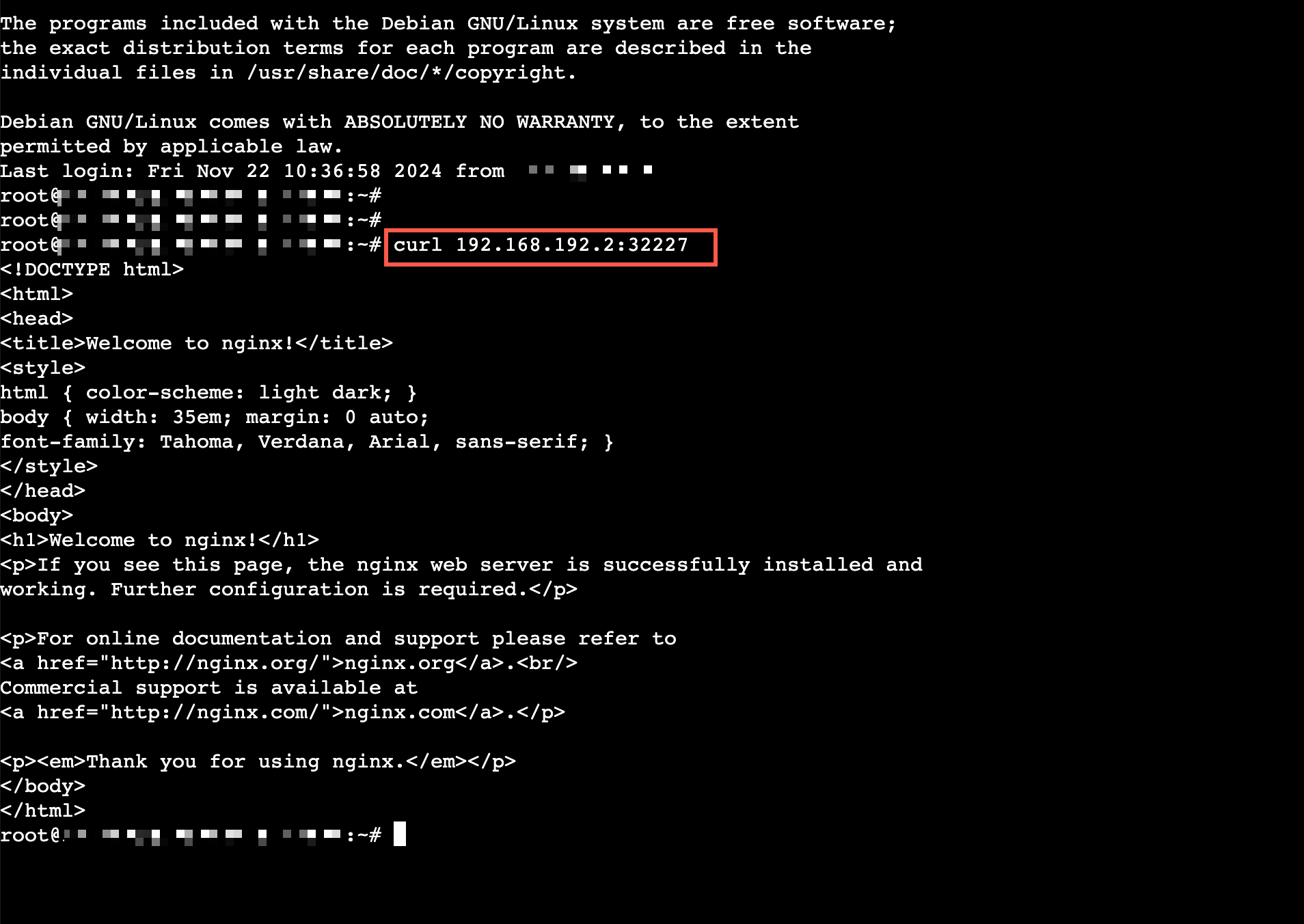
Access services
Any successfully created service can be accessed through any node IP and node port within the same VPC or by any container in the cluster. It can also be accessed through a public IP if the node has one.
Last updated: 2026.07.24 14:51:36
All rights reserved © Beijing Volcano Engine Technology Co., Ltd2024
