Volcengine Kubernetes Engine
Volcengine Kubernetes Engine


Document

- Documentation
 Volcengine Kubernetes EngineCloud-native AIServingKitDeploying the Al inference application through HelmDeepseek practicesQuickly deploying DeepSeek-R1 (full version) with SGLang
 Copy page
 Download PDF
Deepseek practices
Quickly deploying DeepSeek-R1 (full version) with SGLang
Copy pageDownload PDFQuickly deploying DeepSeek-R1 (full version) with SGLang
The following content introduces how to quickly deploy a model inference service with the full-version DeepSeek-R1 based on SGLang by using Volcengine Kubernetes Engine (VKE).
Solution introduction
This solution provides a quick method of deploying DeepSeek-R1 LLM in a Kubernetes cluster that integrates a series of acceleration technologies that come with the Volcano Engine:
- DeepSeek-R1 model: released by Chinese AI startup DeepSeek, the R1 model is an inference model trained based on DeepSeek-V3-Base, excelling in mathematics, code, and natural language reasoning, gaining wide attention for its open source, algorithm innovation, and cost-effectiveness.
- GDKV model acceleration: a fast model loading solution achieved through the Remote Direct Memory Access (RDMA) and GPU Direct RDMA (GDR) technologies provided by Volcano Engine.
- Elastic Instant Cache (EIC): a high-performance distributed KV Cache service launched by the Volcano Engine storage team for LLM inference.
Advantages of the solution:
- Rapid model loading: Multiple acceleration technologies are used to reduce the loading time of the DeepSeek-R1 model to 13 seconds, with a loading speed increased by more than 40 times.
- Cache pooling: breaks through the single-machine memory wall limit by integrating idle memory and disks of GPU clusters to build a distributed cache pool.
Deployment information
- Model: DeepSeek-R1-671B
- Inference engine: SGLang
- Instance specification: ecs.hpcpni3ln.45xlarge instance* 2
Capabilities
- Precision: FP8
- Model acceleration: GDKV
- KV Cache: EIC
- Monitoring: Volcengine Managed Service for Prometheus (VMP) and Application Performance Management Plus (APMPlus)
- Access: API Gateway (APIG)
Notes
- To ensure successful deployment, which involves a bunch of add-ons dependent on each other and a variety of configurations, you need to exactly follow the instructions in this document.
- If both GDKV model acceleration and EIC are enabled, the memory on the node where instances are running may become a performance bottleneck. To avoid that, we recommend enabling EIC only. For details, see Method for testing EIC performance.
- To avoid violation of the VKE limit, we recommend that you proceed based on this solution (or on the resources mentioned in the documents). If you need to change your solution, you can consult the Account Manager of the Volcano Engine.
- Do not use mGPU on GPU resources.
- A full deployment depends on some beta capabilities of the Volcano Engine. Contact the Account Manager of the Volcano Engine to apply for the beta trial of the following features:
- Beta feature/resourceProduct involvedDescriptionhpcpni3ln instance optimized for High-Performance Computing based on GPU The HPC instance, providing computing power. The DeepSeek model has a large number of parameters and therefore requires a GPU instance with large memory, e.g., ecs.hpcpni3ln.45xlarge.Capability of mounting nodes to local disksYou can configure the local disk mounting in the VKE cluster.EICEICA high-performance distributed KV Cache service launched by the Volcano Engine storage team for LLM inference.
Prerequisites
Create a High-Performance Compute Cluster
The high-performance compute cluster is used to achieve logical isolation of HPC GPU instances (compute nodes). Instances in the same cluster are interconnected by Remote Direct Memory Access (RDMA) networks. For details, see Creating HPC clusters.
tip
The region and availability zone where the high-performance compute cluster is located need to be consistent with the region and availability zone of the VKE nodes.
Creating a VKE cluster
The following parameters need to be configured as described in the table when creating a cluster by using the VKE. For details on other parameters, see Creating clusters.
Configuration item | Description |
Cluster configuration | |
Kubernetes version | Select version v1.28 or later. |
Network model | Select VPC-CNI. |
Node pool configuration | |
Managed node pool | Enable Managed node pool. |
Availability zone | Same availability zone as the High-Performance Compute Cluster. |
Instance type | Select ecs.hpcpni3ln, the GPU Accelerated specification. Ensure you already obtained permission for trial of the beta version. |
High Performance Computing Cluster | Select the HPC cluster you created. |
Number of nodes | 2 nodes. |
Data volume | Configure the following two data volumes:
warning
|
Node labels | When you deploy the DeepSeek model by using VKE, you need to specify the RDMA usage mode by using node labels. Set the label key to vke.node.rdma.mode and the label value to shared. |
Kubelet configs | The non-uniform memory access (NUMA) affinity policy for RDMA devices needs to be configured by using custom parameters with the Kubelet when deploying DeepSeek model in the VKE. Select the parameter topology-manager-policy and its value best-effort. |
Addon configuration | |
nvidia-device-plugin | (Required) The NVIDIA device driver. It allows use of management add-ons for GPUs in containers. |
rdma-device-plugin | (Required) The add-on manages RDMA network interface cards (NICs) and enables pod containers to use RDMA devices. |
apig-controller | (Required) API Gateway controller provides the AI Gateway capability of cloud-native, which can complete the intelligent load balancing of the inference traffic according to different policies. |
csi-ebs | (Required) It allows VKE clusters to use the standard Container Storage Interface (CSI) of TOS. |
prometheus-agent | (Required) Volcengine Managed Service for Prometheus (VMP) monitoring add-on collects the monitoring metrics data of the Kubernetes cluster to VMP. |
apmplus-opentelemetry-collector | (Required) Collect OpenTelemetry data and Prometheus metrics, and send them to Application Performance Management Plus (APMPlus). |
apmplus-server-agent | (Required) Send the collection service and host monitoring data to APMPlus in parallel. |
cr-credential-controller | (Recommended) It can pull Container Registry (CR) images without passwords, which simplifies deployment operations. |
keda | (Recommended) The event-driven autoscaler based on Kubernetes completes the autoscaler tasks of the inference service based on complex metrics. |
vci-virtual-kubelet | (Recommended) It can deploy CPU-consuming workloads such as system add-ons by using Volcengine Container Instance (VCI), which eliminates the need for operation and maintenance (O&M) and does not occupy the computing resources of GPU nodes. |
Procedure
Step 1: Create an EIC instance
With approaches such as storage-instead-of-computation and zero-copy GDR, EIC significantly reduces GPU resource consumption and inference latency.
- Log in to the EIC console.
- Click Instances in the left navigation bar and click Create instance.
- Configure parameters required on the page. The parameters mentioned below need to be configured as described. Other parameters can be configured as needed.
- Configuration itemDescriptionVKE clusterSelect the created VKE cluster.Storage typeSelect DRAM.Enable RDMAEnable RDMA.NodeSelect the nodes created during VKE cluster creation.DRAMSet to 500 GiB.Network interface cardSet to eth1, eth2, eth3, eth4.
- Click Create instance in the lower-right corner of the page. If Running is displayed in the Status column, it indicates that the EIC instance has been created.
- If an error occurs when creating an instance, the status will change to Failed. You can hover the mouse over the instance status to view the details. You can delete the instance that fails to be created by clicking Delete in the Actions column and then create a new one. If you cannot handle the issue, contact your account manager of Volcano Engine for support.
Step 2: Deploy LeaderWorkerSet
In this topic, LeaderWorkerSet (LWS) is used to orchestrate the inference workloads across multiple nodes (for example, DeepSeek R1 needs to be deployed across two nodes). LWS allows you to specify a group of pods as objects to be replicated.
- Log in to the VKE console.
- In the left navigation bar, click Application center > Application template. Scroll to the bottom of the page, click More application templates.
- Find leader-worker-set, move the pointer over it, and then click Deploy.
- On the Deploy application page, configure the parameters for leader-worker-set.
- Configuration itemDescriptioOrchestration templateApplication templateSelect the latest Chart version of leader-worker-set.Deployment environmentCluster typeKeep the default value as Managed version.ClusterSelect the VKE cluster created in Prerequisites.NamespaceSelect a namespace under the target cluster.ProtocolRead and understand the agreement before selecting it.
- Click Confirm to start deployment.
- The applications that are already deployed can be found on the Helm page. Find leader-worker-set application by specifying target project, cluster, and namespace, and then click it to view detailed information of the application.
Step 3: Deploy deepseek-r1-sglang
VKE allows DeepSeek-R1 model based applications to run with PD (Prefill-Decode) disaggregation on the SGLang framework, which can be quickly realized by using the Application template.
- In the left navigation bar of the VKE console, click Application center > Application template.
- On the Application template page, find deepseek-r1-sglang and click Deploy.
- On the Deploy application page, configure the parameters for deepseek-r1-sglang.
- Configuration itemDescriptionOrchestration templateApplication templateSelect the latest Chart version of deepseek-r1-sglang.Parameter configurationSelect the configuration method for deepseek-r1-sglang. If you need to enable EIC, click the edit icon to modify the values.yaml file based on the EIC-related parameters in the YAML file section below the table.NameCustomize the application name according to the naming requirements prompted by the interface.Deployment environmentClusterSelect the VKE cluster created in Prerequisites.NamespaceSelect a namespace under the target cluster.ProtocolRead and understand the agreement before selecting it.
- EIC-related parameters in the YAML file:
-
- Click Confirm to deploy the application.
- The applications that are already deployed can be found on the Helm page. Find deepseek-r1-sglang application by specifying target project, cluster, and namespace, then click it to view detailed information of the application.
tip
The service names that match the pattern <application name>-api-svc indicate those services will be working as the external access points of their applications, and therefore are supposed to be used when configuring routing and verifying model deployment.
- View the load status of deepseek-r1-sglang applications on the Deployment page of the VKE cluster.
- On the left navigation bar of the VKE console, select Cluster, and find the target cluster and click the cluster name.
- In the left navigation bar, select Workload > StatefulSet, then enter the name deepseek-r1-sglang in the search box to find it and view its status.
Step 4: Configure Ingress
Configure model routing through APIG Ingress. APIG Ingress can function as a managed cloud-native gateway based on the Volcano Engine APIG, realizing high availability and scalability in Ingress traffic management that are required in cloud-native applications.
- On the left navigation bar on the cluster management page, select Services and Ingresses > Ingress, and click Create Ingress. Use API Gateway to expose the model service externally in the cluster. The parameters mentioned below need to be configured as described. Other parameters can be configured by referring to the Creating APIG Ingress through the console.
- Configuration itemDescriptionBasic configurationNamespaceSelect the namespace in which the deepseek-r1-sglang application template is deployed. It is used to associate the service that is supposed to be exposed for its application.Ingress configurationIngress typeSelect Cloud-native API gateway.APIG specification settingsGateway specificationsYou can select Automatically create, or select Use existing APIG instances.tipWhen you are using the API Gateway to expose the model service in the clusters, we recommend you to configure the following parameters or features (Some parameters can only be configured in the APIG console, and cannot be configured in the VKE console):
- Instance specification: We recommend that you select 4c8g, with two availability zones to realize high availability by default.
- Bandwidth limit: This option is used to set the maximum bandwidth of the Classic Load Balancer (CLB) instance working with the APIG instance. If more bandwidth is required, you can specify a custom CLB instance on the APIG console. For details, see Adding access entrance.
- Circuit breaking: When some GPU instances malfunction, common practice is to take the faulty instances offline to eliminate failures. At the same time, it is necessary to retain the faulty instances for troubleshooting later. You can isolate the faulty instances by configuring a circuit breaking rule for the APIG instance.
- Request timeout: Timeout is not applied to API Gateway by default. We recommend that you keep the default settings. If timeout is needed, you can configure it on the API Gateway console. For details, refer to Advanced routing policy.
- Observability: Monitoring alert and log feature are not turned on by default for the API Gateway instances created in the VKE console. If needed, we recommend that you enable logging and monitoring/alerting for the instance in the APIG console.
- Instance monitoring: This can help you to detect the unexpected anomalies in the whole system chain from the gateway entry level. For example: Unhealthy back end and back-end crashes will cause the APIG to return 503 error code and specific errors.
- Instance logs: You can view the request errors, request time consumption, and the allocation of requests in various Pods in the back end from the access logs.
Backend upstreamWe recommend that you set the Load balancing algorithm parameter to Round Robin. It is more applicable to the scenarios of upgrading back-ends if the back-end loads are approximately balanced.Listener configurationProtocolSelect a protocol as needed. If HTTPS is selected, you need to configure the certificate as described in the document APIG Ingress.Forwarding configurationDomain nameFill in the Ingress domain name to be exposed. The A (Address) record of this domain name needs to be configured later with the public or private IP address generated when the Ingress is successfully created.ServiceSelect the service that is named in the pattern <application name>-api-svc and is associated with the application created based on deepseek-r1-sglang template, and then set the port number to 8080.
- (Optional) Configure authentication for an APIG.
- Log in to the API Gateway console.
- Create consumer: Click Consumer management in the left navigation bar and click Create consumers.
- Generate an API-KEY: In the consumer list, click the name of the target consumer to enter the consumer details page. In the API Key information area, click Generate API Key.
- In the pop-up dialog box, select Automatically create.
- Click Confirm to generate API Key credential information.
- Enable Key Auth add-on: In the left navigation bar, click Plugin Center. On the page that appears, select Key Auth and then click Create Plugin.
- Effective level: Select Routing level and configure the instance, Service, and route to which the add-on belongs.
- Authentication configuration: Select header and enter the text "Authorization" in the textbox on the right side to indicate that API Key will be included in the Authorization header of requests.
- Consumer: select the consumer created in step 1.
- Other options can remain as default.
- Obtain Ingress address.
- VIP: includes both public and private IP.
- Backend service: includes the backend service name and access domain name.
- Configure domain name resolution.
- To test the DNS in the local environment, you can implement a domain-to-IP resolution locally.
- In the production environment, configure the access domain name of Ingress among the domain name providers, and ensure the A record of the Ingress access domain name has been configured with the public IP address or private IP address of Ingress.
Step 5: Enable observability
Basic observability provides the monitoring metrics for AI resources and inference service. Deep observability provides full-link performance monitoring service for inference application.
Basic observability
- In the left navigation bar of the page for a specific cluster, select Overview under the gray title Cloud native observability, then click Enable on the page to start monitoring. For more configuration details, refer to Enable observability and VKE observability.
- After turning on observability, the application metrics of SGLang will be collected into the Volcengine Managed Service for Prometheus (VMP). You can use Explore to query metrics in the VMP console. An example is as follows:
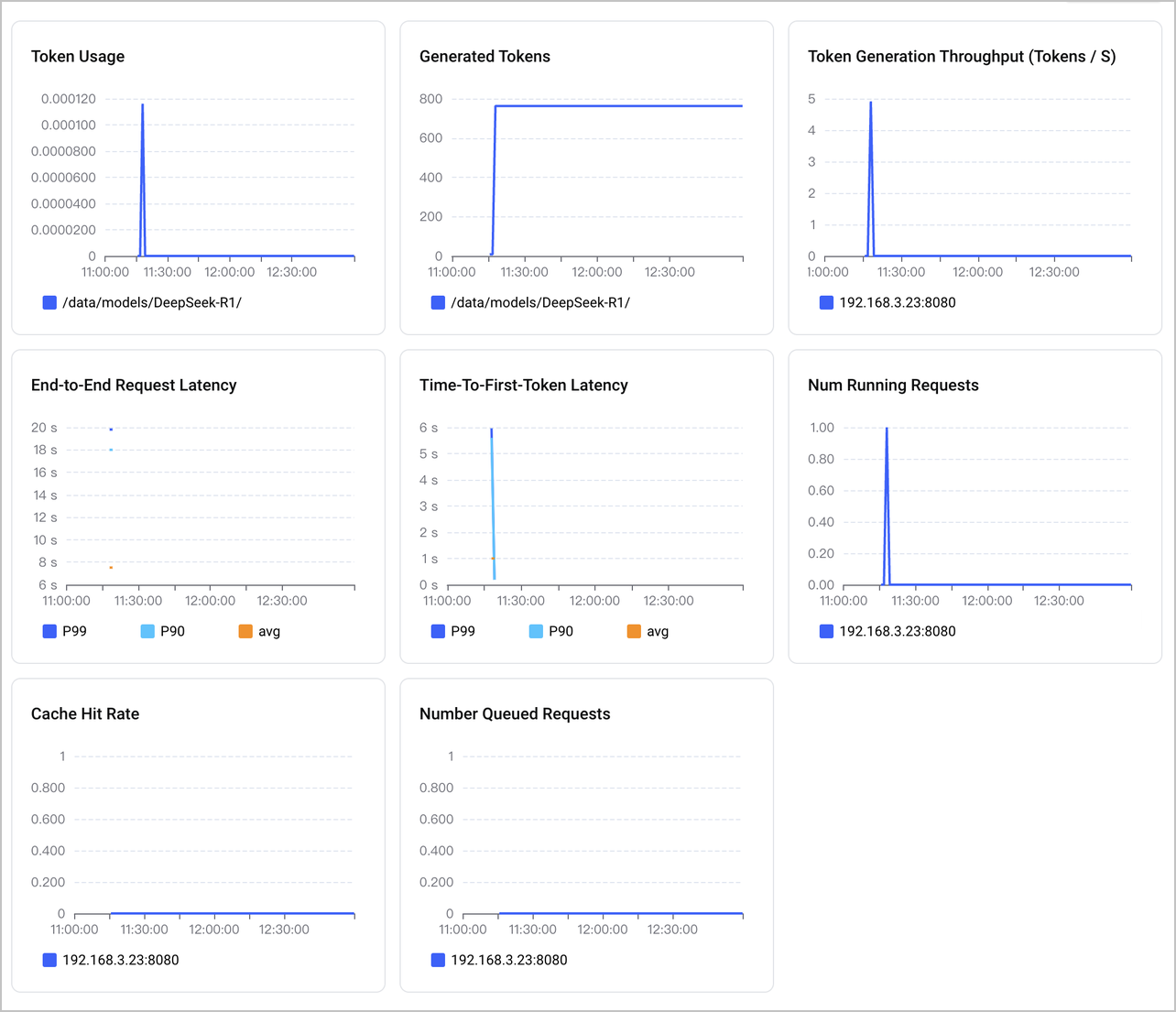
- There is a built-in VMP dashboard that allows you to view the metrics collected from SGLang-based applications. To do that, you can go to the VMP console, select Monitoring dashboard in the left navigation bar and search for sglang to open dashboard as shown below:
-
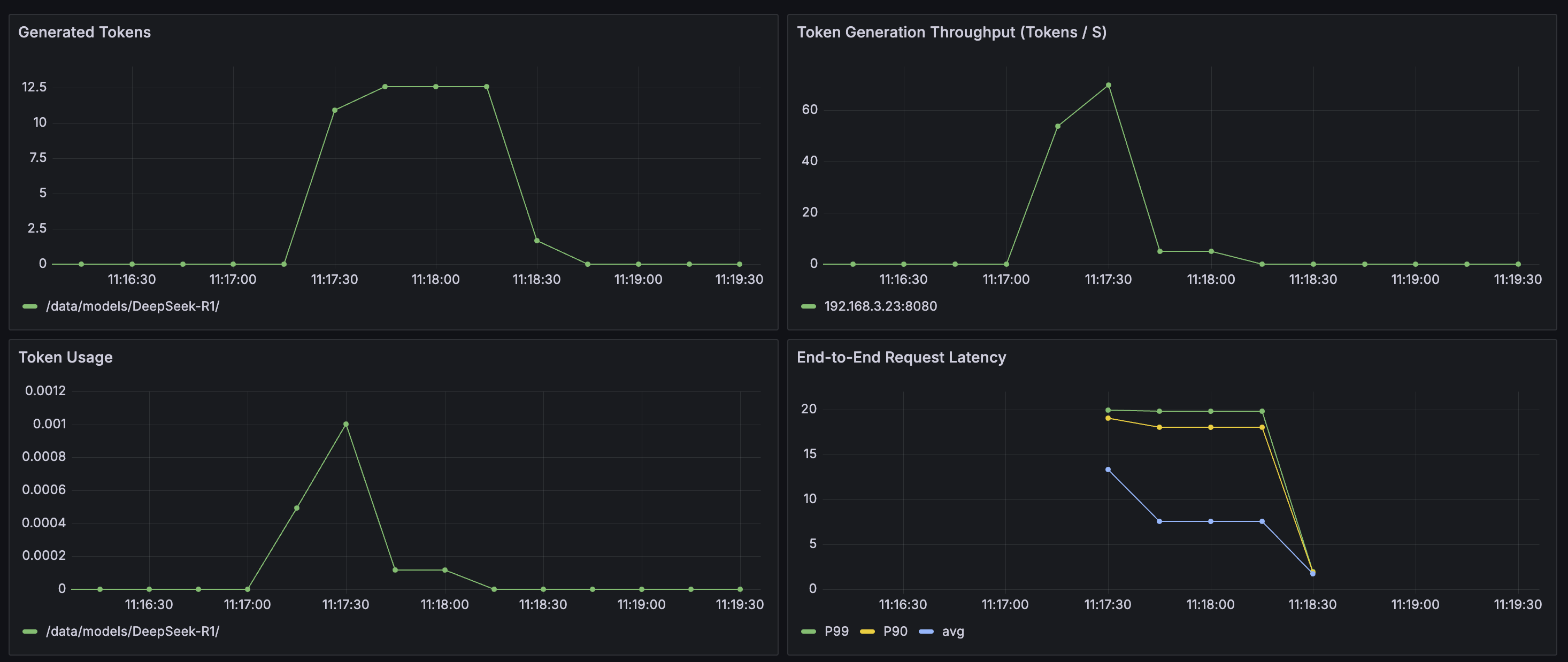
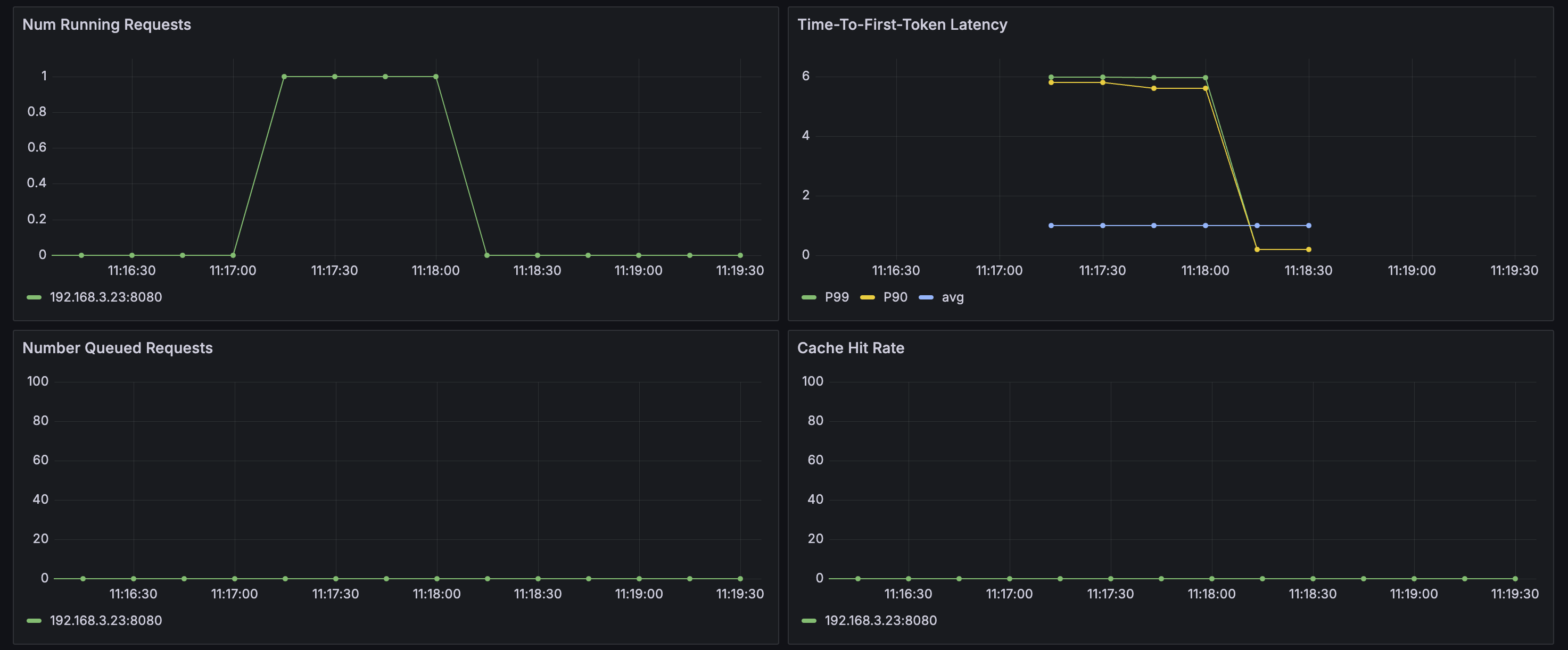
- You can also use Grafana to build a custom monitoring dashboard for SGLang-based applications. For more details, refer to Deploying Grafana in a VKE cluster and integrating Grafana with a workspace.
- Log in to the above Grafana and select to import the following dashboard JSON file:
- The effect after import is shown in the figure:
-
-
Deep observability
- Log in to the APMPlus console. In the left navigation bar, click Server-side monitoring.
- Search for sglang and click the service name in the results to open the monitoring dashboard page.
- View metrics.
- LLM metrics
- On tabs such as Service Overview, LLM performance, and Token usage, you can view the core metrics of the LLM service, including number of LLM calls, token usage, response latency, TTFT, TPOT, QPS, and request error rate.
tip
TTFT and TPOT are effective only when LLMs are called with streaming-enabled requests.
- The example of streaming call is as follows:
-
- Runtime metrics
- On the Runtime monitoring tab, you can view runtime-related metrics, including CPU time, CPU usage, memory usage, number of GC objects, thread count, and context switch count.
- View link analysis.
- From the Trace analysis tab of the SGLang application, you can retrieve link information based on different conditions. Click the ID of the target trace to go to the details page of the trace. View the trace information in the list.
Model verification
Method 1: Access through Service
The service, created along with the deployment of deepseek-r1-sglang application, has a name matching the pattern <application name>-api-svc. You can use the endpoint address (port 8080) corresponding to that service name to perform tests in this method. The endpoint can be called as you do with OpenAI APIs.
The sample code is as follows.
tip
- Replace ****** in http://****** with the endpoint of your <application name>-api-svc Service.
- The parameter content specifies the text you input to chat with LLMs.
Alternatively, you can directly log in to the pod to perform API calls. To do that, you can go to the Helm application details page of deepseek-r1-sglang application, click the associated StatefulSet in the section Workload, and then in the new page, click Console in the top-right corner to open the console where commands can be executed.

Method 2: Access via APIG
When enabling the authentication feature of the APIG, you need to add an authentication token in the request.
The following example is provided for reference.
tip
- Replace the example.com in http://example.com with the domain name of the back-end services obtained in Step 4: Configure Ingress.
- Replace eyJhbGciOiJSUzI****** with the API Key generated in Step 4: Configure Ingress.
- The parameter content is what you want to type to chat with LLMs.
Last updated: 2026.07.24 15:50:48
All rights reserved © Beijing Volcano Engine Technology Co., Ltd2024
