Volcengine Kubernetes Engine
Volcengine Kubernetes Engine


Document

- Documentation
 Volcengine Kubernetes EngineVolcengine Kubernetes EngineBest practicesSecurityBest practices for security group configuration
 Copy page
 Download PDF
Security
Best practices for security group configuration
Copy pageDownload PDFBest practices for security group configuration
This topic introduces a series of best practices for managing security groups in VKE clusters. Security groups provide traffic protection for nodes or pods in VKE clusters at entry points, preventing instances from unauthorized access or even attacks.
When you create a VKE cluster, a default security group that matches the network model of the cluster is automatically created. In the Flannel network model, only the default security group for nodes is generated, while in the VPC-CNI network model, an additional default security group for pods is generated. Security groups work in allowlist mode, meaning only traffic that meets the security group rules can pass through. For details about default security groups, see Security group settings.
Basic principles
Based on the features of VKE, the following basic principles should be followed when you configure security groups:
- Only allow access to specified ports (avoid overexposing unnecessary ports).
- Follow the principle of minimization when allowing source addresses. Do not use 0.0.0.0/0 (unrestricted access) for allowed source addresses.
- Block external access to ports 30000–32768 on ECS instances that serve as cluster nodes. VKE prohibits direct use of NodePort-type Services to expose pod services externally.
- Avoid assigning EIPs to ECS instances that serve as cluster nodes.
- Expose pod services via ALB or CLB, and ensure that security groups allow traffic to these resources.
- Fully allow traffic between network objects (such as pods and ECS instances) within the same VPC. Configure custom isolation rules only if segmentation between these network objects is required.
VKE port overview
The main ports used by VKE and their descriptions are as follows:
- 22: This port is the SSH port for the ECS instance corresponding to the node. Administrators can remotely log in to ECS via the ECS Terminal in the VKE console.
- 6443: This port serves as the entry point for the managed kube-apiserver in VKE. If administrators manage the VKE cluster via a remote client, this port should be opened to the IP address of the remote client.
- 30000–32768: This is the port range on which Services of type NodePort listen. Pods expose their services through this port range.
- 10250: This port is the default access port exposed externally by kubelet.
Default security groups
A default security group is automatically created when a VPC is created and deleted when the VPC is deleted. VKE provides a default security group to ensure normal cluster and node functionality, maintain proper network connectivity between clusters and nodes, and avoid abnormal cluster functionality caused by binding invalid security groups. For detailed inbound and outbound rules of default security groups, see Security group settings.
Clusters with different network models have different default security groups:
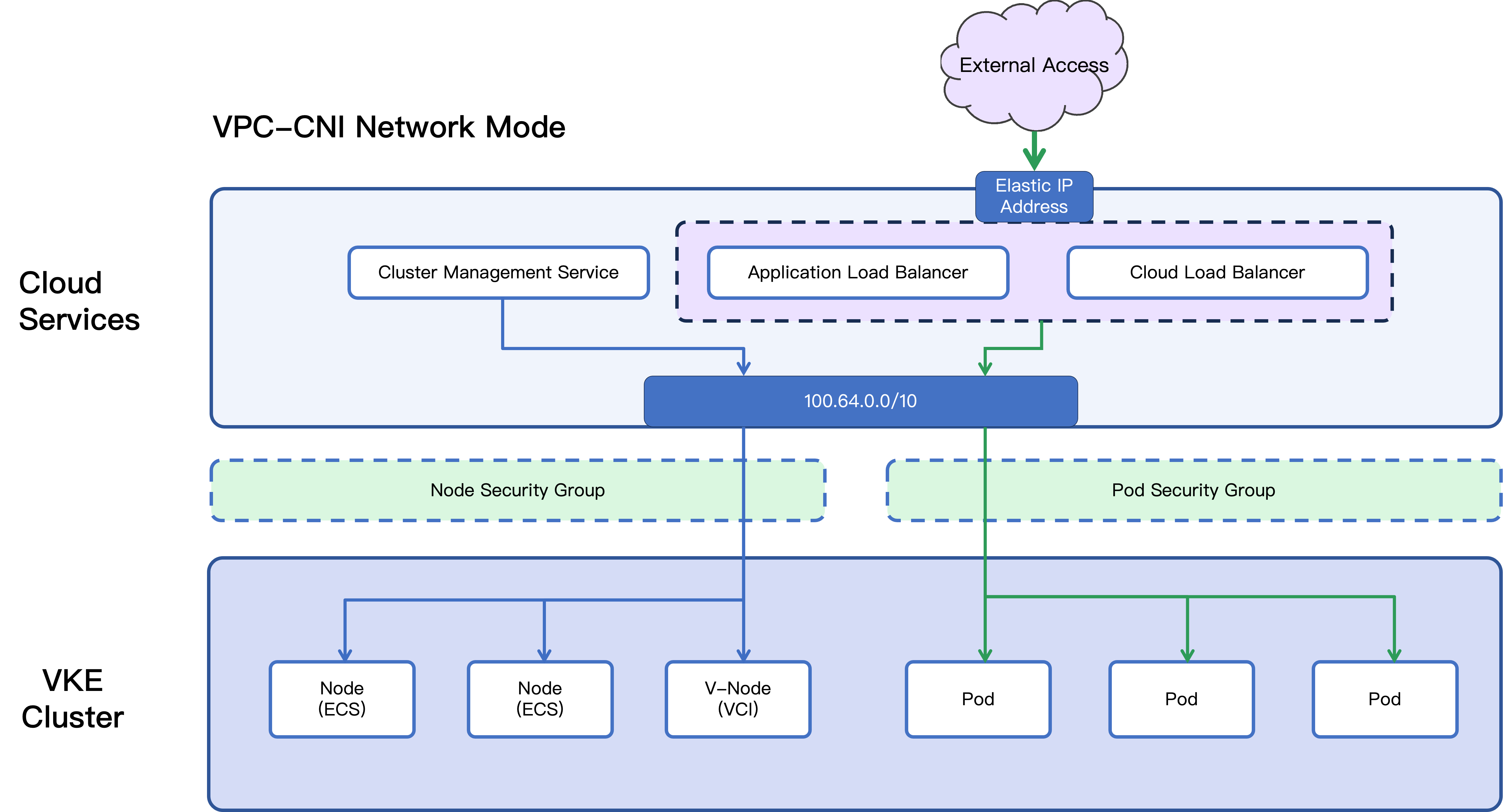
- Security groups for VPC-CNI
- In clusters using the VPC-CNI network model, pod networks are directly allocated from the VPC subnet.This means pods and ECS instances exist on the same network plane. Cloud resources such as ALB and CLB can leverage the capability of direct access to pods, forwarding traffic directly to the real IP addresses of pods and eliminating reliance on NodePort. Therefore, a dedicated security group can be provided for pods to control traffic entry.
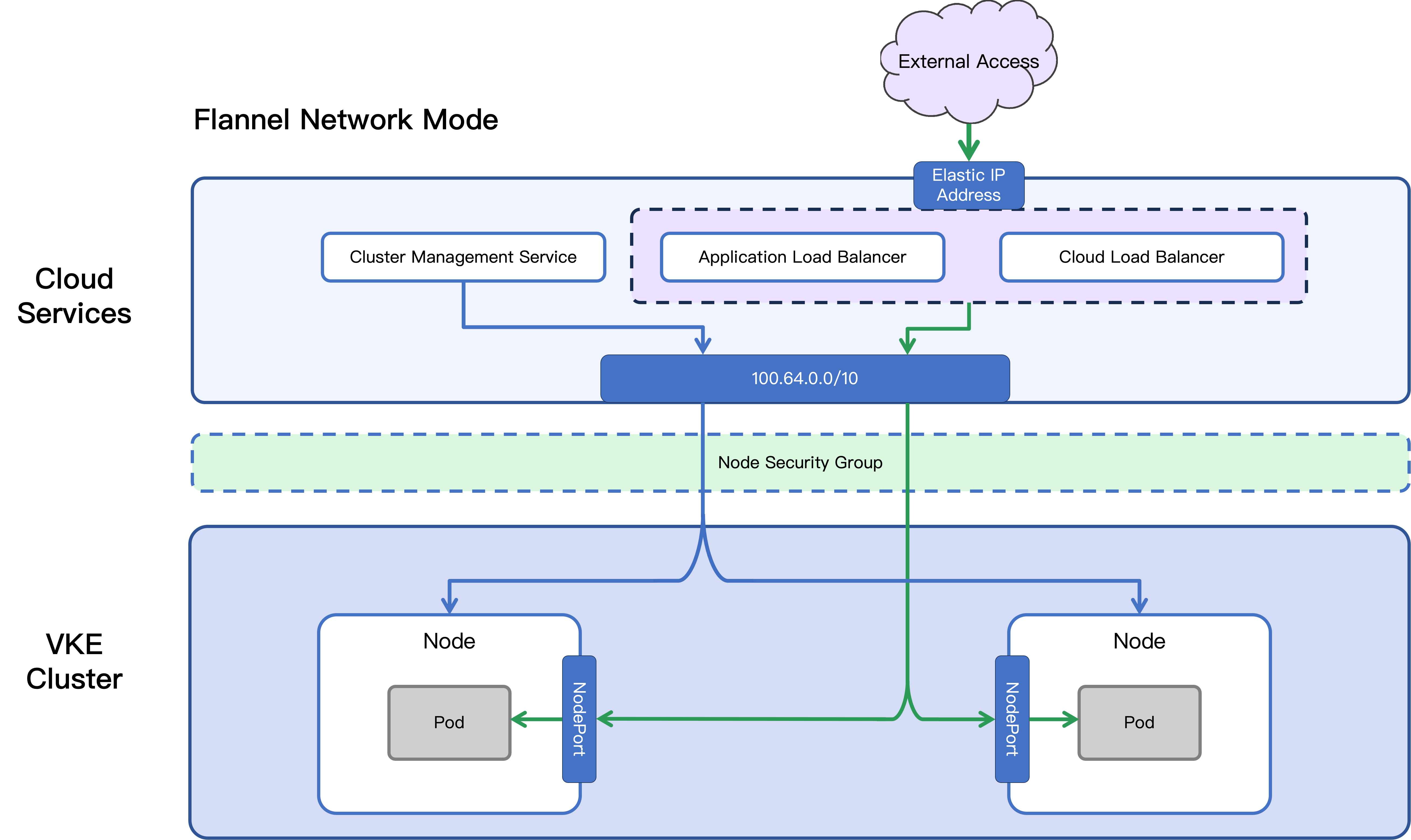
- Security groups for Flannel
- In clusters using the Flannel network model, pods are located in a virtual network provided by Flannel, and network traffic entry relies on NodePort provided by ECS-type nodes. Cloud resources such as ALB and CLB can only forward traffic to specified ports on nodes, so traffic allowance is managed uniformly by the node security group.
Security groups with minimal access
The default security groups are suitable for general scenarios. VKE allows you to create and manage custom security groups with minimized access rules to support scenarios where stricter network security requirements are needed. You can refer to the following instructions to create security groups with minimized access. For more information about managing security group rules, see Cluster access rules.
In Volcano Engine security groups, the following special IP address ranges are available:
- 100.64.0.0/10: This range is used for private communication between cloud resources over IPv4 within a VPC.
- fd00:64::/32: This range is used for private communication between cloud resources over IPv6 within a VPC.
Management operations on VKE clusters and traffic forwarding for cloud resources such as ALB and CLB originate from the two address ranges above. Therefore, these two address ranges can be widely used to replace 0.0.0.0/0.
tip
Private IPv6 networking is currently in the beta stage on the VPC side. For details, see Set up an IPv4 and IPv6 network.
VPC-CNI security groups with minimal access
In clusters using the VPC-CNI network model, the optimized security groups with minimal access for nodes and pods are shown in the following table.
- Node security group
- ProtocolPort rangeSource addressDescriptionWhen the VPC of the cluster uses only IPv4 CIDR:ALLALL******-commonAllows access by all network objects associated with the default security group.ALLALL******-podAllows access by all network objects associated with the default pod security group.TCP22100.64.0.0/10Allows cluster management services to access the SSH port of the ECS instance corresponding to the node.TCP6443100.64.0.0/10Allows cluster management services to access the cluster kube-apiserver entry.TCP30000-32768100.64.0.0/10Allows cloud resources such as ALB and CLB to access NodePort over the TCP protocol.UDP30000-32768100.64.0.0/10Allows cloud resources such as ALB/CLB to access the NodePort over the UDP protocol.TCP10250100.64.0.0/10Provides access to monitoring information of workloads and pods on the node.When the VPC of the cluster enables IPv6 CIDR:TCP22fd00:64::/32Allows cluster management services to access the SSH port of the ECS instance corresponding to the node.TCP6443fd00:64::/32Allows cluster management services to access the cluster kube-apiserver entry.TCP30000-32768fd00:64::/32Allows cloud resources such as ALB and CLB to access NodePort over the TCP protocol.UDP30000-32768fd00:64::/32Allows cloud resources such as ALB/CLB to access the NodePort over the UDP protocol.TCP10250fd00:64::/32Provides access to monitoring information of workloads and pods on the node.
- Pod security group
- ProtocolPort rangeSource addressDescriptionWhen the VPC of the cluster enables IPv4 CIDR:ALLALL******-podAllows access by all network objects associated with the default pod security group.ALLALL100.64.0.0/10Allows cloud resources such as ALB and CLB to access all ports of the pod.ALLALL******-commonAllows access by all network objects associated with the default security group.When the VPC of the cluster enables IPv6 CIDR:ALLALLfd00:64::/32Allows cloud resources such as ALB and CLB to access all ports of the pod.
Flannel security groups with minimal access
In clusters using the Flannel network model, the optimized security groups with minimal permission for nodes are shown in the following table.
Protocol | Port range | Source address | Description |
When the VPC of the cluster uses only IPv4 CIDR: | | | |
ALL | ALL | ******-common | Allows access by network objects associated with the current security group. |
ALL | ALL | x.x.x.x/x | Allows pods to access the ECS instance corresponding to the node. x.x.x.x/x is the CIDR block of the pod. |
TCP | 22 | 100.64.0.0/10 | Allows cluster management services to access the SSH port of the ECS instance corresponding to the node. |
TCP | 6443 | 100.64.0.0/10 | Allows cluster management services to access the cluster kube-apiserver entry. |
TCP | 30000-32768 | 100.64.0.0/10 | Allows cloud resources such as ALB and CLB to access NodePort over the TCP protocol. |
UDP | 30000-32768 | 100.64.0.0/10 | Allows cloud resources such as ALB/CLB to access the NodePort over the UDP protocol. |
TCP | 10250 | 100.64.0.0/10 | Provides access to monitoring information of workloads and pods on the node. |
When the VPC of the cluster enables IPv6 CIDR: | | | |
TCP | 22 | fd00:64::/32 | Allows cluster management services to access the SSH port of the ECS instance corresponding to the node. |
TCP | 6443 | fd00:64::/32 | Allows cluster management services to access the cluster kube-apiserver entry. |
TCP | 30000-32768 | fd00:64::/32 | Allows cloud resources such as ALB and CLB to access NodePort over the TCP protocol. |
UDP | 30000-32768 | fd00:64::/32 | Allows cloud resources such as ALB/CLB to access the NodePort over the UDP protocol. |
TCP | 10250 | fd00:64::/32 | Provides access to monitoring information of workloads and pods on the node. |
Special handling for layer 4 CLB
CLB provides Layer 4 traffic forwarding capabilities. For routing rules implemented via CLB, security group passthrough occurs, requiring the node or pod security group to allow access traffic from clients. Therefore, the following rules need to be added to the above minimal security groups to ensure that access from specified clients is permitted.
Protocol | Port range | Source address | Description |
ALL | User-defined port | x.x.x.x/x | Allows specified clients to access the node. x.x.x.x/x is the public IP address or CIDR block of the client. |
Last updated: 2026.07.23 11:53:56
All rights reserved © Beijing Volcano Engine Technology Co., Ltd2024
