Volcengine Kubernetes Engine
Volcengine Kubernetes Engine


Document

- Documentation
 Volcengine Kubernetes EngineVolcengine Kubernetes EngineBest practicesNodes and node poolsConfiguring custom kubelet parameters
 Copy page
 Download PDF
Nodes and node pools
Configuring custom kubelet parameters
Copy pageDownload PDFConfiguring custom kubelet parameters
The kubelet provides a set of parameter configurations to define and adjust node behavior. This topic describes how to configure kubelet parameters.
tip
VKE supports configuring common kubelet parameters for nodes via the console, allowing you to modify parameters for both newly added nodes and existing nodes within a node pool. For details, see Configuring kubelet parameters.
Background information
What is kubelet?
In a Kubernetes cluster, kubelet is a critical component that runs on every node. It reports detailed node information to the control plane and manages the container lifecycle and node resources according to instructions from the control plane. Its core responsibilities include:
- Container lifecycle management. The kubelet starts containers, stops containers, and maintains the running state of containers based on the PodSpec (pod description) received from the API Server. It ensures containers operate in line with user-defined specifications.
- Health check. The kubelet regularly performs health checks on containers to ensure that applications are running properly. If a check fails, the kubelet can restart the container to maintain application stability and availability.
- Resource management. The kubelet manages node resource usage, such as CPU and memory. It ensures each container gets the resources it needs while preventing over-allocation.
- Node status reporting. The kubelet regularly reports the status of its hosting node to the Kubernetes control plane, including resource utilization and running containers. This helps the Kubernetes scheduler make better scheduling decisions.
Principles for changing kubelet parameters
tip
To meet the needs of large-scale scenarios, VKE has enhanced the functionality and stability of the kubelet on nodes. We recommend using the default kubelet parameters directly.
Changing the default kubelet parameters in a VKE cluster requires a deep understanding of Kubernetes clusters and workloads. Before changing any default settings, make sure to fully understand the purpose of each parameter and evaluate the impact of changes through testing. For a detailed description of parameters, see the official documentation.
For example, in the following scenarios, you may need to modify default kubelet parameters:
- Resource limiting. If a node has specific resource limits or special resource requirements, you need to adjust parameters related to resource management. For example, use --max-pods to control the maximum number of pods per node.
- Custom scheduling. To run specific workloads on particular nodes, you need to adjust kubelet labels or taints. For example, use --node-labels to add custom labels to nodes.
- Specific performance optimization. To optimize performance for specific workloads, especially those with particular hardware requirements, such as applications for high performance computing, artificial intelligence, machine learning, or data science, you many need to adjust advanced parameters. For example, use --topology-manager-policy to specify the behavior of the Topology Manager.
Notes
danger
- Modifying kubelet parameters for a cluster may cause instability in the cluster and services. Before making any changes, be sure to read this section carefully and exercise caution.
- We recommend using the console to configure common kubelet parameters for nodes. For details, see Configuring kubelet parameters for a node pool.
When modifying node kubelet parameters, take note of the following information:
- This operation may cause cluster instability. Potential consequences include (but are not limited to) nodes entering the NotReady state, containers running on the node restarting, or containers being evicted. Before modifying any parameters, fully understand their purpose and validate changes in a test environment first.
- If you have multiple environments (such as test, pre-release, and production), validate parameter changes in the test environment first. After successful validation, proceed to the next environment. Repeat this process until you apply changes to the production environment.
When scaling out nodes in a VKE cluster, the kubelet system configuration is initialized during node installation according to the node specification and feature settings. This system configuration is saved in the /var/lib/kubelet/kubeadm-flags.env file of the node. The configuration file contains the following parameters:
warning
During node upgrade, parameters are overwritten based on this file. Do not directly modify this file or the related parameters.
Parameter | Description |
eviction-hard | Hard eviction threshold. |
kube-reserved | Resource reservation configuration for the Kubernetes node. |
max-pods | Maximum number of pods per node. |
system-reserved | System reserved resource configuration. |
node-labels | Labels assigned during node initialization. |
topology-manager-policy | Topology management policy. |
topology-manager-scope | Resource granularity for the topology management policy. |
feature-gates | Feature gates. |
Prerequisites
- A cluster has been created. The cluster and nodes in the cluster are in the Running state.
- The window of time for this operation does not affect your application availability. It is recommended to perform this operation during off-peak hours.
Creating through the console
VKE supports configuring common kubelet parameters for nodes via the console, allowing you to modify parameters for both newly added nodes and existing nodes within a node pool. For details, see Configuring kubelet parameters.
Using the CLI
Configuring parameters for new nodes
For kubelet parameters not covered in the console-based configuration, you can modify them in the cluster kubelet configuration so that new nodes can use these custom parameters.
In the kube-system namespace of the cluster, modify the KubeletConfiguration content in the ConfigMap named kubelet-config. After modification is complete, new nodes in the cluster can use the new configuration.
tip
- Changing cluster parameters will not change kubelet parameter settings for existing nodes, even after a restart. If you need to modify parameter settings for existing nodes, see Modifying parameters for existing nodes.
- If the control plane of the cluster is upgraded later (including a Kubernetes minor version upgrade), parameter incompatibility may occur. After the control plane upgrade completes, you must reconfigure the custom parameters in the kubelet-config ConfigMap to ensure new nodes added to the cluster use your desired custom configuration. For information about cluster upgrade, see Upgrading clusters.
Modifying parameters for existing nodes
tip
To simplify modifications of parameters on existing nodes, use the console to configure common kubelet settings. For details, see Configuring kubelet parameters.
For kubelet parameters not covered in the console-based configuration, you can modify them on an existing node by using the steps below:
- Use kubectl to connect the clusters. For more details, see Connecting to clusters.
- Run the following command to safely drain the workloads from the target node and prohibit new workloads from being scheduled onto the node. In the command, ${node-name} is the node name.
- Log in to the node and run the following command to back up the kubelet configuration file.
- Modify the parameter configuration in the configuration file /var/lib/kubelet/config.yaml as needed. For example, to enable serialized image pulls for kubelet, change the value of the serializeImagePulls parameter to true.
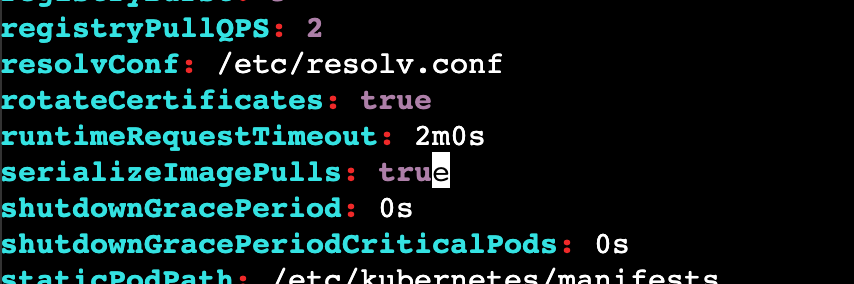
5. Run the following command to restart the kubelet service.
- After the service restarts, run the following command to restore node scheduling. In the command, ${node-name} is the node name.
Validating results
- Use kubectl to connect the clusters. For more details, see Connecting to clusters.
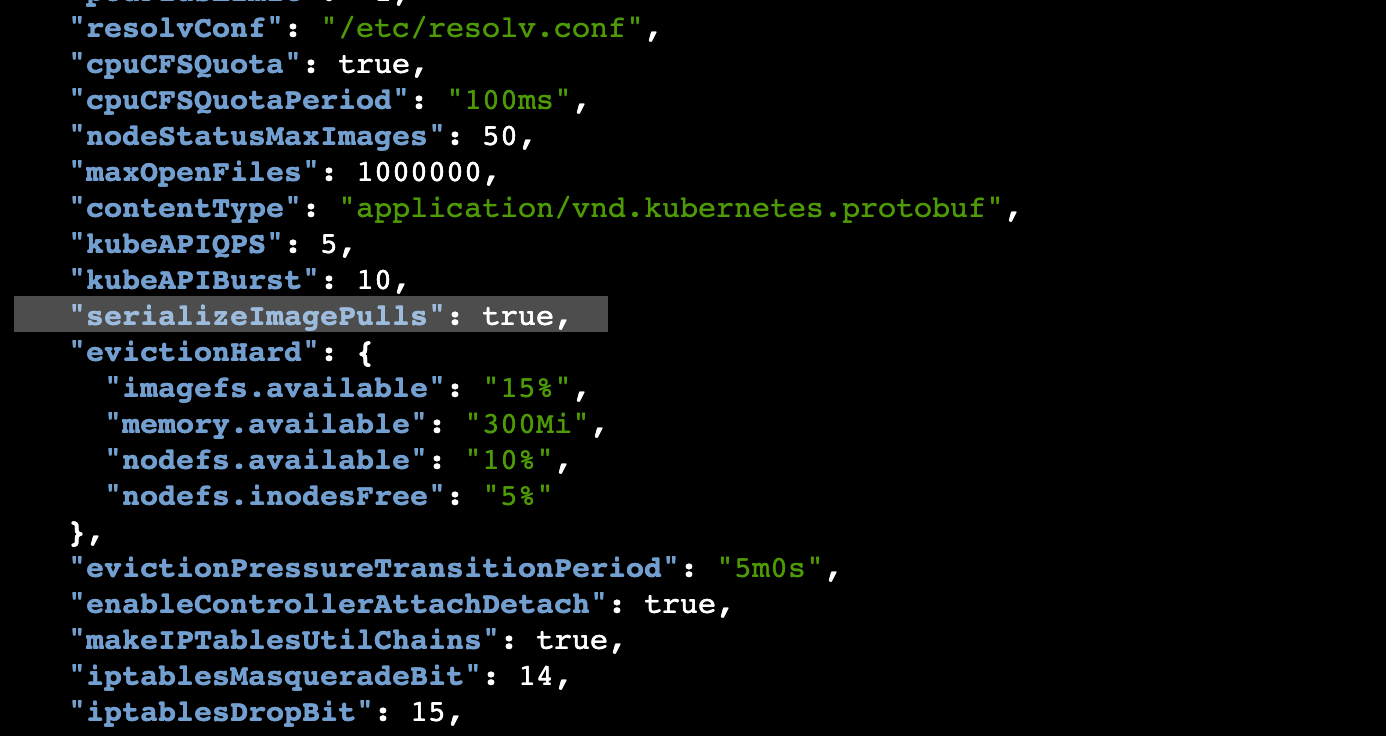
- Verify whether the kubelet parameters take effect.
- Run the following command to confirm the node name.
-
- Start the proxy on the node.
-
- Open a new terminal window and run the following command to directly access kube-apiserver and obtain the active kubelet configuration. In the command, ${node-name} is the node name.
-
-
Last updated: 2025.12.31 20:01:41
All rights reserved © Beijing Volcano Engine Technology Co., Ltd2024
