Volcengine Kubernetes Engine
Volcengine Kubernetes Engine


Document

- Documentation
 Volcengine Kubernetes EngineVolcengine Kubernetes EngineUser guideScheduling managementQoS-aware schedulingAmplifying nodes
 Copy page
 Download PDF
QoS-aware scheduling
Amplifying nodes
Copy pageDownload PDFAmplifying nodes
VKE provides the node amplification feature to virtually inflate the allocatable resources of nodes by using the Katalyst framework. It increases node deployment density without modifying workload declarations. This topic describes how to enable and use the node amplification feature for a cluster.
Feature introduction
Node amplification virtually inflates the capacity and allocatable resources of a node. It makes the scheduler perceive a larger available capacity and schedules more Pods onto the node. This fully uses idle physical resources and achieves Pod‑density improvement with zero intrusion on the Pods.
This capability is implemented through three independent policy groups: the amplification policy, scheduling watermark, and pressure eviction. Each is managed by its own CRD. You can combine them as needed:
CRD | Responsibility | Configuration content |
NodeOvercommitConfig (NOC) | Amplification policy | Select node pools, set amplification ratios (static/dynamic), and set load watermarks. |
NodeSchedulingConfig | Scheduling watermark | Configure the load‑aware scheduling threshold (stop line) per node pool. |
AdminQoSConfiguration (AQC) | Pressure eviction | Tiered pressure eviction: Label‑based fine‑grained eviction and system‑pressure QoS‑aware fallback eviction. |
Prerequisites
- The katalyst add-on has been installed in the target cluster, and the node amplification feature is enabled on the Addon parameter configuration page. For details, see katalyst.
- Dynamic amplification and prediction rely on VMP to provide historical metric queries. Dynamic prediction estimates load based on the use-defined amplification ratio. Cloud-native observability has been enabled in VKE. For details, see Enabling observability. For the names of related core metrics, see the Appendix section of this topic.
Considerations
Before you enable the node amplification feature, confirm the following limitations to prevent business interruption or resource contention.
Limitation item | Description |
Mutual exclusivity with Cluster Autoscaler (CA) | You cannot enable both node amplification and autoscaling for the same node pool. Amplified allocatable resources may mislead CA about actual node capacity. This will cause incorrect scale-in decisions or delayed scale‑up. Amplified node pools and CA node pools must be separated. |
Hard upper limit on amplification ratio | Default limits: CPU ≤ 3.0 and Memory ≤ 2.0. Any configuration exceeding these limits will be rejected by the system and will not take effect. We recommended setting the initial value of CPU to 1.5 to 2.0 and memory to 1.2 to 1.5. Then, gradually increase the value after observation. |
GPU resource amplification not supported | Only CPU and memory can be amplified. GPU, NPU, and other accelerator resources cannot be amplified. |
Nodes with cpuManagerPolicy: static (exclusive‑core nodes) | On nodes with cpuManagerPolicy: static enabled, only the shared CPU pool is amplified. CPU and memory resources of exclusive‑core Pods are excluded from amplification calculation. |
Kubelet restart risk | When katalyst is uninstalled or the amplification ratio is lowered, scheduled Pods are unaffected. However, if kubelet restarts, Pod eviction may occur because the sum of Pod requests may exceed the current node capacity. |
One NOC per node pool | When multiple NOCs match the same node pool, only the most recently created NOC takes effect. |
Procedure
Step 1: Add an amplification label to the target node pool
- Log in to the VKE console.
- On the left navigation bar, select Cluster, and click the name of the target cluster.
- In the left navigation bar of the cluster management page, click Nodes > Node pool.
- On the Node pool page, find the target node pool and click Edit in the Actions column.
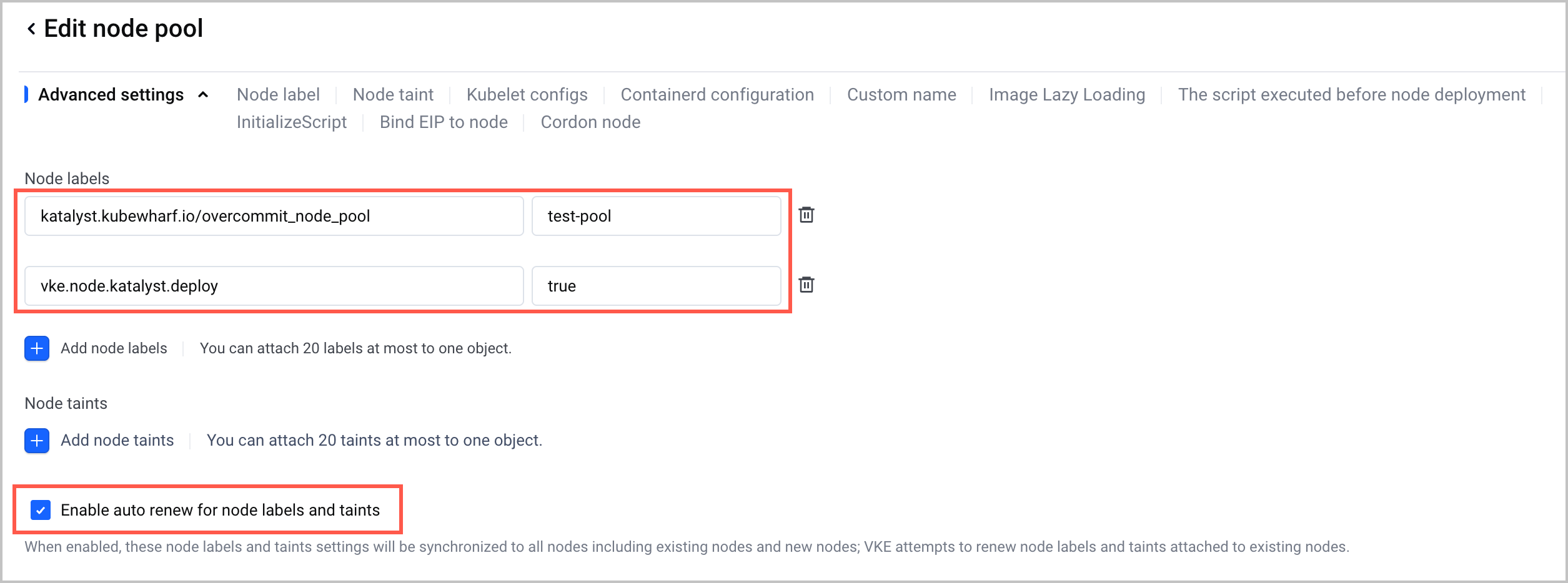
- On the Edit node pool page, configure two node labels and select Enable auto renew for node labels and taints in the Advanced configurations section in the Node pool configuration step.
- Label 1:
- Label key: katalyst.kubewharf.io/overcommit_node_pool
- Label value: the node pool identifier, such as the node pool name or ID. You can specify a custom value.
- Label 2:
- Label key: vke.node.katalyst.deploy
- Label value: true
-
Step 2: Issue an NOC to set the amplification ratio
- Connect to the cluster through kubectl. For details, see Connecting to a cluster via kubectl.
- Define an amplification policy for the node pool by issuing an NOC. The following YAML file nodeovercommit-test.yaml of NOC functions as an example.
-
tip
The resource calculation methods differ between static and dynamic adjustment of the amplification ratio. For details, see the Appendix section of this topic.
- Run the following command to create and issue the NOC.
-
Step 3: (Optional) Enable the load-aware scheduling policy
To address the scheduling priority issue between non‑amplified and amplified nodes within the same node pool, you can combine load‑aware scheduling with NodeSchedulingConfig objects.
- When a node does not match any NodeSchedulingConfig, the global configuration is used. If a matching custom resource exists, its configuration takes precedence.
- When a node matches multiple NodeSchedulingConfigs, the most recently created one takes effect.
tip
If load‑aware scheduling is not enabled, node utilization cannot be effectively controlled. This poses risks to business operations. By default, VKE schedules Pods only based on Pod request values. When actual resource usage exceeds the amplified allocatable resources, OOM failures may occur. Therefore, we strongly recommend enabling load‑aware scheduling.
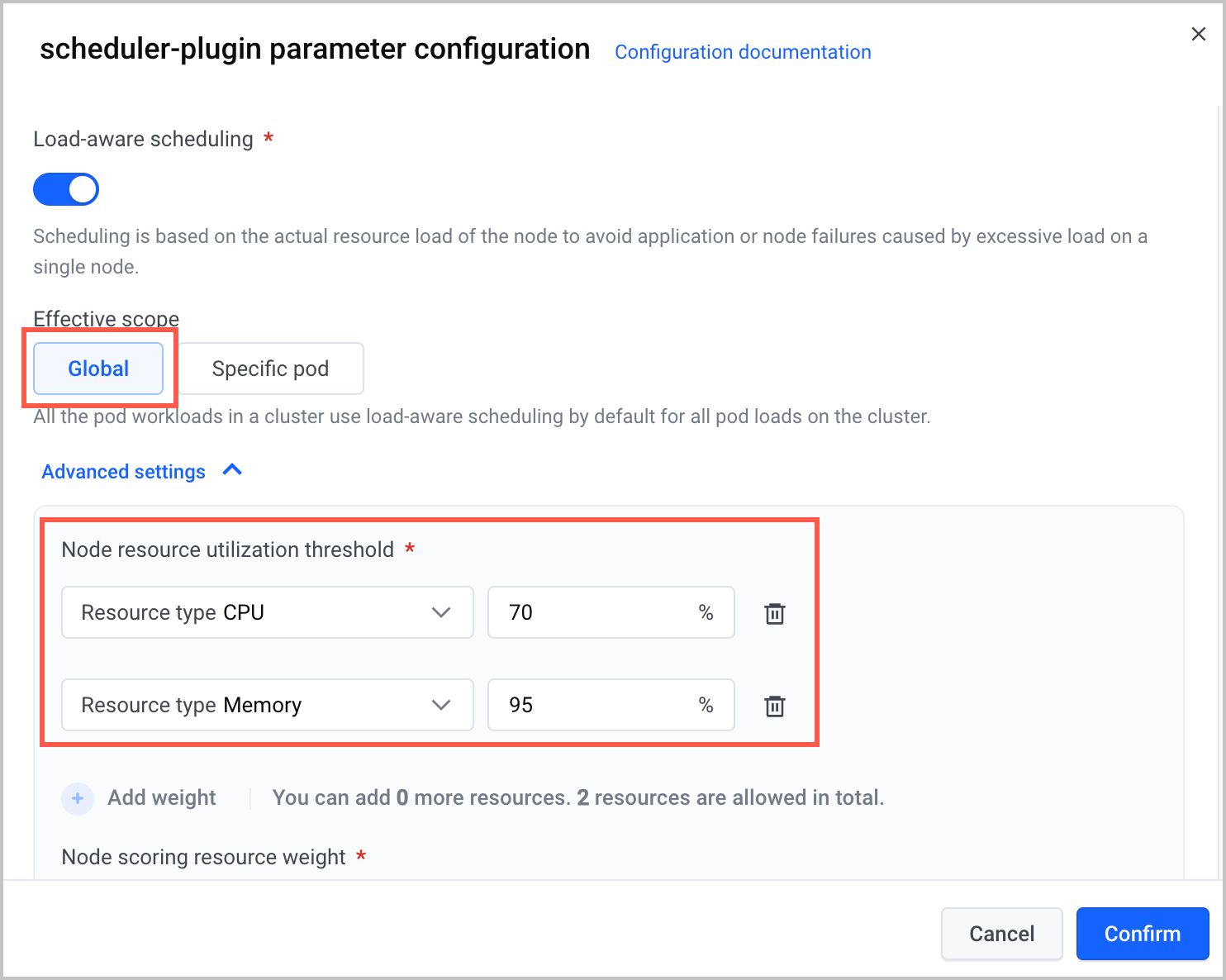
- On the configuration page of the load‑aware scheduling add-on (scheduler‑plugin add-on), configure the global node resource utilization threshold. For more details, see Load‑aware scheduling.
-
- Specify a custom resource utilization threshold for the corresponding node pool by applying a NodeSchedulingConfig. The following YAML file nodeschedulingconfig-test.yaml functions as an example.
-
- Run the following command to issue the NodeSchedulingConfig.
-
Step 4: (Optional) Enable node pressure awareness and eviction policy
When a node is amplified, it can host workloads that exceed its capacity. If the amplification ratio is too high or the actual container load exceeds expectations, the node may become overloaded. This affects overall service performance. We recommend configuring pressure awareness and eviction policies on the node via an AQC and also creating a KatalystCustomConfig (KCC) to add the labels of the node to an allowlist.
- Create an AQC and configure pressure awareness and eviction. The following YAML file adminqosconfiguration-test.yaml functions as an example.
-
- Run the following command to create an AQC.
-
- Create a KCC object to define the Group, Version, and Resource (GVR) information as well as the management behavior of the AQC. The following YAML file katalystcustomconfig-test.yaml functions as an example.
-
- Run the following command to create a KCC.
-
- After the preceding configuration is complete, the system performs pressure awareness and eviction as follows:
- CPU pressure awareness and eviction policy:
- CPU pressure is detected every 5 seconds. If CPU usage reaches usageUpperBoundRatio (0.8 in the example) within at least 8 out of the last 10 detection cycles, an eviction is triggered.
- The cooldown period between two Pod evictions is 300 seconds. After an eviction is triggered, no other evictions will occur within 300 seconds.
- When an eviction occurs, the node is tainted with node.katalyst.kubewharf.io/SystemCPU to prevent Pods from being scheduled onto the node.
- DaemonSet Pods will not be evicted.
- Memory pressure awareness and eviction policy per NUMA:
- Reads NUMA memory watermark values (free, low, min) from /proc/zoneinfo.
- If min < free < low is detected for 12 consecutive cycles (5 seconds for each cycle), a memory eviction is triggered.
- When free < min is detected, the cumulative cycles are quickly increased to 11 cycles. That means that if free < low is detected in the next cycle, eviction will be triggered.
- DaemonSet Pods will not be evicted.
Validate results
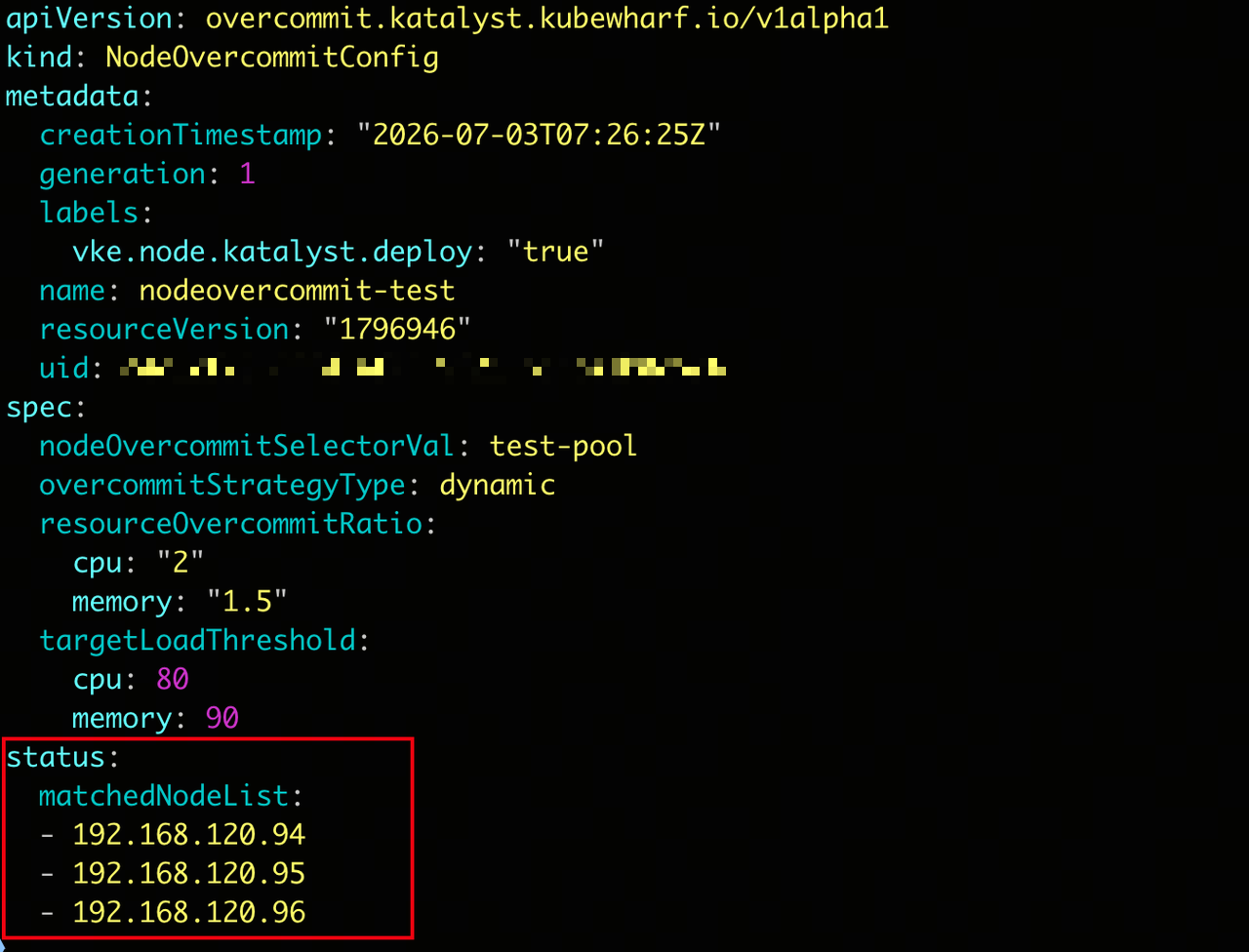
- Check the status field of the NOC to verify the matching relationship between the node and the NOC.
-
- The expected output is as follows:
-
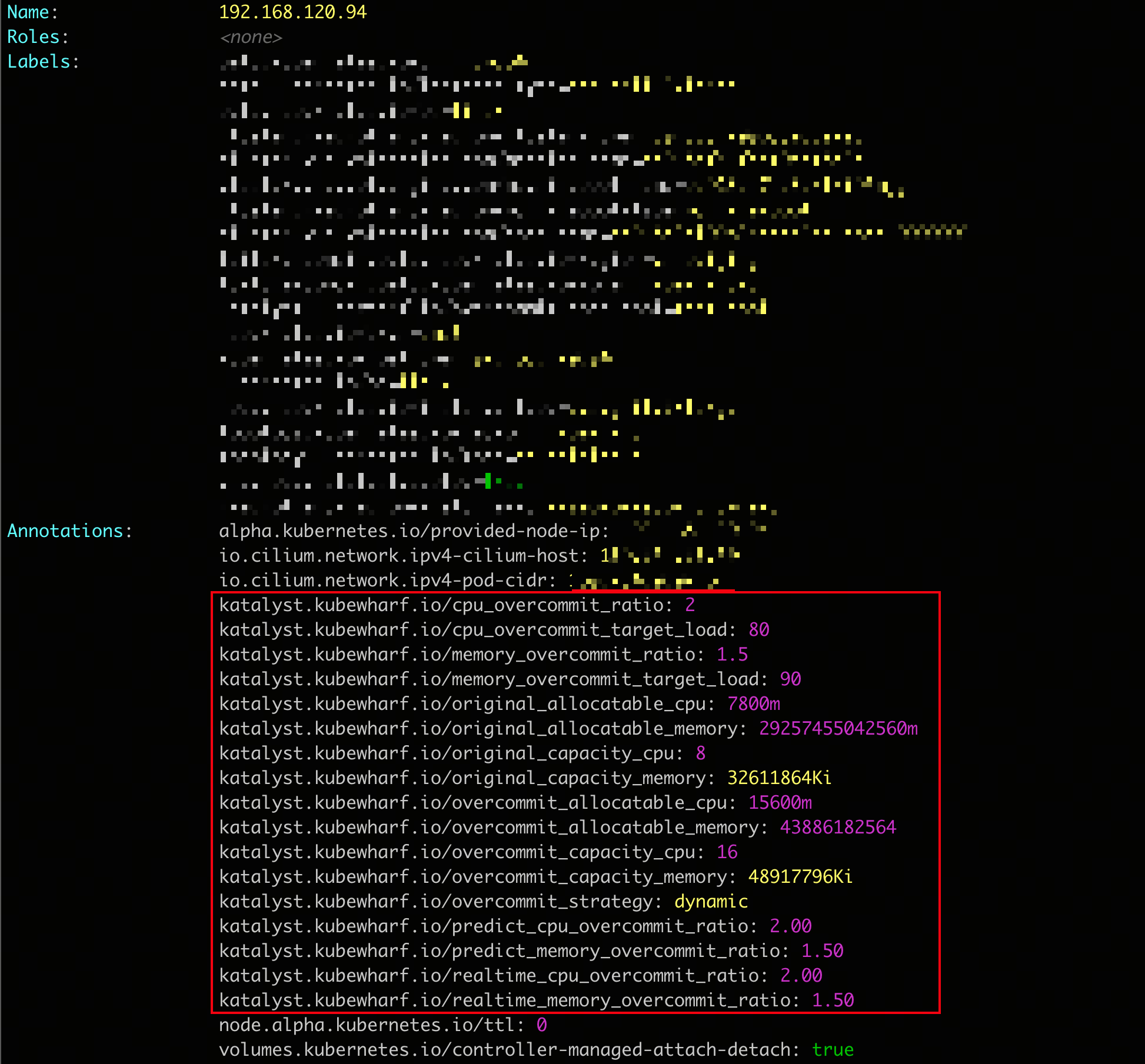
- If CPU and memory amplification ratios are specified for the node, view the annotations related to amplification on the corresponding node.
-
- The expected output is as follows:
-
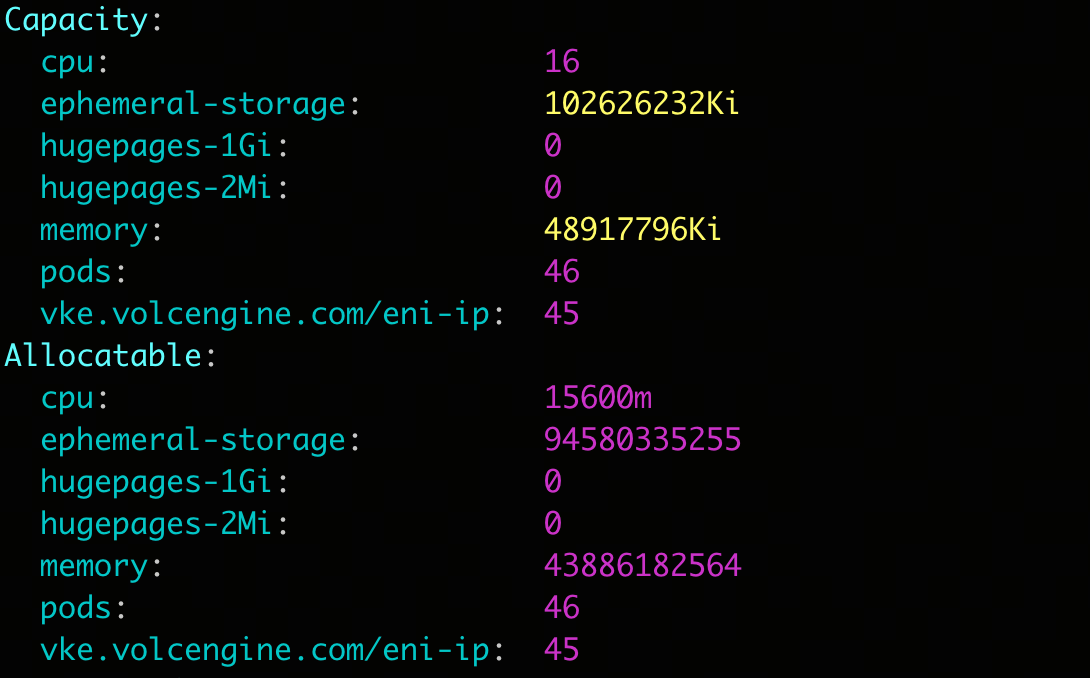
- Verify whether the capacity and allocatable resources of the node have been amplified.
-
- The expected output is as follows:
-
Appendix
Core metrics
The following table describes core metrics related to dynamic amplification and prediction capabilities.
The following table describes controller metric names and their meanings.
The following table describes webhook metric names and their meanings.
The following table describes agent metric names and their meanings.
Amplified resource calculation
Last updated: 2026.07.15 10:47:36
All rights reserved © Beijing Volcano Engine Technology Co., Ltd2024
