Volcengine Kubernetes Engine
Volcengine Kubernetes Engine


Document

- Documentation
 Volcengine Kubernetes EngineVolcengine Kubernetes EngineUser guideNetworkingDNSCoreDNS best practices
 Copy page
 Download PDF
DNS
CoreDNS best practices
Copy pageDownload PDFCoreDNS best practices
As the default DNS add-on in the Kubernetes cluster, CoreDNS is used for service discovery and DNS resolution within the cluster. This topic describes the fundamental principles, key configuration methods, and production‑oriented usage recommendations for CoreDNS. In particular, it focuses on client‑side domain name access patterns, NodeLocal DNS, high‑availability deployment strategies for CoreDNS, and DNS timeout risks in scenarios where IPVS is used.
DNS principles and configuration instructions
Cluster DNS configuration instructions
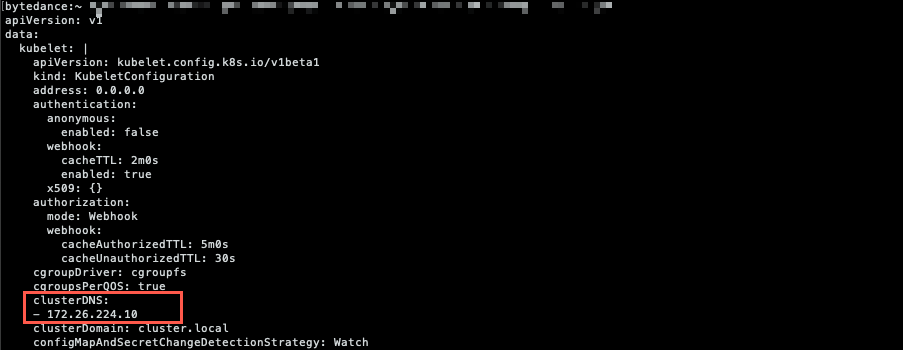
In a Kubernetes cluster, the kubelet startup parameters related to DNS configuration include:
- --cluster-dns=<dns-service-ip>: Configure the IP address of the cluster DNS server.
- --cluster-domain=<default-local-domain>: Configure the suffix of the cluster primary domain name.


Pod DNS configuration instructions
The DNS resolution configuration file in a Pod is /etc/resolv.conf. The Pod performs DNS queries based on the following configuration.
CoreDNS configuration instructions
The following content provides a typical Corefile example:
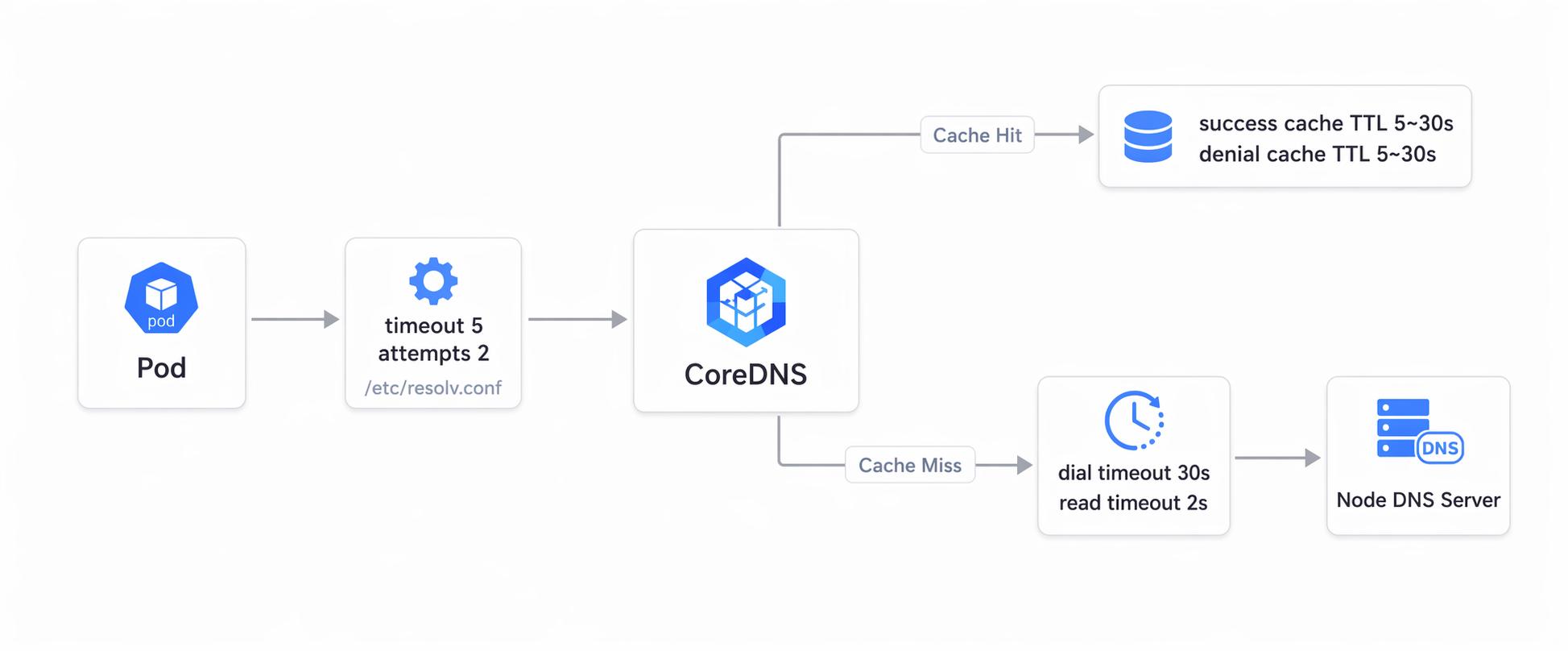
Pod DNS resolution workflow
The following figure displays the process of a Pod performing DNS resolution in ClusterFirst mode.
Client optimization
Optimize the domain name format to reduce unnecessary queries
DNS queries are one of the most frequent network operations in a Kubernetes cluster. Much DNS pressure is not caused by insufficient CoreDNS performance, but by inappropriate client request patterns.
- When you access a Service within the same namespace, preferentially use service-name.
- When you access a Service across namespaces, preferentially use service-name.namespace-name to prevent relying on the implicit search rules of the current namespace.
- When you access an external domain, preferentially use the fully qualified domain name (FQDN). For clients known to be compatible, you can use FQDNs with a trailing dot (.), such as api.example.com. to reduce multiple invalid queries caused by search suffix concatenation.
Pay attention to the amplification effect caused by ndots and search
In the default ClusterFirst mode, Kubernetes usually injects multiple search suffixes and uses ndots:5. This means that when an external domain name is accessed, if the number of dots (.) in the domain name is less than 5, the client will first try concatenating several search suffixes and then query the real domain.
For example, when accessing api.example.com, the client will often first query the domain names in the following order:
- api.example.com.<ns>.svc.cluster.local
- api.example.com.svc.cluster.local
- api.example.com.cluster.local
- api.example.com
In high‑concurrency scenarios, such extra queries directly amplify CoreDNS request volume and tail latency. A more appropriate approach is as follows:
- First, adjust the domain name format on the server side to reduce reliance on search.
- After evaluating the impact, adjust ndots or search locally for specific workloads via dnsConfig. This prevents making cluster‑wide changes that may cause service discovery compatibility issues.
Preferentially use connection pools and persistent connections
When applications frequently access upstream services, preferentially use connection pools, HTTP Keep‑Alive, and gRPC persistent connections. This prevents triggering new DNS resolution and connection establishment overhead per request.
For scenarios where persistent connections cannot be used, consider reducing DNS request frequency through local caching or other methods, rather than relying solely on CoreDNS to handle all instantaneous traffic.
Pay attention to differences among resolvers and base images
Different language runtimes, base images, and libc implementations do not behave identically in DNS resolution. In production environments, pay attention to the following differences:
- Containers based on glibc usually follow most of the configuration in /etc/resolv.conf.
- Images based on musl (such as some Alpine images) behave differently from glibc in search, concurrent requests to multiple nameservers, and A/AAAA query behavior. This may amplify DNS request volume or reduce the benefits of NodeLocal DNS.
- Go applications also differ in the pure Go resolver and the cgo resolver. The actual behavior depends on the image, build method, and runtime environment.
Therefore, if your business is sensitive to DNS latency, we recommend validating the resolver behavior of the used image and language runtime in load‑testing or canary environments first and then deciding whether to change the base image, adjust dnsConfig, or introduce NodeLocal DNS.
Use NodeLocal DNS to improve stability
NodeLocal DNS is applicable to the following scenarios:
- Large clusters with persistently high DNS QPS.
- Frequent external domain access leads to obvious, ineffective queries caused by search domain expansion.
- High UDP/conntrack pressure on the node.
- The cluster uses IPVS. DNS jitter risks during CoreDNS restarts, rolling upgrades, or scale‑ins need to be reduced.
After NodeLocal DNS is enabled, Pods will first access the local cache of the node and then fall back to CoreDNS. This reduces the overhead of cross‑node access to CoreDNS, lowers centralized pressure on CoreDNS, and alleviates some conntrack pressure.
Take note of the following items when you deploy NodeLocal DNS:
- Confirm that the nameserver in the business Pod after injection points to the NodeLocal DNS address.
- First, enable it in a canary manner on high‑traffic or DNS‑sensitive workloads and then gradually expand the scope.
- NodeLocal DNS is a cache and proxy layer, not a replacement for CoreDNS. CoreDNS still needs to stay healthy and redundant.
Prevent probabilistic DNS resolution timeouts caused by IPVS defects
When your cluster uses IPVS as the kube-proxy forwarding mode, during CoreDNS scale-in, restart, or rolling upgrade, DNS requests may experience probabilistic resolution timeouts because UDP sessions may still hit backends that have already exited.
This type of issue is usually more pronounced when the CoreDNS backend set changes. Common trigger scenarios include:
- CoreDNS replica scale-in.
- CoreDNS Pod restart or rolling update.
- Business traffic still directly accesses CoreDNS via the Service.
A more appropriate approach is as follows:
- Preferentially enable NodeLocal DNS to reduce the proportion of business Pod requests directly passing through the CoreDNS Service.
- Use cluster O&M specifications to evaluate whether to adjust the IPVS UDP session persistence duration in kube-proxy.
Optimize the CoreDNS server
Appropriately adjust the number of CoreDNS replicas
The DNS resolution QPS capacity of CoreDNS is positively correlated with CPU consumption. QPS requirements for CoreDNS requests vary based on various services. Therefore, monitoring of CoreDNS needs to be strengthened. Adjust the number of CoreDNS replicas based on the CoreDNS load and health status. We recommend maintaining at least 2 replicas in the production environment and reserving additional capacity for business peak hours and release periods to prevent passive scale-out only when CPU just reaches the threshold.
warning
We recommend keeping the UDP request QPS per CoreDNS instance below 3K QPS to prevent triggering UDP buffer overflow and packet loss issues.
Manually adjust the number of CoreDNS replicas
Run the following command to manually adjust the number of CoreDNS replicas in the cluster, where ${target} is the target number of replicas.
Automatically adjust the number of CoreDNS replicas through HPA with caution
We do not recommend using HPA as the default solution for adjusting the number of CoreDNS replicas. Different from normal stateless workloads, CoreDNS performs automatic scaling only based on CPU utilization, which can easily ignore the following risks:
- DNS pressure is not always linearly correlated with CPU. The request pattern, cache hit ratio, and upstream resolution quality all affect actual performance.
- New replicas after scale-out require cache warm‑up and may not immediately improve tail latency.
- The scale-in, restart, or rolling update changes the backend set, which may increase the likelihood of occasional DNS resolution timeouts in IPVS + UDP mode.
A more appropriate approach is as follows:
- Perform manual scale-out based on monitoring results, and keep a safety margin.
- Preferentially optimize the client request pattern and connection reuse to reduce invalid DNS queries.
- In high‑QPS or high‑jitter scenarios, we recommend first evaluating whether to enable NodeLocal DNS to reduce requests that are directly destined for the CoreDNS Service. If CoreDNS still encounters obvious capacity bottlenecks, scale out CoreDNS based on monitoring data.
Recommendations for high-availability CoreDNS deployment
Besides the number of replicas, consider the following aspects to ensure CoreDNS high availability:
- Keep at least two replicas and reserve redundancy based on the cluster size and maximum QPS.
- Set stable CPU and memory requests and limits for CoreDNS to prevent resource contention with business Pods.
- Distribute CoreDNS replicas across different nodes and across availability zones if possible, to prevent a single point of failure from affecting all DNS capacity.
- Keep ready, health, and lameduck configurations enabled to ensure smoother transitions between old and new replicas during rolling updates.
CoreDNS service observability
We recommend using the DNS service observability capability provided by VKE to configure monitoring and alerting. This capability simultaneously applies to the following observability objects:
- core-dns: Used for cluster service discovery and DNS resolution.
- node-local-dns: Used for node-level local DNS caching and proxying.
You need to focus on the request volume, resolution latency, error code, cache hit ratio, and upstream forwarding health in your daily life.
In addition to DNS add-on metrics, we recommend enabling conntrack‑related metric collection of node‑exporter and configuring alerts to proactively identify when node conntrack utilization is too high or approaching the upper limit. The reason is that a full conntrack table on a node not only affects the forwarding of DNS requests from business Pods, but may also impact health checks and network connectivity on the node where CoreDNS runs. This can ultimately result in DNS resolution timeouts or failures.
tip
For specific observability enabling, metrics collection, and alert template configuration, see VKE observability and DNS service observability.
Collecting CoreDNS logs
Analyzing the resolution logs of CoreDNS is effective in CoreDNS daily troubleshooting. The following content describes how to collect CoreDNS logs in a VKE cluster.
Modifying log levels
When troubleshooting, you can change the log level from errors to debug.
Configuring log collection
You can configure log collection rules in the log center to collect logs of the container that corresponds to CoreDNS. For details, see Collecting container logs.
Last updated: 2026.08.25 14:22:21
All rights reserved © Beijing Volcano Engine Technology Co., Ltd2024
