Volcengine Kubernetes Engine
Volcengine Kubernetes Engine
Volcengine Kubernetes Engine


Document
Volcengine Kubernetes Engine
What's New
History feature release notes
Kubernetes version release notes
Containerd runtime release notes
Add-on release notes
Monitoring add-ons
Scheduling add-ons
DNS add-ons
Security add-ons
GPU add-ons
Sandbox add-on
Security announcements
Product Announcement
Historical announcements
Overview
Getting started
User guide
Clusters
Creating clusters
Connecting to clusters
Upgrading clusters
Node pool
Creating node pools
Scaling out/in node pools
Nodes
Authorization management
Image
Namespaces
Networking
Cluster network
Container Network
Service
LoadBalancer
CLB
Ingress
APIG Ingress
ALB Ingress
Customize ALB Ingress forwarding rules
Certificate and security
CLB Ingress
Nginx Ingress
Gateway API
Workloads
Creating workloads
Configure workloads
Pods
Configuration management
Image acceleration
Storage
FSX client
EBS Volumes
TOS Volumes
NAS volumes
FSX access methods
NFS access methods
EFS volumes
vePFS volumes
FSX access methods
vePFS Client access methods
NFS access methods
CloudFS volumes
Local volumes
Autoscale
Node autoscaler
Workload autoscaler
Horizontal Pod Autoscaler (HPA)
Cron Horizontal Pod Autoscaler (CronHPA)
Intelligent Horizontal Pod Autoscaler (IHPA)
Horizontal Pod Autoscaler based on event-driven (KEDA)
Add-on management
Network add-ons
Storage add-ons
Monitoring add-ons
Scheduling add-ons
DNS add-ons
GPU add-ons
Core add-ons
Sandbox add-on
Upgrading add-ons
Heterogeneous computing
NVIDIA GPU
mGPU scheduling
RDMA high-performance computing
Scheduling management
Topology-aware scheduling
QoS-aware scheduling
Observability
Log management
Basic observation
Setup & Configuration
Cluster observation
Storage observation
Other observation
Using metrics
Full stack observation
Alert management
Diagnosis and inspection
Node check and self-healing
Application center
Backup center
Stability
Large-scale cluster management
Best practices
Authorization
Clusters
Nodes and node pools
Networking
Storage
Scheduling
Observability
Solution
Security and compliance
API reference
Cluster management
NodePool management
Node management
Virtual nodes management
Add-on management
Tag management
Access policy management
Instance images management
Cloud native observability
Inspection and diagnosis
Task management
Volcengine Container Instance
Appendix
SDK reference
Development guide
Terraform
FAQs
General FAQs
Cluster FAQ
cluster management
cluster network
cluster upgrade
Node and Node pool FAQs
Authorization FAQs
Workload FAQs
Service and Ingress FAQs
Storage FAQs
Heterogeneous computing FAQs
Observability FAQs
Quota FAQs
Add-on FAQs
Cloud-native AI
ServingKit
LLM applications
ComfyUI application
Deploying the Al inference application through Helm
Deepseek practices
Qwen practices
Kimi practice
Seed practices
Best practices
DeepSeek model deployment
GLM model deployment
MiniMax model deployment
Qwen model deployment
Kimi model deployment
Volcengine Container Instance
What's new
Historical feature release notes
Product Announcement
Overview
Billing
User guide
Integrating with VCI
Virtual node
VKE cluster uses virtual nodes
Self-managed/third-party cluster uses virtual node
Creating an instance
General purpose instance
GPU-accelerated computing instance
VCI Agent Sandbox
Startup acceleration
E2B-based management
Upgrade guide
Networking
Monitoring
Scheduling
Container configuration
VCI Image Cache
Best practices
Security and compliance
FAQs
- Documentation
 Volcengine Kubernetes EngineVolcengine Kubernetes EngineUser guideImageCreating a custom image based on Docker
 Copy page
 Download PDF
Image
Creating a custom image based on Docker
Copy pageDownload PDFCreating a custom image based on Docker
Volcengine Kubernetes Engine (VKE) allows you to install operating systems on cluster nodes by using veLinux-based custom images. This topic describes how to create a custom image by using the docker run command.
Background
Image creation described in this topic is a VKE-specific encapsulation of custom image packaging. The docker run command automatically performs the following steps to package necessary contents as a custom image:
- Create an Elastic Compute Service (ECS) that runs the veLinux operating system, an Elastic IP (EIP) address, a Virtual Private Cloud (VPC), and a subnet of the VPC according to the selected specification. The ECS instance and EIP address are billed using the pay-as-you-go billing method.
- Package contents as a custom image and check its availability.
- Import the ready-to-use image into the image center in ECS.
- Delete all resources created temporarily in the process, and settle the costs for the pay-as-you-go ECS and EIP usage.
Usage limits
For custom and shared images based on veLinux 2.0 and later or Ubuntu 22.x and later, cgroupv2 is enabled by default in Kubernetes v1.30 and later. To use cgroupv1, submit a ticket.
Prerequisites
- Docker has already been installed on an Internet-connected on-premises machine or ECS instance. For details, see Get Docker.
- The snapshot feature has been enabled. For details, see Snapshots.
- The access key ID and secret access key of your account have been obtained. If you have not obtained these credentials, you can get them at Access Key Management.
- (Optional) If you use a Container Registry Standard Edition instance, ensure that you have prepared the image to be packaged, and obtained the image address, Container Registry username, and Container Registry password.
- (Optional) If you use a Container Registry Standard Edition instance, ensure that the ECS instance used to create the custom image can communicate with the Container Registry instance over the public network or through a VPC.
- If you use a public network, public network access has been enabled for the Container Registry instance. For details, see Enabling public network access. Also note that traffic over the public network is billed using the pay-as-you-go billing method.
- If you want to specify a VPC, ensure that the VPC has been added to the access control allowlist of the Container Registry instance. For details, see Connecting to the VPCs within the account.
- (Optional) If you use an Identity and Access Management (IAM) user to create a custom image, ensure that the IAM user has been granted permission to perform the following actions:
- {"Statement": [{"Effect": "Allow","Action": ["ecs:RunInstances","ecs:StopInstance","ecs:DeleteInstance","ecs:DescribeInstances","ecs:CreateImage","ecs:PreheatImage","ecs:DescribeImages","ecs:DescribeTasks","vpc:CreateVpc","vpc:DeleteVpc","vpc:DescribeVpcs","vpc:CreateSubnet","vpc:DeleteSubnet","vpc:DescribeSubnets","vpc:DescribeSecurityGroups","vpc:AllocateEipAddress","vpc:AssociateEipAddress","vpc:DescribeEipAddresses","vpc:DisassociateEipAddress","vpc:ReleaseEipAddress"],"Resource": ["*"]}]}
Usage limits
- Disclaimer: Custom images are non-standard environments for which Volcano Engine does not provide official support or ongoing maintenance. For detailed disclaimer statements regarding custom images, see Disclaimers.
- You can create Docker-based custom images only by using the VKE base image veLinux.
- During image creation, the system creates an ECS instance and EIP address, which are billed by using pay-as-you-go and automatically deleted when the process ends. Make sure that your account balance is sufficient for the operation to complete successfully.
Procedure
On the on-premises server or ECS instance where Docker is installed, use the docker run command to create a custom image. Note that you need to provide all parameters through environment variables (ENV).
Examples
- Example 1: Only includes required parameters
- docker run --rm \-e VOLC_AK="<AK>" \ -e VOLC_SK="<SK>" \ -e TAILOR_SPEC="ecs.xxx.large" \ vke-cn-beijing.cr.volces.com/vke/private-image-packer:v1.0.9
tip
The backslash (\) character at the end of the previous command indicates line continuation in Shell. If your client cannot correctly recognize the character, delete it and format the command as a single line.
- Example 2: Includes all parameters
- docker run --rm \-e VOLC_AK="<AK>" \ -e VOLC_SK="<SK>" \ -e REGION="cn-shanghai" \-e ZONE="cn-shanghai-a" \-e TAILOR_IMAGE_NAME="my-image-name" \-e TAILOR_SPEC="ecs.xxx.large" \ -e TAILOR_DISK_SIZE="60" \-e TAILOR_COMPAT="false" \-e IMAGES="cr-helm2-cn-beijing.cr.volces.com/****/busyxxx:latest,cr-helm2-cn-beijing.cr.volces.com/****/3gixxx:latest" \-e REGISTRY_USERNAME="paas2b_prod@2100****" \-e REGISTRY_PASSWORD="password123" \-e TAILOR_PASSWORD="password"\-e TAILOR_VPC="vpc-13fawddpwxxxxxx6nu4g2y8bt"\-e TAILOR_SUBNET="subnet-mj92ij8xxxxxxsmt1arvwrtw"\-e TAILOR_KERNEL="5.4"\vke-cn-beijing.cr.volces.com/vke/private-image-packer:v1.0.9
Parameter description
ENV name | Required | Description | Sample value |
ENV name | Required | Description | Sample value |
VOLC_AK | Yes | AKLTN2M1NTRjODNkYmI2NGEzNWFiYTk3ZTZhY******** | |
VOLC_SK | Yes | WkRVek5EWmtaalU0Wm1RMU5ETTJOamcyWlRoaU5EaGlObVJq**** | |
REGION | No | Region. If you leave this parameter empty, it defaults to cn-beijing. For a list of regions and availability zones supported by VKE, see Regions and availability zones. | cn-beijing |
ZONE | No | Availability zone. If you leave this parameter empty, it defaults to {REGION}-a. | cn-beijing-a |
TAILOR_SPEC | Yes | The instance specification from which you want to create a custom image. All instance specifications available in the console can be used. For a complete list, see Instance types and specifications. tip You should select an ECS instance specification that suits your application requirements. For example, if you want to create a custom image for GPU scenarios, you must use a GPU Accelerated instance specification to prevent the resulting ECS instance from failing your application requirements due to a lack of a required driver. | ecs.xxx.large |
TAILOR_DISK_SIZE | No | The capacity of the system volume to be used for creating a custom image. If you do not specify a value, it defaults to 40, which indicates 40 GiB. | 100 |
TAILOR_IMAGE_NAME | No | Name of the custom image. If you leave this parameter empty, a name starting with velinux will be generated automatically. | velinux-example |
TAILOR_COMPAT | No | Whether to use a CentOS-compatible veLinux version.
| false |
REGISTRY_USERNAME | No | The username for the private Container Registry instance from which images are pulled. The username is typically in the Volcano Engine account@Account ID format. tip If you leave this parameter empty, you pull an image as an anonymous user. This parameter must be used together with REGISTRY_PASSWORD. | user@2100****** |
REGISTRY_PASSWORD | No | The password for the username of the private Container Registry instance from which images are pulled. tip If you leave this parameter empty, you pull an image as an anonymous user. This parameter must be used together with REGISTRY_USERNAME. | password@123 |
IMAGES | No | Images to be pulled. If you leave this parameter empty, the system does not pull container images of the user. tip If you specify multiple images, separate them with commas (,). | cr-helm2-cn-beijing.cr.volces.com/****/busy*****:latest,cr-helm2-cn-beijing.cr.volces.com/*****/3gixxx:latest |
TAILOR_PASSWORD | No | The password used when you create an ECS instance. | Password |
TAILOR_VPC | No | The VPC where you want to create the ECS instance. This parameter must be used together with the TAILOR_SUBNET parameter. tip If you specify a VPC and its subnet, ensure that the security group for the subnet includes an inbound rule that opens port 22. | vpc-13fawddpwxxxxxx6nu4g2y8bt |
TAILOR_SUBNET | No | The subnet where you want to create the ECS instance. This parameter must be used together with the TAILOR_VPC parameter. | subnet-mj92ij8xxxxxxsmt1arvwrtw |
TAILOR_KERNEL | No | The kernel version to be used by the image. Available values are 5.4 and 5.10. The default value is 5.4. | 5.4 |
private-image-packer versions
Version | Version status | Update in | Change log | Impact |
Version | Version status | Update in | Change log | Impact |
v1.0.9 | Being maintained | August 2024 | Fixed the issue where the image cannot be found when the kernel version is set to 5.10. | No |
v1.0.8 | Being maintained | June 2024 | Fixed the issue where multiple ECS instances created by using a custom image have the same machine-id value. | No |
v1.0.7 | No longer maintained | October 2023 | Optimized the logic for image preheating to support both ECS image preheating and Elastic Block Service (EBS) snapshot preheating. The default retention period for snapshot preheating is 365 days. | No |
v1.0.6 | No longer maintained | September 2023 |
| An incompatible change that requires you to switch from PREHEATING_DISABLED to PREHEAT_DISABLED. |
v1.0.5 | No longer maintained | August 2023 |
| No |
v1.0.4 | No longer maintained | June 2023 | Added the TAILOR_COMPAT environment variable to provide veLinux compatibility with CentOS. | No |
v1.0.3 | No longer maintained | April 2023 | [Incompatible] Changed the format of the environment variable Zone from a to {REGION}-a, such as cn-beijing-a. For a list of regions and availability zones, see Regions and availability zones. | An incompatible change that requires you to modify environment variable Zone. |
v1.0.2 | No longer maintained | April 2023 | Fixed the issue with execution errors in the China (Guangzhou) region. | No |
v1.0.1 | No longer maintained | April 2023 | Added availability zone check during image preheating. | No |
v1.0.0 | No longer maintained | March 2023 | Released private-image-packer v1.0.0. | No |
Subsequent operations
Troubleshooting errors
If the docker run command returns an error, you need to fix the error and run the command again to complete image creation. Possible errors include:
- docker run command errors, such as syntax errors or missing parameters.
- Failures in custom image checks, such as the operating system, kernel version, basic components (for example, systemd), cloud-init status, DNS settings, Network Time Protocol (NTP) status, add-ons (for example, atop, proxima, and unscd), filesystem mount status, network interface card, and system boot parameters.
View the custom image
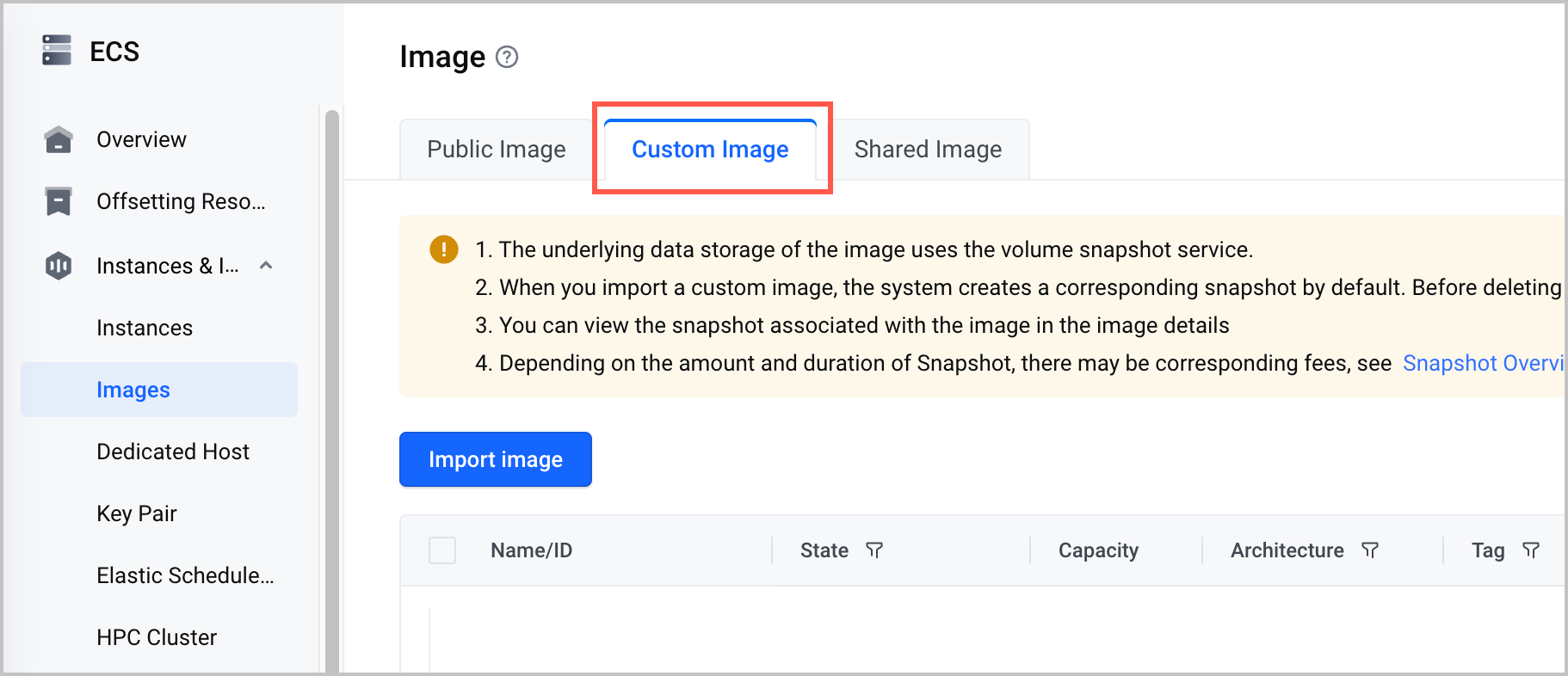
After the docker run command finishes successfully, the created custom image is automatically uploaded to the ECS image center.
Use the custom image
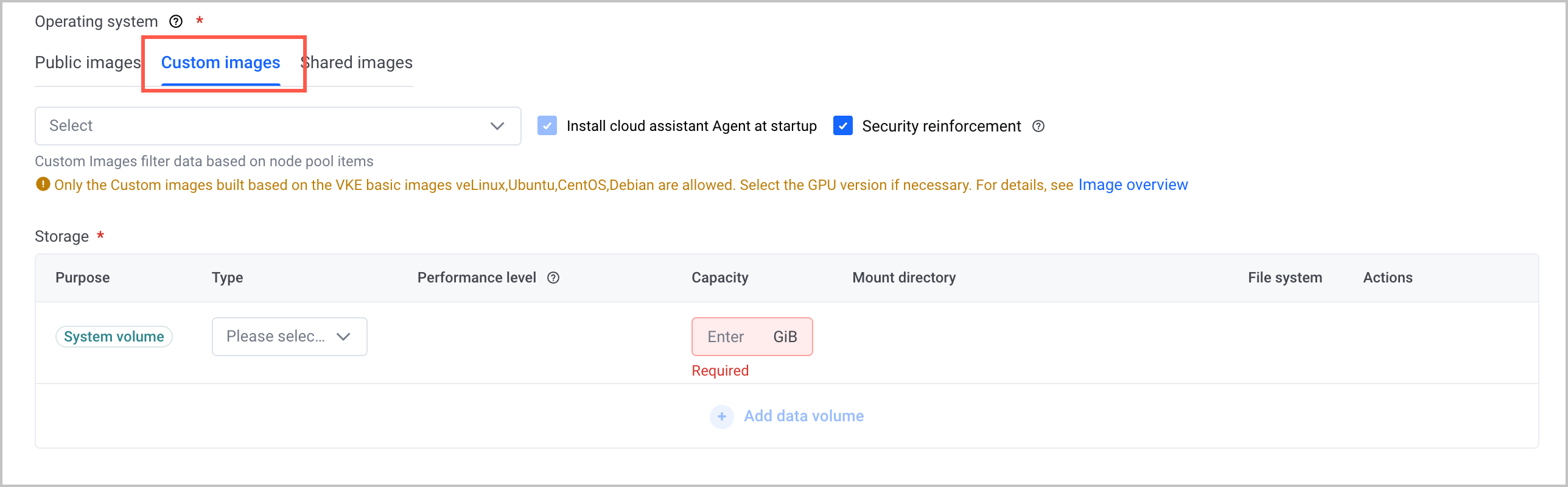
When you create a cluster, create a node pool, or add existing nodes, you can select the created custom image. For details, see Creating clusters, Adding existing nodes, and Creating node pools.
Last updated: 2026.07.07 11:32:41
All rights reserved © Beijing Volcano Engine Technology Co., Ltd2024
