Volcengine Kubernetes Engine
Volcengine Kubernetes Engine
Volcengine Kubernetes Engine


Document
Volcengine Kubernetes Engine
What's New
History feature release notes
Kubernetes version release notes
Containerd runtime release notes
Add-on release notes
Monitoring add-ons
Scheduling add-ons
DNS add-ons
Security add-ons
GPU add-ons
Sandbox add-on
Security announcements
Product Announcement
Historical announcements
Overview
Getting started
User guide
Clusters
Creating clusters
Connecting to clusters
Upgrading clusters
Node pool
Creating node pools
Scaling out/in node pools
Nodes
Authorization management
Image
Namespaces
Networking
Cluster network
Container Network
Service
LoadBalancer
CLB
Ingress
APIG Ingress
ALB Ingress
Customize ALB Ingress forwarding rules
Certificate and security
CLB Ingress
Nginx Ingress
Gateway API
Workloads
Creating workloads
Configure workloads
Pods
Configuration management
Image acceleration
Storage
FSX client
EBS Volumes
TOS Volumes
NAS volumes
FSX access methods
NFS access methods
EFS volumes
vePFS volumes
FSX access methods
vePFS Client access methods
NFS access methods
CloudFS volumes
Local volumes
Autoscale
Node autoscaler
Workload autoscaler
Horizontal Pod Autoscaler (HPA)
Cron Horizontal Pod Autoscaler (CronHPA)
Intelligent Horizontal Pod Autoscaler (IHPA)
Horizontal Pod Autoscaler based on event-driven (KEDA)
Add-on management
Network add-ons
Storage add-ons
Monitoring add-ons
Scheduling add-ons
DNS add-ons
GPU add-ons
Core add-ons
Sandbox add-on
Upgrading add-ons
Heterogeneous computing
NVIDIA GPU
mGPU scheduling
RDMA high-performance computing
Scheduling management
Topology-aware scheduling
QoS-aware scheduling
Observability
Log management
Basic observation
Setup & Configuration
Cluster observation
Storage observation
Other observation
Using metrics
Full stack observation
Alert management
Diagnosis and inspection
Node check and self-healing
Application center
Backup center
Stability
Large-scale cluster management
Best practices
Authorization
Clusters
Nodes and node pools
Networking
Storage
Scheduling
Observability
Solution
Security and compliance
API reference
Cluster management
NodePool management
Node management
Virtual nodes management
Add-on management
Tag management
Access policy management
Instance images management
Cloud native observability
Inspection and diagnosis
Task management
Volcengine Container Instance
Appendix
SDK reference
Development guide
Terraform
FAQs
General FAQs
Cluster FAQ
cluster management
cluster network
cluster upgrade
Node and Node pool FAQs
Authorization FAQs
Workload FAQs
Service and Ingress FAQs
Storage FAQs
Heterogeneous computing FAQs
Observability FAQs
Quota FAQs
Add-on FAQs
Cloud-native AI
ServingKit
LLM applications
ComfyUI application
Deploying the Al inference application through Helm
Deepseek practices
Qwen practices
Kimi practice
Seed practices
Best practices
DeepSeek model deployment
GLM model deployment
MiniMax model deployment
Qwen model deployment
Kimi model deployment
Volcengine Container Instance
What's new
Historical feature release notes
Product Announcement
Overview
Billing
User guide
Integrating with VCI
Virtual node
VKE cluster uses virtual nodes
Self-managed/third-party cluster uses virtual node
Creating an instance
General purpose instance
GPU-accelerated computing instance
VCI Agent Sandbox
Startup acceleration
E2B-based management
Upgrade guide
Networking
Monitoring
Scheduling
Container configuration
VCI Image Cache
Best practices
Security and compliance
FAQs
- Documentation
 Volcengine Kubernetes EngineVolcengine Kubernetes EngineUser guideNetworkingContainer NetworkConfiguring IPv6 public bandwidth for pods
 Copy page
 Download PDF
Container Network
Configuring IPv6 public bandwidth for pods
Copy pageDownload PDFConfiguring IPv6 public bandwidth for pods
In an IPv4/IPv6 dual-stack cluster, the IPv6 addresses assigned to pods do not have IPv6 public bandwidth enabled by default, preventing communication with the Internet. This topic describes how to enable the IPv6 public bandwidth feature for a pod during creation, enabling it to access the Internet via IPv6.
Background information
When you create an IPv4/IPv6 dual-stack VPC and subnets, and then use the VPC and subnets to create a dual-stack cluster, the system will automatically assign IPv6 addresses to the nodes and pods within the cluster. By default, pods in the cluster have only IPv6 addresses and can only access private networks. To allow a pod to access the public network via its IPv6 address, follow the configuration method described in this topic and enable the IPv6 public bandwidth feature for the pod before it is created.
Prerequisites
- An IPv4/IPv6 dual-stack cluster has been created. For details, see Creating IPv4/IPv6 dual-stack clusters.
- VPC and subnet have been bound to an IPv6 gateway. For details, see Enabling IPv6 for VPC. If you cannot access the IPv6 gateway console, please contact your account manager.
- (Optional) If you plan to use a shared bandwidth package, you need to create a shared bandwidth package that supports the IPv4/IPv6 dual-stack protocol in advance. See Creating a Shared Bandwidth Package.
Usage limits
- We recommend that you uniformly configure the IPv6 public bandwidth feature for pods through the method described in this topic. After configuration is complete, do not manually modify the settings (e.g., billing method and bandwidth cap) on the IPv6 gateway console. Otherwise, configuration inconsistencies between the two sides may occur, potentially leading to abnormal or unexpected behavior when pods in the cluster access the public network via IPv6.
- The IPv6 public bandwidth feature for a pod can only be configured during its initial creation. Modifying the annotation after successful configuration will not take effect.
- Trunk ENI does not support IPv6 public bandwidth.
- Only clusters using the VPC-CNI network model support configuring the IPv6 public bandwidth feature for pods.
- A VPC can be configured with only one IPv6 gateway.
- IPv6 gateway instances have the following limitations:
- A single account can enable public bandwidth for a maximum of 20 IPv6 addresses in a single region.
- Each IPv6 gateway instance supports a maximum of 200 outbound-only rules.
tip
- For more details on limitations, see Limits.
- To request an increase in the above quota limits, go to Quota Center to submit an application.
Procedure
Step 1: Install an add-on
- Log in to the VKE console.
- In the left navigation bar, click Cluster. On the page that appears, click the name of the target cluster to go to the management page of the cluster.
- On the cluster management page, click Addons in the left navigation bar.
- Select the Network tab, hover your mouse over the vpc-cni-controlplane add-on card, click Deploy, and enable Bind EIP to pods in the configuration dialog that appears.
tip
If an existing cluster already has the vpc-cni-controlplane add-on installed, ensure it has been upgraded to version 1.5.3 or later. For details, see Upgrading add-ons.
Step 2: Configure IPv6 public network bandwidth for pods
VKE configures IPv6 public bandwidth for pods through instance annotations.
warning
The configuration of IPv6 public bandwidth for a pod applies regardless of whether the pod is scheduled to a regular node or a VCI node.
Taking a stateless Deployment as an example, you can add an annotation during configuration to set up IPv6 public bandwidth for the pods. The following content in YAML is an example with descriptions:
- Create the YAML file of the workload. The code of the sample file deployment-demo.yaml is as follows:
- apiVersion: apps/v1kind: Deploymentmetadata:name: deployment-demonamespace: defaultspec: replicas: 1selector: matchLabels: app: demotemplate: metadata: labels: app: demoannotations:vke.volcengine.com/ipv6gateway-bandwidth-attributes: | # Enable IPv6 public bandwidth feature for pods{"billingType": 2,"bandwidth": 100,"bandwidthPackageId": "bwp-13g2o0a09***","egressOnlyRule": false}spec:containers:- name: demoimage: doc-cn-beijing.cr.volces.com/vke/nginx-demo:v1.0ports:- containerPort: 80
- The key parameters are described in the following table.
- ParameterTypeRequiredDescriptionParameterTypeRequiredDescriptionbillingTypeIntegerYesBilling method for IPv6 public bandwidth. Valid values:
- 2: Pay-as-you-go - Billing by bandwidth cap.
- 3: Pay-as-you-go - Billing by actual traffic.
bandwidthIntegerNoThe upper bandwidth limit for IPv6 public bandwidth, measured in Mbps.- When BillingType is 2, the valid range is 1–500.
- When BillingType is 3: the valid range is 1–200.
- If not configured, the default value is 1 Mbps.
tipThe bandwidth cap is allowed to exceed the configured upper limit. If needed, please contact your account manager. For details, see Limits.bandwidthPackageIdStringNoIPv6 shared bandwidth package ID. For details about shared bandwidth packages, see Creating a Shared Bandwidth Package.egressOnlyRuleBooleanNoWhether to synchronously create outbound-only rules. Valid values:- true: Synchronously create outbound-only rules.
- false: (Default) Do not create outbound-only rules.
tipWhen enabling IPv6 public bandwidth for pods in a cluster, if you do not want the IPv6 address of the pod to be accessible from public IPv6 endpoints, you can configure this parameter to synchronously create outbound-only rules. These bound-only rules deny access from public IPv6 endpoints to the pod.
- Run the following command to create the workload.
- kubectl apply -f deployment-demo.yaml
Result validation
When the pod reaches the Running state, you can use the following methods to verify whether the configuration is correct.
- Click the Pod name to enter the Pod details page.
tip
The status annotation ipv6gateway-bandwidth-status is added to the pod asynchronously with pod startup. To avoid scenarios where the pod starts normally but its network resources are unavailable, you can use an initContainer to continuously monitor this annotation and start the business pod only after the annotation reaches the expected state.
- Log in to the IPv6 Gateway console and click the IPv6 gateway name corresponding to your VPC to enter the gateway details page. On the IPv6 Internet bandwidth tab, use the IPv6 address of the Pod to search and confirm that the configuration matches the expected settings.
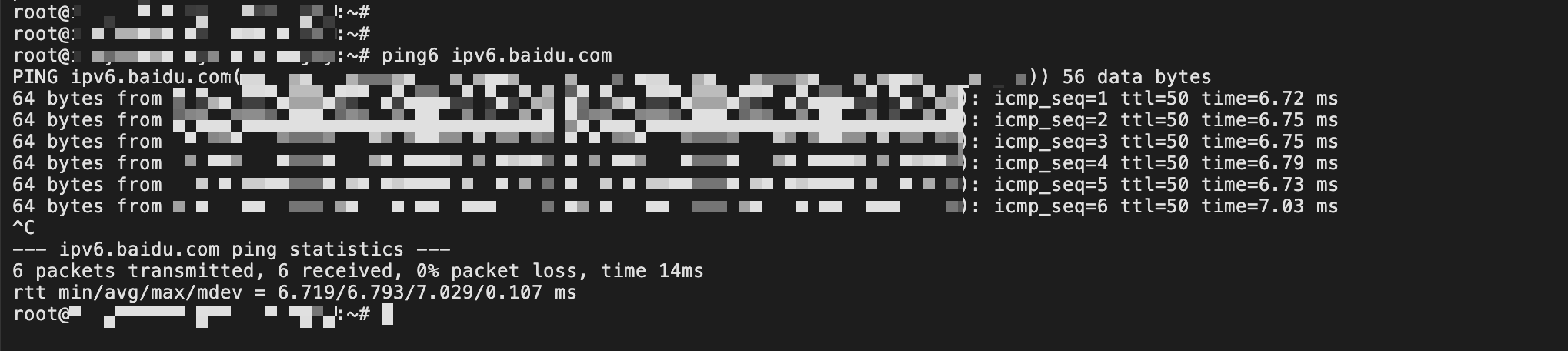
- Log in to the pod console and execute the following commands to verify connectivity.
- ping6 ipv6.baidu.com
- The expected output is as follows:
-
Last updated: 2026.07.24 14:51:39
All rights reserved © Beijing Volcano Engine Technology Co., Ltd2024
