Volcengine Kubernetes Engine
Volcengine Kubernetes Engine


Document

- Documentation
 Volcengine Kubernetes EngineCloud-native AITrainingKitMonitoring AI training jobs
 Copy page
 Download PDF
TrainingKit
Monitoring AI training jobs
Copy pageDownload PDFMonitoring AI training jobs
When you use AI training models to handle business use cases, monitoring the status of training jobs and the load of underlying resources is crucial, as it directly affects the effectiveness of training jobs. This topic provides commonly used monitoring dashboards for AI training and explains how to import these dashboards into the Grafana system for use.
Notes
The following document mainly introduces the practices officially tested and verified. In order to achieve the expected results and comply with the Volcengine Kubernetes Engine (VKE) Limits, you must strictly follow the procedures (or the recommended resources) in this document. If you need to modify the procedures to suit your service requirements, contact the customer manager for consultation.
Prerequisites
- The cluster has cloud native observability enabled and has the node-exporter add-on installed. For more information, see Enabling cloud native observability.
tip
The Prometheus-agent add-on has been upgraded to version v2.0.5 or later. For details, see Upgrading add-ons.
- The rdma-device-plugin add-on has been installed. For details, see Installing add-ons.
- The nvidia-device-plugin and dcgm-exporter add-ons have been installed. For details, see Installing add-ons.
- The VMP workspace associated with the cluster has been connected to your self-hosted Grafana service. Grafana must be version v9.0.2 or later. For details, see Integrating data from VMP into self-managed Grafana.
Configuring AI training jobs
You can deploy AI training jobs in a cluster using workloads and utilize GPU and RDMA resources in the cluster. For details, refer to NVIDIA GPU scheduling and Using RDMA resources in VKE clusters.
To include the monitoring information about training jobs in the dashboard, you need to add the following labels to the training jobs: ai.vke.volcengine.com/task, ai.vke.volcengine.com/job, ai.vke.volcengine.com/team, and ai.vke.volcengine.com/user.
Monitoring dashboards
Preset monitoring dashboards
You can view the preset monitoring dashboards for AI training jobs by going to Cloud native observability > Monitoring center > Dashboard. For details, see AI resource observability.
Importing monitoring dashboards
To monitor AI training jobs that run in the cluster and the underlying resources, you can download the monitoring dashboards provided below and import them into the Grafana system. To do so, follow the steps below:
- Log in to the Grafana system using your account and password.
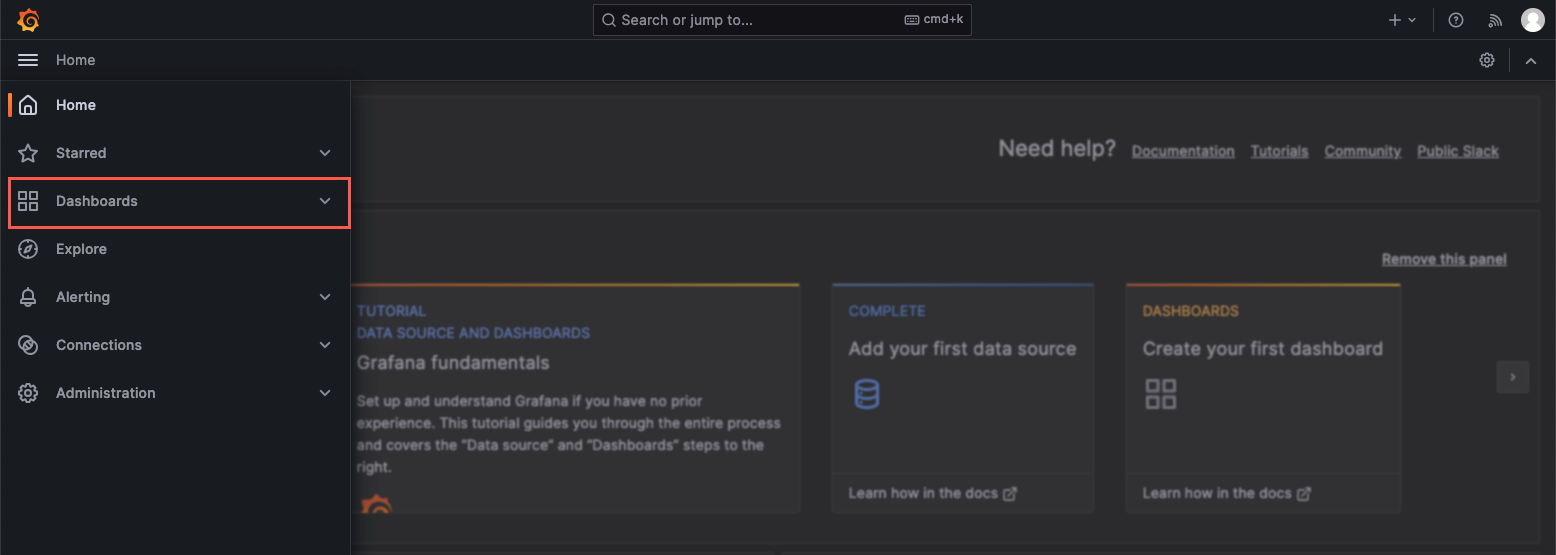
- In the left navigation bar, select Dashboards to enter the dashboard configuration page.
-
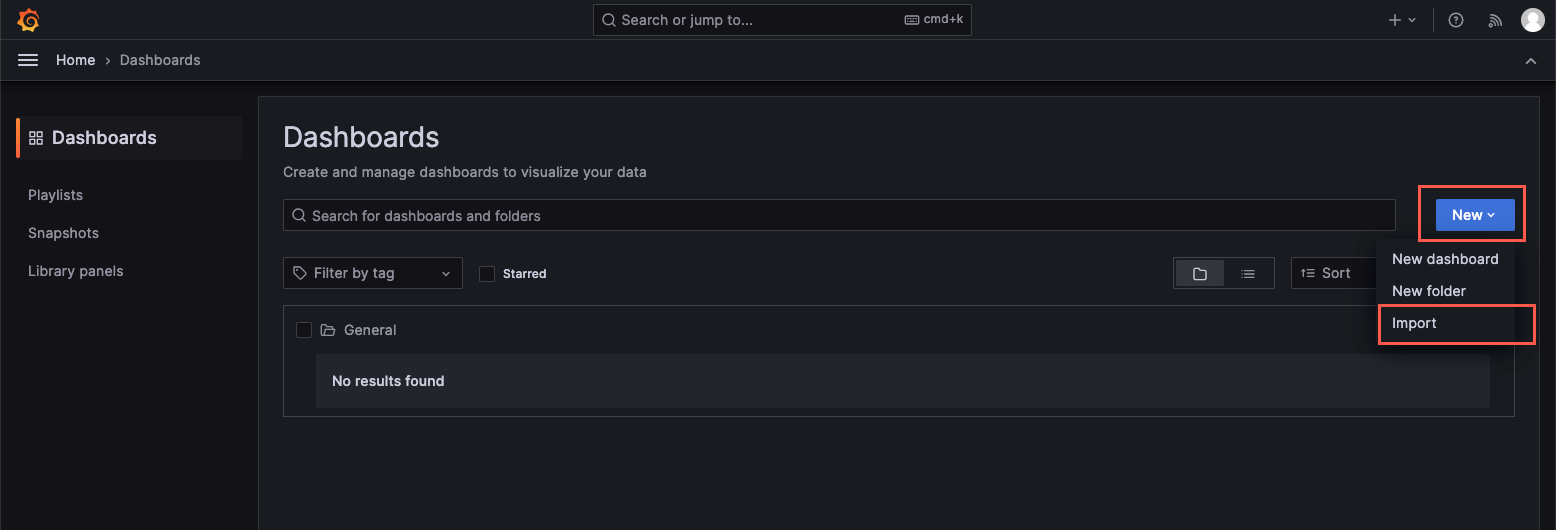
- Choose New > Import from the dropdown menu to enter the dashboard import page.
-
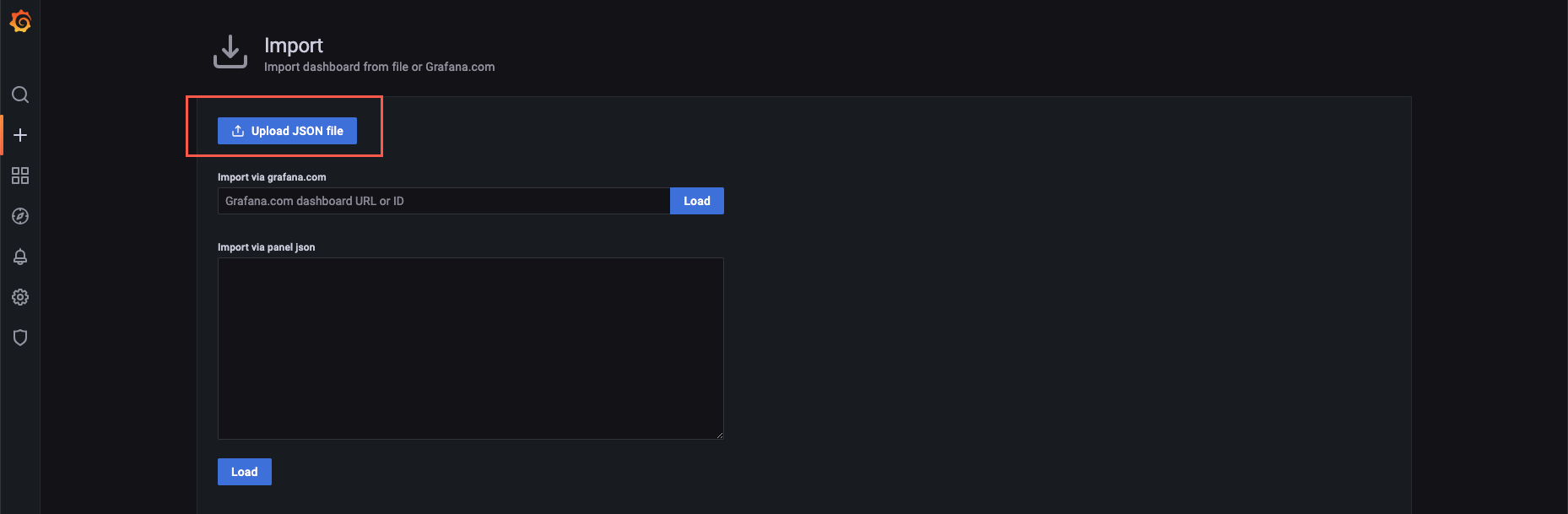
- Click Upload JSON file and select the monitoring dashboard JSON file saved on your local machine.
-
- Set basic information for the monitoring dashboard.
- ParameterDescriptionName(Optional) Modify the dashboard name as needed.Folder(Optional) Select the folder where you want to save the dashboard. If you do not change the folder, it will be saved in the General folder by default.VMPFrom the drop-down menu, select the VMP workspace associated with the target cluster as the data source.
- Click Import to finish the import. Then you can view the monitoring dashboard.
Monitoring dashboard details
Cluster AI monitoring dashboard
This dashboard displays information about AI training jobs and resource usage at the cluster level.
Information category | Description |
Cluster-level training job overview | Displays information about AI training jobs in the cluster, including the number of AI training jobs, number of GPU workers, and GPU utilization by training jobs. |
Cluster-level GPU resource overview | Displays GPU statistics, such as the total number of GPUs, number of allocated GPUs, number of used GPUs, number of faulty GPUs, and number of GPU nodes. |
Resource usage details | Displays cluster resource usage, such as the number of training jobs, number of GPU workers, training job GPU utilization, cluster-level GPU usage, and cluster-level GPU failure rate. |
Node GPU dashboard
This dashboard displays monitoring information at the node level, including GPU node information and GPU card information.
Information category | Description |
Node resource usage | Displays GPU node information, such as node IP addresses, GPU model, node status, CPU cores, memory, and number of GPUs. |
Node-level resource usage details | Displays GPU card information, including GPU utilization, GPU memory usage, abnormal GPU Xid errors, GPU encoder utilization, GPU clock frequency, and GPU power consumption. |
Training job dashboard (rdma-device-plugin)
This dashboard displays monitoring information about AI training jobs and basic resources (GPU and RDMA) at the job level.
tip
The data on this dashboard comes from the rdma-device-plugin add-on. For details, refer to AI resource observability.
Information category | Description |
Training job overview | Displays training job overview, including training jobs, training job workers, training jobs with low GPU utilization, and training job workers with low GPU utilization. |
Training jobs with no workers assigned | Displays a list of training jobs with no worker assigned. |
GPU | Displays GPU monitoring information, such as GPU utilization, GPU Xid errors, GPU memory usage, GPU temperature, and GPU power consumption. |
RDMA | Displays RDMA monitoring information, such as inbound traffic, outbound traffic, number of inbound packets, number of outbound packets, inbound pause duration, and outbound pause duration. |
Training job dashboard (node-exporter)
This dashboard displays monitoring information about AI training jobs and basic resources (GPU and RDMA) at the job level.
tip
The data on this dashboard comes from the node-exporter add-on. For details, see node-exporter documentation.
Information category | Description |
Training job overview | Displays training job overview, including training jobs, training job workers, training jobs with low GPU utilization, and training job workers with low GPU utilization. |
Training jobs with no workers assigned | Displays a list of training jobs with no workers assigned. |
GPU | Displays GPU monitoring information, such as GPU utilization, GPU Xid errors, GPU memory usage, GPU temperature, and GPU power consumption. |
RDMA | Displays RDMA monitoring information, such as inbound traffic, outbound traffic, inbound packets, outbound packets, link down, and error recovery. |
Team training job dashboard
This dashboard displays monitoring information about AI training jobs at the team level.
Information category | Description |
Overview of training jobs for the team | Displays AI training information at the team level. This information includes the number of training jobs, number of GPU workers, GPU utilization by the training jobs, and abnormal training jobs. |
Overview of training jobs for team members | Displays AI training information at the team member level. This information includes the number of training jobs, number of GPU workers, GPU utilization by the training jobs, and Xid errors of training jobs at the granularity of team members. |
Training job list | Displays a list of all AI training jobs for a team. |
Last updated: 2026.07.24 15:50:47
All rights reserved © Beijing Volcano Engine Technology Co., Ltd2024
