Volcengine Kubernetes Engine
Volcengine Kubernetes Engine


Document

- Documentation
 Volcengine Kubernetes EngineVolcengine Kubernetes EngineUser guideStorageLocal volumesUsing dynamic PersistentVolumes created from dedicated local storage
 Copy page
 Download PDF
Local volumes
Using dynamic PersistentVolumes created from dedicated local storage
Copy pageDownload PDFUsing dynamic PersistentVolumes created from dedicated local storage
Volcengine Kubernetes Engine (VKE) supports local storage through the Container Storage Interface (CSI). This topic describes how to use dynamic PersistentVolumes created from dedicated local storage.
Description
[Beta · Apply for trial] The csi-local add-on for local storage and storage-aware scheduling are currently in the beta stage. To use them, submit an application.
Usage limits
- Use ESSD data volumes to mount to the container and image directories /var/lib/containerd and /var/lib/kubelet. Avoid mounting local disks to the container or image directory, as this mounting type is not applicable to local storage scenarios.
- The three add-ons required in this scenario must be installed or uninstalled in the order described in the following content. If this order is not followed, scheduling will malfunction.
- The Kubernetes version of the cluster must meet the following requirements:
- Kubernetes v1.24: v1.24.15-vke.34 and later
- Kubernetes v1.26: v1.26.10-vke.22 and later
- Kubernetes v1.28: v1.28.3-vke.16 and later
- Kubernetes v1.30: v1.30.4-vke.13 and later
- Kubernetes v1.32: v1.32.3-vke.8 and later
- Kubernetes v1.34: v1.34.1-vke.2 and later
- Local storage does not offer highly available volumes and is only applicable to temporary data storage or applications that internally implement high availability.
Prerequisites
- A cluster that uses a compliant Kubernetes version has already been created. For details, see Creating clusters.
- The kubectl tool has been installed in the local environment. For details, see Installing and setting up kubectl.
Procedure
Step 1: Install and set up dependent add-ons
To use local storage, you need to install and set up the following add-ons in the order described below.
danger
- The csi-local add-on depends on the snapshot-controller add-on. Before installing the csi-local add-on, confirm that the snapshot-controller add-on is installed.
- The csi-local add-on must be used with the storage-aware scheduling feature of the scheduler-plugin add-on. Before enabling the storage-aware scheduling feature, ensure that both the snapshot-controller and csi-local add-ons are installed. Otherwise, normal scheduling will be affected.
- Before you uninstall the csi-local add-on, disable the storage-aware scheduling feature in the scheduler-plugin add-on to avoid affecting scheduling capabilities.
- Log in to the VKE console.
- In the left navigation bar, click Cluster. On the page that appears, click the name of the cluster that you need to configure.
- On the cluster management page, click Addons in the left navigation bar.
- Click the Storage tab, move the pointer over the snapshot-controller add-on card, and then click Deploy to install the snapshot-controller add-on. Then, install the csi-local add-on in the same way.
- Click the Scheduling tab, move the pointer over the scheduler-plugin add-on card, and then click Configuration. In the configuration dialog box, select Local storage for the Storage-aware scheduling parameter.
-
Step 2: Configure node pools that use local disks
Configure a node pool that uses a local disk. The following content describes the key configurations involved in this scenario. Specify other parameters based on your business requirements. For details, see Creating node pools and Creating managed node pools.
- Specify the instance type. Select an ECS instance type that supports local disks. For details, see Local disks.
- Configure a data volume.
- Specify container and image directories. Use ESSD data volumes to mount to the container and image directories /var/lib/containerd and /var/lib/kubelet.
Warning
Do not mount local disks to the container or image directory, as this mounting type is not applicable to local storage scenarios.
- Click Add data volume to configure other data volumes by using local disks. Local data volumes support SSD and HDD types. Different ECS types support different data volume types. You can select a local data volume type based on your business requirements.
- Specify custom node labels, which are used to filter nodes during local disk initialization, such as csi-local: "i4ag".
- Configure the InitializeScript to install lvm2 on the node. The installation command is apt-get install -y lvm2.
Step 3: Initialize local disks
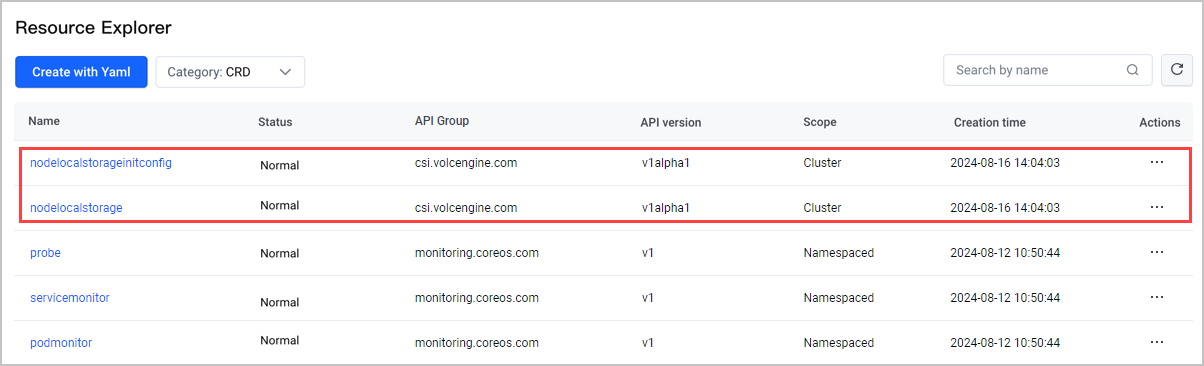
After the csi-local add-on is installed, local storage-related CRDs will be automatically created, including
- NodeLocalStorageInitConfig: Initialize the NodeLocalStorage resources for each node. If NodeLocalStorageInitConfig exists when the csi-local add-on creates NodeLocalStorage resources, the configurations in NodeLocalStorageInitConfig will be populated into the spec of the created NodeLocalStorage resources.
- NodeLocalStorage: Report storage device information for each node. You can edit the Spec field of the NodeLocalStorage resource as needed.
This example scenario uses an ecs.i4ag.12xlarge instance with an Elastic Block Storage (EBS) cloud disk mounted to /dev/vdc and the csi-local: "i4ag" label attached to the node.
- In the left navigation bar, click Workload > Resource Explorer. On the page that appears, click Create with Yaml. On the Create with Yaml page, configure the CR to initialize the local disk.
- Select Custom from the Type drop-down list.
- Enter the following sample YAML configurations in the Yaml code editor.
-
- Wait for about one minute, and then run the following command to view the NodeLocalStorage configuration for the corresponding node. In this example, 192.168.2.6 is the IP address of the node.
-
- The expected result is as follows: You can query the information about the dedicated disk, which indicates that the local disk has been initialized.
-
Step 4: Use a dynamic PersistentVolume based on local storage
Local storage can be used in dynamic provisioning mode. You can select from preset StorageClasses.
Built-in StorageClass | Description |
csi-local-device-hdd | Preconfigured StorageClass for HDD standalone disks. It uses the ext4 filesystem. |
csi-local-device-ssd | Preconfigured StorageClass for SSD standalone disks. It uses the ext4 filesystem. |
csi-local-lvm | Preconfigured StorageClass for LVM-managed shared storage. It uses the ext4 filesystem. |
csi-local-lvm-xfs | Preconfigured StorageClass for LVM-managed shared storage. It uses the xfs filesystem. |
This example uses StatefulSet creation to demonstrate how to use a dynamic PersistentVolume created from dedicated local disks.
- Create a YAML file for the StatefulSet. The following example is a file named statefulset-demo.yaml:
-
- Run the following command to create the workload.
-
Result validation
PV mounting
After you delete the pod and create another one, you can run the exec command to enter the new pod to check whether data in the deleted pod exists.
PV reclaim
Delete the StatefulSet and delete the PVC. The dedicated disk vdc will be reclaimed and formatted, and the file system will be erased.
Last updated: 2026.07.24 10:53:32
All rights reserved © Beijing Volcano Engine Technology Co., Ltd2024
