Volcengine Kubernetes Engine
Volcengine Kubernetes Engine
Volcengine Kubernetes Engine


Document
Volcengine Kubernetes Engine
What's New
History feature release notes
Kubernetes version release notes
Containerd runtime release notes
Add-on release notes
Monitoring add-ons
Scheduling add-ons
DNS add-ons
Security add-ons
GPU add-ons
Sandbox add-on
Security announcements
Product Announcement
Historical announcements
Overview
Getting started
User guide
Clusters
Creating clusters
Connecting to clusters
Upgrading clusters
Node pool
Creating node pools
Scaling out/in node pools
Nodes
Authorization management
Image
Namespaces
Networking
Cluster network
Container Network
Service
LoadBalancer
CLB
Ingress
APIG Ingress
ALB Ingress
Customize ALB Ingress forwarding rules
Certificate and security
CLB Ingress
Nginx Ingress
Gateway API
Workloads
Creating workloads
Configure workloads
Pods
Configuration management
Image acceleration
Storage
FSX client
EBS Volumes
TOS Volumes
NAS volumes
FSX access methods
NFS access methods
EFS volumes
vePFS volumes
FSX access methods
vePFS Client access methods
NFS access methods
CloudFS volumes
Local volumes
Autoscale
Node autoscaler
Workload autoscaler
Horizontal Pod Autoscaler (HPA)
Cron Horizontal Pod Autoscaler (CronHPA)
Intelligent Horizontal Pod Autoscaler (IHPA)
Horizontal Pod Autoscaler based on event-driven (KEDA)
Add-on management
Network add-ons
Storage add-ons
Monitoring add-ons
Scheduling add-ons
DNS add-ons
GPU add-ons
Core add-ons
Sandbox add-on
Upgrading add-ons
Heterogeneous computing
NVIDIA GPU
mGPU scheduling
RDMA high-performance computing
Scheduling management
Topology-aware scheduling
QoS-aware scheduling
Observability
Log management
Basic observation
Setup & Configuration
Cluster observation
Storage observation
Other observation
Using metrics
Full stack observation
Alert management
Diagnosis and inspection
Node check and self-healing
Application center
Backup center
Stability
Large-scale cluster management
Best practices
Authorization
Clusters
Nodes and node pools
Networking
Storage
Scheduling
Observability
Solution
Security and compliance
API reference
Cluster management
NodePool management
Node management
Virtual nodes management
Add-on management
Tag management
Access policy management
Instance images management
Cloud native observability
Inspection and diagnosis
Task management
Volcengine Container Instance
Appendix
SDK reference
Development guide
Terraform
FAQs
General FAQs
Cluster FAQ
cluster management
cluster network
cluster upgrade
Node and Node pool FAQs
Authorization FAQs
Workload FAQs
Service and Ingress FAQs
Storage FAQs
Heterogeneous computing FAQs
Observability FAQs
Quota FAQs
Add-on FAQs
Cloud-native AI
ServingKit
LLM applications
ComfyUI application
Deploying the Al inference application through Helm
Deepseek practices
Qwen practices
Kimi practice
Seed practices
Best practices
DeepSeek model deployment
GLM model deployment
MiniMax model deployment
Qwen model deployment
Kimi model deployment
Volcengine Container Instance
What's new
Historical feature release notes
Product Announcement
Overview
Billing
User guide
Integrating with VCI
Virtual node
VKE cluster uses virtual nodes
Self-managed/third-party cluster uses virtual node
Creating an instance
General purpose instance
GPU-accelerated computing instance
VCI Agent Sandbox
Startup acceleration
E2B-based management
Upgrade guide
Networking
Monitoring
Scheduling
Container configuration
VCI Image Cache
Best practices
Security and compliance
FAQs
- Documentation
 Volcengine Kubernetes EngineVolcengine Kubernetes EngineUser guideScheduling managementtask schedulingJob admission and scheduling based on Kueue
 Copy page
 Download PDF
task scheduling
Job admission and scheduling based on Kueue
Copy pageDownload PDFJob admission and scheduling based on Kueue
This topic mainly describes how to use Kueue in a VKE cluster to implement the All-or-Nothing scheduling capability.
Background
As a Kubernetes-native system, Kueue is used to manage quotas and control how jobs use quotas. In clusters that are shared among multiple teams or services, where complete batch job governance, such as governance on quotas, queues, priorities, and preemption, is required, All-or-Nothing can be achieved through the quota mechanism of Kueue (ClusterQueue) and gang admission (Workload). When the quota is insufficient to accommodate the entire job, the job remains suspended and does not schedule any pods.
Prerequisites
- A managed VKE cluster running Kubernetes v1.30 or later has been created. For details, see Creating managed clusters.
- The KubeConfig of the target cluster has been downloaded and configured in the local $HOME/.kube/config file. For details, see Connecting to clusters using kubectl.
- The Helm tool has been installed in the local terminal. For details, see the official Helm documentation.
Procedure
Step 1: Install Kueue
- Configure the KubeConfig path in the local terminal.
- export KUBECONFIG=${your_kubeconfig_path}## Replace ${your_kubeconfig_path} with the local path of KubeConfig.## For example, if the local path of KubeConfig is /Users/bytedance/.kube/config, the complete command is as follows:## export KUBECONFIG=/Users/bytedance/.kube/config
- Use the Helm tool to install Kueue.
- helm install kueue oci://registry.k8s.io/kueue/charts/kueue \--version 0.18.1 \--namespace kueue-system --create-namespace \--wait
- Confirm the Kueue installation status.
- Confirm the Helm release status.
- helm list -n kueue-system
- The expected output is as follows: STATUS is deployed.
- NAME NAMESPACE REVISION UPDATED STATUS CHART APP VERSIONkueue kueue-system 1 2026-06-15 18:55:25.549036 +0800 CST deployed kueue-0.18.1 v0.18.1
- Confirm the running status of the controller Pods.
- kubectl get pods -n kueue-system -o wide
- The expected output is as follows: READY is 1/1, and STATUS is Running.
- NAME READY STATUS RESTARTS AGE IP NODE NOMINATED NODE READINESS GATESkueue-controller-manager-9c54ccf47-k5vmf 1/1 Running 0 4m10s 192.168.123.8 192.168.123.4 <none> <none>
- Check the registered CRDs.
- kubectl get crd | grep kueue.x-k8s.io
- The expected output is as follows: CRDs such as clusterqueues, localqueues, workloads, and resourceflavors are visible.
- admissionchecks.kueue.x-k8s.io 2026-06-15T10:55:33Zclusterqueues.kueue.x-k8s.io 2026-06-15T10:55:33Zcohorts.kueue.x-k8s.io 2026-06-15T10:55:33Zlocalqueues.kueue.x-k8s.io 2026-06-15T10:55:33Zmultikueueclusters.kueue.x-k8s.io 2026-06-15T10:55:33Zmultikueueconfigs.kueue.x-k8s.io 2026-06-15T10:55:33Zprovisioningrequestconfigs.kueue.x-k8s.io 2026-06-15T10:55:33Zresourceflavors.kueue.x-k8s.io 2026-06-15T10:55:33Ztopologies.kueue.x-k8s.io 2026-06-15T10:55:33Zworkloadpriorityclasses.kueue.x-k8s.io 2026-06-15T10:55:33Zworkloads.kueue.x-k8s.io 2026-06-15T10:55:33Z
Step 2: Perform job admission and scheduling
After Kueue is installed, use Kueue in the VKE cluster to verify the All-or-Nothing scheduling capability.
- Create a queue and set the quota.
- This topic configures a ClusterQueue quota of only 4 CPU cores. This is used to verify later that an entire Job is not admitted when the quota is insufficient. Run the following commands to create ResourceFlavor, ClusterQueue, and LocalQueue.
- cat <<'EOF' | kubectl apply -f -apiVersion: kueue.x-k8s.io/v1beta1kind: ResourceFlavormetadata:name: default-flavor # The ResourceFlavor name. It is referenced by ClusterQueue.---apiVersion: kueue.x-k8s.io/v1beta1kind: ClusterQueuemetadata:name: cluster-queue # The ClusterQueue name.spec:namespaceSelector: {}resourceGroups:- coveredResources: ["cpu", "memory"]flavors:- name: default-flavor # Reference the ResourceFlavor defined above.resources:- name: "cpu"nominalQuota: 4 # The CPU quota of ClusterQueue. Set the value to 4 to test the insufficient quota scenario.- name: "memory"nominalQuota: 8Gi---apiVersion: kueue.x-k8s.io/v1beta1kind: LocalQueuemetadata:name: user-queue # The LocalQueue name.namespace: default # The namespace of the LocalQueue. Jobs must be submitted in the same namespace.spec:clusterQueue: cluster-queue # Associate the LocalQueue with the ClusterQueue. Use the label kueue.x-k8s.io/queue-name on the job to specify this LocalQueue.EOF
- Submit two jobs to verify gang admission.
- Each job requires 3 CPU cores (parallelism=3). However, the queue quota is only 4 cores, which can only accommodate one job. Add the label kueue.x-k8s.io/queue-name=user-queue to the two jobs and set suspend to true to let Kueue manage jobs.
- cat <<'EOF' | kubectl apply -f -apiVersion: batch/v1kind: Jobmetadata:name: job-a # The job name.namespace: default # The job namespace. It needs to be consistent with the LocalQueue namespace.labels:kueue.x-k8s.io/queue-name: user-queue # Specify the LocalQueue used by the job so that the job can be managed by Kueue.spec:parallelism: 3 # The number of parallel pods. The job requires a total of 3 CPU cores.completions: 3 # The number of Pods that must complete.suspend: true # Set the value to true. The job remains suspended, awaiting Kueue admission before being scheduled.template:spec:containers:- name: dummyimage: doc-cn-beijing.cr.volces.com/vke/nginx-demo:v1.0 # The container image address and tag. Replace them with your actual information. If you need to use a public image, make sure that the cluster can access the public network.resources:requests:cpu: "1" # Each pod requests 1 core. Three pods request a total of 3 cores.memory: "1Gi"restartPolicy: Never---apiVersion: batch/v1kind: Jobmetadata:name: job-b # The job name.namespace: default # The job namespace. It needs to be consistent with the LocalQueue namespace.labels:kueue.x-k8s.io/queue-name: user-queue # Use the same queue as job-a to share the 4-core quota.spec:parallelism: 3 # Three cores are required. The two jobs require a total of 6 cores, which is greater than the 4-core quota. Therefore, only one job can be accommodated.completions: 3suspend: true # Set the value to true. The job remains suspended, awaiting Kueue admission.template:spec:containers:- name: dummyimage: doc-cn-beijing.cr.volces.com/vke/nginx-demo:v1.0 # The container image address and tag. Replace them with your actual information. If you need to use a public image, make sure that the cluster can access the public network.resources:requests:cpu: "1"memory: "1Gi"restartPolicy: NeverEOF
Validate results
View workload and job status.
kubectl get workloads -n default
kubectl get jobs -n default
kubectl get pods -n default -o wide
The expected result is as follows:
- One job is admitted (ADMITTED of the corresponding workload is True), and after the job is resumed (suspend is set to false), all 3 pods simultaneously enter the Running state.
- The other job remains in the Suspended state, due to insufficient quota, and its corresponding workload is in the Pending state and does not schedule any pods.
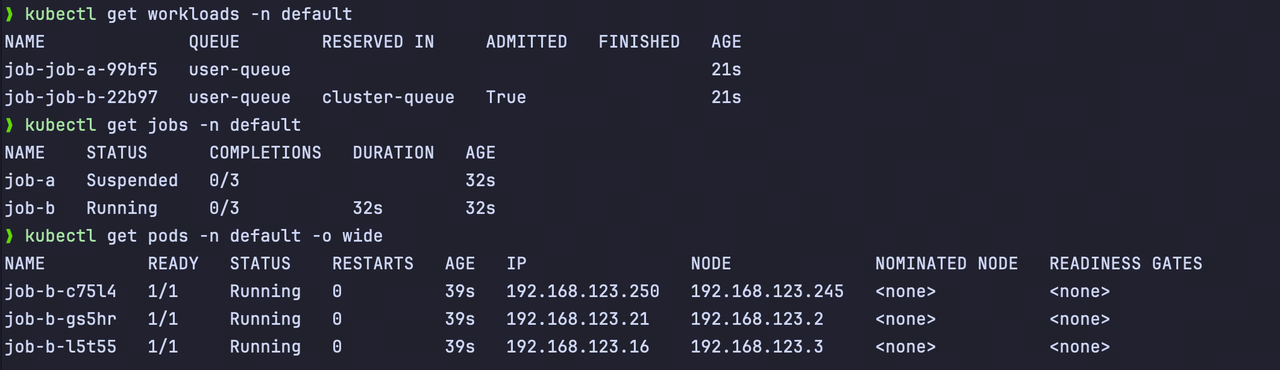
The preceding results prove that when the queue quota cannot accommodate all jobs, Kueue admits each entire job as a whole. This prevents resource waste where half of a job occupies quota and the other half waits in queue and achieves the job-level All-or-Nothing capability.
Clean up resources
After validation is complete, run the following commands to clean up the jobs, queues, and Kueue add-on created in this topic.
## Delete jobs
kubectl delete job job-a job-b -n default --ignore-not-found
## Delete queues and quotas
kubectl delete localqueue user-queue -n default --ignore-not-found
kubectl delete clusterqueue cluster-queue --ignore-not-found
kubectl delete resourceflavor default-flavor --ignore-not-found
## Uninstall Kueue
helm uninstall kueue -n kueue-system
kubectl delete ns kueue-system --ignore-not-found
Last updated: 2026.06.29 19:59:20
All rights reserved © Beijing Volcano Engine Technology Co., Ltd2024
